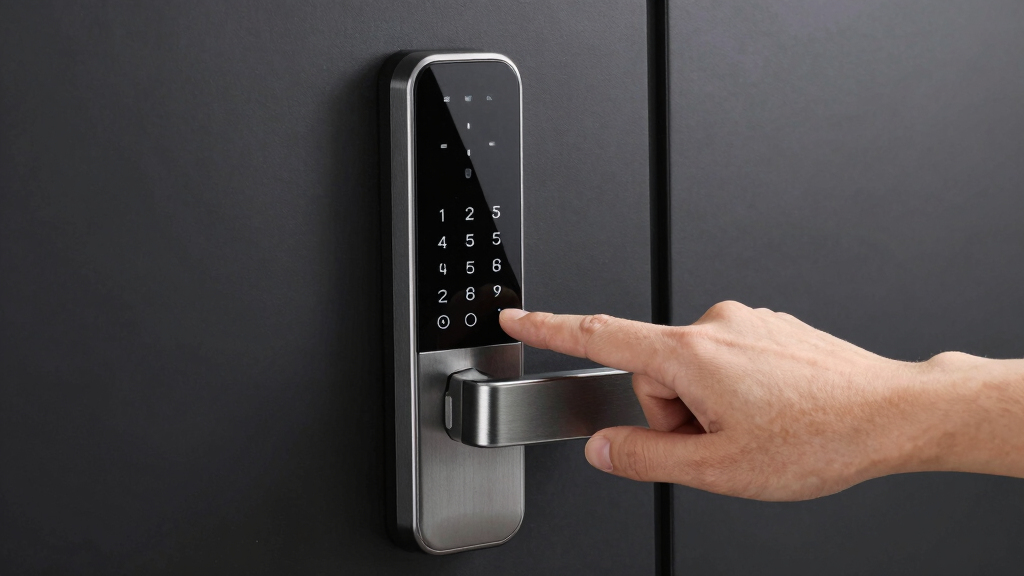
Choosing the best smart deadbolt lock involves balancing security features, ease of use, smart home compatibility, and budget. The Schlage Encode stands out as the overall top pick for its reliable Wi-Fi connectivity and robust build. For those prioritizing biometric access, the eufy Security FamiLock S3 Max offers palm vein recognition, while the Philips WiFi Smart Lock excels in sleek design and app control. However, tradeoffs exist—more advanced features often come with higher costs or increased complexity. Continue reading for a detailed breakdown of these options and how they compare to meet diverse needs.
Listen free for 30 days with Audible
Thousands of audiobooks and originals — cancel anytime.
Start your free trialAs an affiliate, we earn on qualifying purchases.
Key Takeaways
- The best smart deadbolt locks balance security, smart home compatibility, and ease of installation.
- Biometric options like palm vein recognition provide advanced security but tend to be more expensive and complex.
- Wi-Fi connectivity significantly impacts convenience but can introduce security vulnerabilities if not properly managed.
- Design and build quality vary, with premium options offering splash-proof features and premium materials.
- Price ranges reflect feature sets; more affordable locks often lack advanced access methods or extensive integrations.



More Details on Our Top Picks
Schlage Encode Smart Wi-Fi Deadbolt Lock with Touchscreen Keypad, Matte Black, BE489WB CEN 622
This model stands out for its robust build quality, seamless integration with popular smart home systems, and reliable remote management via Wi-Fi. Compared with the eufy C220, it offers more proven security features and a more intuitive app experience, but it does require frequent battery replacements if heavily used. Its easy installation and customizable access codes make it ideal for busy households or property managers needing flexible access control. The built-in alarm adds an extra layer of security, alerting users to forced entry attempts. However, reliance on Wi-Fi means it can be vulnerable to connectivity issues, and battery life may demand regular replacement. Overall, this lock is best suited for users seeking a durable, trusted smart deadbolt with reliable remote control.
Pros:- Reliable Wi-Fi connectivity for remote control and monitoring
- Compatibility with Alexa and Google Home for voice commands
- Secure encryption and a built-in customizable alarm
Cons:- Battery life can be short with heavy use, requiring frequent replacements
- Dependent on Wi-Fi stability for remote features
Best for: Homeowners and property managers seeking a secure, easy-to-install Wi-Fi deadbolt with versatile access options
Not ideal for: Renters or users with unreliable Wi-Fi connections who prefer battery longevity over remote features
- Material:Matte Black
- Connectivity:Wi-Fi
- Control:App control via Schlage Home and Key by Amazon apps
- Compatibility:Alexa, Google Home, Airbnb
- Battery:4 AA batteries (included)
- Battery Life:Up to 6 months
- Lock Type:Keyless deadbolt with touchscreen keypad
- Installation:Screwdriver, no hardwiring needed
- Alarm:Built-in customizable alarm
Bottom line: This pick is perfect for those who prioritize security, brand reliability, and straightforward installation in a smart home setup.
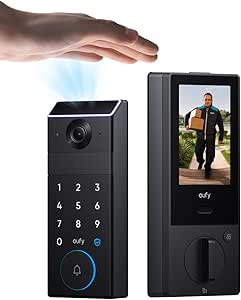
eufy Security FamiLock S3 Max with Palm Vein Recognition, Wi-Fi Keypad Deadbolt & 2K HDR Doorbell Camera
This model excels in biometric security with its palm vein recognition, offering a level of keyless access that surpasses typical fingerprint or PIN methods. Compared to the Philips WiFi Smart Lock, it provides a more sophisticated biometric entry system and a comprehensive home security package with its 2K HDR doorbell camera. Its rear lock video screen, suitable for elderly and children, enhances usability for all family members. The integration with smart home platforms is seamless, but the camera streaming does not support the Matter protocol, limiting future compatibility. Battery life is decent but requires regular charging or replacement, which could be inconvenient for some. This lock makes the most sense for users prioritizing biometric security and integrated video monitoring for full home oversight.
Pros:- Secure palm vein recognition with high accuracy and fast access
- Includes a 2K HDR doorbell camera with wide-angle view
- Easy-to-use rear lock video screen for family monitoring
- Supports smart platform integrations
Cons:- Camera streaming isn’t compatible with Matter, limiting smart home integration future-proofing
- Battery management requires regular attention for continuous operation
Best for: Families and security-conscious homeowners who want biometric access combined with video surveillance
Not ideal for: Users looking for a straightforward, budget-friendly deadbolt without biometric features or integrated cameras
- Product Type:LOCK
- Model Number:T85V0
- UPC:194644232658
- Recommended Uses:Front Door, Home use
- Included Components:Deadbolts & Screws, Exterior & Interior Assembly, Physical Keys, Rechargeable & AAA Batteries
- Unit Count:1
- Item Dimensions:3.07 x 1.22 x 7.87 inches
- Item Weight:1043 grams
Bottom line: Ideal for users wanting biometric security coupled with video monitoring and smart home integration, at the expense of some protocol limitations.
Philips Built-in WiFi Smart Lock with Keyless Entry, Touchscreen, Fingerprint, App Control, Alexa & Google Compatibility, Splash-Proof, Black
This lock is distinguished by its rapid fingerprint recognition, making it a strong choice for users who want quick access without fumbling for keys or entering PINs. Compared with the Philips Wi-Fi Smart Lock Keyless Entry Deadbolt, it offers faster biometric unlocking, but it may lack some of the remote control flexibility or ease of setup found in models like the Schlage Encode. The multiple access methods, including app, fingerprint, PIN, and voice, provide versatility for busy households. Its splash-proof design adds durability, but setup can be challenging for some users, and it relies on sufficient battery power for auto-lock features. This lock is best suited for those who prioritize speed and convenience in biometric entry, especially in high-traffic homes.
Pros:- Fast, secure fingerprint recognition in 0.3 seconds
- Multiple unlocking options including app, PIN, voice, and fingerprint
- Auto-lock feature enhances security when leaving
Cons:- Battery levels must be maintained for auto-lock to work reliably
- Setup and connectivity can be complex for some users
Best for: Families and individuals seeking the fastest biometric unlocking with multiple access options
Not ideal for: Users who want extensive remote management or are concerned about complex initial setup
- Brand:Philips
- Model Number:DDL240X-1HW
- Recommended Uses:Home
- Included Components:AA Batteries x8, Installing Parts, User Manual, WiFi Smart Lock
- UPC:850071183344
- Warranty:24 months
Bottom line: Best suited for users who need rapid, reliable biometric access combined with versatile unlocking methods.
Philips Wi-Fi Smart Lock Keyless Entry Deadbolt for Front Door, Compatible with Alexa & Google Assistant
This model provides a straightforward solution for those wanting multiple access methods, including app, passcodes, fingerprint, and voice commands. Compared with the more advanced Philips DDL240X, it offers similar smart features but with a more user-friendly installation process, making it ideal for DIYers. Its remote locking and notifications boost home security, but the reliance on 2.4 GHz Wi-Fi limits network flexibility, and it misses door sensors for open/close detection, which could be a drawback. The auto-lock and Away Mode features add convenience for busy households. It’s best suited for users seeking an easy-to-install, versatile smart lock without complex biometric options or high-end integrations.
Pros:- Multiple unlocking methods including app, fingerprint, passcode, and voice
- Remote access and real-time notifications
- Easy DIY installation on most standard doors
Cons:- Requires 4 or 8 AA batteries, which are not included
- Limited to 2.4 GHz Wi-Fi networks and no door open/close sensors
Best for: Homeowners wanting simple installation with multiple access options and remote control features
Not ideal for: Tech-savvy users needing advanced biometric security or extensive smart home integrations
- Connectivity:Wi-Fi (2.4GHz)
- Power:4 or 8 AA alkaline batteries (not included)
- Supported Door Thickness:1-3/8″ to 2″
- Remote Control Range:Within 65 ft
- Auto Lock Timer:10 to 180 seconds
- Voice Compatibility:Alexa & Google Assistant
Bottom line: Great for users seeking a simple, versatile, and easy-to-install smart deadbolt with remote features.
eufy Security Smart Lock C220, Fingerprint Keyless Entry Door Lock, Built-in Wi-Fi, App Remote Control, Waterproof Nickel
This lock emphasizes durability and convenience with its 8-month battery life and IP53 waterproof rating, making it suitable for varied climates and long-term use. Compared with the Philips DDL240X, the C220 offers a more rugged build and longer battery life, but it lacks some advanced biometric speed and may require Wi-Fi for remote control. Its multiple unlocking options, including fingerprint, app, keypad, and physical key, make it flexible for family use. Easy installation—taking around 15 minutes—plus its IP53 rating for weather resistance make it a versatile choice for front doors exposed to the elements. The main tradeoff involves battery management and the need for Wi-Fi for remote operation. This lock suits users looking for a reliable, all-weather deadbolt with a long-lasting battery.
Pros:- Long-lasting 8-month battery life
- Weather-resistant IP53 rating suitable for outdoor use
- Multiple unlocking methods including fingerprint, app, keypad, and key
Cons:- Battery life may vary with usage frequency
- Requires Wi-Fi for remote control, which might limit connectivity in some cases
Best for: Homeowners in variable climates seeking a durable, easy-to-install smart lock with excellent battery life
Not ideal for: Users needing the fastest biometric unlock or extensive smart home integration beyond basic control
- Weight:3.22 lbs
- Dimensions:7.67 x 4.49 x 4.41 inches
- Battery Life:8 months
- Battery Type:8 AA batteries
- Connectivity:Built-in Wi-Fi
- Waterproof Rating:IP53
Bottom line: Ideal for users prioritizing weather resistance, long battery life, and multiple entry options for outdoor use.
LOCKSTAR® Smart Door Lock – Keyless Entry Deadbolt with Multiple Access Methods
This option stands out for offering the widest variety of access methods, including app control, fingerprint Touch ID, keypad code, card FOB, traditional key, and compatibility with smart home systems. Compared with the ULTRALOQ Bolt SE, the LOCKSTAR® provides more options for manual and biometric entry, making it ideal for households with different preferences or tenants. Its auto-lock feature adds convenience, while real-time notifications enhance security monitoring. However, it relies on Wi-Fi for app access, which can be a limitation in unstable networks, and the battery life may require regular attention. The included DIY-friendly installation tools make it accessible for non-professionals. Best suited for renters or families seeking flexible access options without complex integration.
Pros:- Multiple secure access options including app, fingerprint, keypad, and traditional key
- Auto-lock feature for added convenience and security
- Real-time notifications for event tracking
- Easy DIY installation with included tools
Cons:- Requires Wi-Fi connection for app control, which may be unreliable
- Battery life may need frequent replacement depending on usage
- Keypad setup can be complex for some users
Best for: Renters or homeowners who want multiple secure access methods and easy installation
Not ideal for: Users seeking a long battery life or a device that functions reliably without Wi-Fi dependency
- Model Number:LS-SDL
- Unit Count:1
- Item Dimensions:1.18 x 2.64 x 6.46 inches
- Item Weight:1 lbs
- Included Components:Screwdriver, Drill Piece, Smart Door Lock
- Recommended Uses:Activity Monitoring, Child Safety, Elderly Security
Bottom line: This lock is ideal for users who value flexible access and straightforward installation, accepting some dependency on Wi-Fi and battery upkeep.
Philips WiFi Smart Keypad Deadbolt Lock with App Control and Voice Support
This pick makes the most sense for users who need a weather-resistant lock with remote control and voice command support. Compared with the ULTRALOQ Bolt SE, the Philips WiFi Lock emphasizes durability with its waterproof IP54 rating and robust construction, making it ideal for outdoor setups. Its support for Alexa and Google Assistant allows voice-activated unlocking, while customizable passwords support multiple users. The requirement for 8 AA batteries, which last around six months, can be a drawback for those seeking low-maintenance operation. The setup process, especially the app configuration, may challenge less tech-savvy users. Nonetheless, this model is well-suited for outdoor use and households prioritizing voice control and weather resistance.
Pros:- Remote control and monitoring via mobile app from anywhere
- Supports multiple unlocking methods including passcodes, keys, and voice commands
- Weather-resistant design suitable for outdoor use
- Customizable user permissions
Cons:- Requires 8 AA batteries, which need replacement every six months
- No included batteries may delay initial setup
- App setup can be complex for some users
Best for: Homeowners needing a weatherproof, voice-compatible deadbolt for outdoor or exposed environments
Not ideal for: Users who prefer low battery replacement frequency or simple plug-and-play installation
- Connectivity:WiFi
- Power:8 AA batteries (not included)
- Battery Life:Up to 6 months
- Material:Satin Nickel
- Waterproof Level:IP54
- Supported Voice Assistants:Alexa, Google Assistant
Bottom line: This lock is best for outdoor use where durability and voice support are priorities, accepting battery maintenance and setup complexity.
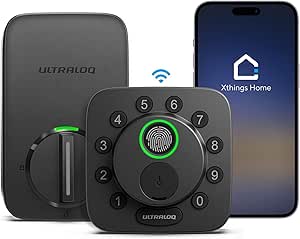
ULTRALOQ Bolt SE Smart Lock with Wi-Fi and Matter Compatibility
The ULTRALOQ Bolt SE excels for seamless integration with a broad range of smart home ecosystems, including Apple Home, Alexa, Google, and Matter-enabled systems. Compared to the Philips WiFi Lock, it offers more extensive ecosystem compatibility and an impressive 18-month battery life, reducing maintenance concerns. Its 7-in-1 access options, including fingerprint, passcodes, app, and voice control, make it versatile for various users. However, it operates solely on 2.4GHz Wi-Fi, which can limit network flexibility, and it lacks a door sensor, so you won’t get real-time status updates without additional devices. This lock suits users who want long-term reliability and broad smart home integration, willing to invest in a compatible ecosystem.
Pros:- Multiple access methods including fingerprint, passcodes, app, and voice control
- Supports Apple Home, Alexa, Google, and Matter ecosystems
- Long battery life of up to 18 months with low battery alerts
- Easy installation and weather-resistant design
Cons:- Limited to 2.4GHz Wi-Fi, no hub required
- No door sensor included for real-time status updates
- Requires compatible ecosystem for full functionality
Best for: Smart home enthusiasts seeking a reliable, long-lasting deadbolt compatible with multiple ecosystems
Not ideal for: Those who prefer a simple setup without ecosystem commitments or need real-time door status monitoring
- Model Number:ULTRALOQ BOLT SE
- Battery Life:Up to 18 months
- Connectivity:Wi-Fi 2.4GHz
- Material:Zinc alloy
- Weather Resistance:Yes
- Warranty:Lifetime mechanical, 18-month electronic
Bottom line: Ideal for users invested in smart home ecosystems who prioritize long battery life and seamless integration, accepting some limitations in network flexibility.
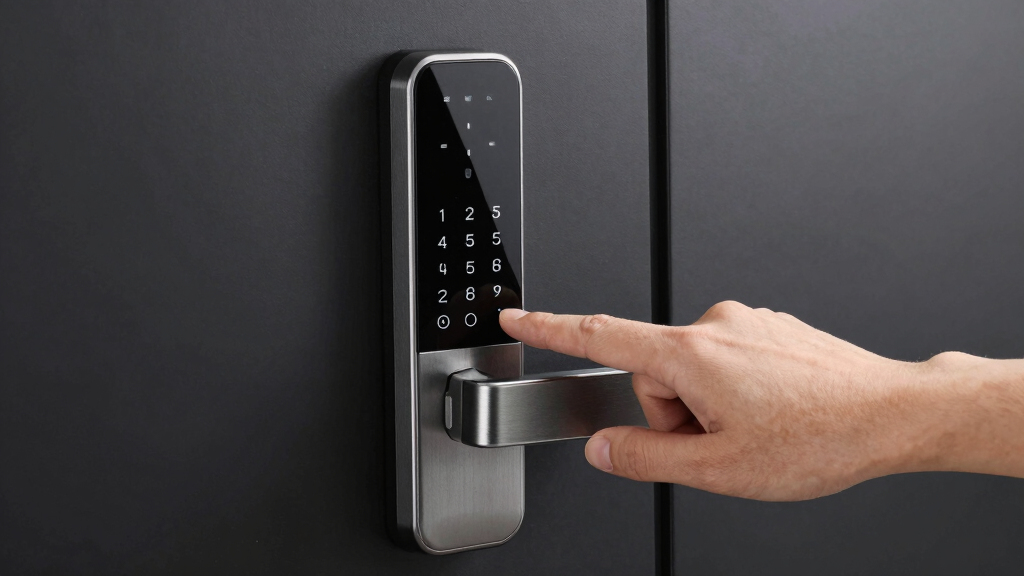
How We Picked
These smart deadbolt locks were evaluated based on their security features, ease of installation, smart home compatibility, connectivity reliability, build quality, and value for money. We prioritized products that offer seamless integration with popular ecosystems like Alexa and Google Assistant, while also considering user interface simplicity and battery life. The ranking reflects a balance between high-performance features and practical usability, ensuring options suitable for various budgets and technical comfort levels. Devices with proven durability and consistent connectivity earned higher positions, while those with complex setups or limited support were rated lower.Factors to Consider When Choosing Best Smart Deadbolt Lock
When selecting a smart deadbolt lock, it’s important to consider multiple factors beyond basic features to ensure the lock fits your home and lifestyle. Evaluating connectivity options, security protocols, installation complexity, and smart home compatibility helps avoid common pitfalls. Making an informed choice means prioritizing what matters most—be it convenience, security, or budget—and understanding the tradeoffs involved in each feature set.Connectivity and Compatibility
Assess whether the lock integrates smoothly with your existing smart home ecosystem. Wi-Fi-enabled locks offer direct control without hubs but may be more vulnerable to hacking if not properly secured. Bluetooth locks are simpler to set up but require proximity to unlock devices. Compatibility with voice assistants like Alexa or Google Assistant enhances convenience, so ensure the lock supports your preferred platforms for seamless integration.
Security Features
Look beyond standard encryption—consider biometric options, temporary access codes, and tamper alerts. Locks with multi-layered security provide peace of mind, especially if you share access with family or service providers. Keep in mind that some advanced features may increase the risk of false rejections or technical glitches, so weighing security against reliability is key.
Ease of Installation
Installation difficulty varies widely. Some locks are designed for DIY setup with straightforward instructions, while others might require professional help. Consider your own comfort level and whether the lock fits your door’s existing hardware. Avoid overly complex models if you prefer a quick, hassle-free upgrade, but recognize that more advanced locks may demand additional setup time.
Battery Life and Power Security
Battery longevity impacts daily convenience—longer-lasting batteries reduce maintenance. Also, check for backup power options or mechanical key access in case of dead batteries or technical failures. Some premium models include low-battery alerts, helping you avoid lockouts, which is especially important for homes with frequent visitors or renters.
Price and Value
Higher-priced models often include more sophisticated security features and better build quality, but they may not be necessary for every user. Assess whether the added features justify the cost for your specific needs. Budget options can be effective for basic security, but may lack smart home integrations or biometric access, so understand where compromises are acceptable.
Frequently Asked Questions
Can I install a smart deadbolt lock myself?
Many smart deadbolt locks are designed for DIY installation, often taking 15-30 minutes with basic tools. Look for models with clear instructions and standard sizing to simplify the process. However, if your door has unusual dimensions or existing hardware that doesn’t fit standard locks, professional installation might be a better choice. Proper installation is critical for security and functionality, so consider your comfort level with tools and DIY projects.
Are smart deadbolt locks secure against hacking?
Smart deadbolt locks incorporate encryption and security protocols, but no device is completely immune to hacking. Choosing models with strong encryption, regular firmware updates, and multi-factor authentication reduces risks. It’s also wise to secure your home Wi-Fi network with strong passwords and firmware updates, as vulnerabilities often stem from poor network security rather than the lock itself.
What should I do if the battery dies?
Most smart locks include a backup key or manual override to prevent lockouts when batteries run out. Some models also feature low-battery alerts, allowing you to replace batteries proactively. Regularly checking battery status ensures your lock remains operational, especially if you have frequent visitors or rely heavily on remote access. Using high-quality batteries can also extend overall lifespan.
Do smart deadbolts work well with existing door hardware?
Compatibility varies; many smart locks are designed to fit standard door preparations, but some require additional adapters or modifications. Measure your door’s thickness, backset, and existing lock dimensions before purchasing. Reading product specifications carefully helps avoid surprises, and consulting a professional can be beneficial if your door has unusual features or hardware.
Is it worth spending more on premium smart deadbolt locks?
Higher-priced models often offer enhanced security, better build quality, and additional features like biometric access or splash-proof design. If you prioritize durability and advanced security, investing in a premium lock makes sense. For basic needs or temporary setups, more affordable options can provide sufficient security without the extra cost, but be mindful that cheaper models may lack seamless integrations or reliable connectivity.
Conclusion
For most homeowners seeking a reliable, easy-to-use option, the Schlage Encode offers a compelling blend of security and smart home compatibility. If biometric access is a priority, the eufy Security FamiLock S3 Max suits those wanting cutting-edge authentication. Budget-conscious buyers should consider models like the Philips Wi-Fi Smart Lock for solid features at a lower price. For premium features and maximum durability, the ULTRALOQ Bolt SE delivers advanced technology with broad compatibility. Your choice hinges on balancing security, ease of installation, and smart home integration tailored to your specific needs. As an affiliate, we earn on qualifying purchases.Grilling season Picks
grills