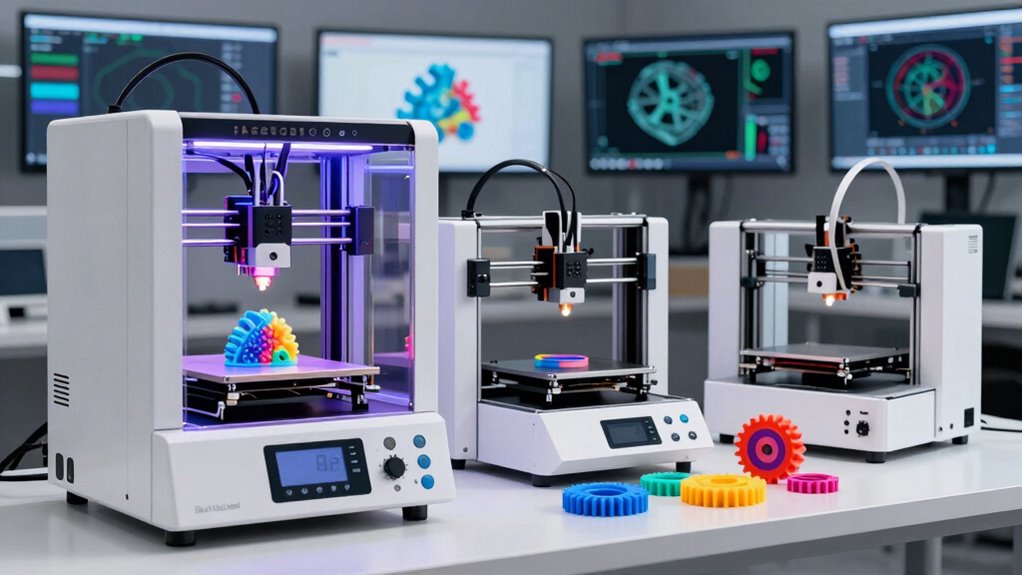

For brackets, enclosures, jigs, and replacement components, I rank the FLASHFORGE Adventurer 5M Pro first. Its broad material support, automatic leveling, and rigid CoreXY frame provide the best balance of capability and convenience. The FLASHFORGE Creator 5 takes second place for advanced multi-material work, while the larger Anycubic Kobra X suits color-coded prototypes.

Prime made for students and young adults
- Fast, free delivery for dorm and study essentials
- Prime Video and Amazon Music included
- Member-only deals
The main choice is between versatile single-material printing, sophisticated tool changing, and greater build volume. I would pick based on materials and part geometry before chasing maximum speed or color count. Those factors have a more direct effect on strength, dimensional consistency, and support removal.
Complete the kit


Key Takeaways
- I rank the Adventurer 5M Pro first for its balanced mix of material range, automation, and rigid construction.
- The Creator 5 is my premium choice for parts requiring multiple materials or cleaner support interfaces.
- The Kobra X provides the largest stated build volume and the hottest nozzle in this comparison.
- All three advertise 600 mm/s, but frame stability, calibration, and material settings matter more for strong parts.
- Carbon-fiber filament users should favor a printer with both stated composite support and suitable nozzle hardware.
| FLASHFORGE Adventurer 5M Pro 3D Printer |  | Best Overall | Build volume: 220 x 220 x 220 mm | Maximum print speed: 600 mm/s | Maximum acceleration: 20,000 mm/s² | VIEW ON AMAZON | See Our Full Breakdown |
| FLASHFORGE Creator 5 4-Toolhead Changer 3D Printer |  | Best Premium Multi-Material Printer | Toolheads: Four independent toolheads | Tool-change time: 7 seconds | Maximum print speed: 600 mm/s | VIEW ON AMAZON | See Our Full Breakdown |
| Anycubic Kobra X Multicolor 3D Printer |  | Best for Large Color-Coded Prototypes | Build volume: 260 x 260 x 260 mm | Maximum print speed: 600 mm/s | Maximum nozzle temperature: 300°C | VIEW ON AMAZON | See Our Full Breakdown |
| 3d printer for functional part | Maximum print speed | Listed materials | Build volume | Maximum nozzle temperature |
|---|---|---|---|---|
| FLASHFORGE Adventurer 5M Pro 3 | 600 mm/s | PLA, ABS, PETG, ASA, TPU, PC, PLA-CF, and PETG-CF | 220 x 220 x 220 mm | 280°C |
| FLASHFORGE Creator 5 4-Toolhea | 600 mm/s | PLA, PETG, TPU, PETG-CF, and support materials | — | — |
| Anycubic Kobra X Multicolor 3D | 600 mm/s | PLA, PETG, TPU, PVA, and ASA | 260 x 260 x 260 mm | 300°C |
More Details on Our Top Picks
FLASHFORGE Adventurer 5M Pro 3D Printer
The Adventurer 5M Pro earns my top position because it covers the widest range of routine functional jobs without demanding a complicated workflow. Its all-metal CoreXY structure supports stable motion, while pressure-sensing leveling and a dual-sided PEI platform reduce setup work. The 280°C direct extruder accepts PETG, ABS, ASA, PC, TPU, PLA-CF, and PETG-CF, giving it a broader stated engineering-material list than the Kobra X.
Its interchangeable nozzle sizes are another practical advantage: 0.25 mm favors fine fit features, while 0.6 or 0.8 mm can shorten production time and build thicker walls. Compared with the Creator 5, however, this is a simpler single-tool machine. It cannot dedicate separate heads to model and support materials. The 220 mm cube build area is also smaller than the Kobra X platform, and its 280°C ceiling trails that model’s 300°C nozzle. I still place it first because most buyers need reliable single-material parts more often than elaborate color or tool-changing workflows.
Pros:- Broad stated support for engineering and carbon-fiber filaments
- Automatic leveling and removable dual-sided PEI platform
- Rigid all-metal CoreXY structure
- Four available nozzle diameters
Cons:- Smaller build volume than the Kobra X
- Lower maximum nozzle temperature than the Kobra X
- No independent multi-tool workflow
Best for: Makers and small workshops producing brackets, housings, fixtures, prototypes, and composite-filament parts.
Not ideal for: Buyers needing very large models or frequent multi-material parts with dedicated support filament.
- Build volume:220 x 220 x 220 mm
- Maximum print speed:600 mm/s
- Maximum acceleration:20,000 mm/s²
- Maximum nozzle temperature:280°C
- Nozzle options:0.25, 0.4, 0.6, and 0.8 mm
- Motion system:CoreXY with all-metal frame
- Bed leveling:Automatic pressure-sensing multipoint leveling
- Extruder:Full-metal direct extruder
- Listed materials:PLA, ABS, PETG, ASA, TPU, PC, PLA-CF, and PETG-CF
Our verdict“I recommend the Adventurer 5M Pro as the most balanced choice for buyers who want strong parts without adopting a specialized production system.”
FLASHFORGE Creator 5 4-Toolhead Changer 3D Printer
I place the Creator 5 second because it solves a harder problem than ordinary multicolor printers: combining materials without repeatedly loading, unloading, and purging one nozzle. Four independent heads permit separate colors, flexible sections, composite material, or specialized supports in one job. Its seven-second FlashSwap system preheats tools in the background, and the claimed reduction of up to 80% in filament waste can matter during repeated production.
This architecture is especially useful for complex ducts, internal channels, and assemblies whose support-contact surfaces must remain clean. Compared with the Adventurer 5M Pro, the Creator 5 offers a much stronger multi-material and support workflow. Compared with the Kobra X, it avoids relying on one nozzle for every filament change. Yet four tools introduce more mechanical complexity, more consumable hardware, and more setup decisions. Buyers producing straightforward PETG or ASA brackets may receive little benefit from that complexity, which keeps this technically ambitious machine below my more broadly useful winner.
Pros:- Four independent toolheads support true multi-material jobs
- Seven-second swaps with background preheating
- Dedicated support tool can improve contact surfaces
- Near-zero-purge design claims up to 80% less waste
Cons:- More toolheads create a heavier maintenance burden
- Advanced workflow may be excessive for basic functional parts
- Stated material range is narrower than the Adventurer 5M Pro list
Best for: Professional prototyping teams and advanced makers producing complex multi-material parts or models with difficult supports.
Not ideal for: Buyers who mainly print straightforward single-material components or want the simplest maintenance routine.
- Toolheads:Four independent toolheads
- Tool-change time:7 seconds
- Maximum print speed:600 mm/s
- Motion system:CoreXY
- Calibration:Fully automatic
- Motion control:Active vibration compensation
- Flow control:Automatic flow calibration
- Listed materials:PLA, PETG, TPU, PETG-CF, and support materials
- Claimed waste reduction:Up to 80% versus single-nozzle multicolor systems
Our verdict“I would choose the Creator 5 when multi-material construction and removable supports justify added complexity.”
Anycubic Kobra X Multicolor 3D Printer
The Anycubic Kobra X has the largest stated work area here at 260 x 260 x 260 mm. That gives it roughly 65% more theoretical build volume than the Adventurer 5M Pro, a meaningful gain for large housings, trays, and workshop organizers. Its 300°C hardened-steel nozzle also supplies the highest temperature rating in the group, while 49-point leveling and vibration compensation support repeatable setup.
Its defining feature is native four-color printing, expandable to as many as 19 colors with added ACE 2 Pro units. I see that as useful for color-coded controls, instructional models, and labeled prototypes, but less persuasive for ordinary structural parts. Even with a shorter filament path and reduced purging claims, a shared-nozzle color system still adds material changes that the Creator 5 avoids with independent tools. The listed material support includes PLA, PETG, TPU, PVA, and ASA, but does not explicitly name carbon-fiber blends. I rank it third because size and color flexibility are compelling, yet its headline strengths are less closely tied to everyday mechanical performance.
Pros:- Largest stated build volume in the comparison
- 300°C hardened-steel nozzle
- Native four-color printing with wider expansion options
- AI monitoring and dual-band network connectivity
Cons:- Multicolor workflow adds complexity that many mechanical parts do not need
- Carbon-fiber filament support is not explicitly listed
- Shared-nozzle changes cannot match independent toolheads for material separation
Best for: Families, schools, and makers producing larger prototypes that benefit from color coding or mixed rigid and flexible materials.
Not ideal for: Buyers focused on abrasive composite filaments or clean multi-material support interfaces.
- Build volume:260 x 260 x 260 mm
- Maximum print speed:600 mm/s
- Maximum nozzle temperature:300°C
- Nozzle material:Hardened steel
- Bed leveling:LeviQ 3.0 with 49-point calibration
- Color capacity:Four colors included; expandable to as many as 19
- Listed materials:PLA, PETG, TPU, PVA, and ASA
- Noise rating:45 dB
- Connectivity:2.4 GHz and 5 GHz Wi-Fi plus LAN
Our verdict“I favor the Kobra X for larger, color-coded prototypes, but not as the default choice for purely structural components.”

How We Picked
I judged each printer around functional outcomes: material compatibility, thermal capability, repeatable first layers, motion-system rigidity, build capacity, and the ability to handle difficult geometry. I gave extra weight to features that reduce failed parts, including automatic calibration, filament detection, vibration compensation, and dependable support workflows.
I treated headline speed and color count as secondary. A fast decorative print does not prove that a machine can produce a loaded bracket. My ranking favors the printer with the broadest everyday usefulness, followed by the specialized premium system and then the larger multicolor model. I also accounted for maintenance burden and workflow complexity.
| 3d printer for functional part | Motion system | Bed leveling | Listed materials |
|---|---|---|---|
| FLASHFORGE Adventurer 5M Pro 3 | CoreXY with all-metal frame | Automatic pressure-sensing multipoint leveling | PLA, ABS, PETG, ASA, TPU, PC, PLA-CF, and PETG-CF |
| FLASHFORGE Creator 5 4-Toolhea | CoreXY | — | PLA, PETG, TPU, PETG-CF, and support materials |
| Anycubic Kobra X Multicolor 3D | — | LeviQ 3.0 with 49-point calibration | PLA, PETG, TPU, PVA, and ASA |
Factors to Consider When Choosing 3d Printer For Functional Parts
I would match a functional-parts printer to the intended load, environment, geometry, and production volume. Color and peak speed come after those basics.Choose Materials Around the Job
I use the service environment to narrow the filament choice. PETG suits general workshop parts, while ASA is better aligned with outdoor exposure. TPU serves flexible pads and seals, and carbon-fiber blends can increase stiffness. A material name on a compatibility list does not guarantee a strong design; layer direction, wall thickness, and print temperature remain major factors.
Match the Nozzle to the Filament
A hardened nozzle is the safer match for abrasive filled filaments because standard brass wears more quickly. Temperature capacity also affects the available material range. The Kobra X reaches 300°C, while the Adventurer 5M Pro pairs a 280°C ceiling with explicit PLA-CF and PETG-CF support. I would check the whole filament path, not temperature alone.
Size Parts Before Buying
The Kobra X has a clear advantage for larger one-piece models. Smaller machines can divide a design into joined sections, but seams may weaken loaded components. Conversely, a compact build plate is adequate for many brackets and jigs. I would pay for extra volume only when my planned designs can use it, since large prints also magnify warping risk.
Treat Speed as a Ceiling
All three advertise 600 mm/s maximum speed, yet functional parts often benefit from slower outer walls and controlled cooling. Peak travel speed says little about layer bonding at a chosen temperature. I give more weight to rigid motion systems, vibration compensation, and calibration, since they help preserve dimensions when speed rises.
Frequently Asked Questions
What filament is best for functional 3D-printed parts?
I view PETG as a practical starting point for workshop components because it balances toughness, printability, and chemical resistance. ASA is better suited to outdoor parts, TPU handles flexible components, and PC may suit demanding loads when the printer and design support it. Material choice should follow the operating environment, not a single strength figure.
Do functional parts require a carbon-fiber filament?
No. I would use carbon-fiber blends when stiffness and dimensional stability justify their added cost and nozzle wear. They are not automatically tougher in every loading direction, and a poorly oriented composite print can still fail between layers. For many fixtures and housings, well-designed PETG or ASA is the more economical answer.
Is a 600 mm/s printer better for functional components?
Not by speed alone. I treat 600 mm/s as a machine limit, not the correct setting for every part. Strong layer bonding may call for slower extrusion, especially with engineering filaments. A rigid frame, accurate flow, controlled temperature, and reliable first layer have a greater effect on usable results than the highest advertised number.
When is a multi-tool printer worth buying?
I would pay for multiple independent tools when parts need separate rigid and flexible regions, several materials, or dedicated support filament. That makes the Creator 5 compelling for complex geometry and smooth support-contact surfaces. For repeated single-material brackets, the simpler Adventurer 5M Pro offers a more direct production workflow.
Which printer is best for small-batch production?
My default small-batch pick is the Adventurer 5M Pro because its automation, nozzle choices, and material range fit varied jobs. I would move to the Creator 5 when support removal or multi-material construction slows production. The Kobra X makes more sense when larger dimensions or visual color coding drive the project.
Conclusion
For most buyers, I recommend the FLASHFORGE Adventurer 5M Pro: it has the best mix of engineering-material support, automation, and manageable complexity. I would choose the Creator 5 for professional multi-material parts or demanding support geometry. The Anycubic Kobra X is my pick for larger prototypes, educational projects, and components whose color coding carries practical value.