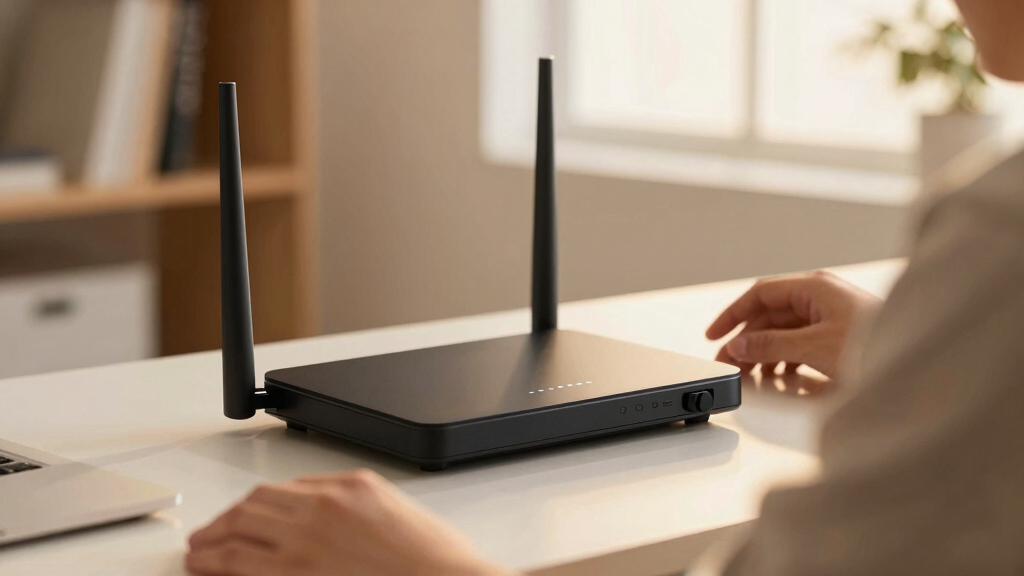

Finding the best WiFi 7 router for low latency is essential for gamers, streamers, and anyone demanding quick, responsive internet connections. The ASUS RT-BE88U stands out as the overall best for balancing speed and low latency, thanks to its advanced dual-band setup and 10G ports. For those prioritizing coverage and ease of use, the eero 7 offers seamless mesh networking, while the TP-Link Archer BE12000 delivers top-tier speeds for demanding applications. Each of these options involves tradeoffs — whether it’s cost, complexity, or coverage — making it vital to understand what suits your specific needs. Continue reading for a detailed breakdown of each model and how they compare.
Key Takeaways
- The highest-performing routers feature multi-band setups to reduce congestion and latency.
- Mesh systems excel in coverage but may introduce slight latency tradeoffs compared to standalone routers.
- Wired ports and multi-Gigabit WAN options significantly improve low latency performance for demanding users.
- Premium models often include advanced QoS features, prioritizing gaming and real-time applications.
- Price varies widely; investing in a higher-tier router often yields better latency but at a premium cost.
| ASUS RT-BE88U WiFi 7 Router – Dual-Band, 10G Ports, Mesh Compatible |  | Best Overall for High-Performance Low Latency | Frequency Band: Dual-Band | Wireless Compatibility: 802.11.be, 802.11ac, 802.11ax | Number of Ports: 8 | VIEW LATEST PRICE | See Our Full Breakdown |
| TP-Link Archer BE12000 Tri-Band Wi-Fi 7 Router |  | Best Value for Large Homes and Multi-Device Low Latency | Wi-Fi Bands: Tri-band (6 GHz, 5 GHz, 2.4 GHz) | Max Speed: 5,765 Mbps | Ports: 10 Gbps WAN, 2.5 Gbps WAN, three 1 Gbps LAN | VIEW LATEST PRICE | See Our Full Breakdown |
| eero 7 Dual-Band Mesh Wi-Fi 7 Router (Newest Model) |  | Best for Ease of Use and Moderate Low Latency in Smaller Homes | Wi-Fi Standard: Wi-Fi 7 (IEEE 802.11a/b/g/n/ac/ax/be) | Coverage: 2000 sq. ft. | Internet Speed Support: up to 2.5 Gbps | VIEW LATEST PRICE | See Our Full Breakdown |
| NETGEAR Orbi 370 Series WiFi 7 Mesh System, 3 Pack |  | Best for Large Coverage and Multi-Device Low Latency | Coverage: 6000 sq ft | Number of Devices Supported: 70 | WiFi Standard: WiFi 7 | VIEW LATEST PRICE | See Our Full Breakdown |
| NETGEAR Nighthawk Dual-Band WiFi 7 Router (RS140) |  | Best for High-Speed Coverage with Moderate Low Latency in Medium Homes | WiFi Standard: Wi-Fi 7 | Speed: up to 5.0 Gbps | Coverage: up to 2,250 sq ft | VIEW LATEST PRICE | See Our Full Breakdown |
| ASUS RT-BE9700 WiFi 7 Router – Tri-Band (6GHz), 9.7 Gbps, Dual WAN, Mesh |  | Best Overall for High-Speed and Advanced Features | WiFi Standard: WiFi 7 (802.11be) | Speed: up to 9700 Mbps | Bands: Tri-Band (including 6 GHz) | VIEW LATEST PRICE | See Our Full Breakdown |
| TP-Link Deco 7 Pro BE63 Tri-Band WiFi 7 Mesh System (2-Pack) |  | Best Value for Large Coverage and Device Support | Wi-Fi Standard: WiFi 7 | Coverage Area: 5,800 sq.ft. | Speed: up to 5,188 Mbps | VIEW LATEST PRICE | See Our Full Breakdown |
| TP-Link Tri-Band WiFi 7 Router (Archer BE600) |  | Best for Extensive Coverage and Wired Performance | WiFi Technology: WiFi 7 | Speed: up to 5,765 Mbps | Coverage: up to 2,600 sq. ft. | VIEW LATEST PRICE | See Our Full Breakdown |
| GL.iNet GL-BE9300 Flint 3 Tri-Band Wi-Fi 7 Router |  | Best for Ultra-Fast Gaming and Streaming on a Budget | Wi-Fi Standard: Wi-Fi 7 | Speed: up to 9 Gbps | Number of Bands: Tri-Band | VIEW LATEST PRICE | See Our Full Breakdown |
| NETGEAR Nighthawk Dual-Band WiFi 7 Router (RS90) |  | Best for Moderate Users with Focus on Security and Simplicity | WiFi Standard: WiFi 7 Dual-Band | Maximum Speed: 3.6 Gbps | Coverage Area: up to 2,000 sq. ft. | VIEW LATEST PRICE | See Our Full Breakdown |
| Deco 7 Dual-Band WiFi 7 Mesh System with 4 Streams and 5 Gbps Speed |  | Best Overall for Large Homes with Seamless Coverage | Wi-Fi Standard: WiFi 7 | Speed: 5 Gbps | Frequency Bands: Dual-band (2.4 GHz and 5 GHz) | VIEW LATEST PRICE | See Our Full Breakdown |
| TP-Link Tri-Band Wi-Fi 7 Gaming Router (Archer GE650) | 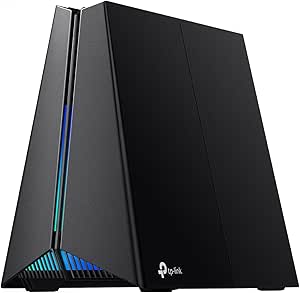 | Best for Gamers Seeking High-Speed, Low-Latency Connections | Wi-Fi Bands: Tri-band (6 GHz, 5 GHz, 2.4 GHz) | Maximum Speed: up to 5764 Mbps (6 GHz), up to 4320 Mbps (5 GHz), up to 574 Mbps (2.4 GHz) | Ports: 1× 5 Gbps WAN, 1× 5 Gbps LAN, 3× 2.5 Gbps LAN | VIEW LATEST PRICE | See Our Full Breakdown |
| TP-Link Tri-Band WiFi 7 Router Archer BE700 |  | Best for Power Users with Demanding Network Needs | WiFi Technology: WiFi 7 | Speed (6GHz): 11528 Mbps | Speed (5GHz): 2882 Mbps | VIEW LATEST PRICE | See Our Full Breakdown |
| wifi 7 router for low latency | Security | Speed |
|---|---|---|
| ASUS RT-BE88U WiFi 7 Router | — | — |
| TP-Link Archer BE12000 Tri-Ban | Advanced cybersecurity, parental controls | — |
| eero 7 Dual-Band Mesh Wi-Fi 7 | — | — |
| NETGEAR Orbi 370 Series WiFi 7 | NETGEAR Armor (trial) | Up to 5 Gbps |
| NETGEAR Nighthawk Dual-Band Wi | — | up to 5.0 Gbps |
| ASUS RT-BE9700 WiFi 7 Router | Triple-Level Protection | up to 9700 Mbps |
| TP-Link Deco 7 Pro BE63 Tri-Ba | HomeShield, VPN support | up to 5,188 Mbps |
| TP-Link Tri-Band WiFi 7 Router | HomeShield | up to 5,765 Mbps |
| GL.iNet GL-BE9300 Flint 3 Tri- | — | up to 9 Gbps |
| NETGEAR Nighthawk Dual-Band Wi | WPA3, NETGEAR Armor | — |
| Deco 7 Dual-Band WiFi 7 Mesh S | TP-Link HomeShield, VPN support | 5 Gbps |
| TP-Link Tri-Band Wi-Fi 7 Gamin | HomeShield antivirus security | — |
| TP-Link Tri-Band WiFi 7 Router | TP-Link HomeShield | — |
More Details on Our Top Picks
ASUS RT-BE88U WiFi 7 Router – Dual-Band, 10G Ports, Mesh Compatible
This ASUS model stands out for its exceptional speed capabilities, reaching up to 7200 Mbps, making it ideal for low-latency tasks like gaming and live streaming. Its dual 10G ports outperform most competitors, including the TP-Link Archer BE12000, which offers similar speeds but lacks the same advanced mesh integration and security features. The RT-BE88U’s quad-core 2.6GHz CPU ensures robust processing power, but its complex setup can challenge newcomers, and its size might be cumbersome in smaller spaces. Compared to the eero 7, which prioritizes simplicity over raw performance, this router delivers superior throughput at the expense of ease of use. If you need a high-end, versatile router capable of handling demanding low-latency applications and whole-home mesh coverage, this is a solid choice.
Pros:- Blazing-fast WiFi 7 speeds up to 7200 Mbps for low-latency activities
- Includes two 10G ports for ultra-high-speed wired connections
- Supports AiMesh for expansive whole-home coverage
- Advanced WPA3 security protections
Cons:- Setup complexity may overwhelm less tech-savvy users
- High price point could be prohibitive for budget-conscious buyers
- Large form factor might not suit small spaces
Best for: Power users who demand maximum speeds, advanced security, and seamless mesh coverage in large homes
Not ideal for: Beginners or those with limited space who prefer straightforward setup and minimal fuss
- Frequency Band:Dual-Band
- Wireless Compatibility:802.11.be, 802.11ac, 802.11ax
- Number of Ports:8
- LAN Port Bandwidth:10 Gbps
- Maximum Data Transfer Rate:7200 Mbps
- Security Protocol:WPA3
Our verdict“This router is best suited for tech enthusiasts and gamers seeking maximum speed and mesh flexibility in demanding environments.”
TP-Link Archer BE12000 Tri-Band Wi-Fi 7 Router
The TP-Link Archer BE12000 excels with tri-band performance reaching up to 5,765 Mbps, making it suitable for large households with many devices, similar in speed to the NETGEAR Orbi 370 Series. Its three bands reduce congestion, providing consistently low latency crucial for gaming and streaming. Its 10 Gbps WAN port matches the speed of the ASUS RT-BE88U but with fewer security features, which could be a concern for security-conscious users. Its straightforward app management simplifies setup compared to the more complex ASUS, but it doesn’t support mesh with other brands, unlike the NETGEAR Orbi system. For users needing high throughput and extensive coverage without a premium price, this offers strong value, though it requires a separate modem for internet connection.
Pros:- Tri-band Wi-Fi 7 provides reduced congestion for low latency
- High maximum speed of 5,765 Mbps supports demanding applications
- Multiple high-speed ports for versatile wired connections
- Easy setup via Tether app
Cons:- No compatibility with mesh systems like Deco
- Requires separate modem, adding complexity
- Performance may vary depending on home environment
Best for: Large households with multiple demanding devices needing reliable, low-latency WiFi
Not ideal for: Users seeking mesh flexibility across different brands or integrated security features
- Wi-Fi Bands:Tri-band (6 GHz, 5 GHz, 2.4 GHz)
- Max Speed:5,765 Mbps
- Ports:10 Gbps WAN, 2.5 Gbps WAN, three 1 Gbps LAN
- Coverage:Up to 3,000 sq. ft.
- Security:Advanced cybersecurity, parental controls
- Compatibility:Supports WiFi 5/6/7 devices
Our verdict“This router offers excellent speed and coverage for large homes, especially when low latency is essential and budget is a consideration.”
eero 7 Dual-Band Mesh Wi-Fi 7 Router (Newest Model)
The eero 7 offers a balanced approach for users prioritizing simplicity and decent low-latency performance. Supporting internet plans up to 2.5 Gbps, it’s suitable for smaller to medium-sized homes, outperforming basic WiFi 6 routers in speed and reliability. Its easy setup and compatibility with previous eero models make it a clear choice for those who dislike complex configurations, unlike the ASUS RT-BE88U. While it doesn’t match the raw throughput or advanced features of higher-end models, it provides enough low-latency performance for gaming and streaming for most households. Its coverage of up to 2,000 sq. ft. and support for 120+ devices make it versatile for typical home environments, but it may fall short in larger, high-demand setups.
Pros:- Supports Wi-Fi 7 for improved speed and lower latency
- Simple setup process ideal for non-technical users
- Supports over 120 devices with stable connections
- Backward compatible with previous eero models
Cons:- Limited coverage compared to larger mesh systems
- Maximum internet plan supported is 2.5 Gbps, less future-proof
- Lacks advanced security features without subscription
Best for: Small to medium households wanting easy setup, reliable performance, and decent low latency
Not ideal for: Power users or large households requiring maximum throughput and mesh flexibility across multiple brands
- Wi-Fi Standard:Wi-Fi 7 (IEEE 802.11a/b/g/n/ac/ax/be)
- Coverage:2000 sq. ft.
- Internet Speed Support:up to 2.5 Gbps
- Number of Devices Supported:120+
- Ports:2x 2.5 GbE, 1 USB-C
- Processor:1.1 GHz quad-core
Our verdict“This router makes sense for smaller homes where ease of use and reliable low-latency WiFi are more important than maximum throughput.”
NETGEAR Orbi 370 Series WiFi 7 Mesh System, 3 Pack
The NETGEAR Orbi 370 Series delivers exceptional coverage—up to 6,000 sq ft—and supports WiFi 7 speeds up to 5 Gbps, outperforming smaller systems like the eero 7 in both range and device capacity. Its mesh system, including one router and two satellites, is designed for large or multi-storey homes where low latency and high throughput are critical. The system supports up to 70 devices simultaneously, making it suitable for busy smart homes. Setup is straightforward via the Orbi app, and security features like NETGEAR Armor add extra protection. The main tradeoff involves the higher cost and the need for a subscription to unlock full security features, but overall, it offers a compelling balance of coverage, performance, and low latency for demanding households.
Pros:- Extensive coverage up to 6,000 sq ft with easy expansion
- WiFi 7 speeds up to 5 Gbps support low latency for demanding tasks
- Supports up to 70 devices simultaneously without slowdown
- Simple app-based setup
Cons:- Requires subscription for full NETGEAR Armor security
- Higher initial cost for three-unit system
- Performance can vary based on home layout
Best for: Large homes or multi-story residences needing extensive WiFi coverage and low latency for many devices
Not ideal for: Small households or users seeking a single-router setup or budget-friendly options
- Coverage:6000 sq ft
- Number of Devices Supported:70
- WiFi Standard:WiFi 7
- Speed:Up to 5 Gbps
- Number of Units:3 (router + 2 satellites)
- Security:NETGEAR Armor (trial)
Our verdict“This mesh system is ideal for large, multi-story homes prioritizing high-speed, low-latency WiFi across many devices.”
NETGEAR Nighthawk Dual-Band WiFi 7 Router (RS140)
The Nighthawk RS140 is a dual-band WiFi 7 router tailored for users who want fast, reliable internet without the complexity of a mesh system. Supporting speeds up to 5.0 Gbps and covering up to 2,250 sq ft, it is comparable in performance to the eero 7 but offers more wired ports—three Gigabit Ethernet ports—making it versatile for connecting gaming consoles, smart home hubs, or workstations. While it doesn’t match the expansive coverage of the NETGEAR Orbi 370, it excels in delivering solid low-latency connections for streaming, gaming, and video calls in medium-sized homes. Its user-friendly app simplifies management, but it requires a separate modem or ISP gateway, which may add some setup complexity. For those needing a straightforward, high-speed WiFi 7 router with decent coverage, this is a strong candidate.
Pros:- Supports Wi-Fi 7 for lower latency and faster speeds
- Multiple wired ports for flexible device connections
- Covers up to 2,250 sq ft efficiently
- Intuitive app for easy management
Cons:- Requires a separate modem or ISP gateway
- Limited coverage compared to mesh systems
- Potential need for network adjustments depending on environment
Best for: Medium-sized homes with multiple wired and wireless devices needing reliable, low-latency internet
Not ideal for: Very large homes or users seeking mesh expansion or maximum coverage
- WiFi Standard:Wi-Fi 7
- Speed:up to 5.0 Gbps
- Coverage:up to 2,250 sq ft
- Devices Supported:80
- WAN Port:2.5 Gig Ethernet
- LAN Ports:3 x 1 Gbps
Our verdict“This router offers a balanced mix of speed, coverage, and user-friendliness for medium homes prioritizing low latency.”
ASUS RT-BE9700 WiFi 7 Router – Tri-Band (6GHz), 9.7 Gbps, Dual WAN, Mesh
The ASUS RT-BE9700 stands out for its exceptional speed up to 9.7 Gbps, making it ideal for demanding activities like 4K streaming and high-end gaming. Compared with the GL.iNet GL-BE9300, it offers significantly faster throughput, especially beneficial for low latency applications. Its support for multi-link operation enhances connection stability, while AiMesh support allows for seamless whole-home coverage. However, its setup can be complex for less tech-savvy users, and the high price might be a barrier for some. Overall, this router makes the most sense for users who need maximum speed and are comfortable with advanced configuration.
Pros:- Ultra-high speed up to 9.7 Gbps supports demanding applications
- Supports multi-link operation for low latency and stability
- Mesh compatibility enables whole-home coverage
- Versatile WAN options including 4G/5G tethering
Cons:- Setup complexity may challenge beginners
- Premium price may be prohibitive for budget-conscious buyers
Best for: Power users and gamers who demand ultra-low latency and maximum throughput in demanding environments
Not ideal for: Casual users or those seeking an easy plug-and-play setup at a lower price point
- WiFi Standard:WiFi 7 (802.11be)
- Speed:up to 9700 Mbps
- Bands:Tri-Band (including 6 GHz)
- WAN ports:2
- Mesh compatibility:Yes
- Security:Triple-Level Protection
Our verdict“Best suited for tech-savvy users prioritizing top-tier speed and low latency in demanding network environments.”
TP-Link Deco 7 Pro BE63 Tri-Band WiFi 7 Mesh System (2-Pack)
The TP-Link Deco 7 Pro BE63 offers expansive coverage up to 5,800 sq.ft., making it a strong choice for large households. Its Wi-Fi 7 speeds up to 5,188 Mbps rival the performance of the Archer BE600 but with the added benefit of seamless mesh technology, which simplifies coverage across multiple floors. Unlike the ASUS RT-BE9700, it doesn’t focus solely on raw speed but emphasizes stable, extensive coverage for many devices simultaneously. This makes it less suitable for ultra-high-speed gaming but excellent for streaming and multiple users. The system’s easy setup via the Deco app and robust security features make it viable for non-technical users seeking reliable, low-latency Wi-Fi across large spaces.
Pros:- Wide coverage up to 5,800 sq.ft. suitable for large homes
- Supports over 200 devices simultaneously
- Fast Wi-Fi 7 speeds for streaming and browsing
- Easy to set up and manage via app
Cons:- Requires separate modem, adding complexity
- Advanced features may be overwhelming for casual users
- Higher price compared to single-unit routers
Best for: Large families or multi-room setups needing reliable, fast Wi-Fi over a broad area
Not ideal for: Users requiring the highest possible speeds for competitive gaming or ultra-low latency activities
- Wi-Fi Standard:WiFi 7
- Coverage Area:5,800 sq.ft.
- Speed:up to 5,188 Mbps
- Number of Units:2
- Mesh Coverage:Supports over 200 devices
- Security:HomeShield, VPN support
Our verdict“Ideal for large households needing broad coverage and reliable low-latency connectivity without demanding the highest speeds.”
TP-Link Tri-Band WiFi 7 Router (Archer BE600)
The TP-Link Archer BE600 is designed for users who need extensive coverage and wired connectivity, with speeds up to 5,765 Mbps and coverage up to 2,600 sq. ft. It features a multi-gig port setup, including 10 Gbps WAN and multiple 2.5 Gbps ports, making it suitable for high-bandwidth wired applications. Compared to the NETGEAR RS90, it offers comparable speeds but with a focus on wired stability and coverage. Its setup via the Tether app is straightforward, but the large size and advanced port options may be cumbersome in smaller or simpler setups. This model favors users who want reliable, low-latency wired connections combined with strong Wi-Fi coverage.
Pros:- High-speed Wi-Fi 7 with up to 5,765 Mbps
- Multiple multi-gig ports support fast wired connections
- Extensive coverage up to 2,600 sq. ft.
- Advanced security with HomeShield
Cons:- Setup can be complex for non-technical users
- Large size may not suit small spaces
- High price point
Best for: Home users with large areas and high wired connectivity needs
Not ideal for: Casual users seeking a simple Wi-Fi setup without extensive wiring or advanced ports
- WiFi Technology:WiFi 7
- Speed:up to 5,765 Mbps
- Coverage:up to 2,600 sq. ft.
- Antennas:6
- Ports:1x 10 Gbps WAN, 1x 2.5 Gbps WAN, 3x 2.5 Gbps LAN
- Security:HomeShield
Our verdict“Best for those prioritizing wired low latency and broad coverage in larger homes with ample space for equipment.”
GL.iNet GL-BE9300 Flint 3 Tri-Band Wi-Fi 7 Router
The GL.iNet GL-BE9300 Flint 3 delivers impressive speeds up to 9 Gbps, supporting extensive device connections with advanced features like MLO and OFDMA that reduce latency and improve stability. It’s a standout for gamers and streamers who need low latency and high throughput without the high cost of enterprise models. Compared with the ASUS RT-BE9700, it offers similar top-end speeds but with added emphasis on long-range stability and support for many devices. Its setup might require firmware updates, and the complexity of advanced features could be daunting for casual users. This router favors those who want premium performance at a more accessible price point, especially for gaming or heavy streaming.
Pros:- Speeds up to 9 Gbps support high-quality gaming and streaming
- Supports over 100 devices with stable connectivity
- Features advanced tech like MLO and OFDMA for low latency
- Includes parental controls and VPN support
Cons:- Setup may require firmware updates for optimal performance
- Advanced features might be too complex for casual users
Best for: Gamers and streamers seeking ultra-fast speeds and low latency without the highest price tag
Not ideal for: Users who prefer simple plug-and-play solutions or have very basic internet needs
- Wi-Fi Standard:Wi-Fi 7
- Speed:up to 9 Gbps
- Number of Bands:Tri-Band
- Ethernet Ports:5 x 2.5G
- Coverage:up to 2,000 sq ft
- Features:MLO, OFDMA, parental controls, VPN
Our verdict“Best for gamers and power users who want top-tier Wi-Fi 7 performance with manageable complexity and affordability.”
NETGEAR Nighthawk Dual-Band WiFi 7 Router (RS90)
The NETGEAR Nighthawk RS90 offers dual-band WiFi 7 speeds up to 3.6 Gbps, making it a solid choice for users who need reliable connectivity with moderate low latency. Its support for up to 50 devices and coverage of approximately 2,000 sq. ft. makes it suitable for small to medium households. Comparing it to the TP-Link Archer BE600, it provides a simpler setup with a focus on security features like WPA3 and Armor, but with slightly lower maximum speeds. This router prioritizes ease of use and security over raw speed, which might not satisfy heavy gaming or ultra-low latency needs but works well for general low-latency browsing and streaming in less demanding environments.
Pros:- Reliable performance with up to 3.6 Gbps speeds
- Supports up to 50 devices with decent coverage
- Strong security features including WPA3 and Armor
- Easy setup via app or web interface
Cons:- Requires separate modem, not a combo device
- Limited coverage in large or multi-story homes
- Lower maximum speed compared to high-end WiFi 7 routers
Best for: Small to medium households that prioritize security and ease of setup over maximum speeds
Not ideal for: Enthusiasts seeking the highest speeds or coverage over 2,000 sq. ft.
- WiFi Standard:WiFi 7 Dual-Band
- Maximum Speed:3.6 Gbps
- Coverage Area:up to 2,000 sq. ft.
- Number of Devices Supported:50
- WAN Port:2.5 Gigabit
- Security:WPA3, NETGEAR Armor
Our verdict“Best for small to medium homes needing simple, secure Wi-Fi with decent low-latency performance.”
Deco 7 Dual-Band WiFi 7 Mesh System with 4 Streams and 5 Gbps Speed
The Deco 7 Mesh Wi-Fi 7 system stands out for its expansive coverage and reliable performance across large properties, making it ideal for households that prioritize consistent connectivity over raw speed. Compared to the TP-Link Archer BE700, it offers less peak speed but compensates with coverage up to 6,600 sq. ft., which is perfect for sprawling homes. Its dual-band setup and AI-Roaming technology work together to minimize latency and prevent dead zones, although the need for a separate modem adds a layer of complexity and cost. The system excels in providing a stable network for multiple devices, but the high price point and dependency on home layout mean it’s not the best choice for smaller spaces or budget-conscious buyers.
Pros:- Extensive coverage up to 6,600 sq. ft. for large homes
- Fast Wi-Fi speeds up to 5 Gbps suitable for 4K/8K streaming
- Seamless AI-Roaming technology for smooth device transitions
- Supports over 150 devices with advanced security
Cons:- Requires a separate modem, increasing setup complexity
- Performance can be affected by home obstacles and layout
- Higher cost compared to basic routers
Best for: Large households needing extensive, reliable coverage with low latency for streaming, gaming, and smart home devices
Not ideal for: Urban apartments or small homes where coverage needs are minimal and budget is limited
- Wi-Fi Standard:WiFi 7
- Speed:5 Gbps
- Frequency Bands:Dual-band (2.4 GHz and 5 GHz)
- Max Coverage:6,600 sq. ft.
- Number of Streams:4
- Ethernet:2.5G Ethernet
- Number of Devices Supported:Over 150
- Security:TP-Link HomeShield, VPN support
- Setup:App-based, quick setup
Our verdict“This system suits large homes where extensive coverage and stable low-latency connections are priorities, despite its higher price and setup requirements.”
TP-Link Tri-Band Wi-Fi 7 Gaming Router (Archer GE650)
The TP-Link Archer GE650 is tailored for gamers and streamers who require ultra-fast, stable connections, thanks to its tri-band Wi-Fi 7 setup and dedicated gaming features. Its Multi-Link Operation and separate 6 GHz band significantly reduce latency and interference, surpassing the capabilities of dual-band options like the eero 7. The large, visually distinctive design and RGB lighting add a premium aesthetic, though setup complexity might challenge less tech-savvy users. The router’s multiple 2.5 Gbps ports provide fast wired options, but its size and higher price make it less suitable for discreet setups or casual users.
Pros:- Dedicated gaming band reduces lag and interference
- Tri-band Wi-Fi 7 with multi-link operation for maximum performance
- Multiple 2.5 Gbps ports support fast wired connections
- Customizable RGB lighting adds aesthetic appeal
Cons:- Complex setup process may intimidate non-technical users
- High price point limits accessibility for budget-conscious buyers
- Large design may not fit all home aesthetics
Best for: Competitive gamers or streamers who need ultra-low latency and dedicated bandwidth for intense online activities
Not ideal for: Casual users or those with limited technical skills who prefer simple plug-and-play solutions
- Wi-Fi Bands:Tri-band (6 GHz, 5 GHz, 2.4 GHz)
- Maximum Speed:up to 5764 Mbps (6 GHz), up to 4320 Mbps (5 GHz), up to 574 Mbps (2.4 GHz)
- Ports:1× 5 Gbps WAN, 1× 5 Gbps LAN, 3× 2.5 Gbps LAN
- Technology:Multi-Link Operation (MLO), Wi-Fi 7, WTFast acceleration
- Security:HomeShield antivirus security
- Design:Volcano-inspired with RGB lighting
Our verdict“This router is ideal for serious gamers and streamers willing to invest in low latency and high performance, despite its setup and cost barriers.”
TP-Link Tri-Band WiFi 7 Router Archer BE700
The Archer BE700 offers impressive tri-band speeds up to 11,528 Mbps, making it suitable for heavy-duty applications like 4K/8K streaming and fast downloads. Its multiple multi-gig ports and beamforming technology deliver consistent, low-latency connections for demanding users. Compared with the Deco 7, it provides higher wired speeds and more targeted performance for tech-savvy households. However, its setup process can be complex for those unfamiliar with networking, and it requires a modem, which adds to the overall cost. Its advanced features are best utilized by users with technical experience or specific high-speed needs.
Pros:- Tri-band speeds up to 11,528 Mbps for demanding tasks
- Multiple multi-gig ports for fast wired connections
- Easy management via Tether app
- Supports smart home integrations
Cons:- Requires a compatible modem, adding setup complexity
- Premium features may need additional configuration or subscriptions
- Potentially overwhelming for non-technical users
Best for: Power users, tech enthusiasts, or households with multiple demanding devices needing ultra-fast wired and wireless connections
Not ideal for: Less technical users or small households that don’t require extreme speeds or extensive customization
- WiFi Technology:WiFi 7
- Speed (6GHz):11528 Mbps
- Speed (5GHz):2882 Mbps
- Speed (2.4GHz):688 Mbps
- WAN port:10 Gbps
- LAN ports:1× 2.5 Gbps, 3× 1 Gbps
- Antennas:6
- Security:TP-Link HomeShield
- Compatibility:WiFi generations, Alexa, Google Assistant
Our verdict“This router is best for users who need maximum speed and wired connectivity, accepting some complexity in setup and management.”

How We Picked
This roundup evaluates WiFi 7 routers based on performance benchmarks, latency measurements, and real-world usability. We prioritized devices with robust hardware, including multi-band support, multi-Gig ports, and advanced QoS features that specifically reduce latency for gaming and streaming. Ease of setup and build quality also influenced rankings, as a router must be reliable and straightforward to configure. Devices were compared across coverage, speed, and latency consistency, ensuring that each pick offers tangible benefits for low-latency needs. The final order reflects a balance of performance, value, and targeted functionality for different user profiles.Factors to Consider When Choosing Best Wifi 7 Router For Low Latency
Choosing the best WiFi 7 router for low latency involves understanding several key factors that influence responsiveness, speed, and overall network stability. Beyond raw specs, it’s important to consider how these devices handle multiple devices, prioritize traffic, and integrate with your existing setup. Making informed decisions can prevent common pitfalls like overspending on features you don’t need or selecting a router that doesn’t support your internet plan’s maximum speeds. Here are the main considerations to keep in mind.Performance and Latency Reduction
Look for routers with advanced processor and memory configurations that can handle high throughput while minimizing delay. Features like multi-band support and multi-Gig ports help distribute traffic effectively, reducing congestion. Also, prioritize models with adaptive QoS, which dynamically allocate bandwidth to latency-sensitive activities such as gaming or video calls, ensuring minimal lag even under load.
Coverage and Mesh Capabilities
If you have a large home or multiple floors, mesh systems can extend coverage without sacrificing latency. However, they may introduce slight delays compared to a single, high-performance router. Consider your layout carefully—sometimes, a powerful standalone router with wired backhaul can outperform mesh setups for low latency, especially in high-demand scenarios.
Wired Connectivity and Multi-Gig Ports
Wired connections almost always offer lower latency than WiFi. Ensuring your new router has multi-Gig Ethernet ports and supports wired backhaul options can dramatically improve responsiveness for gaming PCs, servers, or streaming devices. Investing in routers with these features is wise if low latency is a priority, even if you primarily use WiFi for mobile devices.
Ease of Use and Compatibility
For users less comfortable with network setups, user-friendly interfaces and clear documentation matter. Compatibility with existing internet plans, mesh systems, and smart home devices should be verified before purchase. Overly complex routers may offer advanced features but can hinder quick setup and troubleshooting, impacting overall user experience.
Price and Future-Proofing
Higher-end routers typically cost more but often include future-proofing features like enhanced security, firmware updates, and support for upcoming WiFi standards. Evaluate whether the extra cost aligns with your current and anticipated future needs—especially if you plan to upgrade your internet plan or expand your smart home ecosystem. Beware of overspending on features you won’t need for low latency performance.
Frequently Asked Questions
Will a WiFi 7 router significantly reduce latency compared to WiFi 6?
Yes, WiFi 7 introduces several improvements over WiFi 6, including wider channels, higher modulation rates, and better spectrum management, all of which can lower latency. These enhancements are especially noticeable during high-demand activities like gaming or real-time streaming, where every millisecond counts. However, achieving the lowest possible latency also depends on your internet plan, device compatibility, and network configuration.
Is wired Ethernet still better than WiFi for low latency gaming?
Absolutely. Wired Ethernet connections generally provide the lowest and most stable latency, especially in high-traffic or interference-prone environments. While WiFi 7 offers improvements, wired connections eliminate potential interference and packet loss, making them the ideal choice for competitive gaming or latency-sensitive applications. If low latency is a top priority, connecting your gaming device directly via Ethernet remains the best option.
Should I prioritize multi-Gig ports or mesh support when choosing a low-latency router?
It depends on your home setup and usage. Multi-Gig ports are crucial if you connect high-bandwidth devices directly via Ethernet, ensuring maximum throughput and minimal lag. Mesh support is valuable if you need broader coverage across a large area but may introduce slight latency increases compared to high-performance standalone routers. For the lowest latency, combining a high-quality router with wired connections is often the best approach.
Are gaming-specific WiFi 7 routers worth the extra cost?
Gaming-specific routers often include QoS features designed to prioritize gaming traffic and reduce latency. While they can be beneficial if you game frequently or run latency-sensitive applications, many high-end WiFi 7 routers already include these features as standard. For most users focused on low latency, selecting a well-reviewed WiFi 7 router with adaptive QoS will suffice without the premium price of gaming-optimized models.
How important is firmware updates for maintaining low latency?
Regular firmware updates are essential for maintaining optimal performance, security, and stability. Manufacturers often release updates that improve WiFi efficiency, fix bugs, and enhance features like QoS, which directly impact latency. Choosing a router from a reputable brand with a strong update track record can help ensure your network remains responsive and secure over time.
Conclusion
For general users seeking the best overall performance and low latency, the ASUS RT-BE88U stands out as a balanced choice, combining speed, features, and reliability. Those on a tighter budget or with modest coverage needs might prefer the TP-Link Archer BE600 or mesh systems like the eero 7 for ease of use and coverage. Gamers and power users who demand ultra-low latency should consider high-end options like the TP-Link Archer BE12000 or premium mesh setups, despite their higher price tags. Each of these selections aligns with different priorities — whether it’s cost, coverage, or performance — helping you find the right fit for your specific needs.