Children’s coding robot kits range from screen-free command games to programmable cars and build-your-own machines, so the right choice depends on a child’s age, patience, and appetite for construction. I’d put the Makeblock mBot STEM Coding Robot Kit first for its approachable route from building to coding, while Botley 2.0 stands out for screen-free early learning and the Ozobot Evo for compact, flexible coding activities. The main tradeoff is between quick-start play and kits that demand more assembly or setup in exchange for deeper experimentation. App and computer compatibility, included activities, and adult help needs can matter as much as the robot itself. Read on for the full breakdown of all 15 options and which child each one suits best.

Prime made for students and young adults
- Fast, free delivery for dorm and study essentials
- Prime Video and Amazon Music included
- Member-only deals
Key Takeaways
- mBot is the most balanced starting point: It combines a buildable robot with a path into coding, while the mBot Scratch Coding Box is the more guided choice for children who benefit from structured lessons.
- Screen-free learning is a distinct strength of the Botley options: Botley 2.0 and the original Botley suit younger learners who are not ready for app-based programming; Code & Go Robot Mouse is a simpler activity-led alternative.
- Multi-build kits trade quick setup for construction variety: The Sillbird, WhalesBot, Apitor, and mBot Ranger kits offer multiple configurations, but children need more patience and may need adult help during assembly.
- Robot cars are better for hands-on tinkering than instant play: The ELEGOO UNO R3 and ACEBOTT QD106 invite experimentation with programmable vehicles, but their electronics and setup are a bigger step than beginner activity sets.
- Age labels do not tell the whole story: Reading ability, fine-motor skills, comfort with screens, and willingness to follow build instructions help determine whether a child will enjoy a kit more than the age range alone.
| Teach Tech Mech-5 STEM Coding Robot Building Kit for Kids Ages 10+ |  | Best for Mechanical Coding | Recommended age: 10 years and up | Brand: Teach Tech | Model number: TTC-895 | VIEW LATEST PRICE | See Our Full Breakdown |
| Learning Resources Botley the Coding Robot Activity Set | 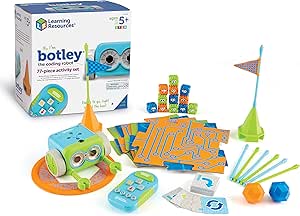 | Best for First-Time Coders | Recommended age: 5 years and up | Brand: Learning Resources | Model number: LER2935 | VIEW LATEST PRICE | See Our Full Breakdown |
| Sillbird 5-in-1 Programmable STEM Robot Building Kit with App and Remote Control, 488 Pieces |  | Best for Multi-Model Building | Recommended age: 8 years and up | Brand: Sillbird | Model: B883 | VIEW LATEST PRICE | See Our Full Breakdown |
| Sillbird 5-in-1 STEM Robot Building Kit with Remote Control, 596 Pieces |  | Best Feature-Rich Build | Recommended age: 8 years and up | Brand: Sillbird | Model: CA-899 | VIEW LATEST PRICE | See Our Full Breakdown |
| Learning Resources Botley 2.0 Coding Robot Activity Set |  | Best Screen-Free Course Play | Age range: 5–10 years | Brand: Learning Resources | Model: LER2938 | VIEW LATEST PRICE | See Our Full Breakdown |
| Makeblock mBot STEM Coding Robot Kit for Kids Ages 8+ |  | Best for Scratch-to-Arduino Progression | Brand: Makeblock | Model: 90053 | Recommended age: 8 years and up | VIEW LATEST PRICE | See Our Full Breakdown |
| Thames & Kosmos My Robotic Pet: Coding Chameleon STEM Kit |  | Best Screen-Free Coding Kit | Brand: Thames & Kosmos | Model number: 620507 | Recommended age: 8–12 years | VIEW LATEST PRICE | See Our Full Breakdown |
| Makeblock mBot Robot Kit with Scratch Coding Box for Kids Ages 8–12 |  | Best Guided mBot Starter | Brand: Makeblock | Recommended age: 8 years and up | Robot version: mBot V1.2 Bluetooth Version | VIEW LATEST PRICE | See Our Full Breakdown |
| WhalesBot C3 Pro 12-in-1 Coding Robot Kit for Kids Ages 4+ | 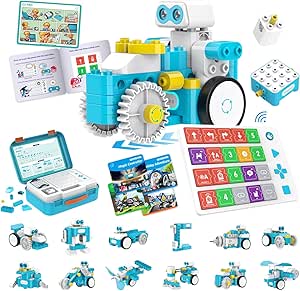 | Best for Young First-Time Builders | Brand: WhalesBot | Model: C3 Pro | Recommended age: 4 years and up | VIEW LATEST PRICE | See Our Full Breakdown |
| Apitor Robot J 6-in-1 STEM Coding Robot Building Kit, 480 Pieces |  | Best for Multi-Model Building | Brand: Apitor | Model: Robot J | Age range: 7–12 years | VIEW LATEST PRICE | See Our Full Breakdown |
| ELEGOO UNO R3 Smart Robot Car Kit V4 with Camera (Arduino Compatible) |  | Best for Camera-Based Robot Car Projects | Recommended age: 12+ recommended; listed age range 8+ | Robot type: Arduino-compatible smart robot car | Camera: ESP32-WROVER camera module | VIEW LATEST PRICE | See Our Full Breakdown |
| ACEBOTT QD106 Programmable Robot Car Kit for Kids |  | Best for Learning Multiple Coding Languages | Model: QD106 | Recommended age: 12 years and up | Controller: ESP32 | VIEW LATEST PRICE | See Our Full Breakdown |
| Ozobot Evo Entry Coding Robot Kit for Kids |  | Best for Screen-Free-to-Screen Coding | Age range: 5 years and up | Coding modes: Ozobot Blockly and screen-free Color Codes | Blockly skill levels: 5 | VIEW LATEST PRICE | See Our Full Breakdown |
| Learning Resources Code & Go Robot Mouse Activity Set | 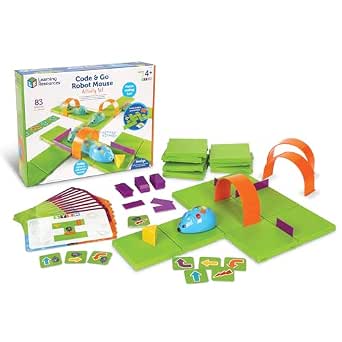 | Best First Screen-Free Coding Kit | Age range: 4 years and up | Included components: 16 maze grids, 22 maze walls, 3 tunnels, 30 double-sided coding cards, 10 double-sided activity cards, cheese wedge, and Activity Guide | Power: 3 AAA batteries, not included | VIEW LATEST PRICE | See Our Full Breakdown |
| Makeblock mBot Ranger 3-in-1 Coding Robot Building Kit for Kids Ages 10+ |  | Best for Rebuildable Advanced Projects | Age range: 10 years and up | Robot designs: Land Raider, Nervous Bird, and Dashing Raptor | Programming languages: Scratch and Arduino | VIEW LATEST PRICE | See Our Full Breakdown |
| children’s coding robot kit | Brand | Recommended age |
|---|---|---|
| Teach Tech Mech-5 STEM Coding | Teach Tech | 10 years and up |
| Learning Resources Botley the | Learning Resources | 5 years and up |
| Sillbird 5-in-1 Programmable S | Sillbird | 8 years and up |
| Sillbird 5-in-1 STEM Robot Bui | Sillbird | 8 years and up |
| Learning Resources Botley 2.0 | Learning Resources | — |
| Makeblock mBot STEM Coding Rob | Makeblock | 8 years and up |
| Thames & Kosmos My Robotic Pet | Thames & Kosmos | 8–12 years |
| Makeblock mBot Robot Kit with | Makeblock | 8 years and up |
| WhalesBot C3 Pro 12-in-1 Codin | WhalesBot | 4 years and up |
| Apitor Robot J 6-in-1 STEM Cod | Apitor | — |
| ELEGOO UNO R3 Smart Robot Car | — | 12+ recommended; listed age range 8+ |
| ACEBOTT QD106 Programmable Rob | — | 12 years and up |
| Ozobot Evo Entry Coding Robot | — | — |
| Learning Resources Code & Go R | Learning Resources | — |
| Makeblock mBot Ranger 3-in-1 C | — | — |
More Details on Our Top Picks
Teach Tech Mech-5 STEM Coding Robot Building Kit for Kids Ages 10+
Mech-5 makes the building itself part of the coding lesson. After a multi-hour assembly, kids program actions such as moving, lifting, throwing, kicking, and drawing with a mechanical coding wheel. That hands-on mechanism offers a different kind of learning from Botley the Coding Robot Activity Set, which focuses on screen-free sequencing with cards and obstacles rather than constructing a robot.
The tradeoff is the commitment: the careful build may suit patient older children, but it leaves less room for quick, ready-to-play sessions than Botley. No batteries are required, which keeps the setup simple once assembly is complete. I’d choose Mech-5 for a child curious about how mechanisms work, not for a beginner who wants a robot to start following commands straight out of the box.
Pros:- Combines mechanical construction with introductory coding.
- Programs a range of physical actions, including lifting, throwing, kicking, and drawing.
- Requires no batteries.
- Offers a more mechanism-focused build than Botley’s card-and-obstacle approach.
Cons:- Assembly takes multiple hours before the robot is ready to use.
- Detailed construction may frustrate children who prefer simpler builds.
- The mechanical coding wheel is a narrower programming approach than app-based kits such as Sillbird’s 5-in-1 model.
Best for: Children aged 10 and up who enjoy detailed building and want to connect coding commands with mechanical movement.
Not ideal for: Younger beginners or families seeking a quick-start kit; assembly takes multiple hours and calls for careful attention.
- Recommended age:10 years and up
- Brand:Teach Tech
- Model number:TTC-895
- Programming method:Mechanical coding wheel
- Programmed actions:Move, rotate, throw, lift, kick, and draw
- Power:No batteries required
- Assembly time:Multiple hours
- Warranty:1 year against manufacturer defects
Our verdict“Choose Mech-5 for a patient older child who wants to build a moving mechanism and learn coding without batteries.”
Learning Resources Botley the Coding Robot Activity Set
Botley is the most direct introduction to coding in this group for younger children: they arrange commands with a remote programmer and use cards, tiles, and obstacles to test a route. The screen-free setup avoids a phone or tablet, while the included guide offers challenges that can grow from simple sequences to commands involving loops and object detection.
Compared with Botley 2.0, this original set has one fewer piece and does not list the newer model’s lights, sounds, or 45-degree turns. Its strength is a clear, activity-led starting point, not flashy extras or construction depth like the Sillbird 5-in-1. The separate remote programmer is part of the process, and families need to supply five AAA batteries. I’d pick it for a child learning command order and problem-solving through physical play.
Pros:- Screen-free play needs no phone or tablet.
- Includes coding cards, tiles, and obstacle pieces for making routes and challenges.
- Activities support progression to loops and object detection.
- The remote programmer and guide give beginners a structured way to try commands.
Cons:- Requires three AAA batteries for Botley and two for the remote programmer; batteries are not included.
- Commands must be sent through a separate remote programmer.
- Offers less construction and mechanical engineering than the Teach Tech Mech-5.
Best for: Families introducing children aged 5 and up to coding through screen-free challenges, cards, and obstacle courses.
Not ideal for: Buyers who want a buildable robot, app-based coding, or a kit ready to use without purchasing batteries.
- Recommended age:5 years and up
- Brand:Learning Resources
- Model number:LER2935
- Piece count:77
- Coding cards:40
- Double-sided tiles:6
- Obstacle-building pieces:27
- Power requirements:3 AAA batteries for Botley and 2 AAA batteries for remote programmer; not included
- Screen-free:Yes
Our verdict“Pick Botley for a young beginner who needs a structured, screen-free way to practice coding sequences.”
Sillbird 5-in-1 Programmable STEM Robot Building Kit with App and Remote Control, 488 Pieces
Five rebuildable models are the main reason to choose this Sillbird kit. With 488 pieces and illustrated instructions, children can assemble a robot, dinosaur, car, tank, and another model, then explore basic programming and path control. App and remote options give it more control variety than Teach Tech Mech-5, whose mechanical coding wheel teaches movement through a more fixed, action-based setup.
The extra variety comes with a real build commitment: assembly may need adult help, and a charge lasts up to 40 minutes. Compared with the 596-piece Sillbird 5-in-1, this version has fewer pieces and does not list LED eyes, sound effects, or a mist feature, but it still suits children who want to change models rather than repeat one activity. I’d favor it for a curious builder who values rebuildable play over a screen-free first lesson.
Pros:- Supports five different builds, including a robot, dinosaur, car, and tank.
- Offers both Bluetooth app and remote control.
- Includes basic programming and path control.
- Illustrated instructions help children follow the multi-step assembly.
Cons:- Up to 40 minutes of play per charge may limit longer sessions.
- Some children may need adult help with the 488-piece assembly.
- Compared with the 596-piece Sillbird 5-in-1, it lacks listed LED eyes, sound effects, and water-activated mist.
Best for: Children aged 8 and up who enjoy assembling different vehicle and creature models and want both app and remote control.
Not ideal for: Families seeking a screen-free kit or long uninterrupted sessions; it uses app or remote control and runs for up to 40 minutes per charge.
- Recommended age:8 years and up
- Brand:Sillbird
- Model:B883
- Piece count:488
- Build models:5; includes robot, dinosaur, car, and tank
- Control:Bluetooth app and remote control
- Programming features:Basic programming and path control
- Battery life:Up to 40 minutes per charge
- Item dimensions:6 x 7 x 8 inches
Our verdict“Choose this Sillbird kit for an eight-and-up builder who wants several models and app or remote control in one set.”
Sillbird 5-in-1 STEM Robot Building Kit with Remote Control, 596 Pieces
This Sillbird pairs five possible builds with the most listed play features among the two Sillbird kits here. Along with app and remote control and coding, it adds LED eyes, sound effects, and a water-activated mist spray. Those extras give children more ways to engage with the robot after assembly, while the 596 pieces provide a substantial building project for ages 8 and up.
Compared with the 488-piece Sillbird 5-in-1, this set adds sensory effects and more pieces, but it shares the same stated play limit of up to 40 minutes per charge. The mist feature also requires adding water, so it brings an extra setup step rather than being a simple always-ready effect. Like the smaller Sillbird, it relies on app or remote control, making Botley 2.0 a better fit for families who specifically want screen-free coding. I’d choose this model when feature variety matters more than minimal setup.
Pros:- Offers five builds from a 596-piece kit.
- Combines remote control, Bluetooth app control, and coding.
- LED eyes and sound effects add feedback during play.
- Rechargeable battery provides up to 40 minutes of play per charge.
Cons:- Up to 40 minutes of play per charge may interrupt longer sessions.
- The water-activated mist requires adding water.
- More pieces and effects add complexity compared with Botley 2.0’s ready-made course activities.
Best for: Children aged 8 and up who want a substantial multi-model build with app or remote control, lights, sounds, and a water effect.
Not ideal for: Families seeking a screen-free coding experience, a quick build, or longer play between charges.
- Recommended age:8 years and up
- Brand:Sillbird
- Model:CA-899
- Manufacturer part number:CA-B899
- Piece count:596
- Build models:5; includes robot, tank, and car
- Control methods:Remote control and Bluetooth app
- Features:Programmable coding, LED eyes, sound effects, and water-activated mist spray
- Battery life:Up to 40 minutes per charge
Our verdict“Choose this kit for a child who wants multiple builds and extra light, sound, and mist effects more than a screen-free setup.”
Learning Resources Botley 2.0 Coding Robot Activity Set
Botley 2.0 is the stronger choice for children who learn by laying out a route and watching commands play out. Its 78-piece set includes coding cards, boards, and stackable obstacles, while object sensing, multi-step commands, lights, sounds, and 45-degree turns add ways to vary a challenge. Unlike the Sillbird 5-in-1 kits, there is no robot construction or app-based control to manage: the focus stays on screen-free sequencing and course design.
Compared with the original Botley Coding Robot Activity Set, this version lists 45-degree turns, lights, sounds, and 16 secret code combinations, making it the more feature-rich course-play option. Its limits are just as relevant: it requires batteries, and the listing gives no manufacturer warranty. I’d choose it for a young learner who wants to invent routes and practice logic, rather than build a robot from pieces.
Pros:- Screen-free coding uses a remote programmer and coding cards.
- Boards and stackable obstacles support custom course building.
- Object sensing and multi-step commands create varied problem-solving challenges.
- Lights, sounds, 45-degree turns, and secret code combinations add play options beyond the original Botley set.
Cons:- Requires batteries.
- Does not offer the multi-model construction found in the Sillbird 5-in-1 kits.
- No manufacturer warranty is listed.
Best for: Children aged 5–10 who prefer screen-free route planning with physical boards, obstacles, and coding cards.
Not ideal for: Families looking for a construction-focused robot kit, app-based programming, or a product with a stated manufacturer warranty.
- Age range:5–10 years
- Brand:Learning Resources
- Model:LER2938
- Piece count:78
- Included coding cards:40
- Included boards:6 double-sided boards
- Features:Screen-free coding, object sensing, 45-degree turns, lights, sounds, and 16 secret code combinations
- Included components:Coding robot, remote programmer, coding cards, double-sided boards, and stackable obstacle pieces
- Warranty:No manufacturer warranty
Our verdict“Pick Botley 2.0 for a child who wants to plan and test screen-free robot routes rather than assemble a robot.”
Makeblock mBot STEM Coding Robot Kit for Kids Ages 8+
The Makeblock mBot suits children ready to move from basic coding ideas into a robot they build and program themselves. Its roughly 15-minute assembly gets families to the coding sooner than a larger, multi-model build such as the Apitor Robot J, while line-following and obstacle avoidance give Scratch projects visible results. Support for Scratch and Arduino also creates a longer learning path: children can begin with visual blocks and later explore text-based programming. The tradeoff is a narrower build experience than kits offering many robot models, and the product description notes that some functions may need compatible add-on parts. You’ll also need to supply four AA batteries for the robot and a CR2025 for the remote.
Pros:- Supports both Scratch and Arduino for a clear path from block coding to more advanced programming.
- Offers line-following, obstacle avoidance, and remote-control activities.
- Assembly takes about 15 minutes, leaving more time for coding projects.
- Tutorials and app support provide guidance for creating projects.
Cons:- Four AA batteries and one CR2025 battery are required but not included.
- Some functions may require additional compatible add-on parts.
- Offers less model variety than the six-build Apitor Robot J.
Best for: Families with children around eight or older who want one robot that can support a progression from Scratch to Arduino.
Not ideal for: Buyers seeking a large collection of build variations or a kit ready to use without sourcing batteries.
- Brand:Makeblock
- Model:90053
- Recommended age:8 years and up
- Programming platforms:Scratch and Arduino
- Robot functions:Remote control, line-following, and obstacle avoidance
- Assembly time:About 15 minutes
- Robot batteries:4 AA batteries, not included
- Remote battery:1 CR2025 battery, not included
Our verdict“Choose the mBot if you want a quick-build robot with a path from Scratch to Arduino, and skip it if multiple build designs matter more.”
Thames & Kosmos My Robotic Pet: Coding Chameleon STEM Kit
The Coding Chameleon takes a different route from app-centered kits such as the Makeblock mBot Robot Kit with Scratch Coding Box: children program with physical, color-coded action cards rather than a screen or software. Its 15-inch build responds to touch and gestures, changes color, and moves its tongue, giving the coding activities a playful, creature-like focus. The guide also introduces biomimicry, so the kit connects robot behavior with ideas from the natural world. Three modes—Coding, Wild, and Pet—offer more than one way to engage with the finished model. The tradeoff is that assembly may need adult help for younger children, and independent play is suggested for ages 12 and up. Choose it for tactile, screen-free exploration, not a progression into Scratch or Arduino.
Pros:- Uses physical action cards for coding without requiring a screen, device, or software.
- Color sensing, touch responses, and gesture reactions make robot behavior easy to observe.
- Three modes support coding activities as well as pet-style interaction.
- Includes a 48-page guide covering assembly, robotics, and biomimicry.
Cons:- Younger builders may need adult help with assembly.
- Independent play is suggested for ages 12 and up, limiting solo use for some children in the stated age range.
- Its screen-free card approach does not offer the Scratch-to-Arduino progression of the Makeblock mBot.
Best for: Families seeking a screen-free robotics activity for children ages 8–12 who enjoy animal-themed builds and hands-on coding.
Not ideal for: Children who want app-based programming, a clear route into Scratch or Arduino, or fully independent assembly at younger ages.
- Brand:Thames & Kosmos
- Model number:620507
- Recommended age:8–12 years
- Robot length:15 inches
- Sensors:Color sensor and infrared sensor
- Play modes:Coding, Wild, and Pet
- Programming method:Color-coded action cards
- Manual:48 pages
- Assembly guidance:Adult help recommended for ages 8+; independent play suggested for ages 12+
Our verdict“Pick the Coding Chameleon for screen-free, animal-themed coding and skip it if your child wants app-based programming or more independent building.”
Makeblock mBot Robot Kit with Scratch Coding Box for Kids Ages 8–12
This mBot package is the better fit for families who want a more structured start than the standard Makeblock mBot. It pairs the familiar quick-build robot with four projects, illustrated assembly instructions, mBlock resources, and eight step-by-step online courses. That guidance can help a child move from building to a first coding task without having to invent a project from scratch. Scratch and Arduino support keeps the learning path broader than the screen-free Coding Chameleon, while the included mCore board, motors, sensors, and tools make the components explicit. Its tradeoffs are practical: the product description says AA batteries are required but does not give the quantity, and it does not promise a range of alternate robot builds. Choose this version for guided lessons rather than model variety.
Pros:- Includes four hands-on projects and eight step-by-step online courses.
- Supports Scratch and Arduino through the mBlock platform.
- About 15-minute assembly and illustrated instructions help children reach the coding activities sooner.
- Includes the mCore board, motors, line-follower sensor, tools, and USB cable.
Cons:- AA batteries are required, but the product data does not state how many.
- Provides a guided mBot experience rather than the multiple model builds offered by the Apitor Robot J.
- Relies on online courses and a coding platform, unlike the screen-free Coding Chameleon.
Best for: Parents of children ages 8–12 who want a quick-build coding robot paired with defined projects and step-by-step online lessons.
Not ideal for: Families who prefer screen-free coding, need battery requirements stated clearly, or want a kit with several different robot models.
- Brand:Makeblock
- Recommended age:8 years and up
- Robot version:mBot V1.2 Bluetooth Version
- Coding languages:Scratch and Arduino
- Projects:4
- Assembly time:About 15 minutes
- Learning resources:mBlock platform and 8 step-by-step online courses
- Included components:mCore mainboard, 2 motors, line-follower sensor, chassis, wheels, cables, screws, tools, USB cable, AA battery holder, infrared remote controller, instruction guide, and coding resources
- Battery requirement:AA batteries required; quantity not specified
Our verdict“Choose this mBot package if guided projects and online lessons will help your child get started; choose another kit for screen-free play or multiple builds.”
WhalesBot C3 Pro 12-in-1 Coding Robot Kit for Kids Ages 4+
The WhalesBot C3 Pro is the youngest-child pick in this group, with an age recommendation starting at four and coding cards that introduce basic action sequences without requiring a coding app. Its 12 guided models, storybooks, and activity map give early builders prompts to follow, while 52 smooth-edged building parts and a coding panel keep the activity tactile. Compared with the Apitor Robot J, it starts at a younger age and leans more on guided, story-based play than app control and icon-based activities. That makes it a gentler entry point, but not the strongest choice for children ready for Scratch, Arduino, or more advanced programming. Battery requirements are not stated, so buyers should check what is needed before expecting immediate play.
Pros:- Offers 12 guided models alongside open-ended building.
- Coding cards and an indicator-light panel introduce basic programming actions.
- Includes four storybooks, an activity map, and a quick-start guide.
- Designed for young children with smooth-edged building blocks.
Cons:- Its beginner-oriented approach may not hold the interest of children ready for Scratch or Arduino.
- Battery requirements are not specified in the product data.
- More dependent on guided models and materials than the app-based Apitor Robot J.
Best for: Families introducing children ages four and up to simple building and foundational coding through guided, story-supported activities.
Not ideal for: Older children seeking Scratch or Arduino programming, or families who need battery requirements clearly listed before purchase.
- Brand:WhalesBot
- Model:C3 Pro
- Recommended age:4 years and up
- Guided models:12
- Building parts:52
- Coding cards:38
- Storybooks:4
- Connectivity:Bluetooth
- Included electronic components:4 components, including controller, motor, lights, and sounds
Our verdict“Choose the C3 Pro as an early, guided introduction to coding and building, but look elsewhere for advanced programming or clearly documented battery needs.”
Apitor Robot J 6-in-1 STEM Coding Robot Building Kit, 480 Pieces
With 480 pieces and six robot models, the Apitor Robot J makes building variety its main advantage. It suits children who want to rebuild rather than return to the same robot, and its two motors, LED lights, and Bluetooth control give each creation movement to explore. The app adds four control modes—dual-motor, single-motor, gyro, and path—plus icon-based coding activities. Compared with the Makeblock mBot Robot Kit with Scratch Coding Box, Apitor offers more model variations, while Makeblock provides clearer Scratch-to-Arduino support and a defined set of coding courses. Apitor’s app-based approach also means a compatible device is needed, and the three AA batteries are not included. The sorting tray helps manage parts, but this is still a larger building project than a quick-assembly mBot.
Pros:- 480 pieces support six different robot models.
- Bluetooth app offers dual-motor, single-motor, gyro, and path control modes.
- Icon-based coding activities add programming practice to hands-on building.
- Includes a sorting tray, instructions, and multicolor LED lights.
Cons:- Requires three AA batteries, which are not included.
- App control requires a compatible device.
- Offers icon-based app coding rather than the Scratch and Arduino progression in the Makeblock mBot kits.
Best for: Children ages 7–12 who enjoy rebuilding models and have access to a compatible device for Bluetooth app control.
Not ideal for: Families seeking screen-free coding, a direct Scratch-to-Arduino learning path, or a kit that includes its required batteries.
- Brand:Apitor
- Model:Robot J
- Age range:7–12 years
- Pieces:480
- Models:6
- Control:Bluetooth app control
- Control modes:Dual-motor, single-motor, gyro, and path
- Motors:2
- Batteries:3 AA batteries required; not included
Our verdict“Choose the Robot J if rebuilding several models is a priority and a compatible device is available; choose an mBot for a more direct Scratch-to-Arduino path.”
ELEGOO UNO R3 Smart Robot Car Kit V4 with Camera (Arduino Compatible)
The ELEGOO stands out for children who want a programmable car they can drive and observe through FPV video. Its camera, ultrasonic sensor, line tracking, and obstacle avoidance give the project more moving parts to explore than the screen-free Ozobot Evo Entry Kit. Guided wiring connectors can reduce assembly mistakes, while app and IR-remote controls let children see the car respond before they start changing code. The tradeoff is complexity: despite an age-range listing of 8+, the supplied guidance recommends 12+, and younger builders may need close adult help with assembly and programming. Compared with the ACEBOTT QD106, this kit has a clearly specified rechargeable battery included, but ACEBOTT explicitly supports Scratch, Arduino, and Python. Choose ELEGOO for camera-led car experiments, not for the simplest first coding activity.
Pros:- FPV camera adds a distinctive way to view and control the robot car.
- Line tracking and obstacle avoidance create varied sensor-based coding projects.
- Keyed connectors help reduce wiring errors during assembly.
- Includes a 2000 mAh rechargeable lithium-ion battery.
Cons:- The project may be too complex for younger children to build independently.
- The supplied product details do not specify supported programming languages.
- Camera, sensors, and multiple control modes make this a more involved first project than Ozobot Evo.
Best for: Families with children around 12 and older who want to build and program a camera-equipped robot car, with an adult available to help with setup.
Not ideal for: Younger beginners seeking a screen-free, low-setup introduction; its wiring, coding, and camera features can be a lot to manage.
- Recommended age:12+ recommended; listed age range 8+
- Robot type:Arduino-compatible smart robot car
- Camera:ESP32-WROVER camera module
- Sensors:Ultrasonic sensor and line-tracking capability
- Control:App and IR remote
- Battery:2000 mAh rechargeable lithium-ion
- Dimensions:8 x 7 x 6 inches
- Weight:1.23 kg
Our verdict“Choose ELEGOO for an older child ready to explore camera-equipped robot-car projects, rather than a simple first coding toy.”
ACEBOTT QD106 Programmable Robot Car Kit for Kids
The QD106 earns its place through a clear learning progression: children can begin with Scratch, then move toward Arduino or Python as their skills grow. Its 16 story-based tutorials and step-by-step, no-solder assembly give families a path through the build instead of leaving them to invent every activity. App and IR-remote control also make it possible to interact with the car in different ways. Compared with the ELEGOO UNO R3, ACEBOTT specifies three programming languages, while ELEGOO’s standout feature is its FPV camera. The QD106’s main catch is practical: batteries are not included, and its recommended age is 12+, despite broader age language in the product description. It suits a child ready for guided coding progression more than a younger child needing a very simple first robot.
Pros:- Supports Scratch, Arduino, and Python for a gradual move between coding styles.
- Sixteen story-based tutorials provide structured activities.
- No soldering is required for assembly.
- Can be controlled by an iOS or Android app or an IR remote.
Cons:- Batteries are not included, so they must be obtained separately.
- The stated recommended age of 12+ may rule it out for younger children.
- Unlike the ELEGOO UNO R3, the supplied description does not call out an FPV camera.
Best for: Families with a child aged 12 or older who wants a guided route from block coding toward text-based programming.
Not ideal for: Buyers who need an out-of-the-box kit with batteries included, or children looking for a very simple preschool-level coding toy.
- Model:QD106
- Recommended age:12 years and up
- Controller:ESP32
- Programming languages:Scratch, Arduino, and Python
- Tutorials:16 story-based tutorials
- Control methods:iOS/Android app and IR remote
- Assembly:No soldering required
- Batteries:Not included
Our verdict“Pick the QD106 for an older learner who values tutorials and a path from Scratch to Python, and plan to supply batteries.”
Ozobot Evo Entry Coding Robot Kit for Kids
Ozobot Evo offers a gentler coding on-ramp than the ELEGOO or ACEBOTT robot cars: children can start by drawing screen-free color codes with the included markers, then try Ozobot Blockly online. That shift from tangible instructions to digital coding makes it a particularly flexible choice for learners who are not ready to begin with a build-heavy kit. Five Blockly skill levels and access to over 700 lessons give families room to find activities that match a child’s pace. The tradeoff is that this is a compact robot for following codes, not a car-building project with the sensors and construction work of the Makeblock mBot Ranger. The included zip case and markers make the kit easy to store and start using, but the product details do not state battery runtime. Pick Evo for accessible coding activities, not mechanical assembly.
Pros:- Combines screen-free color coding with online Ozobot Blockly.
- Five Blockly skill levels can support different stages of learning.
- Includes five dual-tip markers, a charging cable, activities, and a zip case.
- Access to more than 700 educational lessons offers a wide range of activities.
Cons:- It does not offer the robot-car building experience found in ELEGOO and ACEBOTT kits.
- Battery runtime is not specified in the supplied product details.
Best for: Families with children aged 5 and up who want to start with physical coding instructions and add online Blockly when the child is ready.
Not ideal for: Older children seeking to assemble a programmable car, explore vehicle sensors, or work through a hardware-building project.
- Age range:5 years and up
- Coding modes:Ozobot Blockly and screen-free Color Codes
- Blockly skill levels:5
- Educational lessons:Over 700
- Included components:Evo robot, Get Started activities, charging cable, 5 dual-tip Color Code Markers, and zip case
- Battery type:Lithium-ion
- Dimensions:8.5 x 6.5 x 1.8
Our verdict“Choose Ozobot Evo for a young learner who can start with markers and later move into online block coding.”
Learning Resources Code & Go Robot Mouse Activity Set
For a first encounter with coding, the Code & Go set trades programmable apps and vehicle assembly for a simple, hands-on goal: arrange a maze, then press buttons to guide Colby to the cheese. The screen-free controls make sequencing and debugging visible to children as they change the route and try again. Its 16 grids, 22 walls, tunnels, and coding cards support plenty of different layouts, making it easier to reuse in a home learning space or classroom center than a single-route activity. Compared with Ozobot Evo, this set is more focused on physical maze play and does not offer a move into online Blockly. It also lacks the building and sensor programming of the ELEGOO robot car. Batteries are not included, and the set needs a sizable 20-by-20-inch play area.
Pros:- Button-based, screen-free play introduces programming concepts through visible steps.
- Maze grids, walls, and tunnels allow children to change and rebuild routes.
- Coding cards and activity cards provide structured ways to plan routes.
- Lights, sounds, and two speeds add feedback during play.
Cons:- Requires 3 AAA batteries, which are not included.
- The 20 x 20 inch maze takes more space than a small coding robot such as Ozobot Evo.
- Does not offer the app-based coding or robot construction available with ACEBOTT and ELEGOO.
Best for: Parents and educators introducing children aged 4 and up to sequencing and problem-solving without screens.
Not ideal for: Families wanting app-based coding, a robot-building project, or a compact activity that fits in a small play area.
- Age range:4 years and up
- Included components:16 maze grids, 22 maze walls, 3 tunnels, 30 double-sided coding cards, 10 double-sided activity cards, cheese wedge, and Activity Guide
- Power:3 AAA batteries, not included
- Maze size:20 x 20 inches
- Robot features:Lights, sounds, and two speeds
- Model number:LER2831
- Brand:Learning Resources
Our verdict“Choose Code & Go for a young child’s first screen-free coding activity, provided you have room for its maze and batteries.”
Makeblock mBot Ranger 3-in-1 Coding Robot Building Kit for Kids Ages 10+
The mBot Ranger is the strongest fit here for a child who wants the robot itself to change, not just its code. The kit builds into three designs—the tracked Land Raider, self-balancing Nervous Bird, and three-wheeled Dashing Raptor—so each rebuild brings a different way to explore sensors and movement. Scratch offers a more approachable entry before a learner tackles Arduino, while the ultrasonic, line-tracking, light, and gyroscope sensors create room for more involved experiments. Compared with the ELEGOO UNO R3, the Ranger offers three distinct builds rather than a camera-equipped car; compared with the ACEBOTT QD106, its defining feature is the three-in-one construction. That breadth comes with a higher assembly and setup burden, and six AA or lithium batteries are not included. It suits persistent builders, not children who want a quick first activity.
Pros:- Three robot designs offer distinct building and movement projects in one kit.
- Supports both Scratch and Arduino programming.
- Includes a broad set of sensors and modules, including a gyroscope and line-tracking sensor.
- Designed for indoor and outdoor terrain.
Cons:- Requires six AA or lithium batteries, which are not included.
- Assembly and programming may call for adult guidance, especially for younger builders.
- More involved than the Code & Go mouse or Ozobot Evo’s immediate coding activities.
Best for: Builders aged 10 and up who enjoy taking robots apart and rebuilding them, and who want to progress from Scratch toward Arduino.
Not ideal for: Younger children or families seeking a simple, ready-to-start coding toy; assembly, programming, and separate batteries add setup.
- Age range:10 years and up
- Robot designs:Land Raider, Nervous Bird, and Dashing Raptor
- Programming languages:Scratch and Arduino
- Mainboard:Me Auriga
- Sensors and modules:Ultrasonic, line-tracking, 2 light sensors, gyroscope, 12 RGB LEDs, buzzer, temperature sensor, and Bluetooth module
- Power requirement:6 AA or lithium batteries, not included
- Model number:MBR-K01-01
- Warranty:1 year against manufacturer defects
Our verdict“Choose the mBot Ranger for an older, hands-on learner who wants multiple builds and room to advance from Scratch to Arduino.”

How We Picked
I compared these 15 kits as learning tools for children, not simply as toys with programmable features. The main criteria were the clarity of the first activity, the amount of construction and adult assistance involved, the coding approach, and the scope for learning beyond a single play session. I also considered whether a kit relies on an app, computer, remote, or screen-free commands, since setup requirements can decide whether a child can play independently.
The ranking favors kits that balance an accessible starting point with room to progress. That puts the Makeblock mBot STEM Coding Robot Kit ahead as an all-round option, while more specialized picks rank higher for their particular audience: Botley 2.0 for screen-free beginners, Ozobot Evo for compact coding activities, and the ELEGOO and ACEBOTT cars for older children drawn to electronics. Multi-model builders rank well for creative construction, but not above easier-to-start choices when complexity and support needs are part of the decision.
Factors to Consider When Choosing Children’s Coding Robot Kits
Before choosing a kit, I’d match its learning style and setup demands to the child who will actually use it. These points help distinguish a robot that invites repeat problem-solving from one that may stall after the first build.
Match the Coding Method to the Child’s Starting Point
Robot kits teach coding through different entry points: ordered physical commands, color or line cues, block-based apps, and programmable electronics. A child who is learning sequencing may get more from a screen-free activity than from a coding interface with several menus. A child who already enjoys digital puzzles may prefer a kit that supports block coding and later experimentation. Avoid choosing only by the word “coding” on the box; check what the child must do to give the robot instructions. A simple first interaction can build confidence, while a more open-ended system may offer greater room to grow but less guidance.
Treat Age Guidance as a Starting Point, Not a Guarantee
Age recommendations can signal expected reading, construction, and problem-solving demands, but children develop these skills at different rates. Look at the actual tasks: Can the child sort small parts, follow diagrams, read prompts, or manage an app without constant help? A younger child may enjoy advanced building with an adult, while an older beginner may prefer a simple kit that lets them focus on coding rather than assembly. Choosing a kit that is far beyond a child’s current patience can turn a promising activity into a parent-led project. When in doubt, favor a manageable first session and a clear next step.
Account for Setup, Devices, and Adult Help
Some kits start with a few commands, while others require building, charging, pairing, installing an app, or connecting to a computer. Each extra step can affect how often a child reaches for the robot independently. Check whether a phone, tablet, or computer is needed, and confirm that the software supports the family’s devices before buying. Screen-free sets reduce device dependence, but they may offer less flexibility than programmable platforms. If the kit is meant for solo play, a quick setup and clear instructions may matter more than the largest feature list.
Choose Between One Robot and Multiple Builds
Multi-build kits can keep construction interesting by letting children remake a robot in different forms. That variety is useful for children who like following plans and rebuilding, but each new configuration may bring more assembly time and parts to track. A single-purpose robot can be a better fit when the main goal is learning commands or getting straight to an activity. Think about whether the child enjoys building as much as operating the finished model. Also check whether the kit’s different forms change how it is controlled, rather than assuming more build options automatically mean more coding depth.
Look for a Useful Progression, Not Just More Features
A good learning path gives a child a next challenge after the first successful activity. That progression might move from sequencing to loops, from guided blocks to independent projects, or from operating a finished robot to changing how it behaves. A long list of sensors or modes is less useful if the instructions do not explain how to try them. On the other hand, a kit with one clear coding approach can teach more effectively than a broad system that overwhelms a beginner. Consider what the child could reasonably learn over several sessions, not only what is included in the box.
Set Expectations for Small Parts and Electronics
Building kits and robot cars often involve small pieces, wires, fasteners, and careful assembly. Those details can make a project satisfying for a patient child, but frustrating for someone who wants immediate play or finds fine-motor work difficult. Check the workspace and storage needs before choosing a parts-heavy kit, especially if the project may be assembled over multiple sessions. For electronics-focused models, expect a different kind of learning: troubleshooting connections and following technical instructions can be part of the activity. Pay for that extra complexity only when it matches the child’s interests and the level of adult support available.
Frequently Asked Questions
Which coding robot kit is a sensible first choice for a child who has never coded?
I’d start by asking whether the child is ready for a screen and how much help they want. Botley 2.0 and the Code & Go Robot Mouse offer command-based play without making an app the first hurdle, while mBot gives a child who enjoys building a broader route into coding. A complete beginner who likes physical activities may find the screen-free format easier to approach. If the child is already comfortable with tablets and building, mBot may offer a more lasting progression. Match the kit to the child’s interests rather than assuming every beginner needs the simplest robot.
Do I need to buy a coding robot that works without a tablet?
No, but device needs should be part of the decision before purchase. Screen-free kits can reduce setup and let children focus on sequencing commands, which can suit younger learners or families limiting device time. App-based kits can make it easier to edit programs and explore more complex behavior, though they depend on compatible hardware and software. A remote control is not the same as a coding interface, so check how the child actually programs the robot. If device access is uncertain, a screen-free option avoids making the robot dependent on a particular phone or tablet.
Should I choose a multi-build robot kit or a ready-to-code robot?
Choose a multi-build kit when the child enjoys following construction steps and wants to remake the robot in different forms. Pick a ready-to-code or activity-focused robot when the main goal is practicing instructions without a long build first. Multi-build models can offer more variety, but assembly and parts management take time and may call for adult help. A simpler robot can be easier to use repeatedly, even if it offers fewer physical configurations. Think about which part the child enjoys more: making the machine, or telling it what to do.
Are robot car kits appropriate for a child who has only used block coding?
They can be, but a programmable car may add electronics, assembly, and troubleshooting on top of coding. A child who already follows block-based programs may still need adult support with wiring, setup, or instructions, depending on the kit. The ELEGOO UNO R3 and ACEBOTT QD106 are better fits for children who are interested in how a robot is put together, not only in making it move. If the child is new to both coding and electronics, starting with a more guided robot can make the learning curve less abrupt. Check the specific instructions and device requirements before deciding.
How can I tell whether a child will outgrow a beginner robot quickly?
Look for ways to move beyond the first activity, such as more complex command sequences, block-based programming, new builds, or open-ended projects. A kit with clear progression can stay useful after a child masters basic movement, even if its first lesson is simple. Conversely, a wide feature list does not promise long-term interest if the child dislikes setup or construction. Consider what the child already enjoys and what they might want to learn next. For a strong beginner, an approachable kit with a later step can be a better choice than a highly technical model that is hard to start.
Conclusion
Best overall: I’d choose the Makeblock mBot STEM Coding Robot Kit for a balanced path from building to coding. Best for beginners: Botley 2.0 is the screen-free pick for children who need an approachable first experience; the Code & Go Robot Mouse is another straightforward activity-led option. Best value for varied building: I’d look at the Sillbird 5-in-1 kits or the Apitor Robot J if construction variety is the priority, keeping their assembly demands in mind. Best premium-style learning path: The Makeblock mBot with Scratch Coding Box suits families seeking more structure, while the mBot Ranger gives older builders a more involved project. For a compact coding activity, choose Ozobot Evo; for electronics-minded children, compare the ELEGOO UNO R3 and ACEBOTT QD106. The best fit is the one that matches the child’s preferred balance of building, screens, and independent play.
Halloween Picks

Govee Outdoor Halloween Projector Light, 3D Dynamic Visual Holiday Decor

Pumpkin Halloween Fog Machine with 12-Color LED Lights, Bluetooth Speaker, and Remote

Gemmy 6.4 ft Beetlejuice Animatronic Halloween Decoration with Spinning Head
As an affiliate, we earn on qualifying purchases.