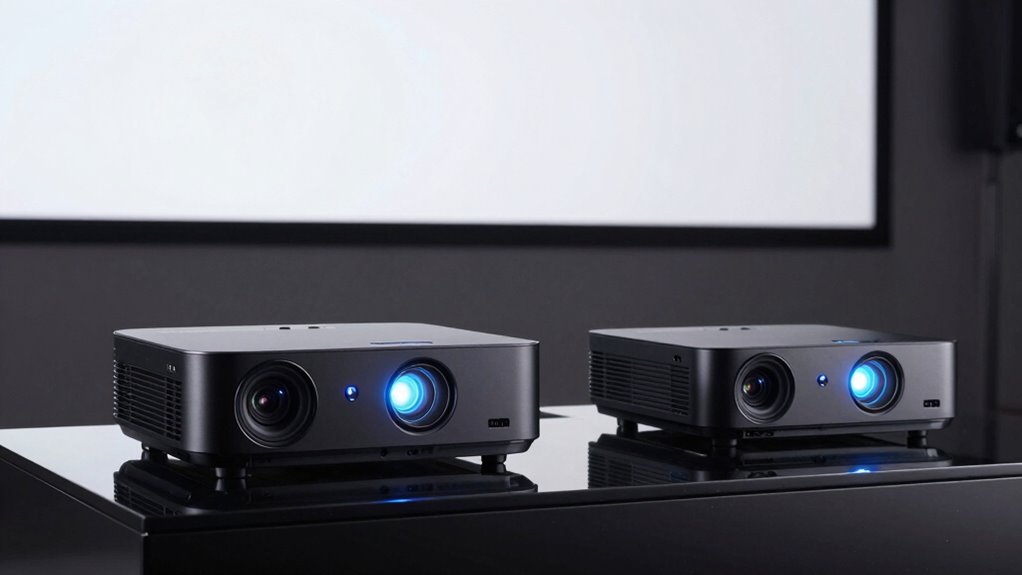

Choosing a 4K projector with low input lag means balancing response time against brightness, light source, setup flexibility, and the resolution at which each speed claim applies. My leading picks are the Optoma UHD38x for its 4,000-lumen brightness and 4.2 ms lag at 1080p, the BenQ TK710 for laser longevity and clearly specified 4K/60 gaming lag, and the Valerion VisionMaster Pro for its broad picture and installation features. The ViewSonic PX701-4K is a strong alternative if you want bright 4K projection and fast gaming modes with dual HDMI.

Prime made for students and young adults
- Fast, free delivery for dorm and study essentials
- Prime Video and Amazon Music included
- Member-only deals
The key distinction is that low-lag figures do not tell the whole story: the Optoma and ViewSonic quote 4.2 ms, while the BenQ lists 16 ms at 4K/60 and 4 ms at 1080p/240. Those figures describe different signal modes, so I compare them with that context in mind. Lamp brightness, long-life laser convenience, and room placement also separate these models. My ranking favors a useful combination of responsive gaming, credible 4K use, and practical fit rather than treating one headline number as the whole decision.
Key Takeaways
- The Optoma UHD38x pairs the lineup’s highest stated brightness, 4,000 lumens, with 4.2 ms input lag at 1080p; its lamp light source is the tradeoff against laser picks.
- The BenQ TK710 specifies both 4 ms at 1080p/240Hz and 16 ms at 4K/60Hz, making its mode-specific gaming performance especially clear.
- The ViewSonic PX701-4K offers 3,200 ANSI lumens, dual HDMI, and a 1.1x optical zoom; placement adjustment remains more limited than the Valerion‘s 0.9–1.5x zoom.
- The Valerion VisionMaster Pro combines 4 ms lag and 240Hz gaming claims with Dolby Vision, HDR10+, built-in streaming features, and a broad zoom range.
- For competitive play, check the lag figure for the resolution and refresh rate you will actually use; 1080p/240 and 4K/60 are different operating modes.
| Optoma UHD38x True 4K UHD Gaming Projector, 4000 Lumens, 240Hz, HDR10 & HLG, White | 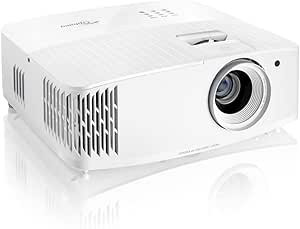 | Best Overall for Bright, Responsive Gaming | Resolution: 3840 × 2160 (4K UHD) | Brightness: 4,000 lumens | Input lag: 4.2 ms at 1080p | VIEW ON AMAZON | See Our Full Breakdown |
| BenQ TK710 4K HDR Laser Home Entertainment and Gaming Projector |  | Best Laser Value for Long-Term Use | Resolution: 3840 × 2160 (4K UHD) | Brightness: 3,200 ANSI lumens | Input lag: 16 ms at 4K/60Hz; 4 ms response time at 1080p/240Hz | VIEW ON AMAZON | See Our Full Breakdown |
| Valerion VisionMaster Pro 4K Laser Projector (2026) |  | Best Premium Pick for Flexible Setup and Streaming | Resolution: 3840 × 2160 (4K UHD) | Brightness: 2,500 ISO lumens | Input lag: 4 ms listed | VIEW ON AMAZON | See Our Full Breakdown |
| ViewSonic PX701-4K UHD Home Theater Projector, 3200 ANSI Lumens, 240Hz, HDR, Auto Keystone, DLP |  | Best for Straightforward Gaming Connections | Resolution: 3840 × 2160 (4K UHD) | Brightness: 3,200 ANSI lumens | Input lag: 4.2 ms listed | VIEW ON AMAZON | See Our Full Breakdown |
| 4k projector with low input lag | Resolution | Brightness | Input lag | HDR |
|---|---|---|---|---|
| Optoma UHD38x True 4K UHD Gami | 3840 × 2160 (4K UHD) | 4,000 lumens | 4.2 ms at 1080p | HDR10, HLG |
| BenQ TK710 4K HDR Laser Home E | 3840 × 2160 (4K UHD) | 3,200 ANSI lumens | 16 ms at 4K/60Hz; 4 ms response time at 1080p/240Hz | HDR10, HLG |
| Valerion VisionMaster Pro 4K L | 3840 × 2160 (4K UHD) | 2,500 ISO lumens | 4 ms listed | HDR10+, Dolby Vision |
| ViewSonic PX701-4K UHD Home Th | 3840 × 2160 (4K UHD) | 3,200 ANSI lumens | 4.2 ms listed | HDR, HLG |
More Details on Our Top Picks
Optoma UHD38x True 4K UHD Gaming Projector, 4000 Lumens, 240Hz, HDR10 & HLG, White
The Optoma UHD38x earns my top spot by pairing a stated 4.2 ms input lag at 1080p with 4,000 lumens of brightness and 4K UHD resolution. That combination suits a living room where lights are not always fully controlled, while the 1080p/120Hz and 4K/60Hz support described for compatible consoles gives buyers useful options. Its headline 240Hz refresh rate is also relevant to high-refresh gaming, though the supplied lag figure is specifically for 1080p; I would not assume 4.2 ms applies to every resolution.
Compared with the laser BenQ, Optoma supplies more stated brightness but gives up the convenience of a laser light source rated for 20,000 hours. Against the ViewSonic, it has a higher brightness figure, while the ViewSonic offers dual HDMI and a powered USB-A port in the listed specification. The Optoma’s lamp life is rated at 10,000 hours, and its placement may need more planning; ceiling mounting is compatible and its throw range is broad, but automatic setup tools are not listed. Audio output is also unspecified, so buyers planning a full home theater may want separate speakers.
This is my best all-around choice for someone who puts bright, large-screen play ahead of laser longevity or built-in smart features. Its HDR10 and HLG support add format flexibility for movies and games, but brightness and resolution alone cannot settle image quality in every room. I would compare its actual throw distance and available connections with the intended setup before deciding.
Pros:- 4,000-lumen brightness is the highest stated figure in this roundup.
- 4.2 ms input lag is specified at 1080p, with 1080p/120Hz and 4K/60Hz console support described.
- True 4K UHD resolution with HDR10 and HLG support.
- Broad stated image-size and throw-distance ranges support varied screen plans.
Cons:- Lamp light source is rated for 10,000 hours, shorter than the BenQ laser’s stated 20,000 hours.
- The 4.2 ms lag figure is for 1080p and should not be treated as the 4K-mode figure.
- Audio output and advanced automatic setup features are not specified.
Best for: Console gamers who want a bright 4K-capable projector for a room with some ambient light and can use 1080p high-refresh modes.
Not ideal for: Buyers prioritizing laser longevity, automatic placement assistance, or a confirmed built-in audio solution.
- Resolution:3840 × 2160 (4K UHD)
- Brightness:4,000 lumens
- Input lag:4.2 ms at 1080p
- Refresh rate:Up to 240Hz
- Console modes:1080p/120Hz and 4K/60Hz support described
- HDR:HDR10, HLG
- Light source life:10,000 hours
- Image size:33–300 inches
Our verdict“I recommend the UHD38x for buyers who want high brightness and responsive 1080p gaming alongside 4K projection, provided a lamp-based setup fits their priorities.”
BenQ TK710 4K HDR Laser Home Entertainment and Gaming Projector
The BenQ TK710 is the most straightforward choice here for buyers who want a laser light source and clearly stated gaming modes. It lists 4 ms at 1080p/240Hz and 16 ms at 4K/60Hz, so I can distinguish its fast high-refresh mode from its 4K console mode. That 4K figure is higher than the other products’ headline lag claims, but those claims are not all tied to the same mode. Buyers should use the figure for the resolution and refresh rate they intend to play.
With 3,200 ANSI lumens, the TK710 is less bright on paper than the Optoma’s 4,000 lumens, but its laser light source is rated for 20,000 hours. That is a meaningful ownership distinction for frequent use. Compared with the Valerion, BenQ lists less extensive smart and HDR feature detail, but it includes a built-in speaker and auto focus among its stated features. Wi-Fi is described as ready without connection details, and only HDMI appears in the listed connectivity, so I would check that the source and streaming arrangement suits the room before choosing it.
Its 95% Rec.709 color coverage and HDR10/HLG support position it for mixed movie and gaming use rather than gaming alone. A three-year warranty is listed. The maximum image size is 144 inches, considerably smaller than the 300-inch claims from Optoma, ViewSonic, and Valerion. That makes the TK710 a better match for a conventional screen size and long daily use than for buyers seeking the biggest possible image or a broad smart-platform specification.
Pros:- Laser light source is rated for 20,000 hours.
- Lag is specified separately as 4 ms at 1080p/240Hz and 16 ms at 4K/60Hz.
- 3,200 ANSI lumens and HDR10/HLG support suit mixed entertainment use.
- Auto focus and a built-in speaker are listed.
Cons:- Maximum image size is listed as 144 inches, smaller than the other models’ stated 300-inch maximums.
- The 4K/60 input lag figure is 16 ms, rather than the 4 ms figure listed for 1080p/240Hz.
- Connectivity lists HDMI only; Wi-Fi-ready details are not specified.
Best for: Frequent gamers who want a laser light source, 1080p high-refresh support, and a defined 4K/60 lag figure.
Not ideal for: Buyers who need a very large image, multiple listed connection types, or the lowest specified lag at 4K/60.
- Resolution:3840 × 2160 (4K UHD)
- Brightness:3,200 ANSI lumens
- Input lag:16 ms at 4K/60Hz; 4 ms response time at 1080p/240Hz
- Light source:Laser, rated 20,000 hours
- HDR:HDR10, HLG
- Color coverage:95% Rec.709
- Maximum image size:144 inches
- Connections:HDMI listed
Our verdict“I would choose the TK710 for laser longevity and transparent mode-specific gaming figures, especially if 144 inches is ample for the room.”
Valerion VisionMaster Pro 4K Laser Projector (2026)
The Valerion VisionMaster Pro brings together fast gaming claims and the broadest set of home-entertainment features in this group. It lists 4 ms input lag, a 240Hz refresh rate, and dedicated game modes alongside Dolby Vision, HDR10+, and 3D support. Its claimed 110% Rec.2020 gamut and 15,000:1 contrast ratio with Enhanced Black Level technology give movie fans more to weigh than the gaming numbers alone. The supplied information does not tie the 4 ms figure to a particular resolution and refresh mode, however, so I would verify the desired mode before making the lag figure decisive.
Placement is where Valerion pulls ahead of the ViewSonic and Optoma: its 0.9–1.5x optical zoom and stated 3.5-to-26.16-foot throw range allow more adjustment around a fixed screen. It also supports tabletop, tripod, and ceiling mounting. By contrast, the BenQ specifies a built-in speaker and auto focus, while Valerion’s advantage is a fuller onboard platform: AI Smart OS, 4GB RAM, 128GB storage, and built-in Wi-Fi and Ethernet. That can reduce reliance on a separate streaming device, though buyers who already use an external streamer may not value those features as much.
At 2,500 ISO lumens, it has the lowest stated brightness figure in this roundup, below the 3,200-lumen BenQ and ViewSonic and the 4,000-lumen Optoma. That may influence its fit in brighter rooms. Its 300-inch maximum image claim is expansive, but screen size alone does not promise the same picture in every space. I rank it third because the mix of zoom flexibility, smart playback, and premium format support is compelling, while brightness and mode-specific lag clarity keep it behind the more directly comparable gaming picks.
Pros:- 4 ms input lag and 240Hz refresh rate are listed for gaming.
- 0.9–1.5x optical zoom and several mounting options ease room placement.
- HDR10+, Dolby Vision, IMAX Enhanced, and 3D support broaden the entertainment feature set.
- Built-in Wi-Fi, Ethernet, AI Smart OS, 4GB RAM, and 128GB storage support streaming use.
Cons:- At 2,500 ISO lumens, its stated brightness is below the other three models.
- The 4 ms lag claim is not tied to a particular resolution and refresh-rate mode in the supplied specifications.
- Its stationary form factor is less suited to frequent relocation.
Best for: Buyers building a flexible living-room or media-room setup who want laser projection, broad format support, and built-in streaming features.
Not ideal for: Players who need a lag figure confirmed for a specific 4K refresh mode, or households prioritizing the highest stated brightness.
- Resolution:3840 × 2160 (4K UHD)
- Brightness:2,500 ISO lumens
- Input lag:4 ms listed
- Refresh rate:Up to 240Hz listed
- Optical zoom:0.9–1.5x
- HDR:HDR10+, Dolby Vision
- Smart features:AI Smart OS, 4GB RAM, 128GB storage
- Image size:40–300 inches
Our verdict“I recommend the VisionMaster Pro for buyers who value installation flexibility and built-in entertainment features and can confirm the gaming lag for their preferred mode.”
ViewSonic PX701-4K UHD Home Theater Projector, 3200 ANSI Lumens, 240Hz, HDR, Auto Keystone, DLP
The ViewSonic PX701-4K is a practical gaming pick for buyers who want 4K UHD projection, 3,200 ANSI lumens, and a stated 4.2 ms input lag. Like the Optoma, it lists a 240Hz refresh rate and a low lag figure without tying that lag number to a particular resolution in the supplied specifications. I would treat those claims as promising for responsive play, then confirm the mode supported by the exact console or PC setup. Its HDR/HLG support and SuperColor technology add home-entertainment flexibility.
Where it differs from Optoma is connection convenience: ViewSonic lists dual HDMI inputs and a powered USB-A port, useful for leaving a console and streaming dongle connected. Auto keystone, four-corner adjustment, and 1.1x optical zoom can help with a less-than-perfect placement, though this is not the broad placement range of Valerion’s 0.9–1.5x zoom. ViewSonic supports an image up to 300 inches, matching the largest stated maximums in the group, and describes a 100-inch image from 10.9 feet as a concrete placement reference.
The limited 1.1x zoom means the room and screen position still need to align reasonably well; keystone correction can adjust geometry but is not a substitute for convenient lens placement. Compared with BenQ, ViewSonic has a larger stated maximum image and more listed physical ports, while BenQ offers a laser light source and separate lag figures for 4K and 1080p. The PX701-4K is a good fit for buyers seeking a simple, bright gaming setup, but the specification list does not state light-source life or built-in audio details.
Pros:- 3,200 ANSI lumens with 4K UHD resolution and HDR/HLG support.
- 4.2 ms input lag and up to 240Hz refresh rate are listed.
- Dual HDMI inputs and powered USB-A support a console plus streaming accessory.
- Auto keystone, four-corner adjustment, and 1.1x optical zoom assist setup.
Cons:- Only 1.1x optical zoom is listed, limiting lens-based placement adjustment compared with Valerion.
- The supplied 4.2 ms figure is not associated with a specific resolution and refresh-rate mode.
- Light-source life and audio details are not included in the supplied specifications.
Best for: Console or PC players who want a bright 4K-capable projector with two HDMI inputs and an easy-to-understand room placement reference.
Not ideal for: Buyers who need extensive optical placement flexibility, a stated laser lifespan, or lag performance tied to an exact resolution mode.
- Resolution:3840 × 2160 (4K UHD)
- Brightness:3,200 ANSI lumens
- Input lag:4.2 ms listed
- Refresh rate:Up to 240Hz listed
- HDR:HDR, HLG
- Optical zoom:1.1x
- Connections:Dual HDMI, powered USB-A
- Maximum image size:300 inches
Our verdict“I would choose the PX701-4K for a bright, connection-friendly gaming setup when its modest optical zoom range fits the room.”

How We Picked
I ranked these four models around the actual promise in the title: 4K projection with low input lag. I looked at each model’s stated lag and refresh-rate modes, then weighed those figures against brightness, light source, image adjustments, connectivity, and the kind of room or gaming setup each supports. I gave more weight to specs that are tied to a named resolution and refresh rate, since that helps a buyer compare expected responsiveness without assuming all modes perform alike.
I also separated gaming speed from overall flexibility. A bright projector can be easier to use in a room with some ambient light, while a laser model can reduce the need to think about lamp replacement. Zoom range and keystone tools affect how easily a projector fits a room, and ports matter when a console and streaming device need to connect at once. These are listed specifications, not independent lab measurements. The ranking reflects the supplied product information, and I avoid treating unmatched lag claims as directly equivalent.
The Optoma takes the lead for brightness paired with a low stated lag figure. BenQ follows for laser longevity and the clearest resolution-specific lag detail. Valerion earns a place for its combination of gaming features, image formats, zoom, and smart functions, while ViewSonic stands out as a straightforward bright gaming pick with useful physical connections. Each may suit a different buyer better than its position suggests.
| 4k projector with low input lag | Refresh rate | HDR | Connections |
|---|---|---|---|
| Optoma UHD38x True 4K UHD Gami | Up to 240Hz | HDR10, HLG | — |
| BenQ TK710 4K HDR Laser Home E | — | HDR10, HLG | HDMI listed |
| Valerion VisionMaster Pro 4K L | Up to 240Hz listed | HDR10+, Dolby Vision | — |
| ViewSonic PX701-4K UHD Home Th | Up to 240Hz listed | HDR, HLG | Dual HDMI, powered USB-A |
Factors to Consider When Choosing 4k Projector With Low Input Lag
I would start with the gaming mode and room, then narrow the choice by light source, brightness, placement, and connections. Those checks prevent a low lag headline from obscuring a practical mismatch.Match input lag to your gaming mode
Input lag is the delay between a control input and its appearance on screen. Compare figures only when their resolution and refresh rate match. BenQ lists 4 ms at 1080p/240Hz and 16 ms at 4K/60Hz, while Optoma gives 4.2 ms at 1080p and describes 4K/60Hz console support. ViewSonic lists 4.2 ms and Valerion lists 4 ms, but the supplied details do not tie those figures to a specific mode. If you play competitive games, check which input mode your source and projector support together; for casual play, a larger image and room fit may matter more than the smallest stated number.
Decide how much brightness your room needs
Ambient light can make a projected picture appear less vivid, so brightness deserves attention alongside lag. The Optoma leads on the stated figure at 4,000 lumens, with BenQ and ViewSonic at 3,200 ANSI lumens and Valerion at 2,500 ISO lumens. The units are not identical across all listings, so I treat these as useful product specifications rather than a precise cross-brand lab comparison. If you can darken the room, you may have more freedom to favor laser longevity or other picture features. In a room with daylight or lights on, the brighter stated models are the more natural starting point.
Choose between lamp and laser
The Optoma uses a lamp rated for 10,000 hours. BenQ and Valerion list laser light sources, with BenQ specifying a 20,000-hour life. A laser can be attractive if the projector will see frequent use and you want a longer stated light-source life. The ViewSonic listing does not provide a light-source lifespan, so ask for that detail if it is central to your decision. These figures describe rated life, not a guarantee of identical brightness or image quality through the full period.
Check throw distance, zoom, and screen size
Before choosing a projector, measure the distance from the intended projector position to the screen and check that it works with the screen size you want. Valerion offers a listed 0.9–1.5x optical zoom; ViewSonic lists 1.1x and Optoma gives a 4–32-foot throw range. BenQ lists a maximum image size of 144 inches, while the other models list up to 300 inches. These ranges and maxima do not mean every room can produce every image size. If placement cannot be centered or adjusted, optical zoom and the manufacturer’s throw information can matter more than a feature such as keystone correction.
Plan connections and sound
Count the sources you plan to leave connected. ViewSonic lists dual HDMI and a powered USB-A port, while BenQ lists HDMI and Optoma’s supplied details list RCA and USB. Valerion lists HDMI, Ethernet, and built-in Wi-Fi, making its onboard streaming options more prominent. Specifications vary in detail, so confirm the exact ports and supported formats needed by your console, receiver, and streamer. The supplied information does not specify audio output for Optoma or ViewSonic; BenQ lists a built-in speaker. For a large screen, many buyers will prefer a separate sound system regardless.
Weigh image features against gaming priorities
HDR labels and color figures help distinguish entertainment focus, but they do not replace the need to check your source and mode. Optoma and BenQ support HDR10 and HLG; Valerion adds HDR10+ and Dolby Vision, while ViewSonic lists HDR/HLG. Valerion also states 110% Rec.2020 gamut and a 15,000:1 contrast ratio, while BenQ gives 95% Rec.709 coverage. I would treat these as clues to each model’s feature set, not direct proof of which image will look best in a particular room. Give the most weight to the gaming mode, brightness, and placement needs you can verify for your setup.
Frequently Asked Questions
Which projector in this roundup has the lowest stated input lag?
The BenQ TK710 and Valerion VisionMaster Pro each list a 4 ms figure, while Optoma and ViewSonic list 4.2 ms. BenQ ties its 4 ms response time to 1080p/240Hz; Valerion’s supplied specification does not identify the mode for its 4 ms claim. The Optoma’s 4.2 ms is specifically at 1080p, while ViewSonic’s listing leaves the mode unspecified. These numbers are not directly equivalent, so compare performance at the resolution and refresh rate you plan to use.
Can I play games in 4K on a projector with a low-lag 1080p mode?
Yes, but the projector may use different response characteristics at different resolutions and refresh rates. The Optoma describes 4K UHD at 60Hz and gives its 4.2 ms input lag at 1080p; BenQ explicitly lists 16 ms at 4K/60Hz and 4 ms at 1080p/240Hz. Check the projector’s mode details and your console or PC output settings before choosing based on a single lag figure.
Which pick makes the most sense for a bright living room?
The Optoma has the highest listed brightness at 4,000 lumens, which makes it a sensible first option when the room cannot be fully darkened. ViewSonic and BenQ list 3,200 ANSI lumens, while Valerion lists 2,500 ISO lumens. Since the brightness units and measurement details are not identical across listings, use these figures as a starting comparison and consider how much light you can control during play.
Is a laser projector a better choice for gaming?
A laser light source can make sense for frequent use when you value a longer stated light-source life. The BenQ TK710 lists 20,000 hours, while the lamp-based Optoma lists 10,000 hours. That distinction does not determine input lag by itself: compare gaming modes separately. Valerion is also laser-based, but the supplied information does not list a light-source life figure.
Which model is easiest to fit into a room with limited placement options?
The Valerion VisionMaster Pro has the broadest stated optical zoom range at 0.9–1.5x, alongside multiple mounting options. ViewSonic lists a 1.1x optical zoom and adjustment tools such as auto keystone and four-corner correction; these can help, though they do not provide the same lens range. Confirm throw distance against your screen and projector location before ordering, since a large maximum screen size does not guarantee a fit in a small room.
Conclusion
For a bright multipurpose room, I would start with the Optoma UHD38x: it combines 4,000 lumens with a 4.2 ms 1080p lag claim, with lamp life as the main tradeoff. Frequent gamers who value a laser source and want mode-specific lag details should look at the BenQ TK710, particularly if 144 inches is enough. For a flexible media room with streaming built in, broad zoom, and premium HDR formats, the Valerion VisionMaster Pro is the more feature-rich fit, though its brightness is lowest here and its lag mode needs confirmation. Choose the ViewSonic PX701-4K if dual HDMI, a powered USB port, and bright 4K projection suit your setup. I would make the final decision only after matching throw distance and gaming mode to the actual room and console.
Fall Picks
fall essentials
As an affiliate, we earn on qualifying purchases.