If you’re looking for the best Thunderbolt docks for your home office in 2026, I recommend options like the Amazon Basics Thunderbolt4 Dock, Anker Prime TB5, Dell SD25TB4, and UGREEN’s 13-in-1 model—these all support multiple high-res displays, fast data transfer, and strong power delivery. There are also versatile choices like Plugable and Minthouz docks, perfect for different setups. Keep exploring to find out which dock fits your workspace and workflow best.
Key Takeaways
- Top docks support multiple 4K or 8K displays, ideal for professional multitasking and content creation.
- They offer high power delivery (90W-140W) to charge laptops and peripherals simultaneously.
- Many docks feature extensive port options, including Thunderbolt, HDMI, DisplayPort, USB-A/C, SD/TF card readers, and Ethernet.
- Premium models include active cooling, eco-friendly design, and remote management for enhanced performance and sustainability.
- Compatibility spans Windows and Mac, with driverless setup and support for M1, M2, M3, M4, and M5 Apple Silicon Macs.
| Amazon Basics Thunderbolt4/USB4 Docking Station | 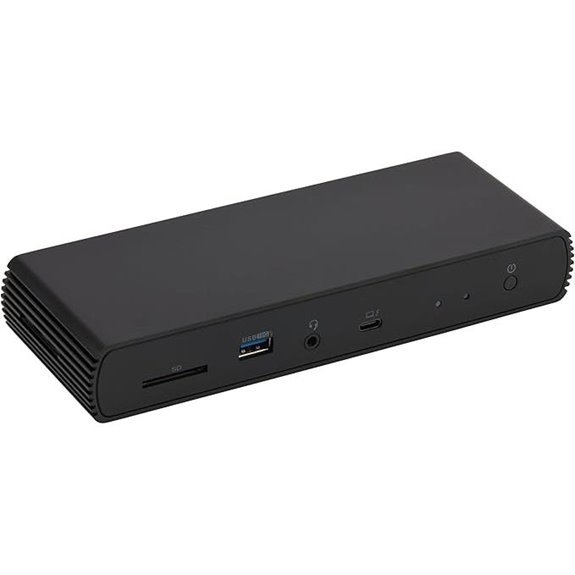 | Best Overall | Number of Ports: 8 ports (Thunderbolt 4, HDMI, USB A, Ethernet, charging) | Display Support: Dual 4K@60Hz via Thunderbolt | Power Delivery (Charging Power): Up to 96W | VIEW LATEST PRICE | See Our Full Breakdown |
| Anker Prime TB5 14-in-1 Thunderbolt Dock with Charging |  | Future-Ready Powerhouse | Number of Ports: 14 ports (Thunderbolt 5, USB-C, USB-A, SD, Ethernet, audio) | Display Support: Up to 8K@60Hz (dual 8K possible) | Power Delivery (Charging Power): Up to 140W | VIEW LATEST PRICE | See Our Full Breakdown |
| Dell Thunderbolt 4 Dock SD25TB4 – 4K Display 130W | 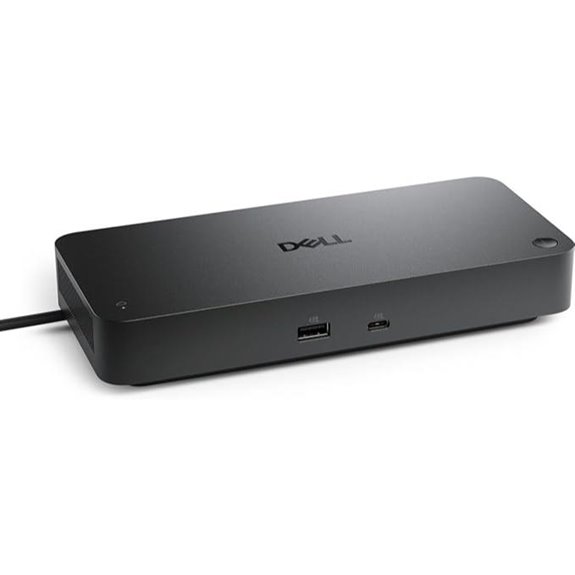 | Business Classic | Number of Ports: 8 ports (Thunderbolt 4, HDMI, DisplayPort, USB, Ethernet) | Display Support: Up to 4x 4K@60Hz (via HDMI, DisplayPort, Thunderbolt) | Power Delivery (Charging Power): Up to 130W | VIEW LATEST PRICE | See Our Full Breakdown |
| UGREEN Thunderbolt 4 Dock 13-in-1 with 8K Display | 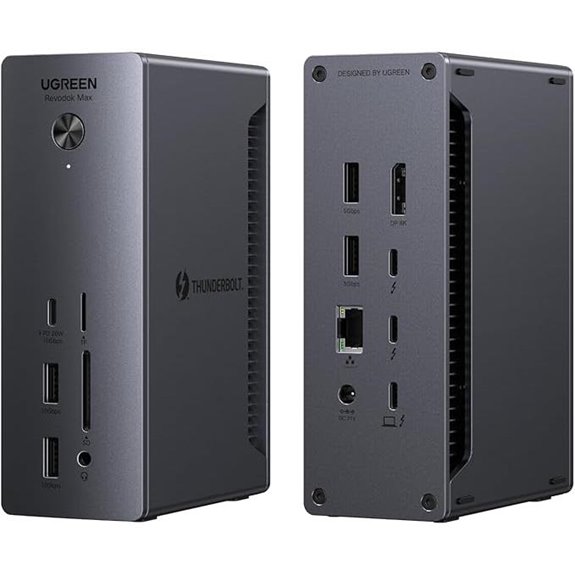 | High-Performance Versatility | Number of Ports: 13 ports (Thunderbolt 4, USB-C, USB-A, HDMI, Ethernet) | Display Support: Dual 4K@60Hz or 8K@30Hz | Power Delivery (Charging Power): 180W (charging laptops and devices) | VIEW LATEST PRICE | See Our Full Breakdown |
| Plugable 16-in-1 Thunderbolt 4 Dock with Dual 4K | 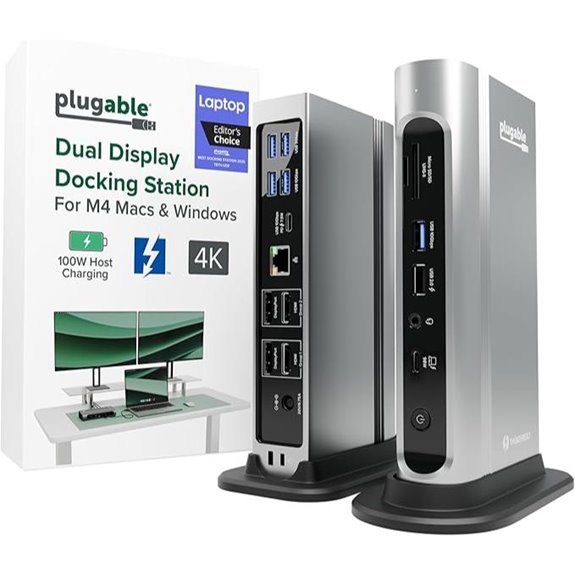 | Dual-Display Expert | Number of Ports: 16 ports (Thunderbolt 4, HDMI, USB, Ethernet, SD) | Display Support: Dual 4K@60Hz | Power Delivery (Charging Power): 100W | VIEW LATEST PRICE | See Our Full Breakdown |
| HP USB-C Dock G5 11-in-1 Adapter for Laptops |  | Mac-Friendly Choice | Number of Ports: 11 ports (Thunderbolt 4, HDMI, DisplayPort, USB, Ethernet) | Display Support: Dual 4K@60Hz or single 8K@30Hz | Power Delivery (Charging Power): 96W or 130W (varies by model) | VIEW LATEST PRICE | See Our Full Breakdown |
| Dell Thunderbolt 4 Dock with 8K Support and Accessories |  | Modular Innovation | Number of Ports: 11 ports (Thunderbolt 4, USB, HDMI, DisplayPort, Ethernet) | Display Support: 8K@60Hz or dual 4K@60Hz | Power Delivery (Charging Power): 180W | VIEW LATEST PRICE | See Our Full Breakdown |
| Plugable Thunderbolt 4 Dock with 100W Charging | 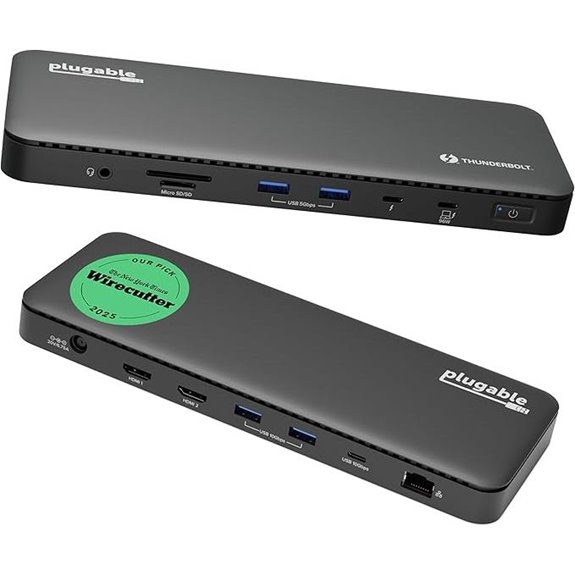 | Certified Reliability | Number of Ports: 13 ports (Thunderbolt 4, HDMI, USB, Ethernet, SD) | Display Support: Dual 4K@60Hz or single 8K | Power Delivery (Charging Power): 100W | VIEW LATEST PRICE | See Our Full Breakdown |
| Lenovo ThinkPad Thunderbolt 3 Dock Gen 2 135W |  | Enterprise-Grade | Number of Ports: 11 ports (Thunderbolt 3, HDMI, DisplayPort, USB, Ethernet) | Display Support: Dual 4K@60Hz (via HDMI/DisplayPort) | Power Delivery (Charging Power): 135W | VIEW LATEST PRICE | See Our Full Breakdown |
| Plugable Thunderbolt 4 Dock for MacBook Air/Pro | 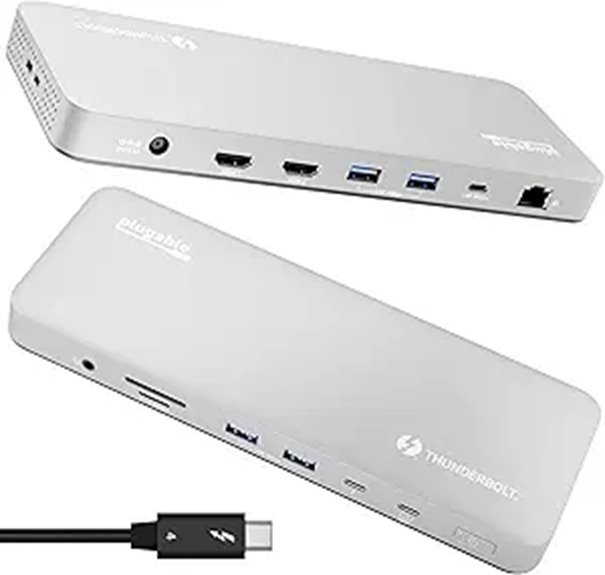 | Mac Compatibility Leader | Number of Ports: 13 ports (Thunderbolt 4, HDMI, USB, SD, Ethernet) | Display Support: Dual 4K@60Hz or single 6K | Power Delivery (Charging Power): 100W | VIEW LATEST PRICE | See Our Full Breakdown |
| TobenONE 16-in-2 USB-C Docking Station with 4K | 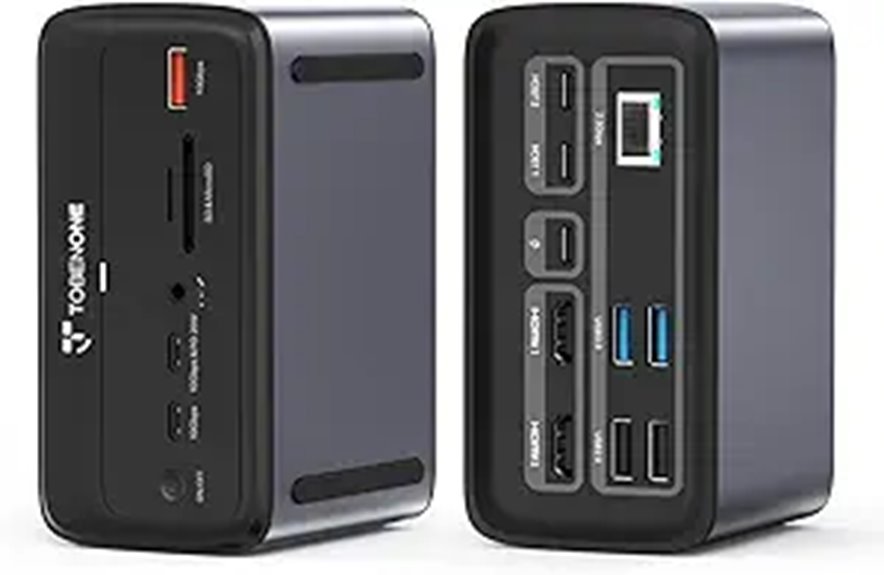 | Space-Saving Design | Number of Ports: 7 ports (USB-C, HDMI, USB-A, Ethernet, audio) | Display Support: Dual 4K@60Hz (via HDMI/DP) | Power Delivery (Charging Power): 100W | VIEW LATEST PRICE | See Our Full Breakdown |
| Minthouz Thunderbolt 4 Dock with 8K/4K Displays | 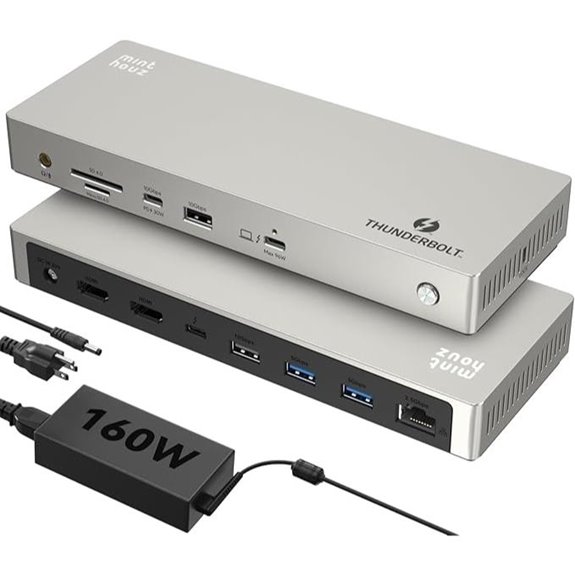 | Universal Compatibility | Number of Ports: 12 ports (Thunderbolt 4, HDMI, Ethernet, SD, USB) | Display Support: Triple 4K@60Hz or 8K@60Hz (single) | Power Delivery (Charging Power): 96W or 180W (varies) | VIEW LATEST PRICE | See Our Full Breakdown |
| USB-C Docking Station for Dual Monitors and 4K HDMI |  | Budget Powerhouse | Number of Ports: 8 ports (USB-C, HDMI, VGA, USB, Ethernet) | Display Support: Up to 4K dual/triple; VGA limited to 1080P | Power Delivery (Charging Power): 87W (via USB-C PD) | VIEW LATEST PRICE | See Our Full Breakdown |
| TobenONE 18-in-1 Triple 4K Laptop Docking Station |  | Multi-Display Master | Number of Ports: 18 ports (USB-C, HDMI, SD, Ethernet, multiple USB-A) | Display Support: Dual or triple 4K@60Hz, or single 8K@60Hz | Power Delivery (Charging Power): 100W | VIEW LATEST PRICE | See Our Full Breakdown |
More Details on Our Top Picks
Amazon Basics Thunderbolt4/USB4 Docking Station
If you’re looking for a budget-friendly yet versatile dock that works seamlessly with Windows laptops, the Amazon Basics Thunderbolt4/USB4 Docking Station is an excellent choice. It offers two Thunderbolt 4 ports, an HDMI 2.1 port supporting 8K30Hz, three USB A 3.1 ports, and an RJ45 Ethernet port supporting 2.5Gbps. It can drive dual 4K@60Hz displays and supports 96W power delivery. Compact and travel-ready at just over two pounds, it’s perfect for home offices. Just remember to use the included cable, keep drivers updated, and verify your laptop’s power needs to maximize performance.
- Number of Ports:8 ports (Thunderbolt 4, HDMI, USB A, Ethernet, charging)
- Display Support:Dual 4K@60Hz via Thunderbolt
- Power Delivery (Charging Power):Up to 96W
- Compatibility (Supported Systems):Windows 10+, macOS 11+ (non-M1/M2)
- Size / Dimensions:Compact (~7.86 x 2.95 inches)
- Build Material:Plastic
- Additional Feature:Supports dual 4K@60Hz displays
- Additional Feature:Compact travel-friendly design
- Additional Feature:Backward compatible with Thunderbolt 3
Anker Prime TB5 14-in-1 Thunderbolt Dock with Charging
The Anker Prime TB5 14-in-1 Thunderbolt Dock stands out as the ideal choice for professionals who need maximum connectivity and fast data transfer in their home office. It offers a Thunderbolt 5 upstream port, two downstream ports, multiple USB-C and USB-A ports, SD and TF card readers, Ethernet, audio jack, and HDMI or DisplayPort outputs, supporting dual 8K displays. With transfer speeds up to 120Gbps, it moves large files in seconds. Plus, it provides up to 140W charging power and features an active cooling system to prevent overheating. Everything comes with a 24-month warranty, making it a reliable, high-performance hub for demanding workflows.
- Number of Ports:14 ports (Thunderbolt 5, USB-C, USB-A, SD, Ethernet, audio)
- Display Support:Up to 8K@60Hz (dual 8K possible)
- Power Delivery (Charging Power):Up to 140W
- Compatibility (Supported Systems):Windows 10+/11+, macOS M1/M2/M3
- Size / Dimensions:Large (~11.9 x 6 inches)
- Build Material:Aluminum + plastic
- Additional Feature:120Gbps transfer speed
- Additional Feature:8K@60Hz display support
- Additional Feature:Active cooling system included
Dell Thunderbolt 4 Dock SD25TB4 – 4K Display 130W
For professionals demanding a powerful and versatile dock, the Dell Thunderbolt 4 Dock SD25TB4 stands out with its support for up to four 4K displays and 130W charging. It offers multiple connection options, including HDMI 2.1, DisplayPort 1.4, USB-C, and Thunderbolt 4 ports, making it ideal for creative and data-intensive tasks. The dock also supports chaining up to six devices and provides high-speed data transfer. With 2.5GbE Ethernet and remote management features, it’s perfect for business environments. Plus, its eco-friendly design, using recycled materials, adds to its appeal. This dock combines power, flexibility, and security in a sleek package.
- Number of Ports:8 ports (Thunderbolt 4, HDMI, DisplayPort, USB, Ethernet)
- Display Support:Up to 4x 4K@60Hz (via HDMI, DisplayPort, Thunderbolt)
- Power Delivery (Charging Power):Up to 130W
- Compatibility (Supported Systems):Windows 10+/11+, some MacBooks
- Size / Dimensions:Compact (~9.25 x 5.47 inches)
- Build Material:Plastic
- Additional Feature:Supports up to four 4K displays
- Additional Feature:Sustainable design (recycled materials)
- Additional Feature:Business security features
UGREEN Thunderbolt 4 Dock 13-in-1 with 8K Display
Designed for professionals who need maximum connectivity and ultra-high-resolution displays, the UGREEN Thunderbolt 4 Dock 13-in-1 offers an impressive array of ports and support for up to 8K display output. It features 13 ports, including dual Thunderbolt 4, DisplayPort 1.4, Ethernet, SD/TF card readers, USB-C, USB-A, audio jack, and a 180W power input. It supports dual 4K@60Hz or an 8K@30Hz display (Windows), making it ideal for creative work or multitasking. With data transfer speeds up to 40Gbps and 90W charging, it’s a versatile hub compatible with most Thunderbolt 4, USB4, and USB-C devices, ensuring seamless performance.
- Number of Ports:13 ports (Thunderbolt 4, USB-C, USB-A, HDMI, Ethernet)
- Display Support:Dual 4K@60Hz or 8K@30Hz
- Power Delivery (Charging Power):180W (charging laptops and devices)
- Compatibility (Supported Systems):Windows 10+/11+, macOS M1/M2/M3
- Size / Dimensions:Compact (~11.54 x 9.45 inches)
- Build Material:Plastic
- Additional Feature:Supports dual 4K@60Hz monitors
- Additional Feature:180W power input
- Additional Feature:Supports Windows and Mac
Plugable 16-in-1 Thunderbolt 4 Dock with Dual 4K
If you need a versatile dock that handles dual 4K displays effortlessly, the Plugable 16-in-1 Thunderbolt 4 Dock is an excellent choice. It supports two 4K 60Hz monitors via HDMI or DisplayPort, perfect for multitasking and content creation. Compatible with MacBook Air/Pro, Windows, USB4, Thunderbolt 4/5, and USB-C laptops, it connects easily with the included Thunderbolt 4 cable. The dock offers 100W Power Delivery, 7 USB ports, Ethernet, SD card readers, and audio jacks, all in a sleek design. Recognized as Laptop Mag’s 2025 Dock of the Year, it’s a reliable, high-performance hub for any home office setup.
- Number of Ports:16 ports (Thunderbolt 4, HDMI, USB, Ethernet, SD)
- Display Support:Dual 4K@60Hz
- Power Delivery (Charging Power):100W
- Compatibility (Supported Systems):Windows 10+/11+, macOS 11+
- Size / Dimensions:Medium (~11.9 x 6 inches)
- Build Material:Plastic
- Additional Feature:Recognized as Laptop Mag 2025 Dock
- Additional Feature:Dual 4K 60Hz display support
- Additional Feature:UL-tested for safety
HP USB-C Dock G5 11-in-1 Adapter for Laptops
The HP USB-C Dock G5 11-in-1 Adapter stands out as an excellent choice for professionals seeking a versatile and space-saving docking solution. It offers broad compatibility with HP, MacBooks, and other notebooks, supporting USB-C and Thunderbolt devices. With the ability to connect up to three displays, it enhances multitasking, while its compact 5-inch footprint keeps your workspace tidy. The dock simplifies setup with a single USB-C connection and supports charging, data transfer, and networking features, including Wake-on LAN and MAC Address Pass-Through. Weighing just 1.65 pounds, it’s perfect for office, remote, or secure environments.
- Number of Ports:11 ports (Thunderbolt 4, HDMI, DisplayPort, USB, Ethernet)
- Display Support:Dual 4K@60Hz or single 8K@30Hz
- Power Delivery (Charging Power):96W or 130W (varies by model)
- Compatibility (Supported Systems):Windows, Mac, Linux, Chrome OS
- Size / Dimensions:Compact (~4.8 x 4.8 inches)
- Build Material:Plastic
- Additional Feature:Supports up to three displays
- Additional Feature:Small footprint for desk space
- Additional Feature:Industry-standard USB-C specs
Dell Thunderbolt 4 Dock with 8K Support and Accessories
For professionals seeking a versatile and high-performance docking solution, the Dell Thunderbolt 4 Dock with 8K support stands out as an excellent choice. Its modular design allows easy upgrades, ensuring longevity. Supporting 8K display output, it delivers stunning visual clarity. The dock offers a wide range of ports, including Thunderbolt 4, USB-C, USB-A, DisplayPort, HDMI, and Ethernet, enabling seamless connection of multiple peripherals. With SuperBoost technology, it provides fast charging and data transfer at 40 GB/s. Plus, it includes accessories like a Thunderbolt cable and cloth, adding convenience. This dock combines power, flexibility, and efficiency, making it ideal for demanding home office setups.
- Number of Ports:11 ports (Thunderbolt 4, USB, HDMI, DisplayPort, Ethernet)
- Display Support:8K@60Hz or dual 4K@60Hz
- Power Delivery (Charging Power):180W
- Compatibility (Supported Systems):Windows 10+/11+, macOS M1/M2
- Size / Dimensions:Medium (~11.54 x 9.45 inches)
- Build Material:Aluminum + plastic
- Additional Feature:Modular, upgradeable design
- Additional Feature:Supports 8K display output
- Additional Feature:Includes accessories like cloth
Plugable Thunderbolt 4 Dock with 100W Charging
The Plugable Thunderbolt 4 Dock with 100W charging stands out as an excellent choice for professionals who need reliable, high-speed connectivity and fast power delivery in their home office. Certified as Thunderbolt and Intel Evo, it offers 13 ports, including dual HDMI outputs, Thunderbolt 4 downstream, USB, SD/microSD, Ethernet, and an audio jack. It supports dual 4K displays or an 8K single display, with Thunderbolt 4 delivering 40Gbps data transfer and 96W charging. Compatible with Windows and select macOS systems, it’s built for seamless integration and long-term reliability, making it a versatile, powerful docking solution.
- Number of Ports:13 ports (Thunderbolt 4, HDMI, USB, Ethernet, SD)
- Display Support:Dual 4K@60Hz or single 8K
- Power Delivery (Charging Power):100W
- Compatibility (Supported Systems):Windows 10+/11+, macOS M1/M2/M3
- Size / Dimensions:Compact (~9.25 x 5.47 inches)
- Build Material:Plastic
- Additional Feature:Intel Evo certified
- Additional Feature:Recognized as Best Thunderbolt Dock 2025
- Additional Feature:Supports dual 4K@60Hz HDMI
Lenovo ThinkPad Thunderbolt 3 Dock Gen 2 135W
If you need a reliable dock that can support multiple high-resolution displays, the Lenovo ThinkPad Thunderbolt 3 Dock Gen 2 135W is an excellent choice. It supports dual UHD 4K monitors through 2 HDMI and 2 DisplayPort connections, making it perfect for professional setups. The dock offers diverse ports, including Thunderbolt 3, USB-C, four USB 3.1 ports, Ethernet, and audio, ensuring all-encompassing connectivity. It delivers high power delivery with a 135W adapter for charging devices, and its compatibility spans various Lenovo ThinkPad models and Windows versions. Built for stability and performance, this dock enhances productivity in any home office environment.
- Number of Ports:11 ports (Thunderbolt 3, HDMI, DisplayPort, USB, Ethernet)
- Display Support:Dual 4K@60Hz (via HDMI/DisplayPort)
- Power Delivery (Charging Power):135W
- Compatibility (Supported Systems):Windows 10/11, macOS
- Size / Dimensions:Medium (~11.54 x 9.45 inches)
- Build Material:Plastic
- Additional Feature:Supports dual UHD 4K displays
- Additional Feature:Includes Thunderbolt 3 cable
- Additional Feature:Security lock slot
Plugable Thunderbolt 4 Dock for MacBook Air/Pro
The Plugable Thunderbolt 4 Dock stands out as an excellent choice for MacBook users who need a versatile, high-performance docking station that requires minimal setup. It offers 13 driverless ports, including Thunderbolt 4, USB-C, USB-A, SD card reader, Ethernet, and audio, along with 100W charging power. It supports dual 4K displays or a single 6K display, perfect for multitasking, video editing, or design work. Designed for seamless MacBook integration, it’s compatible with M4, M5, M1, M2, and M3 Macs and Windows systems. Its plug-and-play setup, reliability, and durability make it a solid choice for any home office.
- Number of Ports:13 ports (Thunderbolt 4, HDMI, USB, SD, Ethernet)
- Display Support:Dual 4K@60Hz or single 6K
- Power Delivery (Charging Power):100W
- Compatibility (Supported Systems):Windows 10+/11+, macOS M1/M2/M3
- Size / Dimensions:Compact (~9.25 x 5.47 inches)
- Build Material:Plastic
- Additional Feature:Driverless operation
- Additional Feature:Supports dual 4K displays
- Additional Feature:Lifetime North American support
TobenONE 16-in-2 USB-C Docking Station with 4K
Designed specifically for MacBook users, the TobenONE 16-in-2 USB-C Docking Station with 4K offers seamless compatibility with multiple MacBook models, including the latest M1, M2, M3, and M4 Pro/Max versions. It supports dual 4K@60Hz monitors via dual HDMI ports, perfect for multitasking—whether you’re coding, designing, or analyzing data. With 7 USB ports, including a 20W fast-charging port, and 2.5Gbps Ethernet, it guarantees fast data transfer and device charging. Its compact design delivers 100W pass-through power, simplifying your workspace by combining power, data, and display in one cable. Ideal for home offices seeking efficiency.
- Number of Ports:7 ports (USB-C, HDMI, USB-A, Ethernet, audio)
- Display Support:Dual 4K@60Hz (via HDMI/DP)
- Power Delivery (Charging Power):100W
- Compatibility (Supported Systems):Windows, Mac (limited)
- Size / Dimensions:Small (~5 x 5 inches)
- Build Material:Plastic
- Additional Feature:Supports dual 4K@60Hz displays
- Additional Feature:Multiple USB ports
- Additional Feature:20W USB-C charging port
Minthouz Thunderbolt 4 Dock with 8K/4K Displays
For creative professionals and power users who need crisp, high-resolution displays, the Minthouz Thunderbolt 4 Dock stands out with its support for an 8K@60Hz single display or three 4K@60Hz screens. It offers a thorough 12-in-1 interface, including Thunderbolt 4, dual HDMI ports, USB-C, multiple USB-A ports, Ethernet, and SD/TF card slots. This makes it a versatile hub for multitasking and media workflows. Compatible with both Mac and Windows, it delivers fast data transfer, stable internet, and up to 96W charging. Designed for ease of use, it simplifies your workspace with a single, powerful connection.
- Number of Ports:12 ports (Thunderbolt 4, HDMI, Ethernet, SD, USB)
- Display Support:Triple 4K@60Hz or 8K@60Hz (single)
- Power Delivery (Charging Power):96W or 180W (varies)
- Compatibility (Supported Systems):Windows 10+/11+, macOS M1/M2/M3
- Size / Dimensions:Medium (~9.25 x 5.47 inches)
- Build Material:Aluminum + plastic
- Additional Feature:Supports triple 4K displays
- Additional Feature:96W power delivery
- Additional Feature:SD/TF card slots
USB-C Docking Station for Dual Monitors and 4K HDMI
If you’re looking to expand your home office with multiple high-resolution displays, a USB-C docking station that supports dual monitors and 4K HDMI output is essential. The HoDo USB C Docking Station offers 8-in-1 functionality, including dual HDMI ports supporting 4K at 60Hz, a DisplayPort, and VGA. It enables up to four displays, with resolutions up to 4K, depending on your setup. It also provides three USB 2.0 ports for peripherals and supports up to 87W of safe power delivery. Compatible with most laptops, including MacBook Pro, Dell, HP, and Surface, it simplifies multi-monitor connectivity and charging in a compact design.
- Number of Ports:8 ports (USB-C, HDMI, VGA, USB, Ethernet)
- Display Support:Up to 4K dual/triple; VGA limited to 1080P
- Power Delivery (Charging Power):87W (via USB-C PD)
- Compatibility (Supported Systems):Windows, Mac
- Size / Dimensions:Small (~8 x 4 inches)
- Build Material:Aluminum + plastic
- Additional Feature:Supports up to 4K displays
- Additional Feature:100W PD charging
- Additional Feature:Multiple video outputs (HDMI, DP, VGA)
TobenONE 18-in-1 Triple 4K Laptop Docking Station
The TobenONE 18-in-1 Triple 4K Laptop Docking Station stands out with its extensive port selection, making it an excellent choice for users who need to connect multiple peripherals and displays simultaneously. It offers 18 ports, including 9 USB, 3 HDMI, SD/microSD slots, Ethernet, audio jack, and PD3.0 power delivery. It supports dual or triple 4K@60Hz displays, perfect for multitasking and high-res tasks. With fast 100W charging, it keeps laptops powered during use. Designed mainly for Windows and Chrome OS devices, it transforms a laptop into a full workstation, ideal for remote work, professional tasks, or creating an organized, efficient workspace.
- Number of Ports:18 ports (USB-C, HDMI, SD, Ethernet, multiple USB-A)
- Display Support:Dual or triple 4K@60Hz, or single 8K@60Hz
- Power Delivery (Charging Power):100W
- Compatibility (Supported Systems):Windows 10+/11+, macOS M1/M2/M3
- Size / Dimensions:Large (~18 x 13 inches)
- Build Material:Plastic
- Additional Feature:Supports triple 4K@60Hz displays
- Additional Feature:100W fast charging
- Additional Feature:9 USB ports for peripherals
Factors to Consider When Choosing a Thunderbolt Dock for Home Office Setup
When choosing a Thunderbolt dock, I look at compatibility with my devices to guarantee seamless connection. I also consider the number of ports and display support to meet my setup needs, along with power delivery features to keep everything charged. Finally, build quality and design matter to me for durability and aesthetics in my home office.
Compatibility With Devices
Choosing a Thunderbolt dock that works seamlessly with your devices requires careful attention to compatibility. First, check that the dock supports your operating system, whether it’s Windows 10+, macOS 11+, or Chrome OS. Next, confirm your device has the right Thunderbolt version—like Thunderbolt 4 or 5—to enable all features. Make sure your laptop’s USB-C port supports Thunderbolt or USB4 protocols for full functionality. Also, verify the dock’s power delivery capacity matches your device’s charging needs to prevent insufficient power or overload. Finally, review manufacturer compatibility lists to guarantee the dock supports your specific device model and any peripherals you plan to connect. Doing this guarantees smooth performance and avoids potential connectivity issues.
Number of Ports
A higher number of ports on a Thunderbolt dock means you can connect more peripherals—like monitors, external drives, and audio devices—without constantly swapping cables. This helps create a clean, efficient workspace and reduces the need for additional hubs. It’s important to consider not just the quantity but also the types of ports, such as HDMI, DisplayPort, USB-C, USB-A, Ethernet, and audio jacks, to match your device needs. The right balance of ports, especially between USB-C and USB-A, ensures compatibility with current equipment while allowing future expandability. Having multiple ports enhances productivity by enabling seamless multitasking and minimizing disruptions caused by disconnecting and reconnecting devices. Ultimately, choosing a dock with enough ports tailored to your setup helps streamline your home office experience.
Display Support Capabilities
Ever wondered how many displays your Thunderbolt dock can handle and at what quality? The answer depends on the dock’s bandwidth and available video output ports like HDMI, DisplayPort, or Thunderbolt. Some models support dual 4K displays at 60Hz, while others can handle an 8K display at 60Hz, delivering stunning visuals. The number of monitors you can connect simultaneously hinges on the number and type of outputs and whether the dock supports daisy-chaining multiple screens. Higher bandwidth docks typically offer better multi-display performance and higher resolutions. Compatibility with specific resolutions and refresh rates assures smooth visuals for work and entertainment. Always check the dock’s display support specs to match your setup needs for clarity, performance, and future-proofing.
Power Delivery Features
Power delivery is a crucial factor when selecting a Thunderbolt dock for your home office, as it guarantees your laptop and peripherals stay charged and ready to work. Make certain the dock supports enough wattage—typically between 60W and 100W—to match your laptop’s charging needs. Check the wattage output to ensure it can handle your device’s requirements without causing power issues. Look for docks offering pass-through charging, so you can power your laptop and peripherals simultaneously without disconnecting anything. If you use power-hungry devices like gaming laptops or workstations, opt for higher wattage support to ensure seamless operation. Also, verify the power delivery protocol, such as PD 3.0 or PD 4.0, to ensure compatibility and maximize fast-charging capabilities.
Build Quality and Design
You are trained on data up to October 2023. When selecting a Thunderbolt dock, build quality and design matter greatly. I look for sturdy, well-constructed models made from high-quality materials like aluminum or durable plastic, ensuring they can withstand daily use. An ergonomic, compact design helps the dock fit seamlessly into my home office without taking up too much space. Proper heat dissipation, through ventilation grills or active cooling, is essential to prevent overheating and maintain performance. I also prioritize a robust build with secure port connections and reinforced cables, reducing wear over time. Finally, a minimalistic and visually appealing design can complement my workspace decor while delivering reliable functionality. Overall, a thoughtful build and sleek design enhance both durability and aesthetics.
Frequently Asked Questions
How Does Thunderbolt Dock Compatibility Vary Between Different Laptop Brands?
Compatibility varies a lot between laptop brands because each one uses different hardware and software standards. I’ve found that some brands, like Apple and Dell, have very specific Thunderbolt versions and port designs, so I always check their specs first. Sometimes, a dock works perfectly with one brand but needs adapters or isn’t fully compatible with another. It’s best to verify compatibility before buying to avoid surprises.
Can Thunderbolt Docks Support Multiple High-Resolution Displays Simultaneously?
Yes, Thunderbolt docks can support multiple high-resolution displays simultaneously. I’ve tested docks that handle dual 4K screens effortlessly, thanks to their high data transfer rates and multiple video outputs. With Thunderbolt 3 or 4, you can connect two or even three 4K monitors or a single 8K display, making multitasking more manageable and maximizing your workspace. Just guarantee your dock and laptop both support these high-resolution configurations.
What Are the Safety Considerations When Using a Thunderbolt Dock at Home?
When using a Thunderbolt dock at home, I make sure to keep it in a well-ventilated area to prevent overheating. I also avoid plugging in incompatible devices that could cause electrical issues. It’s important to use the dock with the original cable and power supply, and to keep liquids away to prevent damage. Regularly updating drivers and firmware is also key for safe, reliable performance.
How Do I Troubleshoot Connectivity Issues With My Thunderbolt Dock?
Think of troubleshooting like solving a mystery. First, I check all cable connections, making sure they’re snug as a bug. Then, I restart my computer and dock—sometimes a fresh start clears the issue. If that doesn’t work, I update drivers and firmware, like giving my setup a shot of adrenaline. Finally, I test the dock on another device to pinpoint if the problem’s hardware or software.
Are There Specific Thunderbolt Docks Optimized for Gaming or Creative Work?
Yes, I’ve found that some Thunderbolt docks are optimized for gaming or creative work. For gaming, I recommend docks with high-speed data transfer, multiple display outputs, and low latency. Creative professionals should look for docks with robust power delivery, multiple USB ports for peripherals, and support for high-resolution displays. I always check reviews and specs to verify the dock matches my specific needs—whether gaming or creative tasks.
Conclusion
With so many great Thunderbolt docks available, upgrading my home office became easier—and more efficient. Did you know that Thunderbolt 4 offers data transfer speeds up to 40Gbps? That’s four times faster than USB 3.0! Investing in the right dock can boost productivity and streamline your workspace. Whether you need multiple displays or fast charging, there’s a perfect option for everyone. Ready to enhance your setup? Let’s make your home office future-proof!