When selecting a wireless monochrome laser printer, the key considerations include print quality, connectivity options, ease of use, and cost efficiency. The best overall pick balances performance with affordability, making it suitable for most home and small office setups. The Brother HL-L2460DW stands out for its fast printing and duplex features, ideal for high-volume users. Meanwhile, the HP LaserJet M140w offers a compact, budget-friendly solution perfect for occasional printing. However, tradeoffs often involve slower speeds, higher maintenance costs, or limited multifunction capabilities. Continue reading for a detailed breakdown of these top models and how they compare.

Prime made for students and young adults
- Fast, free delivery for dorm and study essentials
- Prime Video and Amazon Music included
- Member-only deals
Key Takeaways
- The top-ranked models balance high-quality printing with reliable wireless connectivity and user-friendly features.
- Multi-function models tend to cost more but save space and add versatility for scanning, copying, or faxing.
- Speed and duplex printing are major factors for high-volume environments, influencing overall efficiency.
- Budget-friendly options often sacrifice some multifunctionality and print speed for lower upfront costs.
- Build quality and ongoing maintenance costs vary significantly; higher-priced models often offer better durability.
| Canon imageCLASS LBP6030w Monochrome Wireless Laser Printer, Print Only, White |  | Best for Compact Spaces and Basic Printing Needs | Printer Type: Laser | Color: White | Print Speed: 19 pages per minute | VIEW ON AMAZON | See Our Full Breakdown |
| Brother HL-L2460DW Wireless Monochrome Laser Printer with Duplex and Mobile Printing |  | Best for Speed and High-Volume Home or Small Office Use | Print Speed: 36 pages per minute | Connectivity: Wi-Fi (dual-band), Ethernet, USB | Paper Capacity: 250 sheets | VIEW ON AMAZON | See Our Full Breakdown |
| Brother HL-L2405W Wireless Monochrome Laser Printer with Mobile Printing |  | Best for Budget-Conscious Home Users with High Capacity Needs | Print Speed: 30 pages per minute | Connectivity: Wi-Fi (dual-band), USB | Paper Capacity: 250 sheets | VIEW ON AMAZON | See Our Full Breakdown |
| HP LaserJet MFP M235sdw All-in-One Wireless Laser Printer, Scan/Copy, Black & White, Duplex, Office Use |  | Best for Small Offices Needing Multifunction and Security | Printer Type: Laser | Print Media: Plain paper | Printer Output Type: Monochrome | VIEW ON AMAZON | See Our Full Breakdown |
| HP LaserJet Pro MFP 3101sdw Wireless Black and White All-in-One Laser Printer |  | Best for Small Teams Needing High-Speed, All-in-One Functionality | Print Speed: up to 35 ppm | Functions: Print, Scan, Copy | Automatic Duplex: Yes | VIEW ON AMAZON | See Our Full Breakdown |
| Brother HL-L2480DW Wireless Monochrome Multi-Function Laser Printer with Copy and Scan |  | Best Overall for Small Offices and Home Use | Printer Type: Laser Printer | Color: Black & White | Functions: Print, Scan, Copy | VIEW ON AMAZON | See Our Full Breakdown |
| HP LaserJet MFP M140w Wireless Black & White Printer |  | Best for Small Teams Needing Fast, Wireless Printing | Print Speed: Up to 21 ppm | Connectivity: Wireless, Mobile | Functions: Print, Scan, Copy | VIEW ON AMAZON | See Our Full Breakdown |
| Brother DCP-L2640DW Wireless Monochrome Multi-Function Printer, Copy, Scan, Duplex, Mobile Printing |  | Best for High-Volume Small Business Use | Print Speed: 36 ppm | Scan Speed: 23.6/7.9 ipm | Auto Document Feeder: 50 pages | VIEW ON AMAZON | See Our Full Breakdown |
| HP LaserJet M110w Wireless Black & White Printer |  | Best for Minimalist Small Team Printing | Print Speed: Up to 21 ppm | Connectivity: Wireless, Mobile | Compatibility: Microsoft, Mac, AirPrint, Android, Chromebook | VIEW ON AMAZON | See Our Full Breakdown |
| Brother MFC-L2820DW Wireless Monochrome All-in-One Laser Printer with Copy, Scan, Fax | 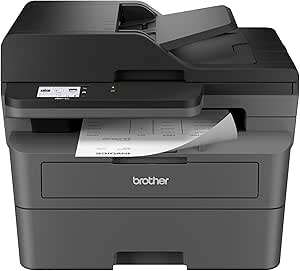 | Best for Small Office Multi-Function and Security | Print Speed: Up to 36 ppm | Scan Speed: 23.6/7.9 ipm | Auto Document Feeder: 50 pages | VIEW ON AMAZON | See Our Full Breakdown |
| HP LaserJet M207dw Laser Wireless Printer, Black and White, Duplex, Office Use |  | Best Overall for Small Office Efficiency | Printer Type: Laser | Print Color: Black and White | Print Speed: 28 pages per minute | VIEW ON AMAZON | See Our Full Breakdown |
| Brother HL-6210DW Monochrome Duplex Wireless Laser Printer |  | Best for High-Volume, Demanding Office Use | Print Speed: 50 ppm | Main Tray Capacity: 520 sheets | Maximum Paper Capacity: 1,660 sheets | VIEW ON AMAZON | See Our Full Breakdown |
| HP LaserJet Pro 3001dw Wireless Black & White Printer |  | Best Compact Office Printer with Security and Multi-Device Support | Print Speed: Up to 35 pages per minute | Auto Duplex: Yes | Maximum Users: Up to 7 | VIEW ON AMAZON | See Our Full Breakdown |
| wireless monochrome laser printer | Print Speed | Connectivity |
|---|---|---|
| Canon imageCLASS LBP6030w Mono | 19 pages per minute | — |
| Brother HL-L2460DW Wireless Mo | 36 pages per minute | Wi-Fi (dual-band), Ethernet, USB |
| Brother HL-L2405W Wireless Mon | 30 pages per minute | Wi-Fi (dual-band), USB |
| HP LaserJet MFP M235sdw All-in | — | Wi-Fi, Ethernet, USB |
| HP LaserJet Pro MFP 3101sdw Wi | up to 35 ppm | Wireless |
| Brother HL-L2480DW Wireless Mo | 36 ppm | Wi-Fi, Ethernet, USB |
| HP LaserJet MFP M140w Wireless | Up to 21 ppm | Wireless, Mobile |
| Brother DCP-L2640DW Wireless M | 36 ppm | Wireless, Ethernet, USB |
| HP LaserJet M110w Wireless Bla | Up to 21 ppm | Wireless, Mobile |
| Brother MFC-L2820DW Wireless M | Up to 36 ppm | Wireless, Ethernet, USB |
| HP LaserJet M207dw Laser Wirel | 28 pages per minute | Wi-Fi, Ethernet, USB 2.0 |
| Brother HL-6210DW Monochrome D | 50 ppm | Gigabit Ethernet, dual-band wireless |
| HP LaserJet Pro 3001dw Wireles | Up to 35 pages per minute | Wi-Fi, Ethernet, Bluetooth |
More Details on Our Top Picks
Canon imageCLASS LBP6030w Monochrome Wireless Laser Printer, Print Only, White
This compact Canon model stands out for its space-saving design, making it ideal for personal use or small offices where desk space is at a premium. Compared to the Brother HL-L2460DW, it offers a lower paper capacity but is significantly smaller and easier to fit in tight spots. Its 19 ppm speed is decent for light daily tasks, but the lack of scanning or copying limits its versatility. Wireless connectivity is straightforward, yet it’s strictly a monochrome printer, so no color or multifunction features are available. The 150-sheet tray may require frequent refills in high-volume environments, but for occasional printing, it’s highly convenient. The tradeoff for its small size is limited functionality, making it less suitable for users needing all-in-one capabilities.
Pros:- Compact and space-saving design
- Fast print speeds of up to 19 ppm
- Wireless connectivity for easy mobile printing
- Low energy consumption in sleep mode
Cons:- Print-only function limits versatility
- Limited to monochrome output
- Small paper capacity may require frequent refills
Best for: Individuals or small offices needing a space-efficient, reliable monochrome printer for basic printing tasks
Not ideal for: Users requiring scanning, copying, or color printing, or those with high-volume needs
- Printer Type:Laser
- Color:White
- Print Speed:19 pages per minute
- Maximum Print Resolution:600 x 600 dpi
- Paper Capacity:150 sheets
- Wireless Connectivity:Yes
- Item Weight:11 pounds
- Dimensions:9.8″D x 14.3″W x 7.8″H
- Warranty:1 year limited
Our verdict“This printer is perfect for those prioritizing a compact, straightforward monochrome printer for light use.”
Brother HL-L2460DW Wireless Monochrome Laser Printer with Duplex and Mobile Printing
This Brother model is designed for users who need quick, efficient printing with minimal fuss. Its impressive speed of 36 ppm surpasses the Canon, making it suitable for busier environments. The dual-band Wi-Fi and Ethernet options provide flexible setup choices, and the 250-sheet paper tray supports higher-volume printing without constant refilling. Unlike the Canon LBP6030w, it includes automatic duplex printing, saving time and paper, which makes it a better choice for those printing in larger quantities. However, it remains monochrome only, and the toner cartridges require compatible supplies for best performance, which may add to ongoing costs. If your needs include high-volume, fast printing in a small office, this model offers a solid balance of features and efficiency.
Pros:- Fast printing speed of 36 ppm
- Large 250-sheet paper tray
- Automatic duplex printing saves time and paper
- Wireless and Ethernet connectivity for versatile setup
Cons:- Limited to monochrome printing only
- Requires compatible toner cartridges for optimal performance
- No multifunction capabilities
Best for: Small teams or busy home offices needing fast, high-capacity monochrome printing with duplex features
Not ideal for: Users who need scanning, copying, or color printing capabilities, or those on a strict budget for toner supplies
- Print Speed:36 pages per minute
- Connectivity:Wi-Fi (dual-band), Ethernet, USB
- Paper Capacity:250 sheets
- Automatic Duplex Printing:Yes
- Mobile Printing:Yes
- Warranty:1 year
Our verdict“Ideal for small offices or busy home setups that demand high-volume, fast monochrome printing with duplexing.”
Brother HL-L2405W Wireless Monochrome Laser Printer with Mobile Printing
The Brother HL-L2405W offers a compelling mix of speed and capacity for budget-minded users. Its 30 ppm speed strikes a good balance, and the 250-sheet paper tray reduces the frequency of refills, making it suitable for daily home or small office printing. Unlike the Canon LBP6030w, it supports mobile printing, which enhances convenience, but it lacks duplex printing, a feature that can save paper and time for those with higher volume needs. The optional toner subscription helps lower running costs, yet reliance on compatible toner cartridges can be a concern for long-term costs. While it’s limited to monochrome, this model makes sense for users who want high capacity and mobile support without paying for multifunction features they don’t need.
Pros:- High 250-sheet paper tray
- Decent speed of 30 ppm
- Supports mobile printing
- Optional toner subscription reduces costs
Cons:- No duplex printing feature
- Limited to monochrome output
- Requires toner subscription for savings
Best for: Home users or small offices seeking a high-capacity, mobile-friendly monochrome printer on a budget
Not ideal for: Those needing duplex printing or multifunction capabilities, or who prefer color printing
- Print Speed:30 pages per minute
- Connectivity:Wi-Fi (dual-band), USB
- Paper Capacity:250 sheets
- Supported Paper Types:Envelopes, specialty paper
- Warranty:1 year
- Toner Subscription:Includes trial
Our verdict“A practical choice for budget-conscious users needing large capacity and mobile printing support without extra features.”
HP LaserJet MFP M235sdw All-in-One Wireless Laser Printer, Scan/Copy, Black & White, Duplex, Office Use
This HP all-in-one model excels for office environments that require more than just printing. Its 28 ppm two-sided print speed is competitive, and the inclusion of scanning and copying broadens its utility compared to single-function printers like the Canon LBP6030w. The device’s secure printing features and multiple connectivity options, including dual-band Wi-Fi and Ethernet, cater to small teams prioritizing security and flexibility. However, it’s heavier and bulkier, which could be a drawback for tight spaces. Its maximum copy speed of 14 ppm may not keep pace with high-volume needs, and the monochrome focus limits its use for color tasks. This model is a strong choice for small offices that need multifunctionality and security in a compact form.
Pros:- Fast two-sided printing up to 28 ppm
- Includes scanning and copying functions
- Secure printing and multiple connectivity options
- Compact for an all-in-one device
Cons:- Limited to monochrome output
- Maximum copy speed of 14 ppm may be slow for high-volume tasks
- Heavy weight for small spaces
Best for: Small office teams requiring secure, multifunction monochrome printing with scanning and copying features
Not ideal for: Home users or small teams that only need basic printing, or those who need color output
- Printer Type:Laser
- Print Media:Plain paper
- Printer Output Type:Monochrome
- Maximum Copy Speed:14 pages per minute
- Connectivity:Wi-Fi, Ethernet, USB
- Dimensions:12.13″D x 16.46″W x 11.59″H
- Item Weight:21 pounds
Our verdict“This printer suits small office environments that need secure, multifunction monochrome printing with added scanning and copying capabilities.”
HP LaserJet Pro MFP 3101sdw Wireless Black and White All-in-One Laser Printer
The HP LaserJet Pro 3101sdw offers a straightforward, fast monochrome printing solution for small teams. Its 35 ppm speed outpaces most competitors, including the Brother HL-L2460DW, making it ideal for busy environments. The inclusion of scanning and copying, along with automatic duplexing, enhances productivity. Wireless connectivity is reliable and simple to set up, allowing multiple users to access the printer with ease. The input tray capacity of 250 sheets and a 50-sheet auto document feeder support high-volume tasks well. Its only notable limitation is that it’s designed solely for black-and-white output, and it relies on HP-specific cartridges, which may influence ongoing costs. This device is well-suited for small teams focused on speed, efficiency, and multifunctionality.
Pros:- High-speed printing up to 35 ppm
- All-in-one functionality with scan and copy
- Automatic duplex printing saves time and paper
- Wireless connectivity for easy device sharing
Cons:- Limited to monochrome output
- Dependence on HP cartridges may increase costs
- No color printing option
Best for: Small teams needing fast, reliable monochrome printing with scanning and copying for daily office tasks
Not ideal for: Users who require color printing or high-volume, multi-function needs beyond basic scan/copy
- Print Speed:up to 35 ppm
- Functions:Print, Scan, Copy
- Automatic Duplex:Yes
- Input Tray Capacity:250 sheets
- Auto Document Feeder:50 sheets
- Connectivity:Wireless
Our verdict“This model offers high-speed, multifunction monochrome printing suited for efficient small team workflows.”
Brother HL-L2480DW Wireless Monochrome Multi-Function Laser Printer with Copy and Scan
The Brother HL-L2480DW stands out as the most versatile option in this lineup, combining printing, scanning, and copying in a compact design ideal for small spaces. Compared with the HP LaserJet M110w, it offers a larger paper capacity and a more user-friendly touchscreen, which makes daily tasks smoother. However, its monochrome-only limitation and lack of fax functionality could be drawbacks for those needing more multifunction options. Despite this, its automatic duplex printing and flexible connectivity—including Wi-Fi, Ethernet, and USB—make it a practical choice for home offices or small businesses that prioritize all-in-one features without extra bulk.
Pros:- Compact design fits small spaces
- Wireless and Ethernet connectivity options
- Automatic duplex printing reduces paper waste
- Easy-to-use 2.7-inch touchscreen
Cons:- Limited to monochrome printing only
- No fax functionality
- Toner replacement may be frequent with high-volume use
Best for: Small office or home user needing a compact, all-in-one machine with reliable wireless connectivity
Not ideal for: Large teams or businesses requiring color printing or fax capabilities, as this model is monochrome-only and lacks fax
- Printer Type:Laser Printer
- Color:Black & White
- Functions:Print, Scan, Copy
- Connectivity:Wi-Fi, Ethernet, USB
- Print Speed:36 ppm
- Touchscreen:2.7 inches
- Paper Capacity:250 sheets
- Automatic Duplex:Yes
Our verdict“This printer makes the most sense for users seeking a reliable, space-saving all-in-one monochrome laser printer for light to moderate use.”
HP LaserJet MFP M140w Wireless Black & White Printer
The HP LaserJet MFP M140w excels in speed and simplicity, making it ideal for small teams of 1-3 people who need quick, reliable monochrome output. Compared with the Brother DCP-L2640DW, it offers a more straightforward setup and a smaller footprint, but it sacrifices some multifunction capabilities and scanning speed. Its compatibility with various mobile devices and seamless wireless setup make it a favorite for on-the-go professionals. Nevertheless, its monochrome-only output and need for HP-specific cartridges with chips can be limiting, especially for those who want more versatility or lower ongoing costs.
Pros:- Compact size fits small workspaces
- Fast printing speeds of up to 21 ppm
- Easy wireless and mobile device setup
- Supports multiple mobile platforms
Cons:- Limited to black & white printing
- Requires original HP cartridges with chips
- Designed mainly for small teams only
Best for: Single users or small teams prioritizing fast, wireless, monochrome printing with minimal fuss
Not ideal for: Offices needing multifunction features beyond printing and scanning, or color printing capabilities
- Print Speed:Up to 21 ppm
- Connectivity:Wireless, Mobile
- Functions:Print, Scan, Copy
- Compatibility:Microsoft, Mac, AirPrint, Android, Chromebook
- Size:Smallest in its class
Our verdict“This pick is best for small team users seeking a straightforward, fast monochrome laser printer with wireless convenience.”
Brother DCP-L2640DW Wireless Monochrome Multi-Function Printer, Copy, Scan, Duplex, Mobile Printing
The Brother DCP-L2640DW is designed for busy small businesses, combining fast print and scan speeds with ample paper capacity and multiple connectivity options. Compared to the Brother HL-L2480DW, it adds a 50-page automatic document feeder and Ethernet connectivity, making it more suited for high-volume workflows. Its automatic duplex feature cuts down on paper costs, but its monochrome-only design and reliance on Brother toner may be limiting for those wanting to diversify functions or reduce consumable costs. Still, its compact design and robust feature set make it a strong contender for office environments that need efficiency without extra bulk.
Pros:- Fast printing and scanning speeds
- Automatic duplex reduces paper use
- Multiple connectivity options including Ethernet
- Compact for office environments
Cons:- Limited to monochrome output only
- Requires compatible Brother toner
- Basic features lacking advanced options
Best for: Small business users requiring high-volume, multi-function monochrome printing with flexible connectivity
Not ideal for: Home users or very small offices with low print volume or need for color features
- Print Speed:36 ppm
- Scan Speed:23.6/7.9 ipm
- Auto Document Feeder:50 pages
- Paper Capacity:250 sheets
- Connectivity:Wireless, Ethernet, USB
Our verdict“This model is tailored for small businesses needing dependable, high-volume monochrome multifunctionality in a compact footprint.”
HP LaserJet M110w Wireless Black & White Printer
The HP LaserJet M110w offers a minimalistic, space-saving design perfect for small teams or individuals who prioritize straightforward, reliable monochrome printing. Its 21 ppm speed is competitive for its size, and setup is notably simple, comparable to the HP LaserJet MFP M140w. While it’s limited to black-and-white output and lacks scanning or copying, its compact form factor and mobile printing support make it ideal for those who need a no-fuss device. The need for HP cartridges with chips can be a minor inconvenience, especially if long-term costs are a concern.
Pros:- Compact size fits tight spaces
- Fast black-and-white printing
- Easy wireless setup and mobile compatibility
- Affordable for small-scale use
Cons:- Limited to monochrome output
- Requires specific HP cartridges with chips
- Not suitable for high-volume or multifunction needs
Best for: Single professionals or small teams needing quick, simple monochrome printing with minimal setup
Not ideal for: Offices requiring multifunction features or color printing capabilities
- Print Speed:Up to 21 ppm
- Connectivity:Wireless, Mobile
- Compatibility:Microsoft, Mac, AirPrint, Android, Chromebook
- Size:Smallest in its class
Our verdict“This printer makes sense for small teams or individuals looking for a straightforward, space-efficient monochrome laser printer.”
Brother MFC-L2820DW Wireless Monochrome All-in-One Laser Printer with Copy, Scan, Fax
The Brother MFC-L2820DW combines multiple functions—printing, copying, scanning, and faxing—in a compact, secure package designed for small offices with higher workloads. Compared with the Brother HL-L2480DW, it adds faxing and a larger 50-page document feeder, which are essential for some business environments. Its 36 ppm speed and 250-sheet tray support busy workflows, but its monochrome-only design and basic display can limit user experience. The inclusion of security features and cloud integration makes it a solid choice for offices concerned about data safety and remote access, though the need for subscription toner services could raise ongoing costs.
Pros:- Fast printing and scanning speeds
- Includes fax functionality
- Secure printing features and cloud support
- Large paper tray and auto document feeder
Cons:- Limited to monochrome printing only
- Basic display may be less user-friendly
- Subscription toner service may increase costs
Best for: Small office environments needing multifunction capabilities, secure printing, and high-volume capacity
Not ideal for: Home users or small teams with minimal multifunction needs or budget constraints
- Print Speed:Up to 36 ppm
- Scan Speed:23.6/7.9 ipm
- Auto Document Feeder:50 pages
- Paper Tray Capacity:250 sheets
- Connectivity:Wireless, Ethernet, USB
- Functions:Print, Scan, Copy, Fax
Our verdict“This all-in-one is best suited for small offices seeking a secure, high-capacity monochrome laser printer with multifunction features.”
HP LaserJet M207dw Laser Wireless Printer, Black and White, Duplex, Office Use
This HP LaserJet M207dw stands out for its balance of speed, security, and ease of use, making it ideal for small office environments. Its 28 pages per minute rate surpasses many basic models, and the wireless support plus mobile printing support ensure seamless connectivity. Compared with the HP LaserJet Pro 3001dw, it offers comparable security features but with a slightly lower maximum speed, which may matter for busier offices. Its duplex printing is automatic, saving time and paper, but the single tray capacity can become a bottleneck with high-volume tasks. Security features are robust, providing peace of mind for sensitive documents. However, it is limited to monochrome output, so it’s not suited for environments needing color. The device’s compact size and simple app control make it a practical choice for small teams that prioritize straightforward operation.
Pros:- Fast printing speed of 28 pages per minute
- Wireless connectivity with mobile printing support
- Automatic duplex printing for time and paper savings
- Strong security features to protect sensitive data
Cons:- Limited to monochrome printing only
- Single tray capacity may require frequent refilling
- Designed primarily for small office use, not high-volume printing
Best for: Small offices needing reliable, fast monochrome printing with basic security features
Not ideal for: Large busy workspaces or high-volume printing environments where higher capacity or color printing is needed
- Printer Type:Laser
- Print Color:Black and White
- Print Speed:28 pages per minute
- Duplex Printing:Yes
- Connectivity:Wi-Fi, Ethernet, USB 2.0
- Maximum Print Resolution:600 x 600 dpi
Our verdict“This model suits small office teams seeking dependable, secure monochrome printing with straightforward setup.”
Brother HL-6210DW Monochrome Duplex Wireless Laser Printer
The Brother HL-6210DW is designed for offices with high-volume needs, offering a blazing fast 50 pages per minute and large paper capacity up to 1,660 sheets. Its high-yield toner cartridges and expandable trays reduce operational costs and refilling frequency, making it a more economical choice for large teams. Compared to the HP LaserJet M207dw, it provides significantly higher speed and capacity, but with a more complex setup process and higher initial price. Its dual-band wireless and Gigabit Ethernet ensure fast, reliable network sharing, while triple-layer security safeguards sensitive data. However, the advanced features and capacity come with a larger footprint that might not fit in small or shared workspaces, and the initial cost can be prohibitive for smaller budgets. This pick makes the most sense for busy, high-volume offices where speed and capacity outweigh compactness and simplicity.
Pros:- Exceptional 50 pages per minute speed
- High-capacity paper trays and toner cartridges
- Reliable dual-band Wi-Fi and Ethernet connectivity
- Triple Layer Security for sensitive documents
Cons:- Higher initial investment
- Complex setup process
- Bulkier footprint not suited for small spaces
Best for: Large offices or workgroups with intensive, high-volume monochrome printing needs
Not ideal for: Small teams or home offices with limited space or lower printing demand
- Print Speed:50 ppm
- Main Tray Capacity:520 sheets
- Maximum Paper Capacity:1,660 sheets
- Connectivity:Gigabit Ethernet, dual-band wireless
- Toner Cartridge Yield:up to 18,000 pages
Our verdict“This model is perfect for high-demand environments where speed, capacity, and security are critical priorities.”
HP LaserJet Pro 3001dw Wireless Black & White Printer
The HP LaserJet Pro 3001dw offers a compact yet speedy solution for small teams, with up to 35 pages per minute and support for multiple devices including smartphones and Chromebooks. Its auto duplex feature enhances efficiency, while HP Wolf Pro Security provides customizable protection for sensitive documents. Compared with the HP LaserJet M207dw, it excels in supporting multiple users simultaneously and offers a slightly faster print speed, making it well-suited for small to medium-sized teams. Its wireless options include Bluetooth, adding versatility. However, it requires original HP cartridges with chips, which could add to ongoing costs, and firmware updates might be necessary to maintain security. Its limited capacity and monochrome-only output mean it’s best for smaller, security-conscious teams that need reliable, fast printing without high volume demands.
Pros:- Fast printing speeds up to 35 pages per minute
- Supports multiple device types including mobile and Chromebook
- Built-in HP Wolf Pro Security with customizable settings
- Auto duplex printing saves time and paper
Cons:- Requires original HP cartridges with chips
- Limited to monochrome printing
- Firmware updates may be needed for security
Best for: Small teams or office environments needing secure, fast monochrome printing from multiple devices
Not ideal for: High-volume or color printing requirements, or users seeking a multi-function device with scanning or copying
- Print Speed:Up to 35 pages per minute
- Auto Duplex:Yes
- Maximum Users:Up to 7
- Connectivity:Wi-Fi, Ethernet, Bluetooth
- Security:HP Wolf Pro Security
Our verdict“This printer suits small teams prioritizing speed, security, and multi-device compatibility within a compact footprint.”

How We Picked
These printers were evaluated based on several key criteria: print performance, connectivity stability, ease of setup, build quality, and overall value. We prioritized models that deliver consistent, clear prints with minimal user hassle, especially over wireless connections. Cost of operation, including toner replacement and energy efficiency, also played a role. The ranking reflects a balance between features and affordability, aiming to identify models suitable for both home and small office use. Our selection emphasizes versatility—whether you need simple printing or multi-function capabilities—and durability for long-term use.Factors to Consider When Choosing Wireless Monochrome Laser Printer
Choosing the right wireless monochrome laser printer involves more than just looking at specs. It’s important to consider your typical usage, space constraints, and future needs. The following factors will help guide your decision to find a model that balances performance and value.Print Speed and Volume
High print speed is essential if you plan to produce large volumes regularly. Look for models that offer at least 20 pages per minute to keep pace with busy environments. If your needs are infrequent or light, a slower, more affordable option may suffice. Additionally, consider the toner yield; higher capacity cartridges reduce long-term costs and downtime.
Connectivity and Ease of Use
Wireless setup should be straightforward, with reliable Wi-Fi and compatibility with multiple devices. Features like mobile printing, AirPrint, or Google Cloud Print enhance flexibility. A user-friendly interface, whether via a touchscreen or simple app controls, can make daily operation easier. Avoid models with complicated setup procedures or unstable connections if you prefer hassle-free printing.
Multifunction Capabilities
If you need to scan, copy, or fax, prioritize models that integrate these functions efficiently. Multi-function printers often save space and reduce clutter but tend to be more costly and complex. For occasional multifunction use, a basic all-in-one might be enough, but for frequent tasks, investing in a dedicated multi-function model can boost productivity.
Build Quality and Maintenance
Durability matters for long-term reliability. Cheaper models may have plastic components that wear out faster, leading to more frequent repairs or replacements. Consider the availability and cost of toner cartridges, which significantly impact ongoing expenses. Higher-end models often feature sturdier construction and better support, translating to fewer headaches over time.
Size and Design
Space constraints influence your choice—compact models are ideal for small desks or limited offices. However, smaller printers might sacrifice some features or speed. Evaluate your workspace and choose a model that fits comfortably while still meeting your functional needs. Also, aesthetic design can make a difference if the printer will be a visible part of your workspace.
Frequently Asked Questions
Can I connect a wireless monochrome laser printer to multiple devices?
Yes, most wireless monochrome laser printers support multiple device connections simultaneously, whether through Wi-Fi, Ethernet, or mobile apps. This allows various users to print from their computers, smartphones, or tablets without needing physical cables. Proper network setup and secure access are important to maintain privacy and smooth operation across multiple users.
How often do toner cartridges need replacement in these printers?
The frequency of toner replacement varies depending on your print volume and the cartridge capacity. High-yield cartridges can handle thousands of pages before needing replacement, which reduces downtime and ongoing costs. For light use, standard cartridges may last several months, but high-volume environments benefit from investing in larger capacity toner units to lower per-page costs.
Are multifunction wireless laser printers worth the extra cost?
Multifunction models add scanning, copying, and sometimes faxing, which can be a real space and cost saver for small offices or home setups. While they tend to be more expensive upfront, they eliminate the need for separate devices, saving desk space and simplifying workflows. If your printing needs are mainly document printing, a basic model might be more cost-effective.
What should I consider if I want a compact wireless monochrome laser printer?
Look for models designed specifically for small spaces, with a slim profile and minimal footprint. However, compact models may have slower print speeds or lower capacity toner cartridges. Balance size with features—if you print frequently or in high volumes, a slightly larger but more capable model might be more suitable despite the extra space required.
Is it better to buy a laser printer with duplex printing or an add-on unit?
Buying a model with built-in duplex (double-sided) printing usually offers better convenience and efficiency, especially if you frequently print double-sided documents. It also often results in lower long-term costs since you don’t need to purchase separate duplex units or manually flip pages. For occasional duplex printing, a simpler model without this feature may suffice, but for regular use, integrated duplexing is a clear advantage.
Conclusion
For most users seeking a reliable all-around performer, the Brother HL-L2460DW offers a great balance of speed, connectivity, and affordability, making it the best overall choice. Those prioritizing budget and infrequent printing might lean toward the HP LaserJet M140w, which offers simplicity and compactness. Small offices or users needing multiple functions should consider the HP LaserJet MFP M235sdw for its versatile features. If durability and high volume are critical, investing in a model like the Brother HL-6210DW or similar premium options makes sense. Ultimately, your decision should align with your specific print volume, space, and feature needs.