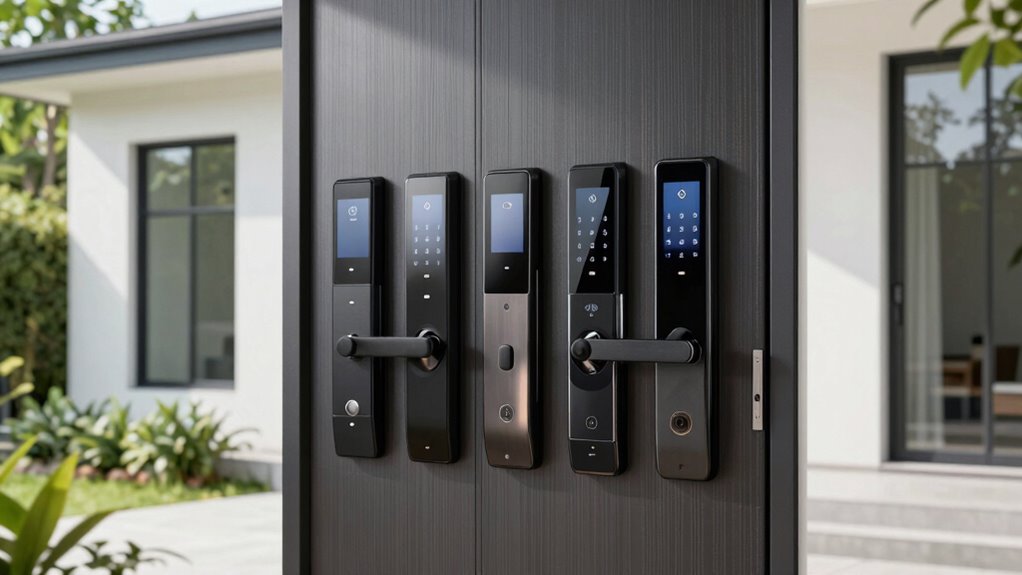
If you’re searching for a smart lock for your front door, you’re likely looking to boost convenience and security. The Schlage Encode stands out as the best overall pick for its reliable Wi-Fi connectivity and robust build. For a budget-friendly option, the Wyze Auto-Lock Bolt v2 offers solid features at a lower price, while the Philips Wi-Fi Smart Deadbolt excels with fingerprint access. These options highlight the tradeoffs between cost, ease of use, and advanced features. Keep reading for a detailed breakdown of each product to find the best fit for your home.
Open a free Amazon Business account
Business pricing, bulk buying and tax-exempt orders.
Create a free accountAs an affiliate, we earn on qualifying purchases.
Key Takeaways
- Top-tier models like the Schlage Encode offer seamless Wi-Fi integration and strong security, justifying higher prices.
- Fingerprint and biometric options, such as the Veise VE017, appeal to users prioritizing quick, keyless access.
- Budget models like Wyze provide good core features but may lack advanced integrations or premium materials.
- Many locks rely on app control and voice compatibility, but the setup process varies and can influence usability.
- Durability and aesthetic fit are critical, with some locks offering more stylish finishes and weather resistance.
| Schlage Encode Smart WiFi Deadbolt Lock with Century Trim, Matte Black |  | Best Overall Smart Lock for Tech-Savvy Homeowners | Connectivity: WiFi | Control: Schlage Home app, Key by Amazon app | Battery: 4 AA batteries (included) | VIEW ON AMAZON | See Our Full Breakdown |
| TEEHO TE001 Keyless Entry Deadbolt with Keypad for Front Door, Matte Black |  | Best Budget-Friendly Keyless Deadbolt for Easy Setup | Material: Aluminum alloy | Battery: 4 AA batteries (not included) | Battery Life: Up to 365 days | VIEW ON AMAZON | See Our Full Breakdown |
| Philips Wi-Fi Smart Front Door Lock Set with Fingerprint and Keyless Entry |  | Best for Versatile Access Methods and Real-Time Monitoring | Connectivity: Wi-Fi 2.4GHz | Fingerprint Recognition Speed: 0.3 seconds | Auto-Lock Timer: 10 to 180 seconds | VIEW ON AMAZON | See Our Full Breakdown |
| Philips Wi-Fi Smart Deadbolt Lock, Keyless Entry Door Lock |  | Best for Remote Access and Multi-Method Unlocking | Connectivity: Wi-Fi 2.4GHz | Power: AA alkaline batteries | Compatibility: Doors 1-3/8″ to 2″ thick | VIEW ON AMAZON | See Our Full Breakdown |
| Philips Wi-Fi Smart Deadbolt Lock with 2 Handles and Keypad |  | Best for Multiple Entry Methods and Family Use | Includes: 2 handle levers, Wi-Fi smart lock | Unlocking methods: Fingerprint, PIN, keys, app | Wi-Fi compatibility: 2.4GHz | VIEW ON AMAZON | See Our Full Breakdown |
| Philips WiFi Keypad Door Lock with Handle, Built-in WiFi, APP Remote Control, Voice & Fingerprint Unlock, Satin Nickel |  | Best Overall Smart Lock for Front Door | Connectivity: WiFi (2.4GHz) | Control: App, Voice (Alexa, Google Assistant) | Fingerprint Speed: 0.3 seconds | VIEW ON AMAZON | See Our Full Breakdown |
| Veise VE017 Fingerprint Smart Door Lock with App Control, Matte Black |  | Best for Advanced Security and AI Recognition | Material: All-zinc alloy, all-metal | Color: Matte Black | Battery Life: ≥12 Months | VIEW ON AMAZON | See Our Full Breakdown |
| Wyze Auto-Lock Bolt v2 Fingerprint Keyless Entry Smart Lock |  | Best for Quick, Reliable Fingerprint Entry with Backup Options | Power: 8 AA batteries, up to 8 months | Connectivity: Wi-Fi | IP Rating: IP53 | VIEW ON AMAZON | See Our Full Breakdown |
| eufy Security Smart Lock C220, Fingerprint Keyless Entry Door Lock |  | Best for Seamless Ecosystem Integration and Easy Installation | Unlock Methods: Fingerprint, app, keypad, physical key, voice | Battery Life: 8 months | Battery Type: 8 AA batteries | VIEW ON AMAZON | See Our Full Breakdown |
| Ulecoce Fingerprint Keypad Deadbolt with Knob Set, Keyless Entry Door Lock with App Control, Auto Lock & One-Touch Lock, 100+ User Codes & 5 Keys |  | Best for Large User Management and Auto-Lock Convenience | Fingerprint Capacity: 512 fingerprints | Number of User Codes: 100+ | Keys Included: 5 keys | VIEW ON AMAZON | See Our Full Breakdown |
| Yale Assure Lock 2 Keypad Deadbolt with Wi-Fi, Black Suede |  | Best Overall Smart Lock for Front Door | Color: Black Suede | Wi-Fi Compatibility: 2.4 GHz Wi-Fi | Works in: U.S. and Canada | VIEW ON AMAZON | See Our Full Breakdown |
| Philips WiFi Keypad Deadbolt with Handle, Built-in WiFi, App Remote Control |  | Best for Advanced Features and Remote Management | WiFi Connectivity: 2.4GHz WiFi, no hub needed | Auto-Lock: Yes, customizable from 0-180 seconds | Battery Life: Up to 6 months | VIEW ON AMAZON | See Our Full Breakdown |
| smart lock for front door | Connectivity |
|---|---|
| Schlage Encode Smart WiFi Dead | WiFi |
| TEEHO TE001 Keyless Entry Dead | — |
| Philips Wi-Fi Smart Front Door | Wi-Fi 2.4GHz |
| Philips Wi-Fi Smart Deadbolt L | Wi-Fi 2.4GHz |
| Philips Wi-Fi Smart Deadbolt L | — |
| Philips WiFi Keypad Door Lock | WiFi (2.4GHz) |
| Veise VE017 Fingerprint Smart | Wi-Fi (via G1 Gateway, sold separately) |
| Wyze Auto-Lock Bolt v2 Fingerp | Wi-Fi |
| eufy Security Smart Lock C220 | — |
| Ulecoce Fingerprint Keypad Dea | — |
| Yale Assure Lock 2 Keypad Dead | — |
| Philips WiFi Keypad Deadbolt w | — |
More Details on Our Top Picks
Schlage Encode Smart WiFi Deadbolt Lock with Century Trim, Matte Black
The Schlage Encode stands out for its seamless WiFi connectivity, allowing remote lock management without additional hubs, unlike the Philips Wi-Fi Deadbolt, which requires a separate hub for remote features. Its compatibility with Alexa and Google Home makes voice control straightforward, but frequent battery replacements can be a hassle with heavy daily use. Compared to the Philips model, the Encode offers a more integrated app experience and a higher security rating, but it’s bulkier and slightly more expensive. Its easy Snap ‘n Stay installation makes it ideal for homeowners seeking a secure, WiFi-enabled lock that works out of the box. The downside? It’s limited to standard door sizes and may drain batteries faster if used constantly.
Pros:- Remote access and management via WiFi and mobile apps
- Works seamlessly with Alexa and Google Home for voice commands
- Easy to install with no wiring required
- High security with encryption and built-in alarm
Cons:- Battery life may require frequent replacements with heavy use
- Requires stable WiFi connection for remote features
- Limited to standard doors and backset options
Best for: Tech-savvy homeowners wanting reliable WiFi access and voice control without complicated setup
Not ideal for: Renters or less tech-inclined users who prefer simpler, non-connected locks
- Connectivity:WiFi
- Control:Schlage Home app, Key by Amazon app
- Battery:4 AA batteries (included)
- Battery Life:Up to 6 months
- Material:Matte Black finish
- Compatibility:Standard doors 1-3/8 in to 1-3/4 in thick, 2-3/8 in or 2-3/4 in backset
- Alarm:Built-in customizable alarm
- Installation:Snap ‘n Stay design, no hardwiring required
Our verdict“Best suited for homeowners seeking a secure, remotely manageable smart lock with voice assistant compatibility.”
TEEHO TE001 Keyless Entry Deadbolt with Keypad for Front Door, Matte Black
The TEEHO TE001 excels in affordability and straightforward installation, making it ideal for those new to smart locks. Its weather-resistant aluminum alloy construction ensures durability outdoors, and the 20-code keypad supports multiple users, including a one-time guest code. Compared to the Philips Wi-Fi Deadbolt, the TE001 doesn’t offer remote access via app, but it compensates with longer battery life—up to a year—and minimal setup effort. The lock’s anti-peeping feature enhances security against code guessing, yet the need for resetting during initial setup can be inconvenient. Its incompatibility with non-standard door holes limits flexibility for some users.
Pros:- Very easy to install with minimal tools
- Long-lasting batteries with low battery indicator
- Multiple access codes and a one-time guest code
- Weather-resistant and durable
Cons:- Requires 4 AA batteries (not included)
- No remote control or app connectivity
- Resetting needed for initial setup and door detection
Best for: Homeowners seeking a reliable, easy-to-install keyless lock without the complexity of WiFi or app control
Not ideal for: Users wanting remote access or integration with voice assistants, as it lacks WiFi connectivity
- Material:Aluminum alloy
- Battery:4 AA batteries (not included)
- Battery Life:Up to 365 days
- Weather Resistance:IP54
- Door Hole Size Compatibility:2-1/8″ (54mm)
- Control:Keypad with 20 codes
Our verdict“Ideal for users prioritizing simple, keyless security without smart home integration nor remote access.”
Philips Wi-Fi Smart Front Door Lock Set with Fingerprint and Keyless Entry
The Philips Wi-Fi Smart Front Door Lock offers a flexible mix of unlocking options—fingerprint, keypad, app, and voice—making it a strong choice for families needing multiple access methods. Its real-time status updates and activity logs provide peace of mind, especially compared to the simpler TEEHO model that lacks remote notifications. Installation is straightforward, but batteries aren’t included, which can delay setup. While it supports remote control via Wi-Fi, it relies on stable internet for full functionality, similar to the Philips WiFi Deadbolt, but with added biometric security. This lock is best for users who value multiple access options and security features over simplicity or lower cost.
Pros:- Multiple unlocking methods including fingerprint, keypad, app, and voice
- Real-time notifications and activity logs for security
- Easy DIY installation with comprehensive instructions
- Supports up to 100 custom codes
Cons:- Batteries not included, requiring additional purchase
- Wi-Fi connection required for remote features
- Potential compatibility issues with non-standard doors
Best for: Families or busy households that want versatile, secure access with activity monitoring
Not ideal for: Budget-conscious buyers or those with non-standard door sizes, due to potential compatibility issues
- Connectivity:Wi-Fi 2.4GHz
- Fingerprint Recognition Speed:0.3 seconds
- Auto-Lock Timer:10 to 180 seconds
- Maximum Custom Codes:100
- Door Compatibility:Standard US doors (cross bore: 1-1/2″ or 2″)
- Batteries:4 AA batteries (not included)
Our verdict“Perfect for households seeking flexible, biometric, and remote monitored access with easy installation.”
Philips Wi-Fi Smart Deadbolt Lock, Keyless Entry Door Lock
The Philips Wi-Fi Smart Deadbolt shines in offering multiple unlocking options—app, passcode, fingerprint, physical key, and voice—making it more adaptable than the TEEHO or Schlage models that focus primarily on app or keypad. Its remote capabilities, combined with real-time notifications, make it ideal for security-conscious users who want to control access from anywhere. However, it only works on 2.4GHz Wi-Fi, which could limit connectivity if your network is dual-band and not properly configured. Batteries are not included, and it lacks a door sensor, which means it cannot alert you if the door is physically opened or left ajar. This lock suits users who prioritize remote access and multiple unlocking methods.
Pros:- Multiple unlocking options including app, passcode, fingerprint, and voice
- Remote control and real-time notifications
- Easy DIY installation compatible with most doors
- Supports auto-lock and away mode for added security
Cons:- Requires 2.4GHz Wi-Fi, not compatible with 5GHz networks
- Batteries not included, requiring additional purchase
- No door open/close sensor included
Best for: Homeowners who need versatile, remotely manageable access with biometric and voice options
Not ideal for: Users with incompatible Wi-Fi or those looking for a lock with built-in door sensors for open/close detection
- Connectivity:Wi-Fi 2.4GHz
- Power:AA alkaline batteries
- Compatibility:Doors 1-3/8″ to 2″ thick
- Remote Range:65 ft
- Supported Voice Assistants:Alexa, Google Assistant
- Auto-Lock Timer:10-180 seconds
- User Codes:up to 100
Our verdict“Ideal for users seeking a feature-rich, remote-controlled smart lock with biometric options and security alerts.”
Philips Wi-Fi Smart Deadbolt Lock with 2 Handles and Keypad
The Philips Wi-Fi Deadbolt with handles offers a comprehensive set of access options—fingerprint, PIN, key, and app—making it ideal for multi-user households. Its included two handle levers and Wi-Fi connectivity support remote management, voice control, and real-time notifications, surpassing the more basic options like TEEHO or single-method locks. Its auto-lock feature enhances security without requiring manual locking, but installation can be more involved due to optional exterior screw and drilling requirements. The lock’s reliance on 2.4GHz Wi-Fi and lack of internal sensors mean it might miss some physical activity alerts. It’s best suited for larger families or shared homes where multiple users and remote management are priorities.
Pros:- Multiple unlocking options including fingerprint, PIN, key, and app
- Remote management via smartphone and voice commands
- Auto-lock feature for added security
- Includes two handles for a complete set
Cons:- No built-in door open/close sensor
- Requires drilling and optional screws for installation
- Wi-Fi only on 2.4GHz networks
Best for: Families needing multiple unlocking options and remote control for shared access
Not ideal for: Homeowners with limited DIY skills or those with non-standard door setups requiring complex installation
- Includes:2 handle levers, Wi-Fi smart lock
- Unlocking methods:Fingerprint, PIN, keys, app
- Wi-Fi compatibility:2.4GHz
- Auto locking:Yes
- Fingerprint capacity:Up to 50 fingerprints
- PIN codes:Unlimited one-time, 100 user PINs
- Door thickness compatibility:1-3/8″ to 1-3/4″
Our verdict“Best for multi-user households wanting flexible, remote, and biometric access with added convenience features.”
Philips WiFi Keypad Door Lock with Handle, Built-in WiFi, APP Remote Control, Voice & Fingerprint Unlock, Satin Nickel
This Philips model stands out for its seamless integration of remote control, fingerprint, and passcode options, making it a versatile choice for those seeking comprehensive access methods. Unlike the Veise VE017, which requires a separate gateway for WiFi management, this lock has built-in WiFi, simplifying setup and reducing additional costs. Its quick 0.3-second fingerprint unlock offers convenience, but it relies heavily on a stable WiFi connection and batteries (not included), which could be a drawback for some users. The included handle set makes installation straightforward on most doors, but compatibility with thicker or non-standard doors may require extra hardware checks. Overall, it offers a balanced mix of features suited for tech-savvy homeowners who prioritize remote management and multiple access options.
Pros:- Built-in WiFi enables direct remote management without extra hubs
- Fast fingerprint recognition at 0.3 seconds
- Supports multiple passcode types for flexible access
Cons:- Batteries are not included, requiring separate purchase
- Dependent on a stable 2.4GHz WiFi connection for full functionality
- Installation may need door size verification for compatibility
Best for: Homeowners who want a feature-rich, easy-to-install smart lock with reliable remote control and multi-method access.
Not ideal for: Users with very thick doors or those who prefer battery-included options without extra purchases, as batteries are sold separately.
- Connectivity:WiFi (2.4GHz)
- Control:App, Voice (Alexa, Google Assistant)
- Fingerprint Speed:0.3 seconds
- Passcode Options:Permanent, one-time, periodic, recurring
- Auto Lock:Yes, 0-180 seconds
- Handle Set Included:Yes
- Door Thickness Compatibility:1-3/8″ to 1-3/4″
- Batteries:8 AA alkaline (not included)
Our verdict“This lock makes the most sense for homeowners seeking a reliable, all-in-one WiFi-enabled smart lock with versatile access options.”
Veise VE017 Fingerprint Smart Door Lock with App Control, Matte Black
The Veise VE017 offers a robust array of unlocking methods, including AI-powered fingerprint recognition and app control, making it ideal for users who want high-security features. Compared to the Philips lock, which relies on WiFi, the Veise’s design emphasizes security with AES128 encryption and a durable, weather-resistant all-metal body, suitable for outdoor use. Its fingerprint system learns over time to improve accuracy, but it requires a separate G1 Gateway for WiFi management, adding complexity and cost. Battery life exceeds 12 months, but batteries (not included) must be replaced annually, and setup can be more involved for less tech-savvy users. This model targets users who prioritize top-tier security and durability, even if they need to purchase additional components.
Pros:- AI-powered fingerprint recognition learns and improves over time
- Multiple unlocking methods, including app, keypad, key, and voice
- All-metal, weather-resistant construction for outdoor durability
Cons:- Requires separate G1 Gateway for WiFi remote control
- Batteries not included, with about a 12-month lifespan
- Setup and configuration may be complex for non-technical users
Best for: Homeowners seeking a premium, AI-enhanced security lock with multiple unlocking options and weather resistance.
Not ideal for: Users looking for an all-in-one solution without extra purchases, since the WiFi gateway is sold separately and setup could be complex.
- Material:All-zinc alloy, all-metal
- Color:Matte Black
- Battery Life:≥12 Months
- Battery Type:4 AA alkaline batteries
- Waterproof Rating:IP55
- Connectivity:Wi-Fi (via G1 Gateway, sold separately)
Our verdict“Ideal for security-conscious users who want a weatherproof, AI-enhanced fingerprint lock with remote management but are prepared for additional setup and costs.”
Wyze Auto-Lock Bolt v2 Fingerprint Keyless Entry Smart Lock
The Wyze Bolt v2 is tailored for those who want a fast, straightforward fingerprint entry with added convenience features like remote management. Its 0.5-second fingerprint recognition and AI learning capabilities outperform many competitors, including the Veise, which might take longer to verify fingerprints. The lock offers multiple unlocking options, including app, keypad, backup keys, and emergency USB-C power, making it versatile in various scenarios. The IP53 rating provides limited water resistance, so it isn’t ideal for harsh outdoor conditions. Battery life extends up to 8 months, but heavy use can reduce this. This pick is best for busy households that need quick access and reliable backup power options.
Pros:- Fast 0.5-second fingerprint recognition
- AI learning improves accuracy over time
- Multiple unlocking options including app, keypad, backup keys, and USB-C backup
Cons:- Wi-Fi needed for remote management, which adds setup complexity
- Battery life may vary with frequent use
- Limited water resistance with IP53 rating
Best for: Families needing a fast, accurate fingerprint lock with multiple entry methods and emergency backup power.
Not ideal for: Users with extreme weather conditions or those seeking a lock with high water resistance, as IP53 is limited.
- Power:8 AA batteries, up to 8 months
- Connectivity:Wi-Fi
- IP Rating:IP53
- BHMA Grade:2
- Battery Backup:USB-C port for emergency power
Our verdict“This lock is perfect for users valuing quick, accurate fingerprint access combined with flexible backup options, ideal for residential use with moderate weather exposure.”
eufy Security Smart Lock C220, Fingerprint Keyless Entry Door Lock
The eufy C220 offers a streamlined experience for users who value quick installation and seamless integration within the eufy ecosystem. Its self-learning AI enhances fingerprint accuracy, similar to the Veise, but it simplifies setup with a 15-minute process and does not require a gateway for WiFi, unlike the Veise or Wyze models. While its BHMA Grade 3 security level offers solid security, it isn’t as robust as some premium models. The long-lasting 8-month battery life and weather resistance make it suitable for most climates, though the limited security grade may not satisfy those needing maximum security. Overall, this lock makes sense for users who want reliable, easy-to-install smart lock features integrated into a broader smart home system.
Pros:- Fast, less than 1-second fingerprint recognition
- Easy 15-minute installation without drilling
- Seamless compatibility with eufy ecosystem and voice assistants
Cons:- Battery life can vary with heavy use
- Limited to BHMA Grade 3 security level
- Requires standard deadbolt and compatible bore size
Best for: Homeowners seeking a quick-install, integrated smart lock compatible with eufy systems and standard deadbolts.
Not ideal for: High-security users or those with unconventional door setups, as it offers Grade 3 security and might not fit all door types.
- Unlock Methods:Fingerprint, app, keypad, physical key, voice
- Battery Life:8 months
- Battery Type:8 AA batteries
- Installation Time:15 minutes
- Waterproof Rating:IP53
- Security Grade:BHMA Grade 3
Our verdict“Best for users who want a quick, reliable smart lock with ecosystem integration and easy setup over maximum security features.”
Ulecoce Fingerprint Keypad Deadbolt with Knob Set, Keyless Entry Door Lock with App Control, Auto Lock & One-Touch Lock, 100+ User Codes & 5 Keys
The Ulecoce deadbolt excels in scenarios requiring multiple user codes and auto-lock features, making it ideal for busy households or small businesses. Its capacity for over 100 user codes surpasses most competitors like the Wyze, which focuses more on quick access. The 0.3-second fingerprint speed rivals the Philips lock but adds the advantage of a high number of user codes and physical keys—useful for family members or service providers. While the gateway for voice control is sold separately, the lock’s straightforward installation and 3-year warranty make it accessible for DIYers. However, lack of detailed battery life data and the need for additional components for voice control could be drawbacks for some.
Pros:- Huge capacity for over 100 user codes
- Fast fingerprint recognition at 0.3 seconds
- Auto-lock feature enhances security
Cons:- Requires a gateway for voice control, which is sold separately
- Battery life details are not specified
- Additional accessories needed for full smart home integration
Best for: Large families or small businesses needing extensive user management and auto-lock features for added convenience.
Not ideal for: Those who prefer a simple, low-maintenance lock without managing numerous user codes or extra accessories.
- Fingerprint Capacity:512 fingerprints
- Number of User Codes:100+
- Keys Included:5 keys
- Material:Matte Black
- Auto Lock Timer:5-60 seconds
- Compatibility:Works with Alexa & Google Assistant (gateway sold separately)
- Warranty:3 years
Our verdict“This lock is ideal for users needing extensive user access management with fast, reliable fingerprint recognition and auto-lock features.”
Yale Assure Lock 2 Keypad Deadbolt with Wi-Fi, Black Suede
The Yale Assure Lock 2 stands out for its versatility in access methods, combining keypad, voice assistant, and app control, making it highly convenient for households that want flexible entry options. Compared with the Philips WiFi Keypad Deadbolt, it offers a more seamless auto-lock feature and easier installation, but it is limited to 2.4 GHz Wi-Fi networks and only functions within the U.S. and Canada. This model is ideal for homeowners who prioritize security alongside multiple access modes, especially if they already use Yale’s ecosystem. Its main tradeoff is regional restriction and reliance on a smartphone or Apple Watch for full features, which could be inconvenient for less tech-savvy users or those outside supported regions.
Pros:- Multiple access methods including keypad, voice, and app
- Easy DIY installation without professional help
- Auto-lock feature enhances security
Cons:- Limited to 2.4 GHz Wi-Fi networks, which may restrict compatibility with some routers
- Region-specific (U.S. and Canada), limiting international use
- Full functionality requires a smartphone or Apple Watch, which may be inconvenient
Best for: Homeowners seeking a reliable, easy-to-install keypad lock with multiple access options and regional support in the U.S. and Canada
Not ideal for: Users in regions outside North America or those relying solely on Wi-Fi networks beyond 2.4 GHz, due to regional restrictions and network limitations
- Color:Black Suede
- Wi-Fi Compatibility:2.4 GHz Wi-Fi
- Works in:U.S. and Canada
- Lock Type:Keypad Deadbolt
Our verdict“This pick makes the most sense for North American homeowners who want a flexible, secure, and easy-to-install keypad lock with modern features.”
Philips WiFi Keypad Deadbolt with Handle, Built-in WiFi, App Remote Control
The Philips WiFi Keypad Deadbolt offers a compelling combination of biometric quick access and remote control, making it ideal for tech-savvy users who want secure, keyless entry without additional hubs. It surpasses the Yale Assure in biometric speed, with a 0.3-second fingerprint recognition, and supports multiple access methods, including PIN and voice commands. However, it requires users to purchase batteries separately and manually enable auto-lock in the app, which may be less convenient. Designed primarily for right-opening doors, it’s best suited for users comfortable with DIY installation and managing battery replacements. The auto-lock feature’s manual setup could be a drawback for those seeking a fully automatic system.
Pros:- Supports multiple access methods including fingerprint, PIN, and voice commands
- Remote control and real-time access via intuitive app
- Fast fingerprint recognition at 0.3 seconds
Cons:- Batteries are not included, requiring an additional purchase
- Auto-lock feature must be manually enabled in the app, adding setup step
- Designed mainly for right-opening doors, limiting flexibility
Best for: Tech-oriented homeowners who prioritize biometric quick access and remote control capabilities for their front door
Not ideal for: Users who prefer a plug-and-play solution with included batteries or need a lock compatible with left-opening doors, as it requires manual auto-lock setup and batteries separately
- WiFi Connectivity:2.4GHz WiFi, no hub needed
- Auto-Lock:Yes, customizable from 0-180 seconds
- Battery Life:Up to 6 months
- Batteries Included:No
- Fingerprint Speed:0.3 seconds
- Door Thickness Compatibility:1-3/8″ to 1-3/4″
Our verdict“This lock makes the most sense for users wanting quick biometric access and remote management, especially if they are comfortable handling batteries and setup steps.”

How We Picked
The products in this roundup were selected based on a combination of performance, usability, build quality, and value. We prioritized locks that offer reliable wireless connectivity—either Wi-Fi or Bluetooth—and evaluated their ease of installation and daily operation. Security features such as fingerprint access, keypad entry, and auto-lock functionality were key factors, along with integration with smart home systems. The ranking reflects a balance between affordability and premium features, ensuring options suitable for different budgets and needs. We also considered user reviews and product durability to recommend options that are both dependable and long-lasting.| smart lock for front door | Connectivity |
|---|---|
| Schlage Encode Smart WiFi Dead | WiFi |
| TEEHO TE001 Keyless Entry Dead | — |
| Philips Wi-Fi Smart Front Door | Wi-Fi 2.4GHz |
| Philips Wi-Fi Smart Deadbolt L | Wi-Fi 2.4GHz |
| Philips Wi-Fi Smart Deadbolt L | — |
| Philips WiFi Keypad Door Lock | WiFi (2.4GHz) |
| Veise VE017 Fingerprint Smart | Wi-Fi (via G1 Gateway, sold separately) |
| Wyze Auto-Lock Bolt v2 Fingerp | Wi-Fi |
| eufy Security Smart Lock C220 | — |
| Ulecoce Fingerprint Keypad Dea | — |
| Yale Assure Lock 2 Keypad Dead | — |
| Philips WiFi Keypad Deadbolt w | — |
Factors to Consider When Choosing Smart Lock For Front Door
Choosing the right smart lock for your front door involves weighing several factors beyond basic features. It’s essential to consider compatibility with your existing smart home ecosystem, as some locks work better with specific voice assistants or hubs. Durability and weather resistance are critical if your door is exposed to the elements, so look for locks with suitable ratings. Ease of installation can vary widely; some models require professional setup, while others are DIY-friendly. Price often reflects the level of security and smart features, so define your priorities—whether convenience, security, or budget—before purchasing. Lastly, think about future-proofing: opt for locks with firmware updates and ongoing support to keep your system secure over time.Compatibility and Ecosystem Integration
Ensure the smart lock you choose works seamlessly with your existing smart home setup—be it Alexa, Google Assistant, Apple HomeKit, or others. Some locks are designed to operate independently via Wi-Fi, while others integrate with broader systems, offering more automation options. Compatibility can affect functionality, so verify app support and voice control features before buying. Choosing a lock that aligns with your ecosystem can simplify management and enhance security through automation.
Build Quality and Weather Resistance
The durability of a smart lock is vital, especially if your front door faces harsh weather. Look for models with high ingress protection ratings (IP ratings) that specify resistance to dust and water. Metal finishes like stainless steel or zinc alloy tend to last longer and resist corrosion. Cheaper plastic locks may be vulnerable to temperature fluctuations and physical damage, so investing in a sturdy, weatherproof model can save trouble and replacement costs in the long run.
Ease of Installation and Maintenance
A lock that’s simple to install can save time and frustration, especially if you’re a DIYer. Many modern locks are designed to fit standard doors, but some require additional bridging components or professional setup. Consider models with clear instructions and minimal wiring or drilling. Maintenance-wise, choose locks with rechargeable batteries or easy-to-replace power sources. Regular firmware updates are also important for security and feature enhancements, so check manufacturer support policies.
Security Features and User Management
Beyond basic access, advanced security features can provide peace of mind. Keyless entry via keypad or fingerprint increases convenience and reduces lost keys. Auto-lock functions prevent accidental unlocking, while multiple user codes or biometric access allow for flexible management. Evaluate whether the lock offers activity logs or alerts for added security oversight. Balance these features against your privacy preferences and the level of control you need over who can access your home.
Price and Future-Proofing
While budget options can meet basic needs, investing a bit more often delivers better long-term value through enhanced security and features. Consider how frequently you might upgrade or expand your smart home system—select a lock with firmware updates and ongoing support. Also, weigh the cost of accessories or subscription services that could enhance functionality. Remember, a higher upfront cost can be justified if it offers durability, better security, and compatibility with future smart home plans.
Frequently Asked Questions
Can I replace my existing lock with a smart lock without changing my door?
Most smart locks are designed to fit standard deadbolt holes, making replacement straightforward for many doors. However, some models may require additional mounting plates or adjustments to fit certain door types. It’s wise to measure your existing lock and compare it with the product specifications beforehand. If your door has unique features or non-standard dimensions, professional installation or custom solutions might be necessary.
Will a smart lock work if the Wi-Fi or power goes out?
Many smart locks have backup power options, like batteries, allowing continued operation during power outages. Some models also include physical key access as a failsafe. Wi-Fi connectivity is often essential for remote control, but local operation via keypad or fingerprint typically remains unaffected. To avoid lockouts, choose a lock with reliable battery life and backup access methods, especially if you live in an area prone to outages.
Are fingerprint smart locks secure enough for residential use?
Fingerprint locks employ biometric technology that is generally secure, as fingerprints are unique identifiers. Modern sensors are sophisticated enough to prevent spoofing, but no system is entirely foolproof. Combining biometric access with other methods, like PIN codes or app control, enhances security. For most homes, a well-designed fingerprint lock offers a good balance of convenience and safety, especially when paired with a strong master PIN and regular firmware updates.
What should I consider regarding smart lock battery life?
Battery life varies significantly across models, with some lasting several months on a single charge and others needing weekly replacements. Look for locks with low-battery alerts to avoid surprises. Consider locks that support rechargeable batteries or easy-to-access replaceable batteries. Installing extra batteries or a backup power source can also prevent lockouts during extended power or battery failures.
Is it worth paying more for a smart lock with voice assistant compatibility?
Voice control adds a layer of convenience, allowing you to lock or unlock your door hands-free. However, it often comes at a higher price and may require additional devices or subscriptions. If you already use a compatible voice assistant, this feature can streamline access management. For those prioritizing simplicity and security, a basic lock with app control might suffice, but for tech-savvy users, voice compatibility enhances overall usability.
Conclusion
For most homeowners, the Schlage Encode offers the best balance of reliability, security, and smart features, making it ideal as the best overall choice. Budget-conscious buyers will appreciate the Wyze Auto-Lock Bolt v2 for solid performance at a lower price, while those seeking premium features and sleek design should consider the Yale Assure Lock 2. Beginners or less tech-savvy users benefit from models that are simple to install and operate, like the Philips Wi-Fi Smart Deadbolt. When choosing, consider your security needs, smart home compatibility, and budget to find the perfect lock for your front door as we move into 2026.
Labor Day sales Picks
labor day deals
As an affiliate, we earn on qualifying purchases.