Wi-Fi problems often start with where you place your router, not your internet speed. If your router is behind furniture, on the floor, or in a corner, signals get weakened or blocked by walls and obstacles. Devices like microwaves or cordless phones can also interfere when the router is nearby. Moving your router to a central, elevated spot free from interference can make a big difference. Staying aware of placement helps keep your connection strong—explore how to optimize it further.

Prime made for students and young adults
- Fast, free delivery for dorm and study essentials
- Prime Video and Amazon Music included
- Member-only deals
Key Takeaways
- Poor placement causes signal weakening due to obstacles like walls and furniture, affecting coverage more than actual internet speed.
- Interference from household devices near the router can disrupt signal quality, regardless of the service plan.
- Strategic placement in central, elevated areas minimizes dead zones and enhances overall signal strength.
- Obstacles such as thick walls and metal objects block Wi-Fi signals, leading to connectivity issues independent of bandwidth.
- Proper router positioning ensures a stable, consistent connection, reducing the need to upgrade internet speed.
Having a strong Wi-Fi connection is essential, but many issues stem from poor placement of your router. When you set up your Wi-Fi router in an inconvenient spot, it can cause a host of problems that aren’t related to your internet speed but rather to how effectively the signal reaches your devices. The placement affects signal strength, which directly impacts your connection quality. If your router sits behind furniture, on the floor, or in a corner of your home, the signal has to work harder to penetrate walls and obstacles, weakening the connection for your devices. This often leads to slow speeds, buffering, or dropped connections, which can be frustrating even if your internet plan promises high speeds.
Device interference is another critical factor that exacerbates Wi-Fi problems. Many household devices emit signals that can interfere with your Wi-Fi, especially if your router is placed near cordless phones, microwave ovens, baby monitors, or Bluetooth devices. These signals can disrupt the transmission, further reducing signal strength and causing inconsistent performance. When your router is close to such electronic devices, it becomes more vulnerable to interference, making the Wi-Fi less reliable. Proper placement involves keeping your router away from these potential sources of interference to guarantee a cleaner, stronger signal reaches your devices.
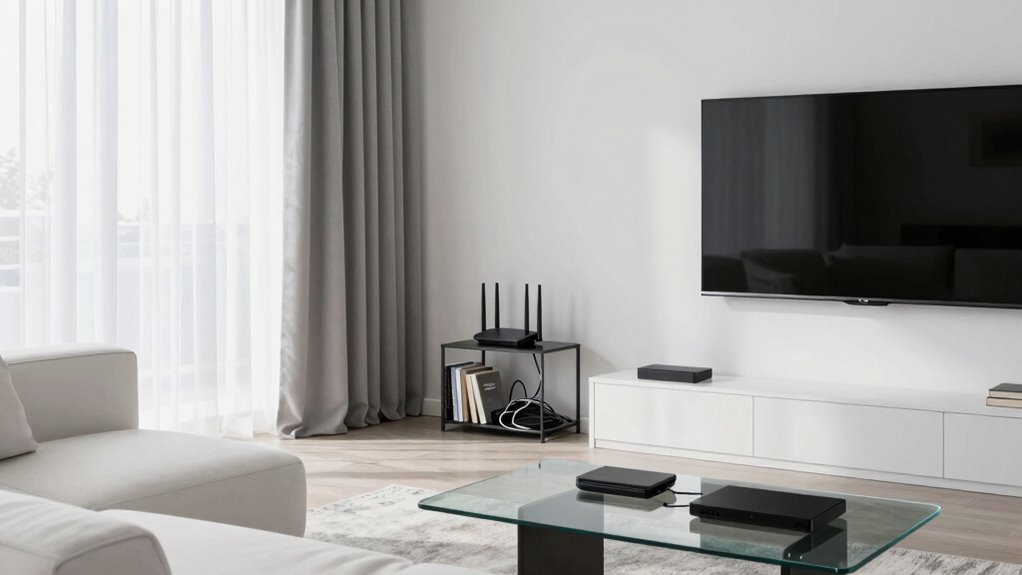
The ideal spot for your router is a central location in your home, elevated and unobstructed. Placing it higher up, such as on a shelf or mounted on a wall, helps maximize coverage by reducing interference from furniture or walls. Avoid corners, basements, or enclosed spaces, as these can trap and weaken signals. If you notice dead zones or weak spots, reposition the router to see if signal strength improves. Sometimes, a simple change in placement can make a significant difference in how well your devices connect. Additionally, understanding how router placement influences your Wi-Fi can help you optimize your entire home network. Staying aware of interference sources can also prevent ongoing issues and improve overall connectivity. Being mindful of signal obstacles like thick walls or metal objects can further enhance your Wi-Fi performance. Proper placement strategies are essential for maintaining a reliable and fast home network, especially during weather emergencies when connectivity becomes even more critical.
As an affiliate, we earn on qualifying purchases.
Frequently Asked Questions
How Can I Test My Wi-Fi Signal Strength Effectively?
To test your Wi-Fi signal strength effectively, use a reliable speed test app or website. Walk around your space while testing to identify areas with Wi-Fi interference or weak signals. Focus on signal optimization by placing your router centrally and avoiding obstructions. Check for consistent speeds and look for dead zones, adjusting your router’s position as needed. Regular testing helps maintain a strong, interference-free Wi-Fi connection throughout your home.
What Are the Best Materials to Avoid Near My Router?
To avoid material interference near your router, steer clear of dense materials like metal, concrete, and thick drywall, which can block signals. Use router shielding techniques with non-metallic materials such as plastic or wood if needed. Keep electronics like microwaves and cordless phones away, as they cause interference. Proper placement with minimal obstructions guarantees better signal strength, reducing issues caused by poor placement rather than speed.
How Does Router Placement Affect Device Battery Life?
Proper router placement enhances device battery life by improving signal strength and reducing device power management issues. When your router is ideally positioned, devices don’t need to boost their transmit power, saving energy. Good router ergonomics, like placing it central and elevated, ensures consistent coverage. This stability means your devices use less power to maintain connections, ultimately extending battery life and providing more reliable performance without draining your device’s energy resources.
Can Multiple Devices Affect Wi-Fi Performance Even if Placed Correctly?
Imagine your Wi-Fi is like a busy highway, and multiple devices are cars. Yes, congestion and interference sources can slow down your connection even if your router’s placement is perfect. When too many devices connect, they compete for bandwidth, causing network congestion. This interference from other electronics or neighboring networks further hampers performance. To keep your Wi-Fi speedy, limit device connections and minimize interference sources.
What Tools Are Available to Analyze Wi-Fi Coverage in My Home?
You can use tools like Wi-Fi analyzers or apps such as NetSpot, Ekahau, or Wi-Fi Analyzer to assess your coverage. These tools identify interference sources and signal interference issues, helping you spot weak spots or crowded channels. By analyzing your home’s Wi-Fi environment, you can optimize your router placement, reduce interference, and improve overall performance. Regular checks guarantee your Wi-Fi stays fast and reliable across all devices.
As an affiliate, we earn on qualifying purchases.
Conclusion
So, next time your Wi-Fi acts up, don’t blame your speed—check your placement first. It’s like blaming your car’s horsepower when the real issue is that you’re parked in a muddy swamp. Adjust your router’s spot, and watch your connection soar. Because, let’s face it, a little common sense and strategic placement beats upgrading your plan and still ending up buffering during your favorite show. Who knew Wi-Fi problems were so easy to fix?
As an affiliate, we earn on qualifying purchases.
As an affiliate, we earn on qualifying purchases.
Fall Picks
fall essentials
As an affiliate, we earn on qualifying purchases.