If you’re searching for the best 49 inch ultrawide monitor for spreadsheets, you’re likely looking for a display that offers ample screen real estate and sharp clarity to handle multiple spreadsheets comfortably. The Samsung 49″ Odyssey G9 stands out for its high refresh rate and curved immersion, ideal for multitasking. For those who prioritize color accuracy and premium build, the Samsung 49″ Odyssey G93SC with QD-OLED offers stunning visuals. Meanwhile, the CRUA 49-inch White Curved Monitor provides a more budget-friendly option without sacrificing essential features. Keep in mind, tradeoffs include balancing between resolution, refresh rate, and ergonomic adjustments. Continue reading for a detailed comparison to find your perfect match.
Key Takeaways
- High refresh rates (120Hz or higher) are less critical for spreadsheets but benefit multitasking and window switching.
- Resolution (DQHD or 5K2K) significantly impacts clarity, especially when viewing detailed spreadsheets side by side.
- Curvature improves immersion but can distort flat work surfaces; choose based on desk setup and preference.
- Built-in features like USB-C, adjustable stands, and HDR are extras that enhance usability but may increase cost.
- Premium options like QD-OLED deliver superior color and contrast, but at a higher price point, while budget models focus on core features.


More Details on Our Top Picks
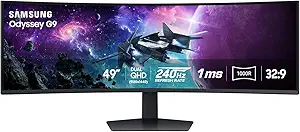
The Samsung Odyssey G9 stands out as the most comprehensive choice for spreadsheet users who also enjoy occasional gaming or multimedia tasks. Its dual QHD resolution and 1000R curvature create a deeply immersive workspace, making it easier to manage multiple spreadsheets side by side. The 240Hz refresh rate and 1ms response time, borrowed from gaming monitors, ensure smooth scrolling and interaction, reducing eye strain during extended sessions. Compared with the Viewedge 49″, its higher brightness and HDR support deliver more vivid visuals, while the adjustable stand adds ergonomic flexibility. The complex setup, premium price, and large footprint are tradeoffs for those who prioritize performance and visual fidelity.
Pros:- Immersive 49-inch curved display enhances multitasking
- High 240Hz refresh rate and 1ms response for smooth navigation
- Vivid visuals with DisplayHDR 1000 and high contrast
- Adjustable ergonomic stand for comfortable long-term use
Cons:- Large size may not fit in smaller workspaces
- Premium price point limits accessibility for budget-conscious users
- Setup complexity due to advanced features
Best for: Power users who need maximum screen real estate with vibrant visuals and adjustable ergonomics for intense spreadsheet work.
Not ideal for: Small offices or users with limited desk space, as the monitor’s size and features require ample room and higher budget.
- Screen Size:49 inches
- Resolution:Dual QHD (5120 x 1440)
- Curvature:1000R
- Refresh Rate:240Hz
- Response Time:1ms(GtG)
- HDR:DisplayHDR 1000
Bottom line: This monitor is best suited for professionals seeking immersive, high-performance screen space with premium features.
CRUA 49-inch White Curved Monitor with DQHD Resolution, 120Hz, AMD FreeSync, and Adjustable Stand
Compared to the Samsung Odyssey G9, the CRUA 49-inch offers a more budget-friendly option with a focus on versatility. Its DQHD resolution and 120Hz refresh rate provide crisp visuals and smooth interaction, suitable for multitasking and light content creation. The curved 1500R display offers an immersive experience, though not as aggressive as the 1000R curve on the Odyssey. Its adjustable stand and multiple ports make it practical for daily office use, but it lacks the HDR capabilities and ultra-fast response times of premium gaming monitors. For those seeking a larger workspace without the high price tag, this offers a solid balance, though it may not satisfy users needing top-tier image fidelity.
Pros:- Affordable large curved display for multitasking
- Adjustable height and tilt improve ergonomics
- Good color coverage with 120% sRGB
- Multiple connectivity options including HDMI 2.1 and DisplayPort 1.4
Cons:- Limited HDR support and lower brightness
- No built-in speakers, requiring external audio
- Potentially high price for a mid-range monitor
Best for: Budget-conscious professionals who want a large, curved display with good ergonomic options for spreadsheet management.
Not ideal for: High-end multimedia creators or gamers requiring HDR or ultra-low response times, as this lacks those advanced features.
- Screen Size:49 inches
- Resolution:5120×1440 (DQHD)
- Curvature:1500R
- Refresh Rate:120Hz
- Contrast Ratio:3000:1
- Color Coverage:120% sRGB
Bottom line: This monitor is best for users seeking a large, curved workspace with good color and ergonomic flexibility at a reasonable price.
Viewedge 49″ Curved Ultrawide Gaming Monitor, 120Hz, 1ms, 32:9 DQHD 5120×1440, FreeSync, G-Sync, HDR
The Viewedge 49″ is designed to excel in gaming and multitasking, making it ideal for spreadsheet users who also enjoy high-quality visuals. Its 120Hz refresh rate and 1ms response time, combined with support for both FreeSync and G-Sync, ensure fluid interactions and minimal lag—important when working with large datasets or complex calculations. The HDR support enhances color depth, although its contrast ratio is comparable to other VA panels. While wall mounting options and a large size might be a challenge for some setups, this monitor offers a good balance of performance features for intensive users who need a wide, immersive workspace.
Pros:- Fast 120Hz refresh rate with 1ms response time
- Supports both FreeSync and G-Sync for smooth visuals
- Large 49-inch curved display enhances multitasking
- HDR support adds color richness
Cons:- Wall mount not included, may require additional accessories
- Large footprint demands ample desk space
- Limited info on built-in speakers or additional features
Best for: Gamers and professionals who require a fast, responsive display with adaptive sync and HDR for multitasking and spreadsheet work.
Not ideal for: Users with limited desk space or those seeking basic, budget-friendly monitors, as its large size and advanced tech come at a higher cost.
- Screen Size:49 inches
- Resolution:5120×1440 (DQHD)
- Curvature:32:9, 1500R
- Refresh Rate:120Hz
- Response Time:1ms
- HDR:HDR
Bottom line: This monitor is best for users who want seamless performance for gaming and productivity on a large, immersive screen.
Samsung 49″ Odyssey G93SC Series Curved Gaming Monitor, QD-OLED, 240Hz, 0.03ms, DQHD, G-Sync Compatible, FreeSync Premium Pro, Adjustable Stand
The Samsung Odyssey G93SC is a standout option for users who prioritize exceptional visual quality alongside productivity. Its QD-OLED technology delivers stunningly vibrant colors and perfect blacks, which can significantly enhance the clarity of complex spreadsheets and graphical data. The 240Hz refresh rate and 0.03ms response time outperform most alternatives, ensuring ultra-smooth interactions, especially when zooming or scrolling large datasets. While the price is notably higher and its focus on gaming and high-performance tasks may be overkill for purely office use, this monitor offers unparalleled visual fidelity for those who need both high productivity and outstanding image quality.
Pros:- Exceptional color vibrancy and deep blacks from QD-OLED
- Ultra-fast 0.03ms response time for smooth interactions
- Large ultrawide curved display enhances immersion
- G-Sync and FreeSync compatibility for seamless visuals
Cons:- High price limits accessibility
- Large size may require substantial desk space
- Primarily designed for gaming and high-end tasks, not basic productivity
Best for: Designers, data analysts, or professionals demanding top-tier visuals alongside multitasking capabilities.
Not ideal for: Budget-conscious users or those with limited desk space, as the premium cost and size may be prohibitive.
- Display Technology:QD-OLED
- Resolution:DQHD
- Screen Size:49 inches
- Refresh Rate:240Hz
- Response Time:0.03ms
- HDR:DisplayHDR True Black 400
Bottom line: This monitor is ideal for users seeking top-tier visual quality with high refresh rate performance in a large, curved format.
Amzfast 49 Inch Curved Ultrawide Gaming Monitor, 120Hz, DQHD 5120×1440, 1500R, 1ms MPRT, HDR, Adaptive Sync, Height Adjustable, HDMI 2.0/DP 1.4
The Amzfast 49-inch offers a compelling package for users who want a large, curved display capable of handling spreadsheets and gaming alike. Its DQHD resolution and 120Hz refresh rate provide smooth visuals, while the 1ms MPRT response minimizes lag and ghosting—useful for fast navigation in complex spreadsheets. The monitor’s ergonomic features, including height adjustment and versatile input options, contribute to extended comfort. Compared to the CRUA, it emphasizes gaming performance with HDR support and adaptive sync, but it may not match the color accuracy or HDR quality of premium models. It strikes a good balance for multi-purpose use without the steep cost of high-end gaming screens.
Pros:- Large immersive curved display for multitasking
- Fast 120Hz refresh rate and 1ms MPRT for responsiveness
- Height adjustment and ergonomic design
- Multiple input options including HDMI 2.0 and DisplayPort
Cons:- Limited HDR capabilities compared to premium models
- Size may require significant desk space
- No mention of built-in speakers or advanced color calibration
Best for: Multitasking professionals who need a large, responsive display for spreadsheets, gaming, and multimedia at a reasonable price.
Not ideal for: Users requiring professional-grade color accuracy or HDR performance for content creation, as this is more gaming-oriented.
- Screen Size:49 inches
- Resolution:5120×1440 (DQHD)
- Curvature:1500R
- Refresh Rate:120Hz
- Response Time:1ms MPRT
- HDR:HDR
Bottom line: This monitor is well-suited for users seeking a versatile, large display with fast response times for both work and play.
INNOCN 49-Inch Curved Ultrawide Gaming Monitor 5K2K, 120Hz, 32:9, HDR400, USB-C, DisplayPort, HDMI, Built-in Speakers, Adjustable
The INNOCN 49-inch curved monitor excels in delivering a high-resolution, immersive experience thanks to its 5120×1440 display and 120Hz refresh rate, making it a solid choice for both multitasking and casual gaming. Compared with the Samsung Odyssey G9, it offers a more balanced blend of features without the extreme 1000R curvature, which can be more comfortable for long work sessions. Its adjustable stand and multiple connectivity options, including USB-C with 65W power delivery, make it highly adaptable for different setups. However, its size demands ample desk space, and it stops short of 4K clarity, which might matter for users needing pixel-perfect detail. This monitor suits professionals who want a wide display for spreadsheets but also appreciate media and light gaming. Beware if your workspace is limited or if you prefer 4K resolution for detailed design work.
Pros:- Wide 32:9 aspect ratio maximizes multitasking capabilities
- High resolution and 120Hz refresh rate ensure smooth visuals
- Multiple connectivity options including USB-C with power delivery
Cons:- Large physical size requires substantial desk space
- Limited to 5120×1440 resolution, not 4K, which may be a drawback for detailed design
Best for: Productivity-focused professionals who want a versatile, high-quality display with some multimedia capabilities
Not ideal for: Gamers seeking ultra-fast response times and peak HDR performance, or users with small desks
- Screen Size:49 Inches
- Resolution:5120×1440 (QHD Wide)
- Refresh Rate:120 Hz
- Aspect Ratio:32:9
- Display Technology:LCD
- Contrast Ratio:3000:1
Bottom line: This monitor is best for those seeking a balanced, flexible ultrawide for work and light entertainment on a spacious desk.
Samsung 49” Business Curved Ultrawide Dual QHD Computer Monitor, USB-C, DisplayPort, HDMI, 120Hz, VESA DisplayHDR 400, Built-in Speakers, Height Adjustable Stand, LS49C954UANXZA, 2024
The Samsung LS49C954UANXZA is tailored for professionals who need a dependable, feature-rich display for multitasking and collaboration. Its dual QHD resolution in a 32:9 format provides sharp visuals ideal for managing multiple spreadsheets side by side, outpacing many single-resolution alternatives like the INNOCN. The inclusion of USB-C with 90W power delivery simplifies cable management, and the height-adjustable stand adds ergonomic flexibility. While its premium feature set makes it suitable for busy work environments, the high price tag and limited focus on color accuracy might deter creative users. It balances productivity with multimedia features, but users with tight budgets or specialized color needs might find it less appealing.
Pros:- Dual QHD resolution enhances multitasking and spreadsheet management
- USB-C with 90W charging reduces cable clutter
- Height adjustable stand improves ergonomic comfort
Cons:- Premium price may be prohibitive for some budgets
- Limited info on color accuracy for professional design
Best for: Business users and teams needing a reliable, versatile ultrawide for multitasking and collaboration
Not ideal for: Creative professionals requiring high color fidelity or gamers prioritizing ultra-fast refresh rates
- Screen Size:49 inches
- Resolution:Dual QHD
- Refresh Rate:120Hz
- HDR:DisplayHDR 400
- Connectivity:USB-C, HDMI, DisplayPort
- Stand:Height Adjustable
Bottom line: This monitor is ideal for busy offices and professionals who prioritize clarity and connectivity over gaming features.
The Samsung Odyssey G9 G91F is engineered for gamers who want an immersive experience, thanks to its 1000R curvature and 144Hz refresh rate. Its 5120×1440 resolution delivers sharp images, with HDR 600 and AMD FreeSync Premium Pro ensuring vibrant visuals and tear-free gameplay. The ultra-fast response time and adaptive sync are tailored for fast-paced titles, outperforming the INNOCN in responsiveness. However, the large size and aggressive curve may be less suitable for prolonged work sessions or multi-window productivity. This monitor shines when gaming and watching multimedia, but it’s less practical for detailed spreadsheet work or office use in constrained spaces.
Pros:- High contrast HDR 600 and 144Hz for smooth, detailed gaming
- 1000R curvature enhances immersion in fast titles
- Fast 1ms response time and adaptive sync minimize motion blur
Cons:- Size and curvature may hinder comfort during long work hours
- Premium price and specialized features limit appeal for casual users
Best for: Competitive gamers and enthusiasts seeking high refresh rates and immersive visuals
Not ideal for: Office users or professionals focused solely on productivity and multitasking in tight spaces
- Display Size:49 inches
- Resolution:DQHD (5120×1440)
- Refresh Rate:144Hz
- Response Time:1ms GtG
- HDR:DisplayHDR 600
- Curvature:1000R
Bottom line: This monitor is best for gamers prioritizing speed, responsiveness, and immersive visuals over general productivity.
Deco Gear DGSKY49 49″ Curved Ultrawide Monitor, 32:9, Dual QHD, 120Hz, USB-C 98W PD, HDR, KVM, PIP/PBP, Height Adjustable
The Deco Gear DGSKY49 stands out for its comprehensive feature set tailored to multitasking, gaming, and professional workflows. Its dual QHD resolution and 120Hz refresh rate deliver sharp, smooth visuals, comparable to more expensive options like the Samsung Business monitor, but with added features like KVM switching and Picture-in-Picture. The inclusion of USB-C with 98W power delivery simplifies device connections, and the ergonomic stand adds comfort for long hours. However, its complexity and price may be overkill for casual users, and the large size demands a spacious desk. This monitor makes the most sense for users who need a versatile display for work, streaming, and light gaming, despite the steeper learning curve.
Pros:- Large 49-inch ultrawide with dual QHD resolution for detailed multitasking
- USB-C with 98W charging reduces cable clutter
- Features like KVM and PIP/PBP add versatile productivity options
Cons:- Higher cost and complexity might overwhelm casual users
- Requires significant desk space and setup familiarity
Best for: Multitasking professionals and power users who want an all-in-one ultrawide with advanced features
Not ideal for: Budget-conscious buyers or those primarily focused on gaming without professional multitasking needs
- Size:49 inches
- Resolution:5120×1440 (Dual QHD)
- Refresh Rate:120 Hz
- HDR:HDR
- Connectivity:USB-C 98W, HDMI, DisplayPort
- Features:KVM, PIP/PBP, Height Adjustable
Bottom line: This monitor suits professionals who seek a feature-rich, all-in-one ultrawide for diverse workflows and multitasking.
How We Picked
These monitors were selected based on their screen size, resolution, refresh rate, and ergonomic features, all tailored for spreadsheet work. Since users need ample workspace with sharp detail, models with ultra-wide aspect ratios and high resolutions ranked higher. We also prioritized build quality, adjustability, and connectivity options, ensuring the monitors can fit into varied workstation setups. The ranking reflects a balance between performance and value, highlighting where premium features justify higher prices and where budget options meet core needs without compromise.Factors to Consider When Choosing Best 49 Inch Ultrawide Monitor For Spreadsheets
When choosing a 49 inch ultrawide monitor for spreadsheets, several factors influence how well it fits your workflow and workspace. Understanding these can help you avoid common pitfalls like overpaying for features you won’t use or selecting a size incompatible with your desk. A thoughtful approach ensures you get a monitor that enhances productivity without unnecessary expense.Resolution and Screen Clarity
High resolution is vital for detailed spreadsheets, as it allows you to view more data without zooming or scrolling excessively. Models with DQHD or 5K2K resolutions provide crisp text and sharp lines, reducing eye strain during long sessions. However, higher resolution often means higher cost and more demanding hardware requirements. Balancing resolution with your computer’s graphics capabilities is essential to avoid performance issues.
Size and Aspect Ratio
A 49 inch ultrawide offers expansive horizontal space, but the curvature and aspect ratio can influence how comfortable it feels. Curved screens improve immersion but may cause distortion when working with flat content or multiple windows. Measure your desk space carefully and consider your seating position; some users prefer slightly smaller screens for better ergonomics. Remember, overly large monitors can become overwhelming if your workspace isn’t designed to support them.
Connectivity and Ergonomics
Look for monitors with versatile connectivity options like USB-C, HDMI, and DisplayPort to streamline your setup. USB-C with power delivery can reduce cable clutter and connect your laptop easily. Ergonomic features such as height adjustment, tilt, and swivel are equally important for comfort during extended work sessions. Cheap stands or fixed mounts can lead to poor posture, so prioritize adjustable stands even if it adds to the cost.
Color Accuracy and HDR Support
If your spreadsheets involve color-coded data or you work across multiple applications, consider a monitor with good color reproduction and HDR support. Premium options like QD-OLED deliver deeper blacks and vibrant colors, enhancing overall visual clarity. For most spreadsheet tasks, color accuracy isn’t critical, but a better display reduces eye fatigue and provides a more pleasant viewing experience. Budget models often lack these features but still serve well for basic data entry.
Price and Long-Term Value
While high-end monitors come with a hefty price tag, they often include features that justify the investment, like superior build quality and advanced display tech. Conversely, more affordable models focus on core functionality, making them suitable for budget-conscious buyers. Consider your long-term needs: if you plan to use the monitor for other professional tasks like editing or design, investing in a premium model may be worthwhile. Always weigh the features against your budget to find the best value.
Frequently Asked Questions
Is a 49 inch ultrawide monitor suitable for multitasking with spreadsheets?
Yes, a 49 inch ultrawide monitor provides an expansive workspace that can display multiple spreadsheets side by side without overlapping. This size reduces the need to switch between tabs or windows constantly, boosting productivity. However, you should ensure your computer’s graphics card can handle the resolution smoothly. Proper ergonomic setup is also essential to avoid neck strain when viewing such a large display.
Do I need a high refresh rate for spreadsheet work?
For spreadsheets and typical office tasks, a high refresh rate (like 120Hz or higher) isn’t critical. Standard 60Hz or 120Hz screens are sufficient because they provide smooth visuals for cursor movements and window transitions. Higher refresh rates matter more for gaming or video editing. Prioritize resolution and ergonomic features over refresh rate when selecting a monitor mainly for data work.
How important is curvature in a 49 inch ultrawide for spreadsheets?
Curvature can enhance immersion and reduce glare, making extended work sessions more comfortable. However, for spreadsheets, a flat display may be preferable if you work with precise lines or grid layouts, as curvature can distort flat content. The choice depends on your workspace layout and personal preference. Test different setups if possible to see what feels more natural for your workflow.
Are budget 49 inch ultrawide monitors good for spreadsheet work?
Budget models can be quite capable for spreadsheet use, especially if they offer at least DQHD resolution and decent connectivity options. While they might lack advanced features like HDR or extensive ergonomic adjustments, they still provide ample screen space and clarity. Be cautious about build quality and ensure the monitor has adjustable stands for better comfort. These models are excellent for those prioritizing cost-efficiency.
What should I consider regarding connectivity for a 49 inch monitor?
Connectivity options like USB-C, HDMI, and DisplayPort are vital for integrating your monitor with various devices. USB-C with power delivery simplifies cable management, especially if you connect a laptop. Check if the monitor supports daisy chaining or multiple inputs to switch easily between devices. Good connectivity ensures your workspace remains uncluttered and adaptable to future upgrades.
Conclusion
For most users focusing on spreadsheets, the Samsung 49″ Odyssey G9 offers a compelling mix of high resolution, curved immersion, and fast response suitable for multitasking. If you prefer a premium visual experience and do not mind the higher price, the Samsung 49″ Odyssey G93SC with QD-OLED is ideal. Budget-conscious buyers will find the CRUA 49-inch White Curved Monitor provides essential features at a lower cost. Beginners or casual users should look for models with straightforward ergonomics and sufficient resolution, while professional data analysts or multitaskers will benefit from larger screens with advanced connectivity options. Ultimately, your choice depends on your budget, workspace, and specific needs, but this lineup ensures there’s a suitable option for every scenario.