
The best calculator for most college students in this lineup is the Texas Instruments TI-30XS MultiView: its clear, multi-line display supports common coursework without the cost or complexity of a graphing model. For advanced math and science, the TI-36X Pro adds more technical functions, while the TI-84 Plus CE suits courses that call for graphing. The right choice depends on your major, course rules, and whether you need graphing or financial functions; paying for features your classes prohibit or never use is an easy mistake. Simpler scientific models can handle many general education and introductory courses, but their displays and function sets differ. Read on for the full breakdown and a guide to matching a calculator to your classes.

Get school and study supplies delivered free — and shop member deals
- Fast, free delivery on millions of items
- Access to Prime Big Deal Days deals on October 6–7
- Prime Video, Amazon Music and more included
Key Takeaways
The TI-30XS MultiView is the strongest everyday pick because its multi-line display offers a useful step up from simpler scientific models without requiring graphing features.
The TI-36X Pro and Casio FX-115ESPLS target more demanding scientific coursework; their broader function sets make more sense for students who will use advanced math tools, not just basic arithmetic.
Graphing models serve a different purpose: the TI-84 Plus CE and TI-84 Evo are aimed at graph-heavy courses, so their extra capability may be unnecessary for students whose classes permit only scientific calculators.
Specialized coursework should drive specialized choices: the BA II Plus is the clear financial-calculator option, while a scientific calculator is a better fit for most other majors.
Extra writing tablets and notepads are convenience features, not substitutes for course compatibility; the ROATEE and iPepul models still need to match your exam rules and required functions.
| Mr. Pen Scientific 2-Line Calculator – Fraction & College Math |  | Best for Checking Multi-Step Work | Functions: 240 scientific functions | Display: 10+2-digit widescreen HD, 2-line display | Cover: Protective hardcover | VIEW LATEST PRICE | See Our Full Breakdown |
| Casio FX-300ESPLSB-WAIT Scientific Calculator |  | Best for Introductory Coursework | Brand: Casio | Model: FX-300ESPLSB-WAIT | Calculator type: Engineering/scientific | VIEW LATEST PRICE | See Our Full Breakdown |
| Texas Instruments TI-84 Plus CE Color Graphing Calculator, Black |  | Best for Graphing and Visual Coursework | Display: Color | Graphing: Color graphing calculator | Notation: MathPrint textbook-style symbols, formulas, and fractions | VIEW LATEST PRICE | See Our Full Breakdown |
| Texas Instruments BA II Plus Financial Calculator | 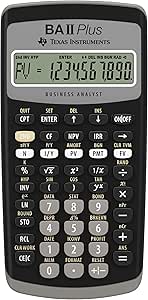 | Best for Business and Finance Majors | Brand: Texas Instruments | Model: BA II Plus (IIBAPL/TBL/1L1/C) | Functions: NPV, IRR, time-value-of-money, amortization, bond, depreciation, compound interest, and statistics | VIEW LATEST PRICE | See Our Full Breakdown |
| ROATEE 991ES MAX Scientific Calculator with LCD Writing Tablet |  | Best for Students Who Want a Built-In Scratchpad | Brand: ROATEE | Model: 991 ES MAX | Model number: AB0607 | VIEW LATEST PRICE | See Our Full Breakdown |
| Casio FX-115ESPLS Advanced Scientific Calculator |  | Best for Engineering and Advanced Science | Brand: Casio | Model: FX-115ESPLSB-WA-IT | Calculator type: Engineering/scientific | VIEW LATEST PRICE | See Our Full Breakdown |
| Casio FX-300ESPLSB-PK Scientific Calculator, Pink |  | Best for Everyday Math in a Distinctive Color | Brand: Casio | Model: FX-300ESPLSB-PK | Calculator type: Engineering/scientific | VIEW LATEST PRICE | See Our Full Breakdown |
| Texas Instruments TI-30XS MultiView Scientific Calculator |  | Best for Reviewing Multi-Step Work | Brand: Texas Instruments | Model: TI-30XS MultiView | Calculator type: Scientific | VIEW LATEST PRICE | See Our Full Breakdown |
| Texas Instruments TI-30Xa Scientific Calculator |  | Best Compact, No-Frills Scientific Pick | Brand: Texas Instruments | Model: TI-30Xa | Display: One-line, 10-digit | VIEW LATEST PRICE | See Our Full Breakdown |
| Texas Instruments TI-84 Evo Graphing Calculator, White |  | Best for Graphing, Programming, and Exam Prep | Brand: Texas Instruments | Model: TI-84 Evo | Calculator type: Graphing | VIEW LATEST PRICE | See Our Full Breakdown |
| iPepul Scientific Calculator with Notepad, 552 Functions, Pink |  | Best for Built-In Scratch Work | Brand: iPepul | Model: 991EX | Calculator type: Engineering/Scientific | VIEW LATEST PRICE | See Our Full Breakdown |
| Texas Instruments TI-34 MultiView Scientific Calculator |  | Best for Fraction-Focused Coursework | Brand: Texas Instruments | Model: TI-34 MultiView | Display: Four-line | VIEW LATEST PRICE | See Our Full Breakdown |
| Texas Instruments TI-30XIIS Scientific Calculator, Black |  | Best for Straightforward Exam Use | Brand: Texas Instruments | Model: TI-30XIIS | Display: Two-line | VIEW LATEST PRICE | See Our Full Breakdown |
| Texas Instruments TI-36X Pro Scientific Calculator |  | Best for Advanced Non-Graphing Coursework | Brand: Texas Instruments | Model: TI-36X Pro | Display: Four-line | VIEW LATEST PRICE | See Our Full Breakdown |
| CATIGA CS-121 Scientific & Graphing Calculator |  | Best Compact Graphing Pick | Brand: CATIGA | Model: CS-121 | Item weight: 4.8 ounces | VIEW LATEST PRICE | See Our Full Breakdown |
| calculators for college student | Brand | Model | Display | Warranty |
|---|---|---|---|---|
| Mr. Pen Scientific 2-Line Calc | — | — | 10+2-digit widescreen HD, 2-line display | — |
| Casio FX-300ESPLSB-WAIT Scient | Casio | FX-300ESPLSB-WAIT | LCD with Natural Textbook Display | 1-year manufacturer warranty |
| Texas Instruments TI-84 Plus C | — | — | Color | — |
| Texas Instruments BA II Plus F | Texas Instruments | BA II Plus (IIBAPL/TBL/1L1/C) | — | — |
| ROATEE 991ES MAX Scientific Ca | ROATEE | 991 ES MAX | Four-line LCD; 6.2 cm screen | 1 year |
| Casio FX-115ESPLS Advanced Sci | Casio | FX-115ESPLSB-WA-IT | LCD, 6.4 cm screen | 1-year manufacturer warranty |
| Casio FX-300ESPLSB-PK Scientif | Casio | FX-300ESPLSB-PK | LCD with natural textbook display | 1 year |
| Texas Instruments TI-30XS Mult | Texas Instruments | TI-30XS MultiView | Four-line MultiView display | — |
| Texas Instruments TI-30Xa Scie | Texas Instruments | TI-30Xa | One-line, 10-digit | 1-year limited warranty |
| Texas Instruments TI-84 Evo Gr | Texas Instruments | TI-84 Evo | — | — |
| iPepul Scientific Calculator w | iPepul | 991EX | 5-line LCD | — |
| Texas Instruments TI-34 MultiV | Texas Instruments | TI-34 MultiView | Four-line | 1-year limited |
| Texas Instruments TI-30XIIS Sc | Texas Instruments | TI-30XIIS | Two-line | 1-year limited |
| Texas Instruments TI-36X Pro S | Texas Instruments | TI-36X Pro | Four-line | 1-year limited warranty |
| CATIGA CS-121 Scientific & Gra | CATIGA | CS-121 | — | 1-year limited warranty |
More Details on Our Top Picks
Mr. Pen Scientific 2-Line Calculator – Fraction & College Math
The Mr. Pen two-line calculator is a practical fit for students who want to check an expression and its result together. Its 10+2-digit widescreen display keeps the entered calculation visible, which can make it easier to catch input errors during algebra, science, or other coursework. The listed 240 functions give it a broad scientific toolkit, while the hardcover helps protect it in a backpack. Compared with the Casio FX-300ESPLSB-WAIT, this model emphasizes a wider, dual-line screen and a larger stated function count rather than a familiar-notation display. The tradeoff is portability: the protective cover adds bulk, and the product details do not identify specific advanced functions or exam approval. Students who need graphing should step up to the TI-84 Plus CE instead.
Pros:- Dual-line display shows the entered expression alongside the result
- 240 listed scientific functions suit a range of non-graphing coursework
- Protective hardcover helps shield the calculator in a backpack
- Ergonomic grip supports comfortable handling
Cons:- Hardcover adds bulk compared with compact school calculators
- Product details do not specify which advanced functions are included
- Not presented as a graphing calculator
Best for: College students taking algebra, general science, or other courses who want a two-line screen for checking entries and results.
Not ideal for: Students in graphing-heavy courses or anyone prioritizing a slim backpack calculator; its cover adds bulk and graphing capability is not listed.
- Functions:240 scientific functions
- Display:10+2-digit widescreen HD, 2-line display
- Cover:Protective hardcover
- Design:Ergonomic grip
- Recommended age:3 years and up
- Calculator type:Scientific
Our verdict“Choose the Mr. Pen if you want a broad-function scientific calculator with a two-line screen and can accept a bulkier cover.”
Casio FX-300ESPLSB-WAIT Scientific Calculator
The Casio FX-300ESPLSB-WAIT is the straightforward pick for students moving through algebra and trigonometry who value readable notation over a long feature list. Its Natural Textbook Display presents formulas in familiar forms, helping students read what they entered without mentally translating every expression. The compact, 6.4-ounce body and included case suit daily trips between classes, while the described dual-power design adds flexibility. Compared with the Mr. Pen Scientific 2-Line Calculator, Casio highlights textbook-style formatting rather than a stated 240-function count and widescreen dual-line layout. Its limits matter for students planning more specialized work: the supplied details do not name advanced functions, and it requires an AAA battery. For visual graphing, the TI-84 Plus CE is a better fit, though it is a different class of calculator.
Pros:- Natural Textbook Display shows formulas in familiar notation
- Suitable for coursework from algebra through trigonometry
- Compact 6.4-ounce body is easy to carry between classes
- Protective case is included
Cons:- Requires an AAA battery
- Specific advanced functions are not listed in the supplied details
- Does not offer the color graphing features of the TI-84 Plus CE
Best for: Students in introductory algebra, geometry, or trigonometry who want textbook-style formula display in a compact calculator.
Not ideal for: Students who need a specified advanced scientific function set, graphing, or a rechargeable-only power setup.
- Brand:Casio
- Model:FX-300ESPLSB-WAIT
- Calculator type:Engineering/scientific
- Display:LCD with Natural Textbook Display
- Power:Dual-power design; 1 AAA battery included
- Dimensions:7 × 3.5 inches
- Weight:6.4 ounces
- Included accessory:Protective case
- Warranty:1-year manufacturer warranty
Our verdict“Pick the Casio FX-300ESPLSB-WAIT for introductory math classes where readable notation and easy portability matter more than advanced capabilities.”
Texas Instruments TI-84 Plus CE Color Graphing Calculator, Black
For college classes that rely on plots, tables, and visual exploration, the TI-84 Plus CE offers more than a standard scientific calculator can. Its color graphing display and MathPrint notation help students connect equations with their graphs and read fractions or symbols in a textbook-like format. The rechargeable battery, stated to last up to a month per charge, also avoids routine disposable-battery replacement, although actual runtime can vary. Compared with the Casio FX-300ESPLSB-WAIT, this is the stronger choice when graphing is part of the coursework, but the Casio is a simpler option for algebra and trigonometry basics. The TI-84’s extra capability may be unnecessary for students whose courses only call for scientific calculations. Its listed four-year online calculator subscription is an included digital component, not a substitute for checking course requirements.
Pros:- Color graphing supports visual exploration of math and science problems
- MathPrint displays textbook-style symbols, formulas, and fractions
- Rechargeable battery is stated to last up to one month per charge
- Lightweight design is suited to classroom use
Cons:- Actual battery life may vary from the stated maximum
- Graphing capability may be unnecessary for introductory coursework
- The supplied details do not specify the calculator’s dimensions or function count
Best for: Students in college math or science courses that require graphing, visual analysis, and textbook-style equation display.
Not ideal for: Students whose coursework only requires basic scientific calculations or who want a simpler, non-graphing calculator.
- Display:Color
- Graphing:Color graphing calculator
- Notation:MathPrint textbook-style symbols, formulas, and fractions
- Battery:Rechargeable; lasts up to one month per charge
- Color:Black
- Included subscription:4-year TI-84 Plus CE online calculator subscription
- Intended use:Math and science; middle school through college
Our verdict“Choose the TI-84 Plus CE when your college coursework calls for graphing and visual analysis rather than scientific calculations alone.”
Texas Instruments BA II Plus Financial Calculator
The TI BA II Plus earns a distinct place here because it handles finance problems that a general scientific calculator is not built around. Its time-value-of-money, NPV, and IRR functions, along with worksheets for amortization, bonds, and depreciation, map directly to common business and finance coursework. It also stores worksheet values and is approved for several professional exams, including the CFA and FRM. Compared with the Mr. Pen Scientific 2-Line Calculator, it is far more focused: students get finance workflows rather than a broad scientific function set. That focus is a limitation for students taking calculus or graphing-based courses, and the worksheets may take time to learn. The included slide case and light 3.68-ounce build make it easy to carry, but new users may need the manual to get comfortable with the more involved calculations.
Pros:- Handles NPV, IRR, and time-value-of-money calculations
- Worksheets cover amortization, bonds, depreciation, and compound interest
- Stores previous worksheet values in memory
- Approved for several professional exams, including CFA and FRM
Cons:- Finance worksheets may take time to learn
- A manual may be helpful for complex calculations
- Its specialized finance tools do not replace a general scientific or graphing calculator
Best for: Business, accounting, and finance students studying cash flows, amortization, bonds, or time-value-of-money calculations.
Not ideal for: Students seeking an all-purpose scientific or graphing calculator for calculus, physics, or general STEM coursework.
- Brand:Texas Instruments
- Model:BA II Plus (IIBAPL/TBL/1L1/C)
- Functions:NPV, IRR, time-value-of-money, amortization, bond, depreciation, compound interest, and statistics
- Weight:3.68 ounces
- Dimensions:6.48 × 2.98 × 0.72 inches
- Battery:1 CR123A battery included
- Material:ABS plastic
- Included accessory:Slide case
- Exam approval:Approved for several professional exams, including CFA and FRM
Our verdict“Choose the BA II Plus for finance-focused coursework and exam preparation, not as your only calculator for broad STEM classes.”
ROATEE 991ES MAX Scientific Calculator with LCD Writing Tablet
The ROATEE 991ES MAX combines a high stated function count with a feature the other picks lack: a separate LCD writing area and stylus for quick notes. Its 417 functions cover listed areas such as algebra, statistics, calculus, and matrices, while the four-line screen can show several calculations at once. That layout may help students keep intermediate work visible, unlike the two-line Mr. Pen Scientific Calculator. The writing tablet is handy for temporary notes, but it is not a substitute for paper or a full note-taking device; the erase control also works only when the lock key is unlocked. Rechargeable power is paired with an included coin battery, adding flexibility but also another battery type to track. Students who want a familiar, course-focused graphing tool may prefer the TI-84 Plus CE.
Pros:- 417 listed functions cover a broad range of math and science subjects
- Four-line LCD can show multiple calculations at once
- Built-in writing area and stylus support quick temporary notes
- Rechargeable power is supplemented by an included coin battery
Cons:- Writing area and erase button work only when the lock key is unlocked
- The included CR5 coin battery may need replacement
- Writing tablet is not a replacement for a full-size note-taking surface
Best for: Students in math and science courses who want many listed scientific functions, a multi-line calculation display, and a built-in scratchpad.
Not ideal for: Students who prefer a conventional calculator layout, need a graphing calculator, or do not want to manage a separate coin battery and writing-area lock.
- Brand:ROATEE
- Model:991 ES MAX
- Model number:AB0607
- Functions:417
- Display:Four-line LCD; 6.2 cm screen
- Writing tablet:LCD writing area with stylus
- Power:Rechargeable; includes one CR5 coin battery
- Dimensions and weight:6.32 × 3.28 inches; 5 ounces
- Warranty:1 year
Our verdict“Pick the ROATEE if a built-in scratchpad and four-line display are useful to your study routine, and you are comfortable with its extra controls and battery setup.”
Casio FX-115ESPLS Advanced Scientific Calculator
The Casio FX-115ESPLS is the strongest fit here for college students whose coursework moves beyond routine algebra into calculus, physics, or engineering. Its Natural Textbook Display lays out expressions in a familiar format, while matrix and vector calculations, equation solving, and built-in constants cover work that the simpler Casio FX-300ESPLSB-PK does not claim to support. That makes it a more capable scientific choice without stepping up to the graphing tools and programming of the TI-84 Evo. The tradeoff is that it remains a scientific calculator: students who need visual graphing or extensive programming should choose the TI-84 Evo instead. It also runs on an AAA battery, so it is not a rechargeable option.
Pros:- Natural Textbook Display makes expressions easier to read in familiar notation.
- Matrix and vector functions suit more advanced science and engineering assignments.
- Equation solving and built-in constants add useful tools for technical coursework.
- Compact 6.4-ounce design is practical for carrying between classes.
Cons:- Does not provide the graphing and Python tools found on the TI-84 Evo.
- Requires an AAA battery rather than charging by USB-C.
Best for: College students in calculus, physics, or engineering who need matrix, vector, and equation-solving functions but do not need graphing.
Not ideal for: Students who need to graph functions on the calculator, or who prefer a rechargeable power system.
- Brand:Casio
- Model:FX-115ESPLSB-WA-IT
- Calculator type:Engineering/scientific
- Display:LCD, 6.4 cm screen
- Power:Battery powered; 1 AAA battery included
- Dimensions:7 x 3.5 inches
- Weight:6.4 ounces
- Warranty:1-year manufacturer warranty
Our verdict“Choose this Casio for advanced scientific coursework when matrix and vector tools matter more than graphing.”
Casio FX-300ESPLSB-PK Scientific Calculator, Pink
The Casio FX-300ESPLSB-PK suits students who want a straightforward scientific calculator with a textbook-style display and a broad set of school-math functions. Its 262 functions cover math and algebra, while the natural display helps keep formulas and results readable. Compared with the more advanced Casio FX-115ESPLS, this model is the simpler pick: the supplied information does not list matrix, vector, or equation-solving tools, so students in technical majors may outgrow it sooner. It also lacks the TI-30XS MultiView‘s four-line screen for comparing calculations. The pink finish gives it a clear personal style, but its practical value depends on whether its function set matches the courses ahead. It uses an included AAA battery and is not rechargeable.
Pros:- Natural textbook display presents formulas and results in a familiar layout.
- 262 functions cover a broad range of school math and algebra tasks.
- AAA battery is included for use without a separate battery purchase.
- Compact 7 x 3.5-inch format is easy to carry in a backpack.
Cons:- The listed features do not include the advanced matrix and vector tools of the FX-115ESPLS.
- Single LCD display does not offer the TI-30XS MultiView’s four-line comparison view.
- Battery-powered rather than rechargeable.
Best for: Students taking general math or algebra who want a textbook-style display, a broad function set, and a pink calculator.
Not ideal for: Engineering and advanced science students who need listed matrix, vector, or equation-solving functions, or learners who want a multi-line calculation view.
- Brand:Casio
- Model:FX-300ESPLSB-PK
- Calculator type:Engineering/scientific
- Functions:262
- Display:LCD with natural textbook display
- Power:Battery powered; 1 AAA battery included
- Color:Pink
- Dimensions:7 x 3.5 inches
- Warranty:1 year
Our verdict“Pick this pink Casio for everyday math and algebra if its simpler scientific toolkit fits your course plan.”
Texas Instruments TI-30XS MultiView Scientific Calculator
The TI-30XS MultiView earns its place for students who benefit from seeing more of their work at once. Its four-line display can show and compare multiple calculations, and textbook-style expressions with stacked fractions make it easier to check how an answer was entered. Function tables add a useful bridge from algebraic rules to values, without requiring the graphing capabilities of the TI-84 Evo. Compared with the single-line TI-30Xa, the MultiView is better suited to following multi-step problems and spotting entry errors. The supplied product details do not specify power source, dimensions, or advanced engineering functions, so I would not choose it on those assumptions. Its stated subject range is broad, but students needing dedicated matrix or vector tools should check another model.
Pros:- Four-line display lets students view and compare multiple calculations.
- Textbook-style expressions and stacked fractions make entries easier to inspect.
- Generates function-value tables for entered or automatically selected x values.
- Supports a wide range of general math and science subjects.
Cons:- Does not provide the graphing and programming capabilities of the TI-84 Evo.
- Product details do not specify power source or physical dimensions for planning around battery needs and portability.
Best for: Students in algebra, geometry, statistics, or general science who want to review several lines of work and use function tables.
Not ideal for: Students who need graphing, Python programming, or confirmed advanced engineering functions such as matrix and vector calculations.
- Brand:Texas Instruments
- Model:TI-30XS MultiView
- Calculator type:Scientific
- Display:Four-line MultiView display
- Expression display:Textbook-style expressions, symbols, and stacked fractions
- Scientific notation:Displays superscripted exponents
- Function tables:Generates (x,y) tables automatically or for entered x values
- Intended subjects:General math, pre-algebra, Algebra 1 and 2, geometry, statistics, general science, biology, and chemistry
Our verdict“Choose the TI-30XS MultiView if seeing several lines of math at once matters more than graphing or advanced engineering tools.”
Texas Instruments TI-30Xa Scientific Calculator
The TI-30Xa is the straightforward choice for students who need core scientific functions in a light, simple package. It handles fractions, trigonometry, logarithms, roots, and one-variable statistics, while its conversions cover common angle and coordinate formats. At 3.52 ounces, it is lighter than the Casio FX-115ESPLS and includes a slide case for protection in a crowded backpack. Its biggest compromise is the one-line display: unlike the TI-30XS MultiView, it cannot show several lines of calculations together, making long expressions harder to inspect. That simplicity may suit students who prefer a familiar basic layout, but it offers less visual support than the MultiView and fewer stated advanced tools than the FX-115ESPLS. It also relies on batteries.
Pros:- Light 3.52-ounce build is easy to carry between classes.
- Slide case protects the calculator when stored in a bag.
- Handles fractions, trigonometry, logarithms, and one-variable statistics.
- Includes useful conversions for angles, fractions, and coordinate forms.
Cons:- One-line display is less convenient for checking multi-step entries than the TI-30XS MultiView.
- Battery-powered design requires batteries.
- Does not list the matrix, vector, or equation-solving capabilities of the Casio FX-115ESPLS.
Best for: Students taking general math, algebra, trigonometry, or introductory science who want a lightweight calculator with a protective case.
Not ideal for: Students who want to review multi-step calculations on-screen, use function tables, or need matrix and vector functions.
- Brand:Texas Instruments
- Model:TI-30Xa
- Display:One-line, 10-digit
- Power:Battery powered
- Functions:Fractions, trigonometry, logarithms, roots, powers, reciprocals, factorials, and one-variable statistics
- Conversions:Fractions/decimals, degrees/radians/grads, DMS/decimal/degrees, and polar/rectangular
- Included accessory:Slide case
- Weight:3.52 ounces
- Warranty:1-year limited warranty
Our verdict“Choose the TI-30Xa for portable, familiar scientific calculations if a one-line display is enough for your coursework.”
Texas Instruments TI-84 Evo Graphing Calculator, White
The TI-84 Evo is the most capable classroom option in this group for students whose courses call for graphing, coding, or an approved exam calculator. Its icon-based interface and increased graphing space are aimed at making functions and data easier to work with than on a conventional scientific model such as the TI-30XS MultiView. Built-in Python programming extends its use beyond routine calculations, while stated compatibility includes ACT, SAT, PSAT/NMSQT, IB Diploma Programme, and AP exams. That extra range comes with a tradeoff: students taking general math or introductory science may find a graphing model unnecessary when a simpler Casio FX-300ESPLSB-PK covers their needs. The listing also names both USB-C charging and an AAA battery, so the power setup is unclear and worth checking before purchase.
Pros:- Graphing format offers more visual tools than the scientific calculators in this group.
- Icon-based interface puts common tools within easy reach.
- Built-in Python supports programming alongside coursework.
- Listed as compatible with ACT, SAT, PSAT/NMSQT, IB Diploma Programme, and AP exams.
Cons:- More capability than students in general math courses may need.
- Product details list USB-C charging as well as an AAA battery, leaving the power arrangement unclear.
- The included online calculator subscription is limited to four years.
Best for: Students in graph-heavy math or science courses who want Python tools and a calculator listed as compatible with major standardized exams.
Not ideal for: Students who only need routine algebra or basic scientific functions, or who want a clearly specified single power method.
- Brand:Texas Instruments
- Model:TI-84 Evo
- Calculator type:Graphing
- Color:White
- Screen size:2.8 inches
- Charging:USB-C
- Battery specification:Listed as battery powered with 1 AAA battery
- Programming:Built-in Python
- Exam compatibility:ACT, SAT, PSAT/NMSQT, IB Diploma Programme, and AP exams
Our verdict“Choose the TI-84 Evo for graphing-heavy coursework, Python, and exam use if you are comfortable confirming its power setup.”
iPepul Scientific Calculator with Notepad, 552 Functions, Pink
The iPepul pairs a 552-function scientific calculator with a small writing pad, a useful combination for students who work through calculations and want somewhere to jot a step without reaching for paper. Its five-line display also gives more room to inspect expressions than the two-line TI-30XIIS. Functions span algebra, trigonometry, statistics, calculus, matrices, and complex numbers, making it broader than the more intermediate-focused TI-34 MultiView. That breadth may appeal to students in technical courses, but the listing does not clarify how its battery setup works: it mentions USB-C charging, solar power, and included lithium-ion batteries. The writing surface is a study aid, not a substitute for a graphing calculator or a full notebook. I’d choose it for its combined scratch-pad and calculation format, not for the most established exam-focused option.
Pros:- 552 functions cover a wide range of scientific and technical subjects.
- Built-in writing pad with a lock key supports quick scratch work.
- Five-line display provides more expression visibility than the TI-30XIIS two-line screen.
- Lists both USB-C rechargeable and solar power.
Cons:- Battery details are unclear despite references to rechargeable, solar, and included lithium-ion power.
- No graphing functions are specified.
- The listing does not state exam approval.
Best for: College students in math or science courses who want a broad scientific function set and a built-in place for quick handwritten notes.
Not ideal for: Students who need graphing, a clearly specified power setup, or a familiar exam-approved model with established exam eligibility information.
- Brand:iPepul
- Model:991EX
- Calculator type:Engineering/Scientific
- Functions:552
- Display:5-line LCD
- Screen size:2.7 inches
- Power source:Type-C rechargeable and solar
- Writing pad:Built-in, with lock key
- Dimensions:6.5 x 3.2 inches
Our verdict“Choose the iPepul if a built-in scratch pad and broad scientific functions matter more than clear battery details or graphing.”
Texas Instruments TI-34 MultiView Scientific Calculator
The TI-34 MultiView is a sensible fit for students who want to see math in a more textbook-like format without stepping up to a graphing model. Its four-line MathPrint display and advanced fraction tools make it easier to inspect stacked expressions and follow fraction simplification than on the two-line TI-30XIIS. Statistics, function tables, and menus add useful range for intermediate coursework, while its SAT, ACT, and AP approval gives it an exam-friendly edge over the iPepul, whose supplied details do not list exam eligibility. The tradeoff is scope: this is an intermediate scientific calculator, not a tool for graphing or the broader equation, matrix, and vector work offered by the TI-36X Pro. I’d favor it when clear fraction work and exam compatibility matter more than advanced college-level functions.
Pros:- Four-line MathPrint display shows textbook-style expressions and stacked fractions.
- Advanced fraction tools include step-by-step simplification.
- Statistics and function tables support varied intermediate coursework.
- Approved for SAT, ACT, and AP exams.
Cons:- Designed for intermediate math rather than advanced graphing or technical coursework.
- Does not offer the matrix, vector, derivative, and integral tools listed for the TI-36X Pro.
Best for: Students taking algebra, statistics, or other intermediate math who value clear fractions and want a calculator approved for SAT, ACT, and AP exams.
Not ideal for: College students whose courses require graphing, matrix or vector operations, or more advanced equation-solving tools.
- Brand:Texas Instruments
- Model:TI-34 MultiView
- Display:Four-line
- Power:Solar and battery
- Item weight:4.64 ounces
- Warranty:1-year limited
- Display feature:Textbook-style MathPrint
- Exam approval:SAT, ACT, and AP
Our verdict“Pick the TI-34 MultiView for exam-approved intermediate math and readable fraction work, but choose the TI-36X Pro for more advanced course tools.”
Texas Instruments TI-30XIIS Scientific Calculator, Black
The TI-30XIIS keeps the job simple: it displays an entry and its result together, with functions for fractions, statistics, conversions, and trigonometry. That makes it a practical choice for students who want an exam-approved scientific calculator without the extra menus and broader tools of the TI-36X Pro. Its two-line display is the clear compromise. It shows more context than a one-line screen, but less of an expression at once than the four-line TI-34 MultiView, which is better suited to checking longer textbook-style calculations. Solar and battery power offer flexibility, though the battery type is not specified in the supplied details. I’d choose this model for routine course calculations and exam use; students working with matrices, vectors, or more involved expressions should look higher in the lineup.
Pros:- Two-line screen shows the calculation entry and result together.
- Includes statistics, fraction, conversion, and trigonometric functions.
- Solar and battery power provide two power sources.
- Approved for SAT, ACT, and AP exams.
Cons:- Two-line display offers less room for expressions than the TI-34 MultiView and TI-36X Pro.
- Battery type is not specified in the supplied product details.
- Does not list the advanced equation, matrix, or vector tools of the TI-36X Pro.
Best for: Students who need an uncomplicated scientific calculator for routine coursework and SAT, ACT, or AP exam use.
Not ideal for: Students who regularly work with long expressions, want a four-line display, or need advanced tools such as matrices and vectors.
- Brand:Texas Instruments
- Model:TI-30XIIS
- Display:Two-line
- Power:Solar and battery
- Item weight:6.2 ounces
- Warranty:1-year limited
- Exam approval:SAT, ACT, and AP
Our verdict“Choose the TI-30XIIS for basic scientific work and exam eligibility; opt for a four-line model if you need more expression visibility.”
Texas Instruments TI-36X Pro Scientific Calculator
For students whose coursework goes beyond routine scientific calculations, the TI-36X Pro packs substantial capability into a non-graphing format. Its four-line MathPrint display presents expressions in textbook-style notation, while equation-solving tools, statistics, matrices, vectors, derivatives, and integrals cover needs that the TI-30XIIS and TI-34 MultiView do not match as fully. It is also solar-powered and approved for SAT, ACT, and AP exams, which makes it a versatile choice across coursework and eligible testing. The main limit is explicit: it cannot graph, so it is not a replacement for the TI-84 Plus CE when a course calls for plotting or visual exploration. Its display may also be harder to read when the calculator lies flat on a desk. I’d rank it above simpler scientific models for technical coursework, but below a graphing model when visual analysis is required.
Pros:- Four-line MathPrint display presents expressions and fractions in textbook-style notation.
- Equation solvers, matrices, vectors, statistics, derivatives, and integrals support advanced coursework.
- Solar-powered operation avoids reliance on a listed replaceable battery.
- Approved for SAT, ACT, and AP exams.
Cons:- No graphing functions, unlike the TI-84 Plus CE.
- Display may be difficult to read when the calculator is flat on a desk.
Best for: College students in math and science courses who need equation solving, matrices, vectors, derivatives, and integrals without graphing.
Not ideal for: Students in courses that require plotting graphs or anyone who needs a screen that is easy to read while the calculator lies flat.
- Brand:Texas Instruments
- Model:TI-36X Pro
- Display:Four-line
- Power:Solar-powered
- Item weight:5.12 ounces
- Warranty:1-year limited warranty
- Exam approval:SAT, ACT, and AP
- Graphing:No graphing functions
Our verdict“Choose the TI-36X Pro for advanced scientific coursework without graphing; select a graphing calculator if your classes require plots.”
CATIGA CS-121 Scientific & Graphing Calculator
The CATIGA CS-121 stands apart from the scientific-only TI-36X Pro by combining scientific and graphing functions in a handheld 4.8-ounce body. Its listed operations cover algebra, trigonometry, calculus, and statistics, while the LCD can show equations and graphs together—a helpful way to connect an expression with its plotted shape. The 7-by-3.3-inch size is portable, but the screen is only three inches, so detailed graphs may be harder to inspect than on the larger-screen TI-84 Plus CE. Its single included LR44 battery is another tradeoff: unlike the TI-36X Pro’s solar power, this model has no rechargeable option listed. The supplied details also do not mention exam approval, so students should check their course or testing rules before relying on it. It suits buyers who want basic graphing in a compact format, not those who need a larger display.
Pros:- Combines scientific and graphing functions in one handheld calculator.
- More than 360 listed operations cover algebra, trigonometry, calculus, and statistics.
- Compact 4.8-ounce design is easy to carry between classes.
- LCD displays equations and graphs simultaneously.
Cons:- Three-inch screen can make detailed graphs difficult to read compared with the TI-84 Plus CE.
- Uses a single LR44 battery and has no rechargeable option listed.
- The supplied product details do not state exam approval.
Best for: Students who want a lightweight calculator with both scientific and graphing functions for coursework that benefits from viewing equations alongside plots.
Not ideal for: Students who need a larger graphing screen, rechargeable or solar power, or confirmed exam approval.
- Brand:CATIGA
- Model:CS-121
- Item weight:4.8 ounces
- Screen size:3 inches
- Battery:1 LR44 battery, included
- Display type:LCD
- Dimensions:7 x 3.3 inches
- Warranty:1-year limited warranty
- Functions:Over 360
Our verdict“Choose the CATIGA CS-121 for portable graphing and scientific functions, but favor the TI-84 Plus CE when screen size or confirmed exam support matters.”

How We Picked
I ranked these calculators by how well they serve real college use: course coverage, ease of entering and checking expressions, display readability, portability, and usefulness beyond a narrow set of tasks. I gave priority to models that can support a broad range of common coursework without making students pay for complexity they may not need. I also separated scientific, graphing, and financial calculators rather than treating their feature counts as directly comparable.
That logic puts the TI-30XS MultiView first as a practical balance for many students, with the TI-36X Pro and FX-115ESPLS higher for students who need more advanced scientific functions. Graphing models rank well for courses that call for them but lower as general recommendations because course policies and student needs vary. Simpler scientific calculators remain sensible for introductory classes, while tablet-equipped and less familiar models must justify their added features through actual classroom usefulness. Before buying, check your department’s approved-device list: a calculator’s capabilities can be a drawback if an instructor or exam does not allow them.
| calculators for college student | Brand | Power |
|---|---|---|
| Mr. Pen Scientific 2-Line Calc | — | — |
| Casio FX-300ESPLSB-WAIT Scient | Casio | Dual-power design; 1 AAA battery included |
| Texas Instruments TI-84 Plus C | — | — |
| Texas Instruments BA II Plus F | Texas Instruments | — |
| ROATEE 991ES MAX Scientific Ca | ROATEE | Rechargeable; includes one CR5 coin battery |
| Casio FX-115ESPLS Advanced Sci | Casio | Battery powered; 1 AAA battery included |
| Casio FX-300ESPLSB-PK Scientif | Casio | Battery powered; 1 AAA battery included |
| Texas Instruments TI-30XS Mult | Texas Instruments | — |
| Texas Instruments TI-30Xa Scie | Texas Instruments | Battery powered |
| Texas Instruments TI-84 Evo Gr | Texas Instruments | — |
| iPepul Scientific Calculator w | iPepul | — |
| Texas Instruments TI-34 MultiV | Texas Instruments | Solar and battery |
| Texas Instruments TI-30XIIS Sc | Texas Instruments | Solar and battery |
| Texas Instruments TI-36X Pro S | Texas Instruments | Solar-powered |
| CATIGA CS-121 Scientific & Gra | CATIGA | — |
Factors to Consider When Choosing Calculators For College Students
Calculator choice is less about finding the model with the longest function list and more about avoiding a mismatch with your classes. I’d start with course rules and the math you will actually do, then weigh ease of use and portability against specialized features.
Start With Your Course and Exam Rules
Check syllabi, department guidance, and exam policies before choosing a model. Some courses allow scientific calculators but restrict graphing or programmable models, so an expensive feature set can become unusable during the moments you need it most. Policies may also differ between classes, even within the same major. If several courses have different rules, choose a model permitted by the most restrictive class or ask instructors whether you may keep a second calculator. Don’t assume that a model accepted in high school will be approved for a college exam. Confirm the exact model name, since similar-looking versions can have different capabilities.
Match Calculator Type to Your Coursework
Scientific calculators cover many introductory math, statistics, and science tasks, while graphing models are aimed at visualizing functions and working with graph-based problems. Financial calculators use specialized functions for business and finance calculations that a typical scientific model may not handle conveniently. A STEM major does not automatically need a graphing calculator; the syllabus and problem style matter more than the degree label. Likewise, a business student may need a financial model for a particular course rather than an all-purpose scientific calculator. Buying by course requirement prevents paying for functions that remain unused or choosing a model that misses a required task.
Choose a Display You Can Read and Check
A clear display helps you spot input mistakes before they affect a long calculation. Multi-line or natural-expression displays can show more of an equation at once, which is useful when working with fractions, parentheses, or nested expressions. A simpler screen may be easier to learn and entirely adequate for routine calculations, but it can require more steps to verify what you entered. Think about whether you prefer seeing an expression as written in a textbook or entering it through a more traditional sequence. If possible, try the keypad layout in a store or inspect a clear product image; button placement can matter more than a headline function count during timed work.
Treat Function Counts as a Starting Point
A long list of functions does not tell you whether a calculator handles your assignments comfortably. Check for the specific operations named in your course materials, such as equation solving, matrices, fractions, or complex-number work. Also ask whether a feature is easy to reach or buried behind multiple menus. Students often buy extra capability as a form of future-proofing, then discover that course restrictions prevent its use or that their classes never call for it. A focused scientific calculator can be a better study tool than a more capable model if its controls are clearer for your daily tasks. Match functions to actual course topics rather than treating more as automatically better.
Weigh Portability, Power, and Durability
A calculator carried between lectures, labs, and exams should fit comfortably in a bag and have buttons that tolerate regular use. Check the power source and whether the model relies on replaceable batteries, solar support, or a rechargeable setup; the practical choice depends on how you prefer to manage power. A solar-assisted model may reduce battery worries in bright settings, while a screen-equipped graphing model can need more deliberate charging or battery planning. Protective covers and sturdy keypads matter if the calculator will share space with books and laptop accessories. Avoid choosing solely by appearance: a color finish or add-on notepad does not compensate for a cramped screen or awkward controls.
Decide Whether One Calculator Can Cover Your Classes
One versatile model can reduce clutter, but a single calculator may not satisfy every course or exam rule. If most classes need only scientific functions and one finance course requires specialized calculations, a dedicated financial calculator may be the cleaner solution than replacing your everyday model. Students in graph-heavy courses should ask whether graphing is expected regularly or only demonstrated in class. Carrying two devices adds cost and the chance of bringing the wrong one to an exam, so label them and review allowed equipment ahead of time. A clear plan by course often beats buying the most capable model available and hoping it covers everything.
Frequently Asked Questions
Should I buy a graphing calculator before I know what my college courses require?
I would wait until you check the syllabus or department guidance. Graphing models such as the TI-84 Plus CE and TI-84 Evo are useful when courses rely on visual graphing tools, but some exams limit calculator types. A scientific model may cover your early coursework at lower complexity, and you can upgrade if a later class requires graphing. If you already own a graphing calculator, confirm that it is permitted before bringing it to an exam. The course policy matters more than choosing the most capable model in advance.
Is a financial calculator useful if I am not a finance major?
The BA II Plus is most useful when a class assigns finance-specific calculations, such as time-value-of-money problems. For general math, science, or introductory statistics, its specialized focus may be less helpful than a scientific calculator. Some business, economics, or accounting courses may require one even when finance is not your major, so check the course list before deciding. If only one class calls for it, compare the course requirement with your everyday calculator needs rather than expecting one device to excel at both. Ask the instructor whether another approved model can perform the required work.
Can a basic scientific calculator cover most first-year college classes?
It can cover many routine calculations in general education, introductory math, and some science courses, but it is not a universal choice. Course work involving graphing, advanced scientific functions, or finance may call for a more specialized model. The TI-30Xa represents a simpler approach, while models such as the TI-30XS MultiView provide a display that can make equations easier to review. Check what your classes expect before relying on a basic calculator for the whole year. A model that is adequate for homework may also face different restrictions during exams.
Do the writing-tablet or notepad features replace a notebook?
No; the writing surfaces on the ROATEE and iPepul are best treated as quick scratch space, not a dependable replacement for class notes. They may be handy for jotting an intermediate result or a short reminder, but they do not provide the same room, organization, or long-term reference value as a notebook or digital note system. Check whether saved writing can be retained and whether the device suits the way you study. These add-ons should come after calculator functions and exam approval in your decision. If you already carry a tablet or notebook, the extra feature may add little value.
What should I do if my classes have different calculator rules?
Write down the allowed models or calculator types for each course before buying. If one model is permitted across all your classes and handles the work you need, it can simplify exam preparation. If a course requires a specialized financial or graphing calculator, decide whether a second device is necessary rather than assuming your everyday scientific model can substitute. Keep any required calculator separate from models that are not allowed in exams, and verify policies again before test day. When a rule is unclear, ask the instructor using the exact model name.
Conclusion
For most college students, I recommend the TI-30XS MultiView as the best overall balance of everyday scientific use and an easy-to-review display. Students seeking a value-focused, straightforward option should compare simpler models such as the TI-30Xa, while beginners who want a more readable expression display may prefer the TI-30XS MultiView. For advanced science and math, the TI-36X Pro is my pick for a broader scientific toolkit; for graph-heavy coursework, choose the TI-84 Plus CE or TI-84 Evo only when your classes permit and use graphing features. Finance students should look to the BA II Plus for specialized financial work. Check your course rules first, then choose the least complicated calculator that covers the work you actually have to do.
Halloween Picks
halloween
As an affiliate, we earn on qualifying purchases.






![Competitive Programmer's Handbook (2018) [Pdf]](https://haltmal.com/wp-content/uploads/2026/10/competitive-programmer-s-handbook-2018-pdf-featured-260x140.jpg)