The best kids programmable coding robots combine approachable coding with enough play or building to keep children engaged. I rank the Wonder Workshop Dash as the best overall for its child-friendly coding focus, while Learning Resources Botley is a strong screen-free starting point and Makeblock mBot suits kids ready for a more hands-on STEM build. The main tradeoff is between simple, immediate play and robots that offer more room to build, code, and troubleshoot. Age, reading confidence, screen use, and adult setup time can matter as much as the robot’s feature list. Read on for the full comparison and help matching each option to your child.

Prime made for students and young adults
- Fast, free delivery for dorm and study essentials
- Prime Video and Amazon Music included
- Member-only deals
Key Takeaways
- Dash leads as the all-around coding choice because its core purpose is teaching children to program a responsive robot, while several other picks lean more toward building or interactive play.
- Botley and the Code & Go Mouse offer screen-free routes, but Botley is a more flexible robot while the mouse set centers on sequencing a path through a maze.
- mBot, Apitor Robot J, and Sillbird are build-first picks; their construction adds engineering practice but also asks for more patience and adult support than ready-to-use robots.
- Ozobot Evo and Sphero Mini use compact, movement-based play, making them easier to store and carry than larger interactive robots, though small size can limit how substantial the build experience feels.
- Two Ruko 1088 listings and two Botley listings appear; buyers should compare the exact included accessories and set contents rather than treating repeated product names as distinct robot platforms.
| Teach Tech Mech-5 STEM Coding Robot Building Kit for Kids Ages 10+ |  | Best for Mechanical Engineering | Brand: Teach Tech | Model: TTC-895 | Recommended age: 10 years and up | VIEW LATEST PRICE | See Our Full Breakdown |
| Makeblock mBot STEM Coding Robot Kit for Kids Ages 8+ | 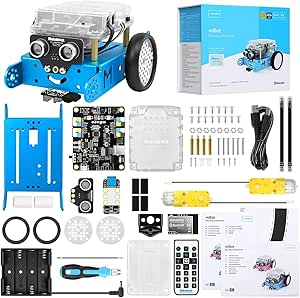 | Best for Coding Progression | Brand: Makeblock | Model: 90053 | Age range: 8 years and up | VIEW LATEST PRICE | See Our Full Breakdown |
| Learning Resources Code & Go Robot Mouse Activity Set | 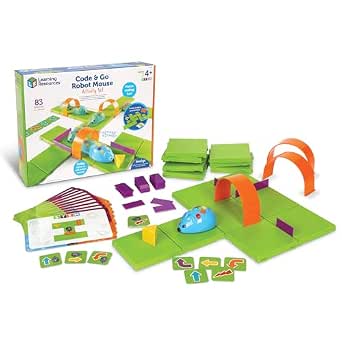 | Best for Young Beginners | Brand: Learning Resources | Model: LER2831 | Recommended age: 4 years and up | VIEW LATEST PRICE | See Our Full Breakdown |
| Ruko 1088 Programmable Interactive Robot Toy for Kids, Gold |  | Best for Interactive Play | Brand: Ruko | Model: 1088 | Color: Gold | VIEW LATEST PRICE | See Our Full Breakdown |
| Ozobot Evo Coding Robot Kit |  | Best for Screen-Free and Digital Coding | Brand: Ozobot | Model: Evo Entry Kit | Recommended age: 5 years and up | VIEW LATEST PRICE | See Our Full Breakdown |
| ACEBOTT 4-in-1 Programmable Robot Arm and Tank Car STEM Kit |  | Best for Modular Building and Robotics Depth | Recommended age: 12 years and up | Controller: ESP32 | Robot arm: 5DOF programmable arm | VIEW LATEST PRICE | See Our Full Breakdown |
| Learning Resources Botley the Coding Robot |  | Best Screen-Free Coding Starter | Recommended age: 5–8 years | Programmable steps: Up to 80 | Coding features: Sequencing, loops, and if/then logic | VIEW LATEST PRICE | See Our Full Breakdown |
| Sphero Mini Green Coding Robot Ball |  | Best Compact App-Based Coder | Recommended age: 8 years and up | Play location: Tabletop | Playtime: Up to 1 hour | VIEW LATEST PRICE | See Our Full Breakdown |
| Educational Insights PYXEL Coding Robot for Kids |  | Best Coding Pet for Blockly-to-Python Learning | Recommended age: 8–14 years | Coding languages: Blockly and Python | Connectivity: Password-protected Wi-Fi; no internet connection or app required | VIEW LATEST PRICE | See Our Full Breakdown |
| Ruko 1088 Programmable Interactive Robot Toy for Kids |  | Best for Big, Multi-Mode Play | Recommended age: 4–9 years | Height: 15.8 inches | Expressions: 10 | VIEW LATEST PRICE | See Our Full Breakdown |
| Apitor Robot J 6-in-1 STEM Coding Robot Building Kit, 480 Pieces |  | Best for Multi-Model Building | Recommended age: 7–12 years | Buildable models: 6 | Pieces: 480 | VIEW LATEST PRICE | See Our Full Breakdown |
| Learning Resources Botley the Coding Robot Activity Set | 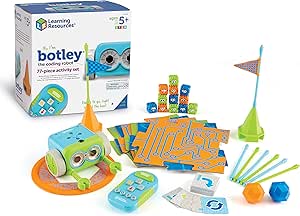 | Best Screen-Free Starter | Recommended age: 5 years and up | Coding method: Screen-free remote programmer | Included coding cards: 40 | VIEW LATEST PRICE | See Our Full Breakdown |
| Wonder Workshop Dash Coding Robot for Kids Ages 6 and Up |  | Best for App-Based Coding Lessons | Recommended age: 6 years and up | App compatibility: Apple iOS, Android OS, and Fire OS | Coding concepts: Sequencing, loops, algorithms, and variables | VIEW LATEST PRICE | See Our Full Breakdown |
| Thames & Kosmos My Robotic Pet: Coding Chameleon |  | Best Screen-Free Coding Pet | Recommended age: 8–12 years | Length: 15 inches | Play modes: Coding, Wild, and Pet | VIEW LATEST PRICE | See Our Full Breakdown |
| Sillbird 5-in-1 Programmable STEM Robot Building Kit with App and Remote Control, 488 Pieces |  | Best for Dual-Control Building Play | Recommended age: 8–16 years | Pieces: 488 | Buildable models: 5-in-1; includes robot, dinosaur, car, and tank | VIEW LATEST PRICE | See Our Full Breakdown |
| kids programmable coding robot | Recommended age |
|---|---|
| Teach Tech Mech-5 STEM Coding | 10 years and up |
| Makeblock mBot STEM Coding Rob | — |
| Learning Resources Code & Go R | 4 years and up |
| Ruko 1088 Programmable Interac | 4–9 years |
| Ozobot Evo Coding Robot Kit | 5 years and up |
| ACEBOTT 4-in-1 Programmable Ro | 12 years and up |
| Learning Resources Botley the | 5–8 years |
| Sphero Mini Green Coding Robot | 8 years and up |
| Educational Insights PYXEL Cod | 8–14 years |
| Ruko 1088 Programmable Interac | 4–9 years |
| Apitor Robot J 6-in-1 STEM Cod | 7–12 years |
| Learning Resources Botley the | 5 years and up |
| Wonder Workshop Dash Coding Ro | 6 years and up |
| Thames & Kosmos My Robotic Pet | 8–12 years |
| Sillbird 5-in-1 Programmable S | 8–16 years |
More Details on Our Top Picks
Teach Tech Mech-5 STEM Coding Robot Building Kit for Kids Ages 10+
Mech-5 makes the robot itself part of the lesson: children build the mechanism, then arrange snap-on buttons on a coding wheel to sequence its actions. That tactile approach suits older kids who want to see how a program translates into movement, including lifting, kicking, throwing, and drawing. Compared with the Makeblock mBot, Mech-5 puts more emphasis on assembly and mechanical action, while mBot offers Scratch and Arduino programming alongside obstacle avoidance and line-following. The tradeoff is that Mech-5 takes multiple hours to assemble and its mechanical coding is less suited to children ready to progress into app-based coding. I’d choose it for a patient builder aged 10 or older; families seeking a quicker start or broader digital coding path should look at mBot instead.
Pros:- Hands-on assembly connects construction choices to how the robot moves.
- Tactile coding wheel lets children sequence actions without a screen.
- Performs varied actions, including lifting, kicking, throwing, and drawing.
- Includes assembly parts and an English instruction manual.
Cons:- Multiple hours of assembly can be a barrier for children who want to start playing quickly.
- Designed for ages 10 and up, limiting its fit for younger beginners.
- Mechanical coding offers a narrower digital programming path than the Makeblock mBot.
Best for: Families with a patient builder aged 10 or older who wants to learn how physical mechanisms and coded sequences work together.
Not ideal for: Younger children or families looking for a robot that is ready to use quickly or teaches app-based block coding.
- Brand:Teach Tech
- Model:TTC-895
- Recommended age:10 years and up
- Programming method:Mechanical coding wheel with snap-on coding buttons
- Robot actions:Moves forward and backward, rotates 360 degrees, throws, lifts, kicks, and draws
- Assembly:Unassembled kit; multiple hours of build time
- Included components:Assembly parts and English instruction manual
- Manufacturer:Elenco Electronics LLC
Our verdict“Choose Mech-5 for an older child who wants a substantial build and tangible mechanical coding, and choose the Makeblock mBot for app-based coding and quicker setup.”
Makeblock mBot STEM Coding Robot Kit for Kids Ages 8+
mBot is a strong pick for children ready to move from a simple coding toy toward programming tools they can grow into. It introduces electronics and robotics through a buildable kit, then supports Scratch, Arduino, and mBlock, with line-following, obstacle avoidance, and remote control to make programs feel active. Its assembly takes about 15 minutes, a much easier start than the multi-hour Teach Tech Mech-5 build. Mech-5 offers more tactile mechanical construction, while mBot has a clearer route into screen-based coding and add-on projects. That wider scope brings a tradeoff: families need four AA batteries for the robot and a CR2025 for the remote, and younger children may need help as they get started. I’d pick mBot for an eight-year-old ready to explore coding beyond button sequences.
Pros:- Supports Scratch, Arduino, and mBlock for a wider coding progression.
- Line-following, obstacle avoidance, and remote control make code and robot behavior visible.
- About 15 minutes of assembly helps children reach the coding activities quickly.
- Compatible with Makeblock add-ons and LEGO parts.
Cons:- Robot and remote batteries are not included.
- Children may need guidance with the electronics and coding setup.
- Offers less extended mechanical assembly than the Teach Tech Mech-5.
Best for: Families with children aged 8 or older who want a buildable robot with a path from beginner-friendly Scratch toward Arduino.
Not ideal for: Buyers seeking a screen-free coding experience or a kit that arrives ready to run without sourcing batteries.
- Brand:Makeblock
- Model:90053
- Age range:8 years and up
- Programming platforms:Scratch, Arduino, and mBlock
- Functions:Line-following, obstacle avoidance, and remote control
- Assembly time:About 15 minutes
- Robot batteries:4 AA batteries, not included
- Remote battery:1 CR2025 battery, not included
- Compatibility:Makeblock add-on packs, electronic modules, parts, and LEGO parts
Our verdict“Choose mBot for a child ready to grow from basic coding into Scratch and Arduino, provided you have compatible batteries and can offer setup help.”
Learning Resources Code & Go Robot Mouse Activity Set
Code & Go Robot Mouse is the most direct first step here for preschool-age coders. Children plan a path through a maze with coding cards, then enter the sequence on Colby’s buttons, so they can connect instructions to movement without using a screen. The included grids, walls, tunnels, and activity cards give families a structured way to change the challenge. Compared with the Ozobot Evo, which adds online Blockly and multiple skill levels, Robot Mouse keeps the activity centered on simple route planning and physical cards. That simplicity suits younger beginners, but it also means less variety in programming methods as a child advances. The maze board needs room to spread out, and the three AAA batteries are not included. I’d choose it for early sequencing practice; older children seeking deeper coding options may outgrow it sooner.
Pros:- Screen-free cards and button controls make the basic programming loop concrete.
- Maze grids, walls, tunnels, and activity cards support changing route challenges.
- Colby has lights, sounds, and two speeds to vary play.
- Designed for children as young as 4.
Cons:- Three AAA batteries are required and not included.
- Maze play needs more setup and space than a compact standalone robot.
- Offers a narrower programming path than the Ozobot Evo’s screen-free codes and Blockly.
Best for: Families introducing children aged 4 or older to sequencing and logic through screen-free maze play.
Not ideal for: Older beginners seeking app-based block coding, advanced challenges, or a compact activity that needs little floor or table space.
- Brand:Learning Resources
- Model:LER2831
- Recommended age:4 years and up
- Robot features:Lights, sounds, and two speeds
- Included components:Colby robot mouse, 16 maze grids, 22 maze walls, 3 tunnels, 30 coding cards, 10 activity cards, cheese wedge, and Activity Guide
- Maze board size:20 x 20 inches
- Number of pieces:83
- Batteries:3 AAA batteries required; not included
Our verdict“Choose Robot Mouse for a young child learning to plan and sequence simple routes, and look to Ozobot Evo when they are ready for broader coding methods.”
Ruko 1088 Programmable Interactive Robot Toy for Kids, Gold
Ruko 1088 is the pick for children who want a characterful robot that responds to several kinds of control. App, remote, voice, and gravity-sensor inputs let kids prompt movement and expressions in different ways, while songs and stories add play beyond coding. Its nine joint motors and programmable actions give it more room for customized movement than the maze-focused Learning Resources Code & Go Robot Mouse. But this is a more entertainment-led choice: it does not offer the same explicit coding progression as the Ozobot Evo, with its Blockly lessons and screen-free color codes. At 15.8 inches tall, it has a larger presence than a small coding robot, and its charging setup excludes USB-C to USB-C cables. I’d choose Ruko for interactive character play with programmable actions, not as the main choice for structured coding lessons.
Pros:- Four control methods give children several ways to interact with the robot.
- Programmable movements and expressions support creative play.
- Songs, stories, dance moves, and Bluetooth speaker functionality broaden its play options.
- Rechargeable battery and included remote reduce reliance on replaceable robot batteries.
Cons:- Its entertainment features offer less structured coding progression than the Ozobot Evo.
- USB-C to USB-C cables are not supported for charging.
- The listed manufacturer-defect warranty is 30 days.
Best for: Families with children aged 4–9 who want a large interactive robot with programmable movements, expressions, and several control options.
Not ideal for: Buyers prioritizing structured coding lessons, a compact robot, or charging exclusively with a USB-C to USB-C cable.
- Brand:Ruko
- Model:1088
- Color:Gold
- Height:15.8 inches
- Recommended age:4–9 years
- Controls:App, 2.4 GHz remote control, voice commands, and gravity sensor
- Programmable features:9 flexible joint motors and 10 expressions
- Power source:Rechargeable lithium-ion battery
- Charging note:USB-C to USB-C cables are not supported
Our verdict“Choose Ruko 1088 for interactive character play with programmable actions, and choose Ozobot Evo if building coding skills is the main goal.”
Ozobot Evo Coding Robot Kit
Ozobot Evo stands out for giving children two ways to code the same small robot: they can draw color-code paths with the included markers or use online Ozobot Blockly. That makes it easier to start screen-free and add block coding later, while five skill levels and more than 700 free lessons provide a wider learning path than the route-card activities in the Code & Go Robot Mouse. The tradeoff is that Blockly requires a compatible device, so the digital path depends on access to one. The kit includes a single robot, which limits shared play if several children want to program at once. Its markers, charging cable, activities, and zip case make it a self-contained starting kit, though families wanting a build-and-assemble project should choose the Makeblock mBot instead.
Pros:- Combines screen-free Color Codes with online Ozobot Blockly.
- Five Blockly skill levels give learners room to progress.
- Includes markers, charging cable, starter activities, and a zip case.
- Access to more than 700 free lessons supports varied activities.
Cons:- Online Blockly requires access to a compatible device.
- The kit includes one robot, limiting simultaneous play between children.
- Offers less construction than the Makeblock mBot.
Best for: Families with children aged 5–11 who want to begin with screen-free coding and later try block-based programming.
Not ideal for: Households without a compatible device for Blockly, or families seeking a multi-robot kit or a hands-on construction project.
- Brand:Ozobot
- Model:Evo Entry Kit
- Recommended age:5 years and up
- Age range description:5–11 years
- Coding methods:Ozobot Blockly and screen-free Color Codes
- Blockly skill levels:5
- Lessons:Over 700 free lessons
- Included components:1 Evo robot, Get Started activities, charging cable, 5 dual-tip Color Code Markers, and zip case
- Battery:Lithium-ion
Our verdict“Choose Ozobot Evo for a child who can start with drawn code paths and progress to Blockly, with a compatible device available for the digital activities.”
ACEBOTT 4-in-1 Programmable Robot Arm and Tank Car STEM Kit
For older kids who want to build before they code, the ACEBOTT 4-in-1 kit offers more mechanical variety than the Sphero Mini or Botley. Its parts can form four configurations, including a tracked robot with a 5DOF programmable arm that can grab, lift, and place objects. That makes coding feel connected to physical tasks rather than only movement or obstacle courses. Arduino and Scratch compatibility, 16 guided tutorials, and assembly videos give learners several ways to get started, while app and infrared control offer a simpler route into driving it. The tradeoff is the build: assembly and programming can take time and may call for adult guidance. Compared with PYXEL, this is a more hands-on construction project, but it is less ready to play straight out of the box.
Pros:- Four configurations let children rebuild the robot for different kinds of play.
- The 5DOF arm adds object-grabbing and placement tasks to coding activities.
- Scratch and Arduino compatibility support different learning stages.
- Sixteen tutorials, assembly videos, app control, and infrared control provide several entry points.
Cons:- Assembly and coding may be demanding for beginners without guidance.
- The product information gives varying age recommendations, so buyers should check the package guidance.
Best for: Families with kids around 12 and up who want a buildable robot that can progress from guided Scratch activities to Arduino projects.
Not ideal for: Younger beginners or families seeking a ready-to-use coding robot that needs little assembly or adult support.
- Recommended age:12 years and up
- Controller:ESP32
- Robot arm:5DOF programmable arm
- Build options:Robot car, tank robot, robotic arm car, or robotic arm tank
- Programming compatibility:Arduino and Scratch
- Control methods:iOS and Android app; infrared remote
- Guided tutorials:16
- Track material:Rubber
Our verdict“Choose ACEBOTT for an older child who wants to build and program a versatile robot, not for a quick-start coding toy.”
Learning Resources Botley the Coding Robot
Botley is the clearest fit here for young children learning what a sequence of commands does: it works without a screen or app, unlike Sphero Mini and PYXEL. Kids enter instructions with the remote programmer, then watch the robot follow black-line paths or tackle obstacles. Support for up to 80 steps, loops, and if/then commands gives the play more room to grow than a basic go-forward-and-turn toy. Its 45-piece set supplies coding cards, tiles, and obstacles, so adults can set up challenges at home or in a classroom. The tradeoff is that commands still need to be entered on the included remote, and the 5–8 age range makes it a short-term choice for children ready for more advanced coding. Compared with the ACEBOTT kit, Botley is much easier to start but offers less building and mechanical depth.
Pros:- Screen-free operation introduces sequencing without needing a tablet or phone.
- Loops and if/then commands build on basic step-by-step programming.
- Path-following and obstacle play make commands visible to young learners.
- The 45-piece set supports varied activities at home or in a classroom.
Cons:- Children enter commands with a separate remote programmer rather than coding directly on a device.
- The recommended age range of 5–8 limits its appeal as children advance.
Best for: Parents and educators looking for a screen-free first coding robot for children ages 5–8, with accessories for making simple path and obstacle challenges.
Not ideal for: Older children seeking Python, app-based programming, robot construction, or a coding platform that grows into more advanced projects.
- Recommended age:5–8 years
- Programmable steps:Up to 80
- Coding features:Sequencing, loops, and if/then logic
- Play features:Follows black-line paths and navigates obstacles
- Set size:45 pieces
- Included components:Botley robot, remote programmer, detachable arms, coding cards, tiles, and obstacles
- Warranty:No warranty
Our verdict“Pick Botley for a young beginner who needs hands-on, screen-free coding more than advanced programming options.”
Sphero Mini Green Coding Robot Ball
At ping-pong-ball size, Sphero Mini is the easiest pick for coding in a small space: its tabletop scale suits quick obstacle courses, and the included cones and bowling pins give kids something to steer around. The Sphero Edu app progresses from drawing routes to drag-and-drop blocks and JavaScript, so one robot can serve a beginner and a learner ready for text coding. That range sets it apart from Botley’s screen-free, early-years approach, while PYXEL offers a more character-driven coding experience. Mini also doubles as an app-controlled game device, but the coding and control depend on a compatible mobile device. Its playtime is up to one hour per charge, so sessions may need charging breaks; children who want a larger robot with expressive responses may prefer PYXEL instead.
Pros:- Drawing, block-based coding, and JavaScript offer multiple levels of programming.
- Compact size suits tabletop play and limited floor space.
- Included cones and pins support obstacle courses and bowling-style challenges.
- Gyroscope and accelerometer enable responsive movement and app-based play.
Cons:- Coding and control require a compatible mobile device and app.
- Playtime is limited to up to one hour per charge.
Best for: Families with a compatible mobile device who want a compact robot for tabletop courses and a path from visual coding to JavaScript.
Not ideal for: Buyers seeking screen-free play, longer uninterrupted sessions, or a robot that works without app-based control.
- Recommended age:8 years and up
- Play location:Tabletop
- Playtime:Up to 1 hour
- Coding options:Drawing, drag-and-drop blocks, and JavaScript
- Apps:Sphero Edu and Sphero Play
- Sensors:Gyroscope and accelerometer
- Included accessories:3 mini cones and 6 mini bowling pins
- Charging cable:Micro USB
Our verdict“Choose Sphero Mini for app-equipped households wanting compact play and several coding levels in one robot.”
Educational Insights PYXEL Coding Robot for Kids
PYXEL pairs coding lessons with the appeal of an interactive robotic dog: programmed actions can show up as lights, sounds, colors, expressions, and tricks. Its strongest distinction from Botley is the coding progression: children can start with Blockly and move on to Python, rather than focusing mainly on screen-free sequencing. Built-in tutorials and an interface that connects over password-protected Wi-Fi without an app or internet connection give learners a self-guided setup, though a Wi-Fi-enabled tablet or computer is still required. Compared with Sphero Mini, PYXEL offers a more expressive character, while Sphero is smaller and includes physical course accessories. PYXEL suits children who want a programmable companion, but it is less suitable for families without a compatible device.
Pros:- Blockly and Python support a progression from visual to text-based coding.
- Built-in tutorials help children begin without a separate app.
- Lights, sounds, expressions, and tricks make programmed actions feel interactive.
- Rechargeable battery and local Wi-Fi connection do not require internet access.
Cons:- A Wi-Fi-enabled tablet or computer is needed to connect and code.
- The interactive pet format may be less appealing to children who prefer building or navigating obstacle courses.
Best for: Families with children ages 8–14 who have a Wi-Fi-enabled tablet or computer and want to progress from Blockly into Python.
Not ideal for: Households seeking a screen-free robot, a floor-course toy, or a coding option that works without a tablet or computer.
- Recommended age:8–14 years
- Coding languages:Blockly and Python
- Connectivity:Password-protected Wi-Fi; no internet connection or app required
- Power:Built-in rechargeable battery
- Interface requirements:Wi-Fi-enabled tablet or computer
- Included components:Coding pet, USB-C cord, Code Activator, guide, and built-in user interface
- Model:PYXEL Coding Pet
Our verdict“Choose PYXEL for a child who wants a characterful coding pet and a route from Blockly to Python using a compatible computer or tablet.”
Ruko 1088 Programmable Interactive Robot Toy for Kids
The Ruko 1088 is the largest and most play-varied choice in this group, standing 15.8 inches tall and mixing programming with dance, storytelling, music, and recording. Remote, Bluetooth app, voice, and phone-tilt controls make it accessible to younger children who may not be ready for the more coding-focused steps of ACEBOTT or PYXEL. Its up to 100 minutes of playtime also exceeds Sphero Mini’s stated hour, making it better suited to longer stretches of interactive play. The tradeoff is that its appeal leans more toward a responsive toy than a clear coding progression: unlike PYXEL, the provided details do not name programming languages. Charging also has a specific limitation—USB-C to USB-C cables are not supported, so use the included cable.
Pros:- Remote, Bluetooth app, voice, and phone-tilt controls offer flexible ways to play.
- Programming sits alongside dance, storytelling, music, gymnastics, and recording.
- Up to 100 minutes of playtime supports longer sessions than Sphero Mini’s stated runtime.
- Ten expressions and nine flexible joints give the robot varied interactive movement.
Cons:- The product information does not identify specific coding languages or a clear progression into advanced programming.
- USB-C to USB-C cables are not supported; the included charging cable is required.
- If the robot does not respond, it may need an initial 30-minute charge.
Best for: Families with children ages 4–9 who want a larger interactive robot with simple programming alongside music, dance, stories, and several control methods.
Not ideal for: Older children focused on learning named coding languages or families seeking a compact robot for tabletop coding challenges.
- Recommended age:4–9 years
- Height:15.8 inches
- Expressions:10
- Flexible joints:9
- Songs:10
- Playtime:Up to 100 minutes per charge
- Control methods:2.4 GHz remote, Bluetooth app, voice command, and phone tilt
- Functions:Programming, gymnastics, storytelling, dance, music, and recording
- Charging note:USB-C to USB-C cables are not supported; use the included cable
Our verdict“Pick the Ruko 1088 for younger children who value a big, expressive play companion more than a focused coding curriculum.”
Apitor Robot J 6-in-1 STEM Coding Robot Building Kit, 480 Pieces
Apitor Robot J is a strong fit for kids who want to build before they start programming. Its 480 snap-together pieces make six models, while the Bluetooth app adds icon-based coding, activities, and four control modes. That variety gives it more construction options than Botley, which focuses on screen-free routes and obstacle challenges rather than rebuilding the robot into different forms. Robot J also includes a sorting tray and step-by-step instructions, helpful for managing a larger kit. The tradeoff is that coding depends on a compatible Bluetooth device, so it is less screen-free than Botley. Families need to supply three AA batteries, too. Choose it for hands-on building and app-based experimentation; skip it if you want a robot that works without a phone or tablet.
Pros:- Six buildable models give construction play more variety than a single-form robot.
- Icon-based app includes coding activities and four control modes.
- Snap-together blocks need no screws or tools.
- Sorting tray and step-by-step instructions help organize and guide builds.
Cons:- Requires three AA batteries, which are not included.
- App control requires a compatible Bluetooth device.
- Building and rebuilding can take time before children get to the coding activities.
Best for: Families with children ages 7–12 who enjoy assembling multiple robot designs and have a compatible Bluetooth device for app-based coding.
Not ideal for: Screen-free households or children who want to start coding immediately without building models or sorting a large set of pieces.
- Recommended age:7–12 years
- Buildable models:6
- Pieces:480
- Coding interface:Icon-based app
- Control:Bluetooth app control
- Control modes:Dual-motor, single-motor, gyro, and path
- Movement:Forward, backward, left, right, and 360-degree stunts
- Batteries:3 AA batteries required; not included
- Dimensions:12.01 × 8.27 × 2.48 inches
Our verdict“Pick Robot J for a child who wants a substantial building kit paired with app-based coding, not for a screen-free or ready-to-run first robot.”
Learning Resources Botley the Coding Robot Activity Set
Botley is the clearest choice here for younger children beginning with programming logic, because its remote programmer introduces commands without asking them to use an app or screen. Coding cards, tiles, and obstacle pieces turn sequencing into routes children can build and revise. Compared with the app-driven Wonder Workshop Dash, Botley keeps the activity centered on physical commands and maze play rather than a device-based set of lessons. Object detection, looping commands, and black-line following add room for harder challenges as skills grow. The tradeoff is a narrower focus: it does not offer the multi-model building of Apitor Robot J or Sillbird’s kit. It also needs five AAA batteries, none included. I’d choose it for hands-on introductory coding, but not for older kids seeking extensive robot customization.
Pros:- Remote programmer introduces coding without a phone or tablet.
- Includes coding cards, double-sided tiles, and obstacle pieces for creating challenges.
- Object detection and obstacle avoidance make route planning more interactive.
- Looping commands and line following provide challenges beyond basic movement.
Cons:- Requires five AAA batteries across the robot and remote, which are not included.
- Does not offer the model-building variety found in Apitor Robot J or Sillbird.
- Coding is centered on the included remote and physical activities rather than an app interface.
Best for: Parents and educators seeking a screen-free first coding robot for children around age five and up, with ready-made maze and obstacle activities.
Not ideal for: Older children who want to build different robot forms or use app-based coding activities and broader programming projects.
- Recommended age:5 years and up
- Coding method:Screen-free remote programmer
- Included coding cards:40
- Included tiles:6 double-sided tiles
- Obstacle-building pieces:27
- Robot features:Object detection, obstacle avoidance, looping commands, and black-line path following
- Batteries:3 AAA for Botley and 2 AAA for the remote; not included
- Model number:LER2935
Our verdict“Choose Botley for screen-free, hands-on coding practice for young beginners, rather than construction projects or app-based lessons.”
Wonder Workshop Dash Coding Robot for Kids Ages 6 and Up
Dash stands out for children who want a responsive robot to command, not a kit they need to assemble. Its apps introduce sequencing, loops, algorithms, and variables through activities, while movement, songs, dancing, obstacle navigation, and voice responses give those commands an immediate payoff. Compared with Botley, Dash relies on a compatible device rather than a screen-free remote, but its app-based activities offer a more developed path into coding concepts. The rechargeable battery also avoids the loose AA or AAA batteries required by Botley and Apitor Robot J, with up to five hours of active play per charge. The tradeoffs are device dependence and limited building: the package has two brick connectors, not a large construction set. Choose Dash for guided digital learning, not screen-free play or extensive model-building.
Pros:- Activities introduce sequencing, loops, algorithms, and variables.
- Responds to commands with movement, songs, dancing, obstacle navigation, and voice interaction.
- Compatible with apps for iOS, Android, and Fire OS.
- Rechargeable battery offers up to five hours of active play per charge.
Cons:- A compatible phone or tablet is required to use its apps.
- Includes only two building-brick connectors, so construction options are limited compared with Apitor Robot J.
- The listed dimensions are incomplete.
Best for: Families with children six and up who have a compatible iOS, Android, or Fire OS device and want interactive app-led coding activities.
Not ideal for: Buyers looking for screen-free programming, a substantial building kit, or a robot that can be used without a compatible device.
- Recommended age:6 years and up
- App compatibility:Apple iOS, Android OS, and Fire OS
- Coding concepts:Sequencing, loops, algorithms, and variables
- Robot behaviors:Singing, dancing, obstacle navigation, and voice response
- Power source:Rechargeable lithium-ion battery
- Active play time:Up to 5 hours per charge
- Included components:Dash robot, two building-brick connectors, and USB charging cable
- Weight:0.7 kg
- Warranty:1 year against manufacturer defects
Our verdict“Choose Dash for app-guided coding lessons and lively robot responses, but look elsewhere for screen-free play or extensive building.”
Thames & Kosmos My Robotic Pet: Coding Chameleon
My Robotic Pet: Coding Chameleon gives screen-free programming a more character-driven feel: children build a 15-inch animal, then use physical action cards to program movements. Color changes, touch and gesture responses, and an extending tongue bring the chameleon’s behavior into the play, while its Wild and Pet modes offer alternatives to coding. Compared with Botley, which centers on routes, mazes, and obstacle avoidance, this kit makes animal-like interaction and assembly the main draw. Its manual also covers robotics and biomimicry, adding context beyond command sequences. That makes it a better fit for kids interested in animals and building than for those seeking app-based lessons. Assembly may call for adult help under age 12, and batteries are recommended but not listed as included.
Pros:- Physical action cards support coding without a screen or software.
- Color-changing responses and articulated movement make play feel character-based.
- Coding, Wild, and Pet modes offer different ways to interact.
- 48-page manual includes assembly guidance and lessons on robotics and biomimicry.
Cons:- Younger builders may need adult help with assembly.
- Batteries are recommended, but the included components list does not specify that they are supplied.
- Its animal-focused play offers less route-planning practice than Botley.
Best for: Children ages 8–12 who enjoy building animal models, physical coding cards, and screen-free interactive play, with an adult available to help assemble it.
Not ideal for: Families seeking an app-based coding curriculum, a ready-to-play robot with minimal assembly, or a clearly specified included battery supply.
- Recommended age:8–12 years
- Length:15 inches
- Play modes:Coding, Wild, and Pet
- Coding method:Physical action cards
- Sensors:Color sensor and infrared sensor
- Lighting:RGB LEDs
- Manual:48 pages
- Assembly guidance:Ages 8+ with adult help; ages 12+ for independent play
- Batteries:Duracell batteries recommended; inclusion not specified
Our verdict“Pick the Coding Chameleon for a child who values hands-on assembly and screen-free animal interaction more than app-led coding lessons.”
Sillbird 5-in-1 Programmable STEM Robot Building Kit with App and Remote Control, 488 Pieces
Sillbird’s 5-in-1 kit pairs a sizable build with a choice between Bluetooth app control and a remote. That flexibility can help a child move from basic remote driving to the kit’s basic programming and path features, while five build options—including a robot, dinosaur, car, and tank—keep construction in the mix. Compared with Apitor Robot J, Sillbird has slightly more pieces and lists both app and remote control, while Apitor specifies four app control modes. Sillbird’s clearest compromise is its stated play time: up to 40 minutes per charge, shorter than Dash’s up to five hours of active play. Its 8–16 age range also makes it a better match for older builders than Botley. Choose it for varied construction and two control options, not long sessions between charges.
Pros:- 488 pieces support five buildable models, including a robot, dinosaur, car, and tank.
- Offers both Bluetooth app control and a remote.
- Basic programming and path control provide an entry point beyond manual driving.
- Illustrated step-by-step instructions support assembly.
Cons:- Play time is up to 40 minutes per charge.
- Programming features are described as basic, with less detail than Dash’s named coding concepts.
- Requires building before children can play with the completed robot models.
Best for: Families with children ages 8–16 who want a multi-model building project with both remote operation and introductory app-based programming.
Not ideal for: Children who want extended play between charges, or buyers seeking detailed coding features beyond basic programming and path control.
- Recommended age:8–16 years
- Pieces:488
- Buildable models:5-in-1; includes robot, dinosaur, car, and tank
- Control methods:Bluetooth app and remote control
- Programming features:Basic programming and path control
- Battery life:Up to 40 minutes per charge
- Dimensions:6 × 7 × 8 inches
- Weight:1.8 pounds
- Model:B883
Our verdict“Choose Sillbird for an older child who wants multiple builds and flexible controls, but not for long battery-powered sessions or advanced coding activities.”
How We Picked
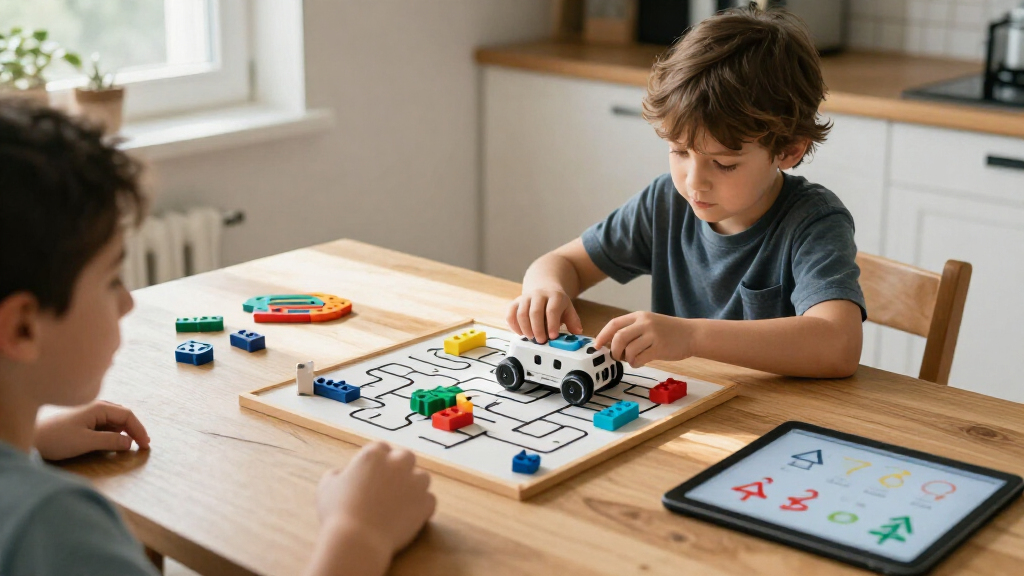
I ranked these kids programmable coding robots by how clearly each one connects play to learning code. The main criteria were the coding methods available, how quickly a child can get started, the range of challenges or ways to extend play, and whether the robot’s design fits its stated age group. I also weighed construction demands, likely adult involvement, portability, and whether the product’s primary appeal is coding, building, or interactive entertainment.
The ranking favors robots with an accessible path from first commands to more involved programming, rather than products with the longest feature list. Dash ranks first as a balanced coding-centered option; screen-free choices rank well for young beginners, while build kits rise for families who value engineering and accept a longer setup. Repeated listings are treated as overlapping options, not separate innovations, because their exact package contents may differ.
Factors to Consider When Choosing Kids Programmable Coding Robots
Before choosing, I’d match the robot to the kind of learning your child will actually enjoy: giving commands, solving a route, building a machine, or experimenting with an app. These differences can shape everyday use more than the word “programmable” on a package.
Choose the Coding Style Before the Robot
Coding can mean arranging physical buttons, drawing a route, using visual blocks, or controlling a robot through an app. A child who likes puzzles may connect with directional commands, while a child who wants to see cause and effect may prefer a mobile robot responding to code. These methods are not interchangeable: a simple sequence teaches order, but may not lead naturally to loops, conditions, or debugging. Check whether the product’s coding approach can grow with your child or mainly supports a short set of activities. A common mistake is choosing by the word “coding” without checking what the child will actually do. Start with the interface your child can use independently, then prioritize added complexity only if they are ready for it.
Balance Age Guidance With Adult Help
Age labels provide a starting point, but reading skills, patience, and fine-motor confidence affect whether a child can use a robot alone. Building kits can teach valuable engineering ideas, yet sorting pieces and following assembly steps may require an adult even when the child is within the stated age range. Screen-free toys can reduce app setup, though children may still need help planning commands or resetting activities. Think about the role you want to play: occasional coaching, shared building, or mostly independent play. If the robot is a gift, ask whether the child has access to a compatible device when app-based coding is part of the experience. A slightly simpler robot used independently may serve a beginner better than a complex kit that stays unfinished.
Decide How Much Building Is Part of the Fun
Build-first robots provide a different kind of challenge from ready-to-play models: children assemble the machine before they can explore its behavior. That can make programming feel more tangible, especially for kids interested in mechanisms, vehicles, or robot design. The tradeoff is time, workspace, and the chance that construction becomes the main activity rather than coding. Look at the number of configurations and whether rebuilding is central to the product, not just a headline feature. For a child who likes tinkering, a multi-build kit can extend play; for a child who wants quick results, a prebuilt robot may be a better match. Consider where parts will be stored and whether the child is likely to rebuild after the first project.
Check Screen, App, and Device Expectations
“Coding robot” does not always mean the same amount of screen use. Some options emphasize screen-free command entry, while others use an app for coding, interaction, or expanding activities. Before buying, check the supported device types and whether the child can use the app with your household’s existing setup. A screen can make block-based programming easier to understand, but it also adds charging, pairing, and compatibility steps. Families limiting screen time may prefer a robot whose core activities work without an app, even if its coding ceiling is lower. Avoid assuming that an app-based toy will work on every phone or tablet; verify compatibility and connection requirements first.
Prioritize the Right Kind of Long-Term Play
Longevity comes from a child wanting to return to the robot, not just from a long feature list. Open-ended coding, new challenges, different builds, and shared activities can all extend play, but each appeals to a different child. A maze-based set can be satisfying for a young problem-solver without offering the same open-ended exploration as a programmable mobile robot. Conversely, an app with many options may feel like too much for a beginner. Think about what your child repeats by choice: stories, puzzles, construction, or experimentation. Paying more for extra features makes sense only when they support the kind of play your child already enjoys.
Compare the Exact Kit Contents
Products with similar names may come in different bundles, and repeated listings can make the differences easy to miss. Check what is included for activities, building, control, and ongoing use instead of relying on the product name alone. A larger activity set may add structured challenges, while a base robot may focus on the robot itself. For build kits, confirm the stated piece count and the number of configurations described for that specific listing. Also check whether any required device or accessory is supplied or needs to come from home. This quick comparison helps avoid paying for a duplicate set or expecting activities that are not included.
Frequently Asked Questions
Which type of coding robot is easiest for a child who has never coded?
For a first experience, I’d favor a robot with a simple command method and activities that show the result of each instruction. Screen-free options such as Botley and the Code & Go Mouse can make sequencing feel concrete, though they teach different styles of play. A maze set is especially clear for practicing direction and order; a more flexible robot can offer a broader set of interactions. If the child already enjoys tablets and puzzles, a visual coding app may be a comfortable next step. Choose based on whether the child is more motivated by solving a path or making a robot respond.
Should I choose a screen-free robot or an app-based coding robot?
Choose screen-free when you want fewer device requirements and a direct, hands-on introduction to commands. App-based options can present visual code and support more varied programming activities, but they depend on compatible hardware and may involve setup. Neither approach is automatically better: the right choice depends on your child’s familiarity with devices and your household’s screen preferences. If you are unsure, check whether the robot’s main activities remain usable without an app. Also think about who will troubleshoot pairing or software questions if the child gets stuck.
Are robot building kits a good first coding toy?
They can be, especially for children who enjoy construction and are willing to work through assembly before programming. The building stage can connect code with physical mechanisms, but it adds another learning curve beyond coding itself. For a child who wants immediate results, a ready-to-use robot may provide a smoother start. If choosing a kit, plan for some shared setup and check that the age guidance fits the child’s patience and dexterity. A build kit is most rewarding when construction is part of the appeal, not just a hurdle on the way to coding.
How can I tell whether a robot will hold a child’s interest?
Look for a play pattern your child already likes rather than relying on the number of modes or pieces. Children who enjoy puzzles may return to route challenges, while builders may prefer kits with alternate configurations. Kids who like storytelling or character interaction may respond more to an expressive robot than to a maze activity. Check whether the product offers a clear next step after the first activity, such as harder challenges or new ways to program. If the child loses interest when instructions are too open-ended, structured activities may matter more than advanced coding features.
What should I check when two listings have the same robot name?
Compare the full listing details, since the name alone may not identify the included bundle. Look for activity cards, accessories, building components, or other extras that change how the robot can be used. In this roundup, both Ruko 1088 and Botley appear more than once, so I would not assume each listing represents a different robot platform. Check the product description for package contents and the exact version before choosing. If the bundles are nearly identical, base the decision on the activities and accessories your child will use rather than the duplicated title.
Conclusion
For most families seeking a coding-centered robot with room to explore, I’d start with Wonder Workshop Dash as the best overall. Botley is my best value-style pick for screen-free beginners, while the Code & Go Mouse is a focused choice for children who learn through route puzzles. For more involved construction, Makeblock mBot is my best premium-style recommendation; Apitor Robot J and Sillbird suit kids who want multiple builds and are ready for assembly. Choose Ozobot Evo or Sphero Mini when compact movement-based play matters, and look to the ACEBOTT kit for a more specialized robot-arm and tank-car building experience. The right choice is the one whose coding method, setup demands, and style of play fit the child—not simply the one with the most features.