
Using a VPN at home can boost your online privacy and help you access content from around the world. It encrypts your data, protecting you from hackers and trackers, and lets you browse securely. However, depending on the server you connect to and your encryption settings, your internet speed might slow down. Distant or overloaded servers are often the culprits. Want to understand how to find the right balance? Keep exploring for more tips.
Key Takeaways
- VPNs enhance privacy and access to global content but may introduce latency due to encryption processes.
- Connecting to nearby servers optimizes speed, while distant servers can slow down your internet.
- High-traffic or overloaded VPN servers can cause lag, reducing browsing and streaming performance.
- Strong encryption ensures security but might slightly decrease connection speed depending on the protocol used.
- Experimenting with different server locations helps balance privacy benefits and maintaining optimal internet speed at home.
Have you ever wondered how to protect your online privacy while browsing from home? Using a VPN can be a smart move, especially if you’re concerned about hackers, data tracking, or geographic restrictions. At its core, a VPN creates a secure, encrypted tunnel between your device and the internet. This is known as VPN encryption, which scrambles your data so that anyone trying to intercept it only sees gibberish. It’s like sending your information through a secret code that only you and the VPN server can decode. But the effectiveness of this encryption depends heavily on the VPN service you choose, as stronger encryption protocols provide better security without sacrificing speed too much.
A VPN encrypts your data, creating a secure tunnel between your device and the internet for enhanced privacy.
Another factor that influences your VPN experience is the VPN server locations. VPN providers typically operate servers across various countries and cities. When you connect to a VPN server, your traffic is routed through that specific location. If you pick a server in a nearby country, you’ll likely experience less lag and faster speeds. Conversely, selecting a server far away or in a congested area can cause noticeable slowdowns. The availability of multiple server locations gives you flexibility; you can switch between them to find the best balance of speed and privacy. If you’re streaming content or gaming, choosing a server close to your location can reduce buffering and latency, making your online experience smoother.
However, using a VPN at home isn’t always flawless. While it boosts privacy, it can also slow your connection down, especially if the VPN server is overloaded or far from your physical location. The encryption process, although essential for security, requires extra processing power, which can introduce delays. Additionally, some VPN providers emphasize security over speed, resulting in slower browsing, streaming, or downloading. If you notice significant lag, it might be worth experimenting with different server locations or adjusting your VPN settings to find a better balance. It’s also important to pick a reputable VPN provider known for reliable encryption and a wide array of server options to optimize your experience.
Choosing a VPN with strong encryption protocols can help strike the right balance between security and speed, ensuring your online activities remain protected without unnecessary slowdown. In the end, using a VPN at home can be a double-edged sword. It offers excellent privacy and access to content from around the world, but it can also introduce some latency. Your best approach is to understand how VPN encryption works and to choose server locations wisely. By doing so, you’ll maximize your security without sacrificing too much speed, allowing you to browse confidently and comfortably from the safety of your own home.

GL.iNet GL-MT6000 (Flint 2) WiFi 6 High Speed Gaming Routers for Wireless Internet, 2 x 2.5G Ethernet Ports, Long Range Computer VPN WiFi Router, Home & Business
- Initial Firmware Update: Enhances performance and user experience
- WiFi 6 Standard: Speeds up to 6 Gbps with low latency
- High-Speed Gaming Performance: 8-stream Wi-Fi 6 for stable gaming
As an affiliate, we earn on qualifying purchases.
As an affiliate, we earn on qualifying purchases.
Frequently Asked Questions
Can a VPN Improve My Home Wi-Fi Security?
Yes, a VPN can improve your home Wi-Fi security. It encrypts your internet traffic using strong encryption protocols, making it harder for hackers to intercept your data. Plus, it can protect your devices, provided they’re compatible with the VPN service. Just verify your devices support the VPN’s encryption protocols, and you’ll enjoy a safer browsing experience. However, some devices may have limited compatibility, so check before choosing a VPN.
Does Using a VPN Affect My Online Gaming Experience?
Think of your online gaming experience as a race—using a VPN can either be your fastest lap or a frustrating slowdown. VPN latency and server stability play key roles; if the VPN has high latency or unstable servers, your game might lag or disconnect. However, a reliable VPN can protect your privacy without hurting your gameplay, so choose a provider with low latency and stable servers for the best experience.
How Do I Choose the Best VPN for Home Use?
To select the best VPN for home use, you should consider VPN features like strong encryption, a no-logs policy, and reliable speed. Look for pricing options that fit your budget and offer good value, including free trials or money-back guarantees. Compare different providers, read reviews, and verify they support your devices. This way, you’ll find a VPN that balances security, performance, and affordability for your home needs.
Will a VPN Prevent My ISP From Tracking My Browsing?
Think of a VPN as a secret tunnel through a busy city; it hides your steps from prying eyes. A VPN can prevent your ISP from tracking your browsing, boosting your privacy. While it encrypts your data and masks your IP, some ISPs might still see that you’re connected to a VPN server. So, yes, it helps protect your browsing privacy, but it’s not an absolute shield against all tracking.
Is It Legal to Use a VPN at Home in My Country?
Using a VPN at home is generally legal in most countries, but you should check your local laws. Some places have legal restrictions or VPN censorship that limit or regulate VPN use. If you’re considering it, make sure you’re not violating any regulations or laws. Staying informed about your country’s rules helps you avoid legal issues and ensures you’re using your VPN responsibly and legally.

My Free VPN. Unlimited & High Speed VPN for Phone Android. Best VPN Proxy Service. Hide IP!
- Cost: Free to use
- Usage Limit: Unlimited access
- Time Restriction: No time limits
As an affiliate, we earn on qualifying purchases.
As an affiliate, we earn on qualifying purchases.
Conclusion
Using a VPN at home is like having a security guard for your online world—it’s great for protection, but sometimes, it slows things down like a busy hallway. I once activated mine during a vital video call, and my connection lagged like traffic in rush hour, making me wish I’d turned it off. Remember, it’s all about balancing safety and speed—know when the guard is worth the wait, and when it’s better to let your connection run free.
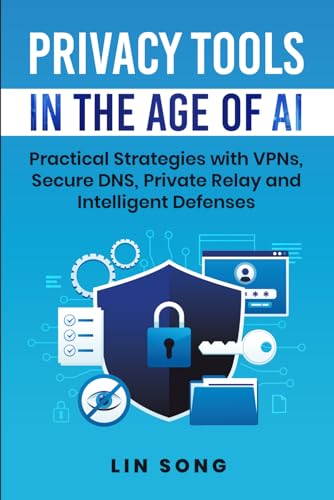
Privacy Tools in the Age of AI: Practical Strategies with VPNs, Secure DNS, Private Relay and Intelligent Defenses (Build Your Own VPN)
As an affiliate, we earn on qualifying purchases.
As an affiliate, we earn on qualifying purchases.
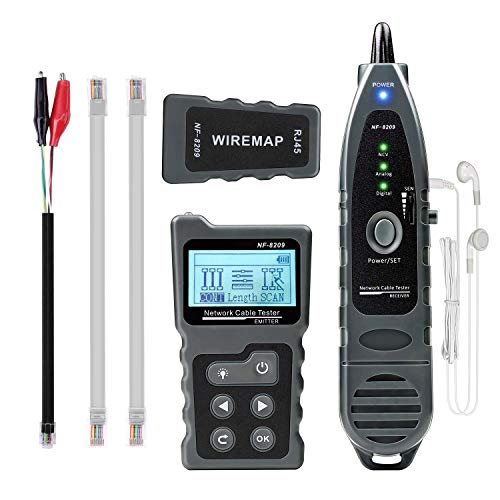
KOSOL Network Cable Tester, Ethernet Wire Tracer and PoE Tester
- Digital Cable Scanning: AC filter, analog, and PoE modes
- Fault Distance Measurement: Locates faults up to 200m away
- Multi-Function Tool: Cable testing, PoE, hub blink, NCV
As an affiliate, we earn on qualifying purchases.
As an affiliate, we earn on qualifying purchases.