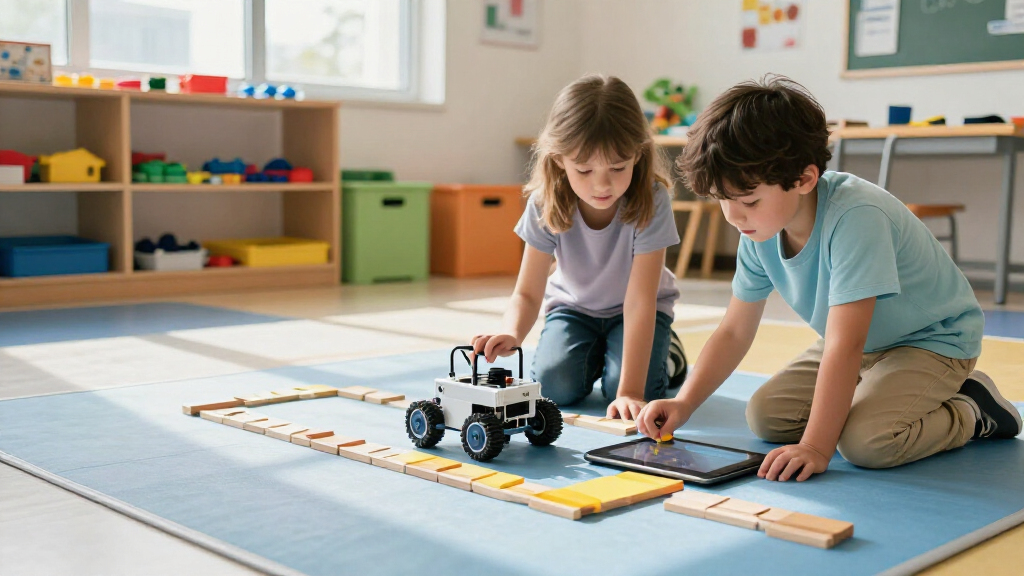
Coding robots for kids range from screen-free toys that teach sequencing to programmable kits that introduce text-based code. My best overall pick is the Wonder Workshop Dash for its approachable coding activities and room for children to build new skills. The Ozobot Evo stands out for compact, flexible lessons, while the Makeblock mBot2 suits older kids ready for a more technical challenge. The main tradeoff is between simple, immediate play and a higher learning ceiling that may require more setup and adult help. Read on for the full breakdown of all 15 options and help matching a robot to your child.

Prime made for students and young adults
- Fast, free delivery for dorm and study essentials
- Prime Video and Amazon Music included
- Member-only deals
Key Takeaways
- Dash is the most balanced starting point: it pairs an approachable format with more room to develop than a basic sequencing toy.
- Screen-free does not mean interchangeable: the Code & Go Mouse and Botley models focus on physical sequencing, while app-based robots introduce a different workflow.
- Age and coding depth matter more than piece count: building kits such as Apitor Robot J and Teach Tech Mech-5 add construction, but that can make the first coding session less direct.
- The mBot2 and VinciBot have more headroom: their Scratch and Python pathways suit children who are ready to move beyond simple movement commands.
- Bundle and version names need close attention: Botley sets and Wonder Workshop bundles may change the activities or included accessories, so compare contents before choosing.
| Thames & Kosmos My Robotic Pet: Coding Chameleon Robotics Kit |  | Best for Screen-Free, Character-Led Coding | Brand: Thames & Kosmos | Model: My Robotic Pet: Coding Chameleon | Product type: Robotics kit | VIEW LATEST PRICE | See Our Full Breakdown |
| Ozobot Ozo at Home Coding Robot Kit for Kids Ages 5+ |  | Best for Young Beginners | Brand: Ozobot | Model: 70101KIT | Recommended age: 5 years and up | VIEW LATEST PRICE | See Our Full Breakdown |
| Ozobot Evo Entry Coding Robot Kit |  | Best for Growing Coding Skills | Brand: Ozobot | Model: Evo Entry Kit | Recommended age: 5 years and up | VIEW LATEST PRICE | See Our Full Breakdown |
| Wonder Workshop Dash Coding Robot for Kids Ages 6 and Up |  | Best for App-Based Interactive Play | Recommended age: 6 years and up | Connectivity: Five apps for Apple iOS, Android, and Fire OS | Functions: Singing, dancing, obstacle navigation, and voice commands | VIEW LATEST PRICE | See Our Full Breakdown |
| Makeblock mBot STEM Coding Robot Kit for Kids Ages 8+ | 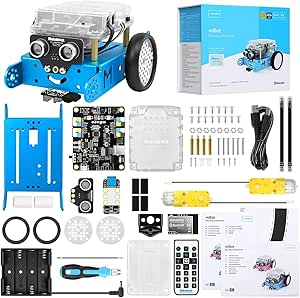 | Best for Hands-On Building and Electronics | Brand: Makeblock | Model: 90053 | Recommended age: 8 years and up | VIEW LATEST PRICE | See Our Full Breakdown |
| Learning Resources Code & Go Robot Mouse Activity Set | 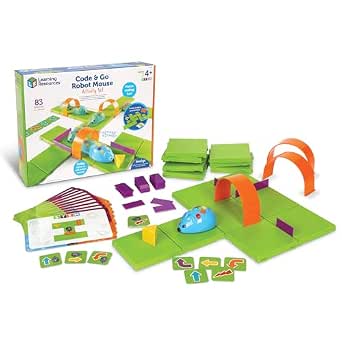 | Best for Screen-Free Beginners | Recommended age: 4 years and up | Pieces: 83 | Maze board size: 20 × 20 inches | VIEW LATEST PRICE | See Our Full Breakdown |
| VinciBot Coding Robot for Kids Ages 8–12, Scratch and Python STEM Toy |  | Best for Coding Progression | Recommended age: 8 years and up | Programming languages: Scratch-style block programming and Python | Sensors: 8 | VIEW LATEST PRICE | See Our Full Breakdown |
| Makeblock mBot2 Coding Robot Kit for Kids | 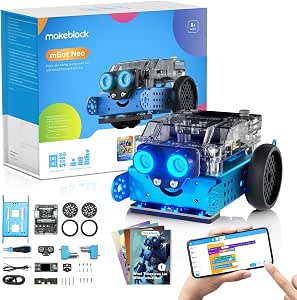 | Best for Sensor-Rich Projects | Recommended age: 8 years and up | Programming languages: Scratch and Python | Playtime: Up to 5 hours per charge | VIEW LATEST PRICE | See Our Full Breakdown |
| Teach Tech Mech-5 STEM Coding Robot Building Kit for Ages 10+ |  | Best for Mechanical Building | Recommended age: 10 years and up | Programming method: Buttons attached to a mechanical coding wheel | Robot actions: Move forward and backward, rotate 360 degrees, throw, lift, kick, and draw | VIEW LATEST PRICE | See Our Full Breakdown |
| Apitor Robot J 6-in-1 STEM Coding Robot Building Kit, 480 Pieces |  | Best for Multi-Model Building | Recommended age: 7–12 years | Number of pieces: 480 | Build options: 6 models | VIEW LATEST PRICE | See Our Full Breakdown |
| Learning Resources Botley the Coding Robot |  | Best for First Coding Steps | Brand: Learning Resources | Model: LER2936 | Recommended age: 5–8 years | VIEW LATEST PRICE | See Our Full Breakdown |
| Learning Resources Botley 2.0 Coding Robot Activity Set |  | Best Screen-Free Activity Set | Brand: Learning Resources | Model: LER2938 | Recommended age: 5–10 years | VIEW LATEST PRICE | See Our Full Breakdown |
| Wonder Workshop Wonder Pack Coding Robot Bundle for Kids Ages 6–11 |  | Best for App-Based Creative Coding | Brand: Wonder Workshop | Model: WB05 | Age range: 6–11 years | VIEW LATEST PRICE | See Our Full Breakdown |
| Learning Resources Botley the Coding Robot Activity Set | 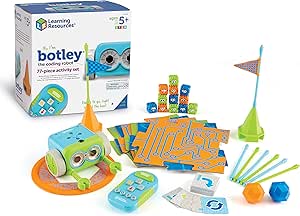 | Best for Ready-Made Challenges | Brand: Learning Resources | Model: LER2935 | Recommended age: 5 years and up | VIEW LATEST PRICE | See Our Full Breakdown |
| ELEGOO UNO R3 Smart Robot Car Kit V4 with Camera |  | Best for Older Beginner Builders | Brand: ELEGOO | Model number: US-EL-KIT-012 | Recommended age: 12 years and up | VIEW LATEST PRICE | See Our Full Breakdown |
| coding robots for kid | Recommended age | Model | Brand | Included components |
|---|---|---|---|---|
| Thames & Kosmos My Robotic Pet | 8–12 years; adult help recommended for ages 8+ | My Robotic Pet: Coding Chameleon | Thames & Kosmos | — |
| Ozobot Ozo at Home Coding Robo | 5 years and up | 70101KIT | Ozobot | Ozo at Home robot and charging cable |
| Ozobot Evo Entry Coding Robot | 5 years and up | Evo Entry Kit | Ozobot | 1 Evo robot, Get Started activities, charging cable, 5 dual-tip color-code markers, and zip case |
| Wonder Workshop Dash Coding Ro | 6 years and up | — | — | Dash robot, two building brick connectors, and USB charging cable |
| Makeblock mBot STEM Coding Rob | 8 years and up | 90053 | Makeblock | — |
| Learning Resources Code & Go R | 4 years and up | — | — | — |
| VinciBot Coding Robot for Kids | 8 years and up | — | — | — |
| Makeblock mBot2 Coding Robot K | 8 years and up | P1010132 | — | Robot, 4 coding project cards, USB cable, screwdriver, and line-following track map |
| Teach Tech Mech-5 STEM Coding | 10 years and up | TTC-895 | — | Assembly parts and English instruction manual |
| Apitor Robot J 6-in-1 STEM Cod | 7–12 years | — | — | — |
| Learning Resources Botley the | 5–8 years | LER2936 | Learning Resources | Botley robot, remote programmer, detachable arms, coding cards, tiles, and obstacles |
| Learning Resources Botley 2.0 | 5–10 years | LER2938 | Learning Resources | Coding robot, remote programmer, 40 coding cards, 6 double-sided boards, and stackable obstacle pieces |
| Wonder Workshop Wonder Pack Co | — | WB05 | Wonder Workshop | Dash robot, sketch kit, launcher, gripper, building-brick connectors, and USB charging cable |
| Learning Resources Botley the | 5 years and up | LER2935 | Learning Resources | Botley robot, remote programmer, detachable arms, 40 coding cards, 6 double-sided tiles, 27 obstacle-building pieces, and starter guide |
| ELEGOO UNO R3 Smart Robot Car | 12 years and up | — | ELEGOO | — |
More Details on Our Top Picks
Thames & Kosmos My Robotic Pet: Coding Chameleon Robotics Kit
The Coding Chameleon is a strong fit for kids who want to build a creature and then teach it to react, rather than begin with an app. Its colored action cards introduce programming without a screen, while touch and gesture responses, color sensing, and RGB lights make its behavior feel connected to its surroundings. The three modes also give children options beyond following code, including more open-ended pet-style play. Compared with the Ozobot Ozo at Home, this kit leans further into construction and imaginative character play; Ozo offers more guided activities and a path to Blockly. The tradeoff is that assembling the 15-inch model may call for adult help, and batteries are recommended but not listed as included. The manual adds useful context on robotics and biomimicry, though this is less suited to children seeking a quick, ready-to-code robot.
Pros:- Physical action cards offer a screen-free introduction to programming.
- Color and infrared sensors, touch and gesture responses, and RGB LEDs support reactive play.
- Coding, Wild, and Pet modes offer different ways to interact with the robot.
- The 48-page manual covers assembly, robotics, coding, and biomimicry.
Cons:- Assembly may require adult help for the recommended age group.
- Batteries are recommended but are not listed among the included components.
Best for: Families seeking a screen-free coding activity that combines building, imaginative pet play, and introductory robotics for children ages 8–12.
Not ideal for: Children who want a robot ready to use with little assembly, or families who prefer app-based lessons and a clear progression into block coding.
- Brand:Thames & Kosmos
- Model:My Robotic Pet: Coding Chameleon
- Product type:Robotics kit
- Length:15 inches
- Sensors:Color sensor and infrared sensor
- Play modes:Coding, Wild, and Pet
- Coding method:Physical colored action cards
- Recommended age:8–12 years; adult help recommended for ages 8+
- Manual:48 pages
Our verdict“Choose the Coding Chameleon for a child who wants a buildable, screen-free robotic pet more than a guided app-based coding curriculum.”
Ozobot Ozo at Home Coding Robot Kit for Kids Ages 5+
Ozo at Home is the most guided starting point in this group for a young child encountering coding for the first time. Its 27 activities use color codes, magnetic tiles, a two-sided board, and engineering challenges, giving families several hands-on ways to practice sequencing and logic before moving to Ozobot Blockly. That staged approach makes it more approachable for ages 5 and up than the build-focused Makeblock mBot, which asks older children to assemble a robot and handle separate batteries. The tradeoff is that Ozo’s activity path is designed to be completed in order, so children who want to jump between open-ended projects may find it restrictive. Blockly also calls for a computer or tablet, meaning the experience only stays screen-free through the earlier activities. This is a learning kit first, not a robot-building project.
Pros:- Provides 27 guided activities across multiple learning formats.
- Begins with hands-on color codes and magnetic tiles before introducing Blockly.
- Activities cover sequencing, logic, loops, problem-solving, and engineering design.
- Includes a robot and charging cable for the activities.
Cons:- The planned activity progression is intended to be completed in order.
- Blockly programming requires a computer or tablet.
Best for: Parents of children ages 5 and up who want structured, hands-on coding activities that can begin without a screen and later introduce Blockly.
Not ideal for: Older children seeking robot construction, open-ended hardware projects, or freedom to skip around a curriculum; Blockly also requires a compatible computer or tablet.
- Brand:Ozobot
- Model:70101KIT
- Recommended age:5 years and up
- Activities:27
- Learning formats:Mystical Forest Mat, Blank Magnetic Board, Color Codes, Ozobot Blockly, and engineering challenges
- Programming:Color codes and Ozobot Blockly
- Included components:Ozo at Home robot and charging cable
- Dimensions:9 x 7.5 x 2 inches
Our verdict“Pick Ozo at Home for a young beginner who benefits from a guided, gradual path from screen-free coding to Blockly.”
Ozobot Evo Entry Coding Robot Kit
The Ozobot Evo Entry Kit is a flexible choice for children who may start with simple commands but need room to move into more advanced coding. It pairs screen-free Color Codes with Ozobot Blockly across five skill levels, and access to more than 700 lessons gives families plenty of material beyond the included starter activities. Compared with the more structured Ozobot Ozo at Home, Evo is a better match for learners who want a broad lesson library and a robot they can keep using as their skills grow. Ozo’s 27 guided activities may feel easier to follow for a first introduction, though. Evo’s online Blockly option also depends on a compatible device, and the kit includes just one robot, so it is less suited to sibling play that requires two robots at once. The zip case, markers, and charging cable make the kit easier to store and start using.
Pros:- Combines screen-free Color Codes with Ozobot Blockly.
- Five Blockly skill levels support progression from beginner to advanced coding.
- Access to more than 700 lessons extends learning beyond the starter activities.
- Includes dual-tip markers, a charging cable, starter activities, and a zip case.
Cons:- Online Blockly coding requires a compatible device.
- Only one robot is included.
Best for: Families with children ages 5–11 who want both screen-free coding and a substantial Blockly lesson pathway that can grow from beginner to advanced levels.
Not ideal for: Households without a compatible device for online Blockly, or siblings who need multiple robots for shared activities.
- Brand:Ozobot
- Model:Evo Entry Kit
- Recommended age:5 years and up
- Age range:5–11 years
- Coding methods:Ozobot Blockly and screen-free Color Codes
- Blockly skill levels:5
- Included components:1 Evo robot, Get Started activities, charging cable, 5 dual-tip color-code markers, and zip case
- Battery:Lithium-ion
- Item dimensions:8.5 x 6.5 x 1.8
Our verdict“Choose Evo over Ozo at Home when you want a wider lesson library and a coding path that can advance with your child.”
Wonder Workshop Dash Coding Robot for Kids Ages 6 and Up
Dash is the pick for children who learn coding concepts through an active robot that moves, talks, and responds to commands. Its five compatible apps introduce sequencing, loops, algorithms, and variables through play, while obstacle navigation, voice commands, singing, and dancing make code feel connected to visible actions. Compared with the Ozobot Evo Entry Kit, Dash offers a more character-like style of interaction; Evo adds screen-free Color Codes and a large lesson library, which may suit families seeking more explicit progression. Dash needs no assembly, so children can get to app-guided activities without building first. That convenience comes with a screen dependency: programming uses compatible apps, and the robot is designed for indoor play. Its lack of a camera also rules out camera-based features. For a child who wants a responsive app-controlled companion, those limits may matter less than the immediate play value.
Pros:- Five compatible apps introduce sequencing, loops, algorithms, and variables.
- Singing, dancing, voice commands, and obstacle navigation make programming actions easy to see.
- Requires no assembly before play.
- Rechargeable battery supports up to five hours of active play.
Cons:- App-based coding requires a compatible device.
- Designed for indoor use and does not include a camera.
Best for: Families with children ages 6–11 who have a compatible iOS, Android, or Fire OS device and want coding concepts taught through movement and interactive play.
Not ideal for: Buyers seeking screen-free programming, outdoor use, a camera-equipped robot, or a build-it-yourself robotics project.
- Recommended age:6 years and up
- Connectivity:Five apps for Apple iOS, Android, and Fire OS
- Functions:Singing, dancing, obstacle navigation, and voice commands
- Battery life:Up to 5 hours of active play
- Power source:Rechargeable lithium-ion battery included
- Camera:None
- Included components:Dash robot, two building brick connectors, and USB charging cable
- Weight:0.7 kg
Our verdict“Choose Dash for a child who wants an immediately playable, expressive robot and is comfortable learning through apps.”
Makeblock mBot STEM Coding Robot Kit for Kids Ages 8+
The Makeblock mBot stands apart from ready-to-play robots by making construction part of the coding lesson. Children assemble the kit, then explore Scratch and Arduino alongside line-following and obstacle-avoidance functions; that combination suits learners curious about how a robot’s electronics and behavior fit together. Its assembly time of about 15 minutes is a more approachable entry than a larger, more involved building project, while compatible apps and add-on modules leave room for later experimentation. Compared with Dash, mBot offers more hands-on hardware learning, but Dash needs no assembly and emphasizes app-guided interactive play. The mBot’s main practical drawback is power: four AA batteries and a CR2025 for the remote controller are sold separately. Families who want a robot ready for coding straight out of the box may prefer Ozobot Evo instead.
Pros:- Hands-on assembly connects coding with electronics and robotics.
- Supports both Scratch and Arduino programming.
- Line-following and obstacle-avoidance functions make programs visible in motion.
- Compatible apps and add-on modules allow room for expanded projects.
Cons:- Four AA batteries for the robot are not included.
- The remote controller also requires a separate CR2025 battery.
Best for: Families with children ages 8 and up who want a buildable robot that introduces Scratch, Arduino, electronics, and basic autonomous movement.
Not ideal for: Children seeking a ready-to-play robot with minimal setup, or families who do not want to source separate batteries for the robot and remote.
- Brand:Makeblock
- Model:90053
- Recommended age:8 years and up
- Programming platforms:Scratch and Arduino
- Assembly time:About 15 minutes
- Robot batteries:4 AA batteries, not included
- Remote controller battery:CR2025, not included
- Compatible add-ons:100+ electronic modules and 500+ parts
Our verdict“Pick mBot over Dash when building and exploring electronics matter more than immediate, app-led play.”
Learning Resources Code & Go Robot Mouse Activity Set
For young children taking their first steps with coding, Colby the mouse makes sequencing tangible: kids arrange coding cards, build a maze, then use simple buttons to guide the robot toward the cheese. The screen-free setup keeps the activity focused on planning and cause and effect, while the included maze pieces and activity cards provide prompts for repeat play at home or in a classroom. Compared with the app-based Apitor Robot J, this set asks less of a child’s device skills and is better suited to early learners. That simplicity is also its limit: it is designed for ages 4 and up, not for children ready to move into Scratch or Python. The mouse needs three AAA batteries, which are not included.
Pros:- Screen-free button controls make early sequencing accessible to young children.
- Maze grids, walls, tunnels, and activity cards support repeatable challenges.
- Lights, sounds, and two speeds give the robot feedback as children test commands.
- Suitable for home, homeschool, and classroom activities.
Cons:- Requires three AAA batteries, which are not included.
- Its simple controls and young age focus offer less programming depth than VinciBot or mBot2.
Best for: Families and early-years classrooms seeking a tactile, screen-free introduction to sequencing for children age 4 and up.
Not ideal for: Older children who want open-ended app coding, Python, or a robot they can expand with electronic modules.
- Recommended age:4 years and up
- Pieces:83
- Maze board size:20 × 20 inches
- Robot features:Lights, sounds, and two speeds
- Included coding cards:30 double-sided cards
- Included activity cards:10 double-sided cards
- Battery requirement:3 AAA batteries, not included
- Screen-free:Yes
Our verdict“Choose Colby for a young beginner who needs hands-on, screen-free coding practice rather than app-based programming.”
VinciBot Coding Robot for Kids Ages 8–12, Scratch and Python STEM Toy
VinciBot’s strongest case is the path from beginner block coding to Python, backed by activities involving drawing, music, dancing, and light effects. Eight sensors and preset modes let children start exploring movement and responses before they write their own programs. That gives it broader coding progression than the screen-free Code & Go Robot Mouse, while its stated compatibility with LEGO bricks, TECHNIC motors, and third-party modules offers room to extend builds. The tradeoff is that some tutorials and coding resources are online, and the available description does not identify which third-party modules work with it. Its listed runtime is over four hours per charge, shorter than mBot2’s stated maximum of five. I’d choose it for a child ready to grow beyond introductory coding, not for a family seeking a wholly offline toy.
Pros:- Supports Scratch-style block programming and Python.
- Eight sensors and preset modes offer ways to explore before writing code.
- Activities span drawing, music, dancing, and LED effects.
- Compatible with LEGO bricks, TECHNIC motors, and third-party electronic modules.
Cons:- Some coding activities and tutorials rely on the Vinci.MatataStudio website.
- The product details do not identify which third-party electronic modules are compatible.
- Runtime is listed as over four hours, below mBot2’s stated maximum of five hours.
Best for: Families with children age 8 and up who want one robot that can progress from block-based coding to Python and support compatible add-ons.
Not ideal for: Buyers who want fully self-contained offline instruction or need a clearly specified list of compatible third-party electronics.
- Recommended age:8 years and up
- Programming languages:Scratch-style block programming and Python
- Sensors:8
- Battery capacity:1500 mAh
- Runtime:Over 4 hours per charge
- Preset modes:Line following, precision drawing, and IR remote control
- Included coding cases:17
- Online tutorial cases:Over 75
- Compatibility:LEGO bricks, TECHNIC motors, and third-party electronic modules
Our verdict“Pick VinciBot for a child ready to advance from blocks to Python and explore a range of sensor-led activities.”
Makeblock mBot2 Coding Robot Kit for Kids
mBot2 is the most project-oriented pick here for children who want to program a robot that can react to its surroundings. Its 10-plus sensors support activities such as line following, obstacle avoidance, and color identification, while Scratch and Python give learners a route from visual coding to text-based programming. Compared with VinciBot, mBot2 lists more than 10 sensors and several control connections, including Bluetooth, USB, and Wi-Fi; VinciBot instead calls out compatibility with LEGO and TECHNIC builds. The mBot2 also includes project cards, a cable, screwdriver, and track map, but it needs assembly before play and some activities may depend on an app or Wi-Fi. Its stated maximum of five hours per charge is useful for longer sessions, though actual playtime depends on use.
Pros:- Supports both Scratch and Python for a gradual move into text coding.
- More than 10 sensors enable varied movement and detection projects.
- Bluetooth, USB, and Wi-Fi provide multiple control and connection options.
- Project cards and a line-following track map give beginners structured starting activities.
Cons:- Assembly is required before the robot is ready to use.
- Some features and activities may require an app or Wi-Fi connection.
Best for: Children age 8 and up who enjoy guided robotics projects and want to build from Scratch basics toward Python and sensor-based challenges.
Not ideal for: Families seeking a ready-to-play robot without assembly or activities that do not depend on an app or Wi-Fi.
- Recommended age:8 years and up
- Programming languages:Scratch and Python
- Playtime:Up to 5 hours per charge
- Control methods:Bluetooth, USB, and Wi-Fi
- Sensors:10+ advanced sensors
- Expandable modules:30+
- Included components:Robot, 4 coding project cards, USB cable, screwdriver, and line-following track map
- Model:P1010132
Our verdict“Choose mBot2 for a hands-on learner who wants guided sensor projects and a clear route from Scratch to Python.”
Teach Tech Mech-5 STEM Coding Robot Building Kit for Ages 10+
Mech-5 makes construction part of the coding lesson: children spend several hours assembling the mechanism, then program actions with buttons on a coding wheel. It can move, rotate, throw, lift, kick, and draw, so the payoff is a mechanical sequence of physical actions rather than the sensor-driven app projects offered by mBot2. Unlike the app-connected Apitor Robot J, Mech-5 requires no batteries, which keeps operation simple once assembly is complete. That simplicity does not make it a quick-start robot: careful building takes time, and its coding method is limited to the wheel rather than Scratch or Python. I’d place it with older children who enjoy following construction instructions and seeing how mechanisms work, not with beginners looking for immediate play or expandable digital coding.
Pros:- Assembly brings mechanical engineering and construction into the coding activity.
- Coding wheel controls several distinct movement and action types.
- Battery-free operation avoids replacing or charging batteries.
- Combines problem solving, coding basics, and hands-on mechanical building.
Cons:- Assembly takes several hours and requires careful attention to the instructions.
- Programming is limited to the mechanical coding wheel rather than Scratch or Python.
Best for: Children age 10 and up who enjoy detailed assembly and want to learn how mechanical parts carry out programmed actions.
Not ideal for: Younger children or families wanting a preassembled robot, app-based coding, or a short setup before play.
- Recommended age:10 years and up
- Programming method:Buttons attached to a mechanical coding wheel
- Robot actions:Move forward and backward, rotate 360 degrees, throw, lift, kick, and draw
- Power source:No batteries required
- Educational focus:Coding, mechanical engineering, construction, problem solving, and STEM
- Included components:Assembly parts and English instruction manual
- Model:TTC-895
- Manufacturer warranty:1 year against manufacturer defects
Our verdict“Choose Mech-5 for an older child who values building a mechanism as much as programming its actions.”
Apitor Robot J 6-in-1 STEM Coding Robot Building Kit, 480 Pieces
Robot J is the build-and-rebuild choice: its 480 snap-together pieces can form six models, so children get more construction variety than with the focused assembly of Mech-5. The Apitor app adds four control modes, including icon-based coding activities, while dual motors and multicolor LEDs make the finished builds move and light up. Compared with mBot2, Robot J puts more emphasis on rebuilding physical models; mBot2 offers Scratch and Python plus more than 10 sensors for coding projects. Robot J’s app and Bluetooth are required for control and coding, and three AA batteries are not included. I’d pick it for a child who likes repeated build variations and app-guided play, but not for someone seeking standalone programming or a clear path to Python.
Pros:- 480 snap-together pieces support six different robot models.
- Four control modes offer varied ways to operate the builds.
- Icon-based coding activities provide an accessible app-based introduction.
- Two built-in motors and multicolor LED lights add movement and visual feedback.
Cons:- Three AA batteries are required and not included.
- Robot control and coding require the Apitor app and Bluetooth.
- Its listed coding approach does not offer the Scratch or Python progression found in mBot2 and VinciBot.
Best for: Children ages 7–12 who enjoy rebuilding models and want app-based, icon-led coding alongside hands-on construction.
Not ideal for: Families who want screen-free coding, battery-free play, or programming options such as Scratch and Python.
- Recommended age:7–12 years
- Number of pieces:480
- Build options:6 models
- Control:Bluetooth via Apitor app
- Control modes:Dual-motor, single-motor, gyro, and path
- Motors:2 built-in motors
- Lighting:2 multicolor LED lights
- Battery requirement:3 AA batteries, not included
- Dimensions:12.01 × 8.27 × 2.48 inches
Our verdict“Choose Robot J for a child who wants repeated model-building and app-based coding more than advanced programming languages.”
Learning Resources Botley the Coding Robot
Botley keeps coding screen-free, which makes it a strong first robot for children learning how instructions become movement. Kids enter up to 80 steps with the remote, then use loops and if/then logic to tackle paths and obstacle courses. Compared with the larger Botley 2.0 Activity Set, this 45-piece version has fewer boards and accessories, so it takes less space and offers a simpler starting point. Its coding cards, tiles, obstacles, and detachable arms still give children practical ways to invent challenges rather than just watch a robot move.
The tradeoff is that commands must be entered through a separate remote, and the recommended age range stops at eight. I’d choose Botley 2.0 for a broader activity set and longer age runway; this Botley suits families who want a straightforward introduction without adding an app.
Pros:- Screen-free activities introduce sequencing and logic through movement.
- Supports up to 80 programmed steps, loops, and if/then logic.
- Includes coding cards, tiles, obstacles, and detachable arms for hands-on challenges.
Cons:- Commands must be entered with the separate remote programmer.
- The recommended age range of 5–8 may limit its appeal as children grow.
Best for: Families seeking a screen-free first coding robot for children ages 5–8, with simple challenges ready to use at home.
Not ideal for: Older children looking for more varied activities or coding beyond the listed age range; the Botley 2.0 set offers more pieces and a wider recommended age range.
- Brand:Learning Resources
- Model:LER2936
- Recommended age:5–8 years
- Programming capacity:Up to 80 steps
- Coding features:Loops, if/then logic, obstacle courses, and black-line following
- Set size:45 pieces
- Included components:Botley robot, remote programmer, detachable arms, coding cards, tiles, and obstacles
- Warranty:No manufacturer warranty
Our verdict“Choose this Botley for a child ages 5–8 who is ready for screen-free sequencing and obstacle-course play.”
Learning Resources Botley 2.0 Coding Robot Activity Set
Botley 2.0 is the fullest screen-free option among the Botley products here: its 78-piece set includes coding cards, double-sided boards, and stackable obstacles for building varied routes. Kids can start with simple commands and work toward multi-step sequences, while object sensing, lights, sounds, music, and 45-degree turns add ways to change a challenge. Compared with the 45-piece Botley, this set gives families more materials and a recommended age range extending to ten; compared with the Dash Wonder Pack, it avoids app-based coding entirely.
The tradeoff is that programming still happens through the included remote, not an app or coding interface. That keeps setup screen-free but may feel limiting to children ready for more open-ended coding. There is also no manufacturer warranty listed, so I’d favor this set for activity variety rather than long-term app progression.
Pros:- Large set of boards, coding cards, and obstacles supports custom routes.
- Challenges can progress from simple commands to multi-step sequences.
- Object sensing, lights, sounds, music, and angled turns add variety without a device.
Cons:- Commands must be entered with the remote programmer rather than an app.
- No manufacturer warranty is listed.
Best for: Families or classrooms wanting a screen-free robot set with enough boards and obstacles to create multiple coding challenges for children ages 5–10.
Not ideal for: Children ready to code through apps or build more open-ended projects; the Wonder Pack offers app-compatible coding and creative accessories.
- Brand:Learning Resources
- Model:LER2938
- Recommended age:5–10 years
- Set size:78 pieces
- Programming method:Screen-free remote programmer and coding cards
- Included components:Coding robot, remote programmer, 40 coding cards, 6 double-sided boards, and stackable obstacle pieces
- Features:Object sensing, lights, sounds, music, 45° turns, and 16 secret code combinations
- Warranty:No manufacturer warranty
Our verdict“Pick Botley 2.0 when a broad range of screen-free route-building activities matters more than app-based coding.”
Wonder Workshop Wonder Pack Coding Robot Bundle for Kids Ages 6–11
The Wonder Pack pairs app-based coding with hands-on add-ons, making it a more flexible creative kit than the screen-free Botley robots. Dash works with compatible apps to introduce sequencing, events, loops, and algorithms, while the sketch kit, launcher, gripper, and building-brick connectors let kids connect code to drawing, launching, and construction. Support for iOS, Android, and Fire OS gives families more device options than a kit tied to one platform.
That flexibility comes with a screen requirement: unlike Botley 2.0, this is not a device-free coding experience. Its indoor-only use and lack of a camera also narrow what the robot can do. I’d favor this bundle over a simpler route-programming robot for children who want to make different kinds of projects, but skip it if avoiding apps is the main goal.
Pros:- Combines coding with sketching, launching, gripping, and building-brick projects.
- Compatible apps teach sequencing, events, loops, and algorithms.
- Supports Apple iOS, Android OS, and Fire OS.
- Offers up to five hours of active play per charge.
Cons:- Requires a compatible device and apps, unlike the screen-free Botley sets.
- Designed for indoor use only.
- Camera is not included.
Best for: Families with a compatible tablet or phone whose children ages 6–11 want app-guided coding alongside drawing, launching, gripping, and building activities.
Not ideal for: Buyers seeking screen-free play, outdoor use, or a robot with a camera; Botley 2.0 is a better fit for device-free coding challenges.
- Brand:Wonder Workshop
- Model:WB05
- Age range:6–11 years
- App compatibility:Apple iOS, Android OS, and Fire OS
- Coding concepts:Sequencing, events, loops, and algorithms
- Included components:Dash robot, sketch kit, launcher, gripper, building-brick connectors, and USB charging cable
- Battery life:Up to 5 hours of active play
- Camera:Not included
- Use:Indoor
Our verdict“Choose the Wonder Pack for a child who has access to a compatible device and wants coding to lead into creative robot projects.”
Learning Resources Botley the Coding Robot Activity Set
This Botley set is built around guided, hands-on challenges: the starter guide, 40 coding cards, six double-sided tiles, and 27 obstacle pieces give children a clear path from following commands to making their own routes. Its screen-free remote uses simple arrow buttons, while the robot can detect objects, follow black lines, and run looping commands. Compared with the 45-piece Botley, this 77-piece Activity Set supplies substantially more route-building material; Botley 2.0 adds features such as lights, sounds, and 45-degree turns, but this set emphasizes guided practice.
The main catch is battery preparation: the robot needs three AAA batteries and the remote needs two, and none are included. As with the other Botley kits, commands go through a remote rather than an app. I’d choose this version for structured learning activities, but prefer Botley 2.0 for added interactive effects.
Pros:- Starter guide and coding cards provide ready-made practice challenges.
- Screen-free remote uses simple arrow buttons.
- Robot can detect objects, follow black-line paths, and run loops.
- Includes 27 obstacle-building pieces and six double-sided tiles.
Cons:- Requires three AAA batteries for the robot and two for the remote; batteries are not included.
- Uses a remote programmer rather than an app-based coding interface.
Best for: Parents and educators who want a screen-free robot with a starter guide and enough tiles and obstacles to run structured coding challenges.
Not ideal for: Families who want a kit ready to use without supplying batteries or children seeking app-based coding; the Wonder Pack offers app-compatible activities.
- Brand:Learning Resources
- Model:LER2935
- Recommended age:5 years and up
- Coding method:Screen-free remote programmer
- Number of pieces:77
- Included components:Botley robot, remote programmer, detachable arms, 40 coding cards, 6 double-sided tiles, 27 obstacle-building pieces, and starter guide
- Robot batteries:3 AAA batteries, not included
- Remote programmer batteries:2 AAA batteries, not included
Our verdict“Choose this Activity Set for guided screen-free coding practice with plenty of physical pieces for building routes.”
ELEGOO UNO R3 Smart Robot Car Kit V4 with Camera
The ELEGOO kit shifts coding from directing a ready-made robot to building and programming a robot car. Its UNO R3 controller, Arduino IDE support, guided wiring materials, and example programs give older beginners a concrete way to connect code with hardware. The camera adds live FPV video, while line-tracking and ultrasonic sensors support line following and obstacle avoidance. Compared with the Wonder Pack, this is much more focused on electronics and assembly than creative app activities; compared with Botley, it asks for substantially more patience and adult support.
The rechargeable battery is included, but first-time builders may need help with wiring and Arduino IDE customization. Its recommended age of 12 and up makes it a poor match for younger children seeking immediate play. I’d pick it for a teen interested in how a programmable robot is assembled, not as a first coding toy for a young child.
Pros:- Build-and-program format connects coding with wiring and robot hardware.
- Camera supports live FPV video, while sensors enable line tracking and obstacle avoidance.
- Can be controlled through the ELEGOO app or an IR remote.
- Includes a rechargeable 2000 mAh battery and guided wiring materials.
Cons:- Assembly and programming may require adult guidance for first-time builders.
- Customizing behavior requires Arduino IDE programming.
- Recommended age of 12 and up makes it unsuitable for younger coding beginners.
Best for: Teens ages 12 and up who want to assemble a robot car, explore Arduino IDE programming, and experiment with camera and sensor functions.
Not ideal for: Younger children or families seeking a ready-to-use, screen-free introduction; Botley offers simpler remote-based coding with no assembly requirement listed.
- Brand:ELEGOO
- Model number:US-EL-KIT-012
- Recommended age:12 years and up
- Controller board:ELEGOO UNO R3
- Camera and Wi-Fi module:ESP32-WROVER-based
- Sensors:Line-tracking and ultrasonic
- Control methods:ELEGOO app and IR remote
- Battery:2000 mAh rechargeable lithium-ion
- Dimensions and weight:8 x 7 x 6 inches; 1.23 kg
Our verdict“Choose this kit for an older beginner ready to assemble and program a sensor-equipped robot car, not for a young child seeking simple coding play.”
How We Picked
I compared these robots by how clearly they teach a coding idea, how quickly a child can begin, and how well the activities fit the stated age range. I also looked at coding progression, including whether a robot stays with basic sequencing or offers a path toward block-based or text-based programming. Build-and-code kits were judged on the balance between construction time and programming payoff; a larger parts count alone did not earn a higher place.
The ranking favors products that combine accessible first steps with useful ways to keep learning. That puts Dash ahead as a balanced pick, while more specialized options rank higher for particular needs: screen-free sequencing, robotics construction, or advanced coding. Setup demands, likely need for adult guidance, and differences among similar bundles also shaped the order. Since package contents and software support can change, check the current listing for included accessories and compatibility before buying.
| coding robots for kid | Brand |
|---|---|
| Thames & Kosmos My Robotic Pet | Thames & Kosmos |
| Ozobot Ozo at Home Coding Robo | Ozobot |
| Ozobot Evo Entry Coding Robot | Ozobot |
| Wonder Workshop Dash Coding Ro | — |
| Makeblock mBot STEM Coding Rob | Makeblock |
| Learning Resources Code & Go R | — |
| VinciBot Coding Robot for Kids | — |
| Makeblock mBot2 Coding Robot K | — |
| Teach Tech Mech-5 STEM Coding | — |
| Apitor Robot J 6-in-1 STEM Cod | — |
| Learning Resources Botley the | Learning Resources |
| Learning Resources Botley 2.0 | Learning Resources |
| Wonder Workshop Wonder Pack Co | Wonder Workshop |
| Learning Resources Botley the | Learning Resources |
| ELEGOO UNO R3 Smart Robot Car | ELEGOO |
Factors to Consider When Choosing Coding Robots For Kids
Choosing a coding robot is less about finding the most features and more about matching the learning format to the child. These broader checks can help avoid a robot that is either too limited after a few sessions or too complicated to get started.
Match the First Coding Lesson to the Child
For a child new to coding, a useful first task is one they can understand without a long explanation: arrange commands, predict a route, then see what happened. Screen-free robots can make that sequence visible and keep the focus on cause and effect. App-based block coding adds flexibility, but it may also bring device setup and on-screen instructions into the activity. A common mistake is buying for an older age recommendation when the child has little patience for building or troubleshooting. Choose the easiest starting format the child will actually use, then weigh how much progression it offers after those first lessons.
Check the Learning Path, Not Just the Coding Label
“Coding” can mean anything from entering a short movement sequence to writing Python, so the label alone says little about the learning experience. Look for the step after the first activity: can the child add conditions, loops, sensors, or more complex instructions? A robot with a clear progression can stay useful longer, but a bigger coding ceiling may come with more adult support and setup. Younger beginners may get more from mastering sequences than from facing advanced tools too soon. Pick the next skill your child is ready to practice rather than the most advanced language listed on the box.
Decide Whether Building Is Part of the Goal
Construction kits combine engineering and programming, which can be rewarding for children who enjoy following diagrams and handling small parts. They also split attention: the child may spend a session assembling the robot before reaching the coding activities. If the main goal is to start programming quickly, a ready-to-use robot is usually a more direct fit. If your child likes making and modifying models, assembly can be part of the learning rather than a delay. Check the recommended age, storage needs, and whether the build can be taken apart or reused for other designs.
Account for Screens, Devices, and Setup
A robot may depend on a phone, tablet, or computer even when the coding itself is designed for children. Before choosing, check which devices and operating systems are supported, whether an app is needed, and whether setup requires an account or an internet connection. A screen-free model avoids some of those hurdles, though its programming options may be narrower. For family use, consider whether the device will be available whenever the child wants to play or whether it is shared. Avoid assuming that every app-based kit will work with the household’s current device.
Compare Bundles by What They Add
Activity sets and bundles can include cards, accessories, or extra challenges that change how much a child can do right away. Those additions matter when they expand play or support independent use, but duplicate parts may have little value if the child already owns the base robot. Compare the included contents rather than relying on a similar product name. Also check whether the robot, controller, and required accessories are all included in the specific package. This is especially useful when several versions of one model appear in a shopping search.
Plan for Frustration, Care, and Repeat Play
Robots can lose their appeal if a child cannot tell why a command failed or if the toy needs frequent attention between sessions. Consider how clearly the activities show progress, how easy the robot is to reset, and whether small parts or charging needs suit your household. Sensor-based play can be affected by floors, lighting, or obstacles, so a suitable play area may matter. More elaborate kits can offer a longer learning path but ask for more patience with setup and troubleshooting. Favor a manageable challenge: a child should have room to experiment without needing an adult to solve every problem.
Frequently Asked Questions
Should I choose a screen-free robot or one that uses an app?
Choose screen-free when your main goal is to teach command order and simple problem-solving with minimal device setup. An app-based robot can offer more varied activities and, in some cases, a longer coding path. The tradeoff is that the child must also manage an interface, and the family needs a compatible device. Think about whether your child enjoys learning on a screen and whether that device will be available during play. If unsure, a simple sequencing toy can be a lower-friction first step, while an app-based option makes more sense when the child is ready for broader challenges.
Is a robot labeled for ages 8 and up suitable for a younger child who likes coding?
Age labels reflect more than interest: they can account for reading demands, small parts, construction steps, and the complexity of the activities. A younger child may enjoy the robot with an adult nearby, but that does not guarantee independent play. Look at the first activity and ask whether the child can follow its instructions and recover from a mistake. Building kits may need more supervision than ready-to-use robots, even when the coding idea is accessible. If the child is still learning basic sequences, a simpler model can offer a more satisfying start.
Do I need to buy a bundle or activity set?
Not always; a bundle is worthwhile when its extra materials add challenges or make it easier for a child to play independently. If the base robot already includes enough activities for your child’s current level, extra accessories may go unused. Compare the exact package contents, since similarly named versions can include different cards, parts, or add-ons. Also check whether an accessory is required for the activities you want to use. Choose the set based on what it adds to play, not just the word “bundle.”
When should I choose a building kit over a ready-to-use coding robot?
A building kit is a good match when the child enjoys assembling models and wants engineering to be part of the activity. It can make the robot’s structure feel connected to how it moves, but construction takes time before coding begins. A ready-to-use robot is a more direct choice when the priority is practicing programming right away. Consider how much adult help the child is likely to need with instructions and troubleshooting. If both goals matter, favor a kit whose coding activities are clear enough to reward the effort of building it.
How can I tell whether a robot will remain useful after the beginner activities?
Look for a progression from basic commands into ideas such as loops, conditions, sensor responses, or more advanced programming languages. The presence of many activities is less telling than whether those activities teach new skills. Check whether the next steps suit your child’s age and whether they require extra software, accessories, or adult instruction. A more advanced pathway may provide room to grow but can be frustrating if the child is not ready for it yet. Match the robot’s next learning step to what your child is likely to attempt in the coming months.
Conclusion
For most families, I recommend the Wonder Workshop Dash as the best overall because it balances accessible entry with room for continued coding activities. For beginners who need direct, screen-free sequencing, the Learning Resources Code & Go Robot Mouse is a focused starting point; compare Botley versions if you want a different screen-free activity format. As a value-minded choice, the Ozobot Ozo at Home kit is worth a close look for families prioritizing approachable home activities, while the Ozobot Evo is the compact pick for flexible coding play. For a premium learning path, I would choose the Makeblock mBot2; for children who want a build-first challenge, consider the Apitor Robot J or Teach Tech Mech-5. If your child is ready for Scratch or Python, compare the VinciBot and mBot2 by age, device support, and the coding tools they will actually use. Before ordering, confirm the exact bundle contents and software compatibility.
Black Friday Picks

Vitamix Propel Series 510 Professional-Grade Blender, Black
As an affiliate, we earn on qualifying purchases.