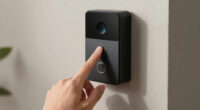
For a video doorbell compatible with Google Home, I’d start with the Google Nest Doorbell (Wired, 3rd Gen) for the most direct fit with Google’s smart-home ecosystem. The Tapo D210 is a strong alternative if you want a wireless kit with a chime, while the Reolink Battery Video Doorbell with Home Hub Mini suits buyers who want a hub-based setup. The main tradeoffs are wired versus battery power, Google integration versus broader feature sets, and whether you need local storage or a supplied chime. I compare all nine options by setup, day-to-day convenience, and how well each fits a Google Home household. Read on for the full breakdown and help choosing the right one for your entryway.

Prime made for students and young adults
- Fast, free delivery for dorm and study essentials
- Prime Video and Amazon Music included
- Member-only deals
Key Takeaways
- Nest models offer the most direct Google Home fit: The lineup includes three Nest choices, making them natural starting points for buyers who want Google’s own doorbell ecosystem; wired and battery versions suit different installation constraints.
- Tapo stands out for wireless flexibility: The D210 pairs a wireless doorbell with a chime, while the D205 emphasizes a wide viewing angle, so buyers should choose based on included setup needs versus the view they want.
- Wiring changes the ownership experience: The Kasa KD110 and wired Nest models avoid battery recharging, but they require a compatible existing doorbell circuit or installation work.
- Specialized hardware brings specific tradeoffs: Anona’s dual-camera design and Reolink’s included Home Hub Mini offer distinct approaches, but buyers should check how their preferred alerts, storage, and Google Home controls work before choosing.
- The best pick depends on more than resolution: Power source, chime arrangements, Google integration, and storage preferences separate these options more sharply than a resolution label alone.
| Anona 3K Dual-Camera Wireless Video Doorbell with Chime |  | Best for Doorstep Coverage | Main camera: 3K, 5MP | Cameras: Dual | Night vision: Color | VIEW ON AMAZON | See Our Full Breakdown |
| Tapo D210 2K Wireless Smart Video Doorbell with Chime |  | Best for Flexible Alerts | Resolution: 2K | Field of view: 160° diagonal | Connectivity: 2.4GHz Wi-Fi | VIEW ON AMAZON | See Our Full Breakdown |
| Kasa Smart Video Doorbell Camera KD110 (2K Resolution, Hardwired with Chime) | 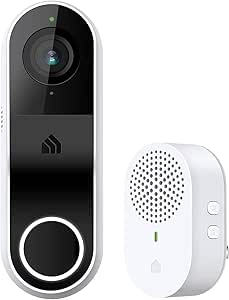 | Best Hardwired Value | Model: KD110 | Resolution: 2K (3MP) | Field of view: 160° diagonal | VIEW ON AMAZON | See Our Full Breakdown |
| Tapo 2K Wireless Smart Video Doorbell D205 160° Ultra-Wide View | 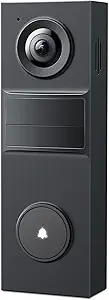 | Best Battery-Life Pick | Resolution: 2K (3MP) | Field of view: 160° | Battery capacity: 5200mAh | VIEW ON AMAZON | See Our Full Breakdown |
| Google Nest Doorbell (Wired, 3rd Gen) – 2K Video, Live View – Hazel |  | Best Google Home Integration | Video resolution: 2K HDR | Field of view: 166° | Power: Wired | VIEW ON AMAZON | See Our Full Breakdown |
| Google Nest Doorbell (Battery) Wireless Video Doorbell – Snow |  | Best for Flexible Google Home Installation | Model: GA01318-US | Power: Battery-powered | Connectivity: Bluetooth and Wi-Fi | VIEW ON AMAZON | See Our Full Breakdown |
| Google Nest Doorbell (Wired, 2nd Gen) – Ash |  | Best for Google Home Event Alerts | Field of view: 145° diagonal, 3:4 ratio | Power: Wired; requires compatible chime and transformer | Free video history: 3 hours of event video | VIEW ON AMAZON | See Our Full Breakdown |
| Google Nest Doorbell (Wired, 2nd Gen) | 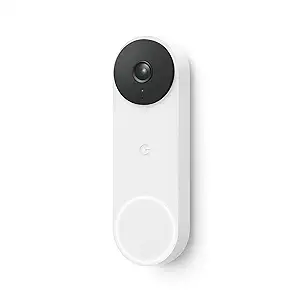 | Best for Subscription-Free Basic Alerts | Type: Wired video doorbell | Generation: 2nd | Power requirements: Compatible chime and transformer required | VIEW ON AMAZON | See Our Full Breakdown |
| REOLINK Battery Video Doorbell (2nd Gen) with Home Hub Mini, 2K Camera Kit |  | Best for Local Recording Without a Subscription | Resolution: 2K 4MP | Field of view: 150° × 150° × 180° | Power: Battery or compatible 8–24 VAC wiring | VIEW ON AMAZON | See Our Full Breakdown |
| video doorbell compatible with google home | Power | Field of view | Compatibility |
|---|---|---|---|
| Anona 3K Dual-Camera Wireless | Rechargeable battery or hardwired | — | — |
| Tapo D210 2K Wireless Smart Vi | — | 160° diagonal | Alexa and Google Assistant |
| Kasa Smart Video Doorbell Came | Hardwired | 160° diagonal | Alexa and Google Assistant |
| Tapo 2K Wireless Smart Video D | — | 160° | Alexa, Google Assistant, and Tapo App |
| Google Nest Doorbell | Wired | 166° | — |
| Google Nest Doorbell | Battery-powered | — | — |
| Google Nest Doorbell | Wired; requires compatible chime and transformer | 145° diagonal, 3:4 ratio | Google Assistant and Amazon Alexa |
| Google Nest Doorbell | — | — | Google Assistant and Amazon Alexa |
| REOLINK Battery Video Doorbell | Battery or compatible 8–24 VAC wiring | 150° × 150° × 180° | — |
More Details on Our Top Picks
Anona 3K Dual-Camera Wireless Video Doorbell with Chime
The Anona’s clearest advantage for Google Home households is its dual-camera setup: one view covers visitors while another watches the area closer to the doorstep, helping buyers keep an eye on packages as well as people. Its 3K, 5MP main camera offers more detail on paper than the 2K Tapo D210 and Kasa KD110, and AI alerts for people, pets, and packages do not require a subscription. Google Assistant compatibility puts it in the running for smart-home use, while battery or hardwired power gives it more installation flexibility than the wired-only Kasa. The tradeoff is that wireless use relies on 2.4GHz Wi-Fi, and local recording requires a separately purchased microSD card. Choose it for coverage and storage control, not for a confirmed Google Home feature set beyond the stated assistant compatibility.
Pros:- Dual cameras cover visitors and the area near the doorstep.
- AI detection for people, pets, and packages is available without a subscription.
- Battery or hardwired power allows more installation flexibility than the wired-only Kasa KD110.
- Supports local microSD storage up to 512GB and includes an indoor chime.
Cons:- A microSD card must be purchased separately for local recording.
- Wireless operation supports 2.4GHz Wi-Fi only.
- The provided compatibility details do not specify which Google Home viewing or alert features are supported.
Best for: Google Assistant households that want separate visitor and doorstep views, package alerts, and the option to store footage locally.
Not ideal for: Buyers who need dual-band Wi-Fi, want included local storage media, or need specific Google Home display and notification features confirmed before buying.
- Main camera:3K, 5MP
- Cameras:Dual
- Night vision:Color
- AI detection:People, pets, and packages
- Power:Rechargeable battery or hardwired
- Battery capacity:5200mAh
- Local storage:microSD card up to 512GB; card not included
- Wi-Fi:2.4GHz, Wi-Fi 6
- Smart home compatibility:Alexa and Google Assistant
Our verdict“Pick the Anona if doorstep and package coverage matter more than dual-band Wi-Fi or a clearly specified Google Home feature set.”
Tapo D210 2K Wireless Smart Video Doorbell with Chime
The Tapo D210 suits buyers who want to tune alerts and placement rather than maximize camera resolution. Its 2K video and 160° diagonal view cover a broad area, while person detection and activity zones can help limit notifications from less relevant motion. A rechargeable battery and included 15° wedge make it easier to angle the camera than the hardwired Kasa KD110, and Google Assistant compatibility gives it a place in this roundup for Google Home users. Local microSD recording avoids a cloud plan, though the card is not included; Tapo Care is the route to the listed 30-day cloud history. Compared with the Tapo D205, the D210 includes a chime and a motion-activated spotlight, but its battery life varies with conditions and use. It makes most sense when alert controls and an included chime outweigh the appeal of longer stated battery life.
Pros:- 160° diagonal field of view pairs broad coverage with 2K video.
- Person detection and activity zones help tailor motion alerts.
- Rechargeable battery and included 15° wedge offer flexible placement.
- Includes a chime and supports local microSD storage up to 512GB.
Cons:- The microSD card is sold separately.
- Thirty-day cloud video history requires a Tapo Care subscription.
- Battery life varies with usage and environmental conditions.
Best for: Google Assistant users who want person-focused alerts, adjustable activity zones, battery-powered installation, and an included chime.
Not ideal for: Buyers who want an included microSD card, cloud history without a subscription, or a published battery-life figure that removes uncertainty.
- Resolution:2K
- Field of view:160° diagonal
- Connectivity:2.4GHz Wi-Fi
- Battery capacity:6400mAh rechargeable battery
- Local storage:microSD card up to 512GB; card not included
- Cloud storage:30-day video history with Tapo Care subscription
- Night vision:Full color with motion-activated spotlight
- Audio:Two-way audio
- Compatibility:Alexa and Google Assistant
Our verdict“Choose the D210 if adjustable alerts, a supplied chime, and flexible battery placement matter more than predictable battery life or subscription-free cloud history.”
Kasa Smart Video Doorbell Camera KD110 (2K Resolution, Hardwired with Chime)
The Kasa KD110 is a practical fit for a Google Home setup when the entrance already has doorbell wiring. Its 2K video and 160° field of view offer broad visitor coverage, and compatibility with Google Assistant puts it alongside the battery-powered Tapo D210 without requiring routine recharging. The included modular chime can be placed away from the doorbell, which gives it an advantage over the Tapo D205, where a chime is not included. Buyers can record to a microSD card or choose Kasa Care cloud storage, including a continuous-recording option described in the product details. The main compromise is installation: unlike the Anona or either Tapo battery model, the KD110 requires hardwiring, so it is a poor match for many rentals or unwired entrances. It also uses 2.4GHz Wi-Fi and supports microSD cards up to 256GB.
Pros:- 2K resolution and a 160° diagonal field of view cover a broad entrance area.
- Hardwired power avoids battery recharging.
- Modular chime supports flexible placement and volume control.
- Offers local microSD storage or optional Kasa Care cloud storage.
Cons:- Requires hardwiring, limiting installation options for renters and unwired homes.
- Supports 2.4GHz Wi-Fi only.
- MicroSD support is capped at 256GB, below the 512GB limits listed for the Tapo D210 and D205.
Best for: Homeowners with existing doorbell wiring who want Google Assistant compatibility, an included chime, and local recording support.
Not ideal for: Renters or households without existing doorbell wiring, and buyers who need 5GHz Wi-Fi or higher-capacity microSD support.
- Model:KD110
- Resolution:2K (3MP)
- Field of view:160° diagonal
- Power:Hardwired
- Connectivity:2.4GHz Wi-Fi
- Night vision range:Up to 30 ft
- Local storage:microSD card up to 256GB
- Weather resistance:IP64
- Compatibility:Alexa and Google Assistant
Our verdict“The KD110 is a strong fit for a wired entrance if you want a supplied modular chime and local recording rather than battery-powered flexibility.”
Tapo 2K Wireless Smart Video Doorbell D205 160° Ultra-Wide View
For buyers who prefer fewer charging interruptions, the Tapo D205 stands out with a 5200mAh battery rated for up to 180 days, although actual runtime depends on use and conditions. It pairs that battery with 2K video, a 160° view, AI person detection, and custom activity zones, giving Google Assistant households useful coverage and alert controls without requiring a subscription for those detection features. Compared with the Tapo D210, the D205 has the longer stated battery life, but it does not include an indoor chime; the D210 also lists a motion-activated spotlight and a supplied angled wedge. Local microSD recording is available up to 512GB, while cloud backup requires Tapo Care. Its 2.4GHz-only Wi-Fi is another limitation for networks configured around 5GHz. Pick this model for battery endurance, not for a complete in-box chime setup.
Pros:- 5200mAh battery is rated for up to 180 days of use.
- 2K video and a 160° field of view provide broad entrance coverage.
- AI person detection and custom activity zones are available without a subscription.
- Supports local microSD storage up to 512GB.
Cons:- Indoor chime is not included and must be purchased separately.
- Wi-Fi support is limited to 2.4GHz.
- Cloud backup requires a Tapo Care subscription.
Best for: Google Assistant households seeking a battery-powered doorbell with a long stated runtime, person detection, and local storage support.
Not ideal for: Buyers who need an included indoor chime, dual-band Wi-Fi, or cloud recording without a subscription.
- Resolution:2K (3MP)
- Field of view:160°
- Battery capacity:5200mAh
- Battery life:Up to 180 days
- Power source:Battery powered
- Connectivity:2.4GHz Wi-Fi
- Local storage:microSD card up to 512GB; card sold separately
- Audio:Two-way audio
- Compatibility:Alexa, Google Assistant, and Tapo App
Our verdict“Choose the D205 if a long stated battery runtime and subscription-free person alerts outweigh the need for an included chime.”
Google Nest Doorbell (Wired, 3rd Gen) – 2K Video, Live View – Hazel
For a buyer whose priority is a doorbell from the Google ecosystem, the wired Nest Doorbell is the most direct fit in this group: its Google Home integration is central to the product rather than one compatibility item among several. The 2K HDR image and 166° field of view give it a wider listed view than the 160° Tapo D210, while wired power removes the battery-charging routine required by the Anona and Tapo models. Secure encryption is another stated feature. The tradeoffs are more pronounced for buyers who want flexible installation or local storage: this model requires a wired connection, and the listed advanced features require Google Home Premium. The product details do not specify local recording options, so buyers who want microSD storage may prefer the Anona or Kasa KD110. Choose this Nest when Google Home fit outweighs wiring constraints and subscription requirements.
Pros:- Designed for integration with Google Home.
- 2K HDR video and a 166° field of view provide detailed, wide coverage.
- Wired power avoids battery recharging.
- Includes secure encrypted video.
Cons:- Requires a wired connection, limiting placement and suitability for unwired homes.
- Advanced features require Google Home Premium.
- The supplied product details do not specify local storage options.
Best for: Google Home households with existing doorbell wiring that prioritize a Google-branded setup and continuous wired power.
Not ideal for: Renters, homes without doorbell wiring, or buyers who want local microSD recording or advanced features without a Google Home Premium subscription.
- Video resolution:2K HDR
- Field of view:166°
- Power:Wired
- Color:Hazel
- Night vision:Yes
- Smart home compatibility:Google Home
- Advanced features:Google Home Premium subscription required
- Video security:Encrypted video
Our verdict“Pick the wired Nest Doorbell if Google Home integration and battery-free power matter more than installation flexibility or avoiding a subscription for advanced features.”
Google Nest Doorbell (Battery) Wireless Video Doorbell – Snow
The Google Nest Doorbell (Battery) is the clearest fit here if you want Google Home integration without depending on existing doorbell wiring. Its battery-powered design gives you more placement flexibility than the wired Nest Doorbell (2nd Gen), while HD live streaming covers everyday visitor checks. The weather-resistant build suits an exposed entrance, and the Google Home app keeps setup and management within Google’s ecosystem. The tradeoff is ongoing charging: unlike a wired model, this doorbell needs periodic battery attention. Its supplied details also don’t specify the detection categories or video-history options listed for the Nest Doorbell (Wired, 2nd Gen). I’d choose it for installation freedom, not for buyers prioritizing continuous wired power or clearly specified event-history features.
Pros:- Battery-powered installation allows more flexible placement
- HD live streaming for checking visitors
- Weather-resistant design suits outdoor mounting
- Designed for management through the Google Home app
Cons:- Battery requires periodic recharging
- Requires a compatible smartphone and app
- Provided product details do not specify detection categories or video-history options
Best for: Google Home households that want a battery-powered doorbell and cannot rely on compatible existing wiring.
Not ideal for: Buyers who want continuous wired power, detailed event-history options, or a stated package and vehicle alert feature set.
- Model:GA01318-US
- Power:Battery-powered
- Connectivity:Bluetooth and Wi-Fi
- Video quality:HD
- App:Google Home app
- Weather suitability:Weather-resistant; indoor and outdoor use
- Color:Snow
- Dimensions:2.4 x 4.6 x 16 cm
Our verdict“Choose this Nest if wireless placement and Google Home control matter more than avoiding battery maintenance.”
Google Nest Doorbell (Wired, 2nd Gen) – Ash
If your priority is useful alerts inside Google Home, this wired Nest stands out for identifying people, packages, animals, and vehicles. It includes 3 hours of free event video history, with longer history and continuous recording available through subscriptions. Compared with the battery-powered Nest Doorbell, wired power avoids routine recharging, but installation depends on a compatible chime and transformer. Its 145-degree diagonal view is a defined coverage spec, while the supplied information for the REOLINK Battery Video Doorbell lists a wider, more detailed field of view and local recording through its hub. The Reolink’s listed compatibility is Alexa, though, making this Nest the more direct pick for a Google-centered home. I’d skip it if you lack the required wiring or want longer history without a subscription.
Pros:- Alerts cover people, packages, animals, and vehicles
- Includes 3 hours of free event video history
- Google Home app support and Google Assistant compatibility
- Wired power avoids periodic battery recharging
Cons:- Requires a compatible chime and transformer
- Extended history and continuous recording require subscriptions
- Not compatible with the Nest app or home.nest.com
Best for: Google Home users with compatible doorbell wiring who want categorized activity alerts and a short free event-history window.
Not ideal for: Renters or homeowners without a compatible chime and transformer, and buyers unwilling to subscribe for extended video history.
- Field of view:145° diagonal, 3:4 ratio
- Power:Wired; requires compatible chime and transformer
- Free video history:3 hours of event video
- Extended video history:Up to 30 days with subscription
- Continuous recording:Up to 10 days with Nest Aware Plus
- App:Google Home app
- Compatibility:Google Assistant and Amazon Alexa
- Recycled material:43% post-consumer recycled materials
Our verdict“Pick this wired Nest for categorized alerts and Google Home management if your doorbell wiring is compatible.”
Google Nest Doorbell (Wired, 2nd Gen)
This Nest is the straightforward wired choice for people who want Google Home-compatible alerts without paying for a subscription just to get basic activity detection. It can identify people, packages, animals, and vehicles, and includes 3 hours of free event video history. That gives it an advantage over the Nest Doorbell (Battery) in the supplied information on named detection categories and free history, while the battery model is easier to place where wiring is unavailable. The tradeoff is that this model needs a compatible chime and transformer, and extended video history or face detection requires Nest Aware. It also works with Alexa, but its defining strength in this roundup is its fit with Google Assistant and the Google Home ecosystem—not flexible installation or local hub storage like the REOLINK kit.
Pros:- Detects people, packages, animals, and vehicles
- Includes 3 hours of event video history without a subscription
- Integrates with Google Assistant and Amazon Alexa
- Uses 43% post-consumer recycled materials
Cons:- Requires existing wiring and a compatible chime and transformer
- Extended video history and face detection require a subscription
- Not compatible with the Nest app or Nest site
Best for: Google Home households with existing compatible doorbell wiring that want basic detection and event history without a subscription.
Not ideal for: Renters and homes without compatible wiring, or buyers who want longer history without a subscription or local hub storage.
- Type:Wired video doorbell
- Generation:2nd
- Power requirements:Compatible chime and transformer required
- Activity detection:People, packages, animals, and vehicles
- Free video history:3 hours of event video
- Subscription options:Nest Aware and Nest Aware Plus
- Compatibility:Google Assistant and Amazon Alexa
- Recycled material:43% post-consumer recycled materials
Our verdict“Choose this model for basic Google Home alerts and free event history if your home already has compatible doorbell wiring.”
REOLINK Battery Video Doorbell (2nd Gen) with Home Hub Mini, 2K Camera Kit
The REOLINK kit is the outlier for buyers who value local recording over a clearly stated Google Home integration: its supplied compatibility lists Amazon Alexa, not Google Assistant or Google Home. That makes it a less certain match for this roundup than either wired Nest, even though its 2K 4MP video, head-to-toe view, and included Home Hub Mini offer capabilities the Nest 2nd Gen listings don’t specify. Recording can continue locally without a subscription, with a microSD card sold separately, and the doorbell can run on battery or compatible wiring. Its battery-life estimate assumes just five minutes of recording per day, so actual needs may differ. I’d choose it for local storage and flexible power only if its smart-home compatibility meets your requirements.
Pros:- 2K 4MP video with a 1:1 head-to-toe view and HDR
- Local offline recording through the included Home Hub Mini
- Battery or compatible 8–24 VAC wired power
- Detects people, vehicles, animals, and packages
Cons:- Provided compatibility lists Amazon Alexa, not Google Home or Google Assistant
- MicroSD card is sold separately
- Up-to-10-month battery estimate is based on five minutes of recording per day
Best for: Buyers who want battery or wired installation and local, subscription-free recording, and are comfortable with the listed Alexa compatibility.
Not ideal for: Shoppers who require confirmed Google Home or Google Assistant integration, or who want included storage without buying a microSD card.
- Resolution:2K 4MP
- Field of view:150° × 150° × 180°
- Power:Battery or compatible 8–24 VAC wiring
- Battery life:Up to 10 months, based on 5 minutes of recording per day
- Wi-Fi:2.4 GHz and 5 GHz
- Storage:Home Hub Mini supports up to 1 TB microSD card; card sold separately
- Detection:People, vehicles, animals, and packages
- Weather resistance:Waterproof
- Listed smart-home compatibility:Amazon Alexa
Our verdict“Choose this Reolink kit for flexible power and local recording only if Alexa compatibility works for your smart home instead of Google Home.”

How We Picked
I ranked these doorbells by how well they answer the specific need behind this search: adding a useful video doorbell to a home that uses Google Home. I weighed the clarity of the Google ecosystem fit alongside practical factors such as wired or battery power, setup demands, supplied chimes, viewing coverage, and the role of any hub or storage system. A higher-resolution spec mattered only when it helped explain the product’s use case; it did not outweigh installation fit or platform compatibility.
The order favors options with a clear, low-friction Google Home role, then separates alternatives by the buyer they serve best. Nest models rank strongly for direct ecosystem alignment, while Tapo, Kasa, Anona, and Reolink earn consideration for particular combinations of wireless convenience, wiring, coverage, or hub-based features. I also treated product differences as tradeoffs: a doorbell can be a capable camera yet still be a less natural choice if its power requirements, app setup, or Google Home behavior do not match the household.
| video doorbell compatible with google home | Power | Compatibility |
|---|---|---|
| Anona 3K Dual-Camera Wireless | Rechargeable battery or hardwired | — |
| Tapo D210 2K Wireless Smart Vi | — | Alexa and Google Assistant |
| Kasa Smart Video Doorbell Came | Hardwired | Alexa and Google Assistant |
| Tapo 2K Wireless Smart Video D | — | Alexa, Google Assistant, and Tapo App |
| Google Nest Doorbell | Wired | — |
| Google Nest Doorbell | Battery-powered | — |
| Google Nest Doorbell | Wired; requires compatible chime and transformer | Google Assistant and Amazon Alexa |
| Google Nest Doorbell | — | Google Assistant and Amazon Alexa |
| REOLINK Battery Video Doorbell | Battery or compatible 8–24 VAC wiring | — |
Factors to Consider When Choosing Video Doorbell Compatible With Google Home
Before choosing a model, I’d map the doorbell to the way your home is wired and the way you use Google Home. Compatibility can mean different things in practice: a device may connect to the platform but still handle notifications, live viewing, and smart displays differently. These broader checks can prevent a technically compatible purchase from becoming an awkward fit.
Check What Google Home Compatibility Means for Your Routine
Start by listing the actions you expect to use, such as viewing the camera on a smart display, receiving visitor notifications, or checking live video in the Google Home app. A compatibility badge does not always mean every feature behaves identically across apps, displays, and phone notifications. Check current support details for the exact model and the Google devices you own, since integrations can vary by product generation and software. Avoid choosing by brand name alone: third-party models may connect to Google Home while keeping some settings or recorded footage in their own app. If hands-free viewing is the main goal, prioritize confirmed support for the display or speaker setup you plan to use.
Treat Power as an Installation Decision, Not a Spec
A wired doorbell can reduce charging chores, but only if your existing transformer and wiring are compatible with the model. Battery-powered options make installation easier in more homes, yet cold weather, frequent motion events, and heavy live-view use can affect how often charging is needed. A common mistake is assuming that an existing chime proves the wiring is suitable; check the manufacturer’s voltage and installation requirements. If you rent or cannot alter the entryway, battery models are usually easier to place and remove. If you own the home and want steady operation, a wired model may be worth arranging professional installation for.
Plan the Chime and Alert Path Before Buying
Decide how you want to hear the doorbell when your phone is away: through an existing mechanical chime, a supplied plug-in chime, a smart speaker, or a mix. A bundled chime can simplify setup, but it may occupy an outlet or depend on a separate connection. Smart-speaker announcements can be convenient, though they should not be treated as a guaranteed replacement for every household’s chime needs. Check whether household members need alerts on different phones and whether the notification controls offer enough flexibility. This step matters especially in larger homes, where a camera can work perfectly while visitors remain unheard.
Choose a View That Fits Your Doorstep
Resolution is only part of the picture: camera angle and mounting height affect whether the video captures faces, packages, or visitors standing close to the door. A wide view can include more of the porch but may make people appear smaller or introduce distortion near the edges. Dual-camera designs aim to cover different parts of the entry area, which may help with package visibility, but they add another design feature to evaluate against your actual mounting space. Before buying, note where visitors stand and where parcels are usually left. A camera with a headline resolution advantage may be a poorer fit if its field of view misses the area you need.
Understand Storage, Subscriptions, and Hub Requirements
Look beyond the live feed and check how the doorbell handles recorded events, retention, and playback. Some systems rely on cloud plans for longer video history, while others pair with a hub or offer local storage; availability and limits depend on the specific model and service terms. Do not assume that Google Home compatibility means recordings will be stored or managed inside Google Home. A hub can add useful local control, but it also adds hardware, setup steps, and another device to maintain. If you mainly want to answer a visitor live, a complex recording setup may be unnecessary; if reviewing missed deliveries matters, confirm storage details before committing.
Match the Product to Your Maintenance Tolerance
Battery models trade easier installation for periodic charging, while wired models trade installation constraints for less routine power maintenance. App ecosystems also affect upkeep: using one primary platform can simplify household habits, while a third-party doorbell may require a separate app for settings or recorded clips. Consider who will troubleshoot the system and whether they are comfortable managing accounts, permissions, and firmware updates. A feature-rich kit is not automatically the easiest choice if the household only needs a reliable visitor alert. Pick the setup that the people at home will actually maintain, not just the one with the longest feature list.
Frequently Asked Questions
Will every doorbell in this roundup show live video on a Google Nest Hub?
Do not assume that every model will behave the same way on a Nest Hub just because it is described as Google Home compatible. Support can depend on the exact doorbell generation, current software, account linking, and the display device. Check the manufacturer’s current compatibility page for the specific action you want, especially live viewing and visitor announcements. If a Nest Hub is central to your setup, favor a model with clearly documented support for that use rather than relying on a general compatibility label. Also confirm whether setup and advanced settings still require the doorbell maker’s app.
Should I choose a battery doorbell or a wired one if my home already has a doorbell?
An existing doorbell does not automatically mean its wiring meets a new camera’s requirements. Check the model’s power specifications and your transformer details before deciding; an installer can assess the circuit if the information is unclear. Wired models can reduce charging interruptions, while battery models can be easier to install and may suit renters or homes without usable wiring. Think about how often the camera may record and how accessible the doorbell is for charging. The better option is the one that fits both your circuit and your tolerance for maintenance.
Do I need to buy a separate chime for these Google Home-compatible doorbells?
That depends on the model and how you want to hear visitors. Some kits include a chime, while wired models may work with a compatible existing chime or rely on app and smart-home notifications. Check whether the included chime is required for setup or simply adds another way to hear the bell. If you plan to use Google speakers for announcements, confirm that the doorbell supports the specific announcement behavior you want. For a large home, plan for audible coverage rather than assuming a phone alert will be enough.
Does a higher-resolution doorbell always give me better evidence of a visitor or package?
No. Resolution can help preserve detail, but the camera’s angle, mounting position, lighting, and motion coverage also shape what appears in a clip. A wide view may show more of the porch while making a face or parcel smaller in the frame. Before selecting a model, think about whether your main concern is identifying visitors, seeing packages near the ground, or covering a broad entry area. Compare the field of view and camera placement options alongside the resolution claim. A well-aimed camera can be more useful than a higher-resolution unit pointed at the wrong part of the doorstep.
Can I use Google Home without giving up the doorbell maker’s app or storage service?
Often, Google Home serves as one part of the setup rather than replacing the manufacturer’s app. The maker’s app may still control settings, firmware, event history, or storage, while Google Home handles selected smart-home functions. The exact split differs by product, so check which features require an account, subscription, or separate app before buying. If you want one app for everything, verify that the doorbell supports the specific controls you use rather than assuming integration removes the second app. Also review storage terms if keeping recorded clips matters to you.
Conclusion
For most Google-centered households, I’d choose the Google Nest Doorbell (Wired, 3rd Gen) as the best overall fit, particularly when existing wiring is suitable. My best value direction is the Tapo D210 for buyers who want a wireless kit with a chime, while the best premium choice is the wired Nest option for those prioritizing a direct Google ecosystem match and a permanent installation. Beginners who want a straightforward wireless starting point should compare the Nest Doorbell (Battery) with the D210 based on whether Google integration or a bundled chime matters more. For specific needs, consider the Tapo D205 for its wide-view emphasis, the Anona for dual-camera coverage, the Kasa KD110 if you prefer a wired third-party model, or Reolink if its included hub-based setup suits your storage preferences. Before choosing, verify the exact Google Home functions, power requirements, and chime arrangement you need.