When comparing monitor stands and adjustable arms, you’ll find stands offer greater stability but limit flexibility, holding your monitor in a fixed position. Adjustable arms provide more flexibility, allowing you to easily change height, tilt, and positioning, but they may require proper mounting to stay secure. Your choice depends on whether you prioritize a stable setup or the ability to customize your workspace—a balance you’ll better understand as you explore this more.
Key Takeaways
- Monitor stands generally offer fixed stability but lack flexibility for repositioning compared to adjustable arms.
- Adjustable monitor arms provide high flexibility with easy movement and positioning, enhancing ergonomic customization.
- Stability of both options depends on proper installation; stands may be less stable with larger screens if not chosen carefully.
- Monitor arms clamp securely to desks, offering secure attachment suitable for dynamic workspace adjustments.
- Fixed monitor stands are less adaptable, while adjustable arms support ongoing workspace and task changes.
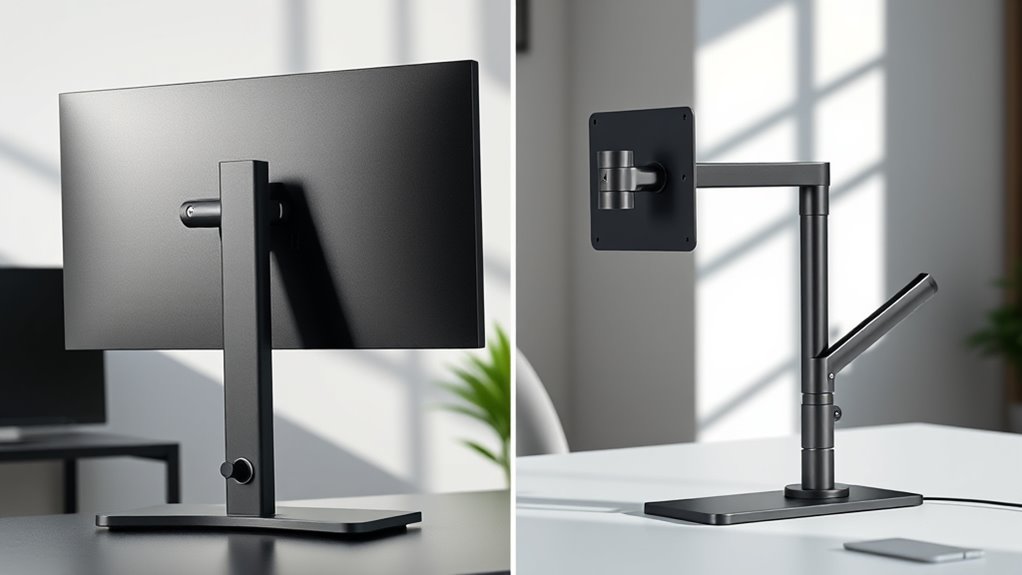
Monitor stands are straightforward and usually less expensive upfront. They come in various styles, from simple risers to more elaborate platforms with storage. Because they are static, they hold your monitor securely in one position, which helps improve your posture by reducing neck and eye strain. Their ergonomic benefits are notable—they enable you to set your monitor at the ideal height, angle, and distance, promoting better spinal alignment. However, their fixed nature means you can’t easily adjust the position once it’s set, limiting flexibility if your workspace or tasks change frequently. Additionally, many monitor stands are lightweight and may lack stability if not chosen carefully, especially with larger screens.
Monitor stands are simple, affordable, and improve posture but lack flexibility for adjustments.
Adjustable monitor arms, on the other hand, are designed for versatility. They clamp onto your desk and allow you to easily move, rotate, and adjust your monitor’s position with minimal effort. This flexibility enhances ergonomic benefits by enabling you to fine-tune the monitor’s height, tilt, and distance based on your comfort and posture needs. It’s especially useful if you work with multiple screens or switch between sitting and standing positions regularly. However, these benefits come at a higher initial cost. Adjustable arms tend to be more expensive than simple stands, and their installation can be more complex, requiring mounting hardware and sometimes tools.
From a cost comparison perspective, if you’re on a tight budget, a basic monitor stand offers a quick, affordable solution with noticeable ergonomic improvements. It’s a practical choice for most users who don’t need frequent adjustments. Conversely, if you prioritize flexibility and plan to customize your workspace or switch between different work setups, investing in an adjustable arm might be worth the extra expense. Over time, the flexibility and improved ergonomic positioning can reduce discomfort and potential health issues, possibly saving you money on medical expenses or ergonomic accessories.
Ultimately, your decision depends on your workspace needs, budget, and how much you value flexibility. Both options provide ergonomic benefits, but their differences in stability and adjustability mean you should consider how each aligns with your daily routines. If you prefer a simple, cost-effective solution, a monitor stand works well. If you want maximum adjustability and long-term comfort, an adjustable arm might be the better investment. Considering the ergonomic advantages of each can help you make an informed choice that supports your overall health and comfort during work.
Frequently Asked Questions
Which Option Is Better for Dual Monitor Setups?
For dual monitor setups, monitor arms often serve you better because they offer greater flexibility and adjustability, helping you optimize your workspace. However, consider size limitations because larger monitors might not fit or move easily on arms. Also, think about aesthetic considerations—arms can look sleeker and less cluttered compared to traditional stands. If you want a clean, adaptable setup, go with monitor arms, but guarantee they suit your monitor sizes.
Are Monitor Arms Suitable for Large or Heavy Screens?
Sure, monitor arms are perfect for giant screens—if you enjoy risking a dramatic crash. They usually have impressive weight capacities, but don’t overlook installation complexity; mounting a hefty monitor can turn into a workout. If your screen’s too heavy or awkward, you might be better off with a sturdy monitor stand. Otherwise, expect some precarious balancing acts and frequent adjustments to keep that massive display stable.
How Do Monitor Stands Impact Desk Space Management?
Monitor stands help you manage desk space by elevating your screen, freeing up surface area for other essentials. They often include cable management features, keeping cords organized and reducing clutter. Plus, a sleek stand enhances your desk’s aesthetic appeal, making your workspace look tidy and professional. You’ll find it easier to maintain a clean, efficient setup, which boosts your productivity and creates a more enjoyable environment.
Can Monitor Arms Be Easily Repositioned During Work?
Yes, monitor arms can be easily repositioned during work. They’re designed for adjustability and flexibility, allowing you to move your monitor to different heights, angles, or positions quickly. However, keep in mind that stability concerns might arise if the arm isn’t properly secured or is overloaded. Overall, with the right setup, monitor arms offer excellent ease of repositioning, making your workspace more ergonomic and adaptable to your needs.
Do Monitor Stands Support Ergonomic Adjustments Effectively?
You’ll find that monitor stands do support ergonomic adjustments, but they may not offer the same flexibility as arms. While they provide a decent ergonomic benefit by allowing height and tilt adjustments within their range, their adjustment range is usually limited. For a truly customizable setup that keeps you comfortable all day, a monitor arm might be the better choice, giving you more precise control and freeing up desk space.
Conclusion
Choosing between monitor stands and arms ultimately depends on your needs, but did you know that adjustable monitor arms can increase workspace efficiency by up to 20%? If you value stability, a sturdy stand might be your best bet. However, if flexibility and ergonomic positioning matter most, arms offer impressive mobility. Consider your priorities carefully—balancing stability and flexibility will help you create a more comfortable and productive workspace tailored just for you.